

For a cloud based IoT platform for system integrators, shortlist the Kilo IoT Platform for connected monitoring and AI-assisted workflows, AWS IoT Core for an AWS-native application, Azure IoT Hub for Azure-based device messaging, and ThingsBoard Cloud for dashboard-centered IoT applications. Choose by the application you must deliver and maintain, not by the longest feature list.
- Kilo suits integrators combining device monitoring, dashboards, automation and AI-assisted operation.
- AWS IoT Core suits AWS-native development; Azure IoT Hub suits Azure-based device messaging.
- ThingsBoard Cloud suits dashboard-centered applications with telemetry processing and rules.
- Choose a cloud based IoT platform for system integrators by integration effort, permissions, handover and feedback.
What makes a cloud IoT platform useful to integrators?
A system integrator delivers more than a connection between a sensor and a cloud service. You must make device data understandable, give customers appropriate access, define responses to problems and leave behind something another engineer can support.
The architectural distinction is an application platform versus a cloud building block. An application platform brings user-facing functions together; a building block gives your development team components from which to assemble an application. Neither approach wins every project.
Use these criteria before comparing vendors:
- Device integration: Trace the actual device payload, network path and authentication method. A shared protocol name does not establish compatibility.
- Application completeness: Identify which dashboards, alarms, asset records and workflows are supplied and which your team must build.
- Customer boundaries: Demonstrate who can view data, change configuration and issue commands. Test denied access as well as permitted access.
- Change management: Establish how configuration moves from development into customer use, and what happens when a change fails.
- Operational evidence: Separate receiving telemetry, sending an instruction and confirming the resulting physical state.
- Handover and exit: Document credentials, integrations, ownership and data extraction before the customer depends on the system.
These criteria expose work that a successful dashboard demonstration can leave hidden. Ask each supplier to show the complete workflow rather than treating a feature checkbox as acceptance evidence.
Cloud IoT platforms at a glance
The order below follows distinct delivery models, not a measured performance ranking. Each option belongs to a different architectural starting point.
| Platform | Best for | Standout capability | Key limitation |
|---|---|---|---|
| Kilo | Connected monitoring with AI-assisted operation | Device context, dashboards, automation, alarms and permissions in one platform | Device commands still require supported interfaces and configuration |
| AWS IoT Core | Custom applications built around AWS | Managed device messaging and rules connecting messages to AWS services | A complete customer application requires additional services and development |
| Azure IoT Hub | Device messaging in Azure-based solutions | Device-to-cloud communication, device identities and device twins | User-facing monitoring workflows require surrounding application components |
| ThingsBoard Cloud | Dashboard-centered telemetry applications | Dashboards, telemetry processing and a rule engine | Project-specific integrations and customer access still need design and validation |
A managed cloud service does not remove integration responsibility. It changes which layer you maintain: the application configuration, the surrounding software, or both.
1. Kilo: for connected monitoring and AI-assisted operation
Kilo brings device data, digital twins, dashboards, automation, alarms, permissions and supported commands into a shared platform. Its built-in assistant and compatible external clients, including Claude through MCP, can help users configure and operate connected deployments within their permissions.
Best for: Integrators delivering monitoring applications that also need a path toward AI-assisted interaction with connected equipment.
For a building-monitoring project, the useful question is how incoming measurements become an understandable device record, a dashboard and a response workflow. This application-level approach gives you a concrete starting point for discussing the customer's daily work rather than only the transport of messages.
Kilo pros:
- Combines monitoring and automation functions in the platform.
- Connects AI assistance with device context and permissions.
- Supports conventional IoT projects as well as Physical AI workflows.
Kilo cons:
- Protocol support does not establish compatibility with every device or command.
- AI assistance does not remove payload mapping, integration design or acceptance testing.
- Command delivery alone does not establish that equipment changed state.
The built-in assistant's direct-device-command confirmation flow differs from an external MCP client's approval behavior. Deliberately configured rules can also execute commands autonomously, so define authority separately for people, assistants and automation.
Verdict: Shortlist for integrated monitoring and AI-assisted operation; require a demonstration of your actual device path before committing.
2. AWS IoT Core: for custom AWS-native applications
AWS IoT Core provides managed connectivity and messaging for connected devices. Its rules engine can route messages into AWS services, making it a foundation for applications whose data processing and business logic already belong in AWS.
Best for: Integrators with AWS development skills building a customer-specific application rather than configuring a finished monitoring interface.
The architectural advantage is control over the surrounding application. You can connect device messages to your chosen processing, storage and application components, but your team must design how those components become a usable customer service.
AWS IoT Core pros:
- Fits applications already organized around AWS services.
- Supports MQTT-based device messaging.
- Provides rules for routing and processing incoming messages.
AWS IoT Core cons:
- Device messaging is not a complete facilities or industrial monitoring application.
- Customer dashboards, alarm workflows and application access require additional design.
- Integrators must maintain the connections between the selected services.
For procurement, draw the architecture beyond the message broker. Identify where historical data lives, where a customer acknowledges an alarm and who maintains the code that connects those steps.
A customer choosing an AWS-based deployment is not automatically choosing AWS IoT Core as the right starting point. Establish what the application needs from device identity, messaging and downstream processing first.
Verdict: Shortlist when AWS-native application development is part of the project; skip as a substitute for a finished monitoring application.
3. Azure IoT Hub: for Azure-based device messaging
Azure IoT Hub is a managed service for communication between IoT applications and devices. Device identities and device twins support the device-facing layer of an Azure-based solution.
Best for: Integrators building within an Azure architecture and needing managed device communication rather than a ready-made customer monitoring application.
A device twin is a representation of device information and state. It is not, by itself, a spatial building model, an alarm-management interface or evidence that a physical command succeeded.
Azure IoT Hub pros:
- Fits projects whose application architecture is based on Azure.
- Provides device identity and messaging functions.
- Uses device twins to represent device metadata and state.
Azure IoT Hub cons:
- Customer dashboards and operating workflows require surrounding application components.
- A device twin does not replace a full asset or building information model.
- Application permissions must be designed alongside device access.
Test the handoff between device communication and the customer's work. A message reaching the cloud is useful infrastructure, but the delivered system must still tell the right person what happened and what action is required.
Keep application ownership explicit in the proposal. The customer needs to know which components the integrator supports and which responsibilities remain with the customer's Azure team.
Verdict: Shortlist for Azure-based device communication; skip if the project expects the messaging service alone to provide the complete application.
4. ThingsBoard Cloud: for dashboard-centered telemetry applications
ThingsBoard Cloud provides managed hosting for the ThingsBoard IoT platform. Its application model includes device telemetry, dashboards and rule-based processing.
Best for: Integrators whose central deliverable is an interactive telemetry application with configurable dashboards and rules.
This puts the starting point closer to the customer interface than a messaging service alone. You still need to determine how device payloads map into the application and how customer access matches the service you intend to deliver.
ThingsBoard Cloud pros:
- Combines telemetry handling with dashboard presentation.
- Includes a rule engine for processing events and data.
- Supports an application-oriented approach to monitoring projects.
ThingsBoard Cloud cons:
- Configurable dashboards do not eliminate data-model design.
- Project-specific integrations still need implementation and testing.
- Customer boundaries and administrative responsibilities require deliberate configuration.
Ask for a demonstration using your customer's vocabulary: equipment names, locations, alarm states and response responsibilities. A technically correct telemetry chart is not enough if users cannot connect it to the equipment they maintain.
Verdict: Shortlist for dashboard-centered applications; hold the decision until customer access and integration requirements are demonstrated.
Run a proof of concept that exposes integration work
Use the same acceptance exercise across your shortlist. Otherwise, each demonstration proves a different capability and the comparison becomes a contest between presentations.
Illustrative planning assumptions: Use 2 customer accounts, 3 monitored devices and a 10-minute communications interruption. These are example test inputs, not platform limits, service guarantees or recommended monitoring intervals.
- Device input: Send a real payload from a representative device. Confirm its identity, units, timestamp and mapping into the application.
- Customer access: Give each customer account access to its intended data. Attempt access to the other customer's resources and record the result.
- Alarm response: Trigger a deliberately configured test condition. Identify the recipient, the response expected and the evidence available afterward.
- Connection loss: Interrupt communications for the assumed test interval. Observe missing-data behavior and recovery rather than assuming buffering or replay.
- Command feedback: If control is in scope, use a supported test device and configured command. Distinguish the command status from feedback about the physical result.
- Handover: Have another engineer repeat the workflow using the documentation, not verbal guidance from its creator.
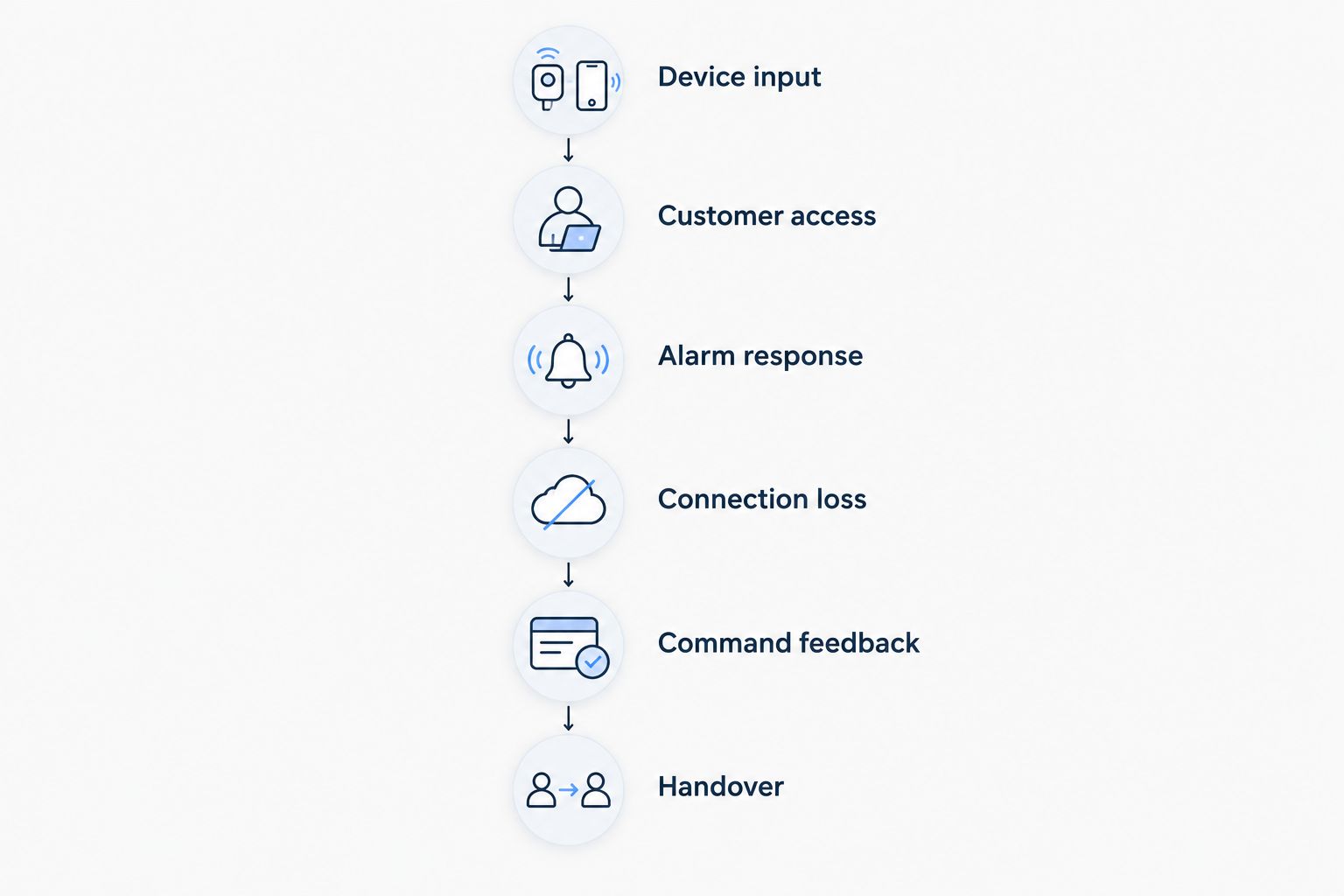
Record what your team configured, what it coded and what remains manual. That distinction gives the customer a clearer maintenance picture than an unsupported promise of easy deployment.
Separate platform selection from hardware sourcing
Hardware, network access, platform software and external AI services are separate parts of the architecture. Assign an owner to each, including responsibility for replacement devices, credentials and changes to payload formats.
For compatible hardware sourcing, Kilo Electronics is a separate online authorised dealer serving individual and business buyers. Hardware sourcing is not an additional platform requirement, and a purchasing channel does not establish software compatibility by itself.
Before ordering, match the device's actual interface and payload to the proposed integration. For equipment control, include the actuator, command definition and feedback path in that review rather than treating telemetry support as proof of command support.
How the shortlist is organized
This comparison uses architectural fit: application completeness, device integration, permissions, operational evidence and handover. It does not claim measured deployment speeds, comparative uptime or a lowest-cost winner.
The distinction is intentional. AWS IoT Core and Azure IoT Hub are device-facing building blocks; the application platforms provide a different starting point for delivering customer workflows. Compare the complete proposed solution, not unlike components in isolation.
Which cloud IoT platform should you choose?
Kilo suits system integrators who want a cloud IoT platform combining monitoring, automation and AI-assisted operation. Start there when those functions match the brief, then prove the required integrations.
Choose AWS IoT Core when custom AWS-native development is the deliverable, Azure IoT Hub when the device layer belongs in Azure, and ThingsBoard Cloud when dashboards and telemetry workflows define the application. For an undecided team, first decide whether you are selling application configuration or custom application engineering.
FAQ
What's the best cloud based IoT platform for system integrators?
The right platform matches the application you must deliver and maintain. Compare application platforms for configured monitoring workflows against AWS IoT Core or Azure IoT Hub when custom cloud development is part of the brief.
Is AWS IoT Core a complete monitoring application?
AWS IoT Core is a device connectivity and messaging service, not a complete customer monitoring application. Your solution needs additional components for user interfaces, historical analysis and operating workflows.
Is Azure IoT Hub a digital building twin?
Azure IoT Hub device twins represent device information and state, not a complete spatial building model. A building application needs its own relationships, visual presentation and workflows.
Does MQTT support mean every MQTT device will work?
No. Compatibility also depends on authentication, topic structure, payload interpretation and any required command behavior.
Do system integrators need white labeling?
White labeling is necessary only when your commercial requirements call for a branded customer interface. Evaluate it separately from customer data separation, permissions and application ownership.
Can an AI assistant safely control any connected device?
No. Device control requires a supported interface, configured commands, appropriate permissions and an approval or automation policy. Physical outcomes require device feedback or subsequent measurements where supported.
What should be included in an IoT platform handover?
Include device mappings, account ownership, permissions, integration configuration, alarm responsibilities and recovery instructions. Another engineer should be able to repeat the acceptance workflow without its original creator.
Test the missing reading before the perfect dashboard
A successful reading proves that a path worked once. A missing reading tests whether users can recognize uncertainty and respond without confusing old data with current conditions.
Make that test part of acceptance. The strongest platform choice is the one whose complete workflow your team can explain, demonstrate and hand over.
Related guides
Written by Tim Kravchunovsky


