Yes—you can give the same sensor type different alarm thresholds at different sites when the monitoring system evaluates readings against site-specific rules or settings. For an IoT platform such as the Kilo IoT Platform, the implementation question is how a device’s site selects the applicable alarm limit. Sharing a sensor model does not require sharing an alarm policy, but the site assignment, rule scope and notification routing must agree.
- For alarm thresholds per site same sensor type deployments need site-specific rule scope, not different sensor models.
- Separate the measurement definition from the site’s alarm limits, reset conditions and response owner.
- Kilo combines IoT monitoring, rules and alarms; establish the applicable site policy before configuring a deployment.
- Test that a reading triggers the intended site’s alarm without triggering another site’s policy.
Can you set different alarm thresholds for one sensor type by site?
Yes. Keep the sensor’s measurement definition consistent, then apply the alarm condition according to where that sensor operates. A temperature reading remains a temperature reading; the acceptable operating range belongs to the monitored application, not automatically to the sensor model.
The basic configuration process is:
- Identify the measurement. Establish the decoded field, unit and device identity used by the alarm.
- Assign the site. Give the evaluation process an unambiguous way to associate that device with its location.
- Select the policy. Apply the limit approved for that site and application.
- Define the response. Specify the alarm condition, recovery behavior and responsible recipient.
- Test isolation. Confirm that another site’s policy does not evaluate the same reading unintentionally.
These are implementation requirements, not names of particular interface controls. A platform can meet them through separate scoped rules, configurable parameters or another documented mechanism. Don’t assume it supports inherited site settings simply because it supports device groups.
Keep measurement definitions separate from operating limits
A sensor model tells you what the hardware measures and how it reports data. It does not tell you what every building, process or storage area considers acceptable. Even identical sensors can monitor applications with different requirements.
Keep the following concepts distinct:
- Measurement definition: the field, unit and interpretation of the incoming reading.
- Device identity: the particular sensor that produced the reading.
- Site assignment: the location responsible for that sensor’s current application.
- Alarm policy: the condition that requires attention at that location.
- Response ownership: the person or team expected to investigate.
This separation lets you standardize hardware without standardizing every operating decision. It also makes a device replacement easier to reason about: a compatible replacement needs the correct measurement mapping and site assignment, rather than a newly invented operating policy.
A dashboard’s colored warning band is a separate concern. A visual threshold does not prove that an alarm rule uses the same limit. Verify the evaluated condition rather than treating the dashboard appearance as evidence of alarm behavior.
Choose a site-specific rule structure you can maintain
There are different ways to organize site-specific thresholds. The following comparison describes general implementation patterns, not a claim that every platform exposes each option.
| Configuration pattern | Best for | Advantage | Limitation |
|---|---|---|---|
| Separate scoped rules | Sites with distinct operating requirements | Each site’s condition and response are explicit | Repeated logic needs coordinated maintenance |
| Shared logic with site parameters | Repeated workflows with different approved limits | Common evaluation logic stays together | Requires documented parameter selection and fallback behavior |
| Device-specific rules | Individual equipment exceptions | Makes a genuinely exceptional device explicit | Becomes difficult to maintain when used for routine site differences |
Use the simplest documented structure that expresses the real policy. Separate rules are a reasonable starting point when sites differ substantially. Shared parameters become useful when the workflow is genuinely the same and only approved settings vary.
Avoid copying a rule without reviewing its complete configuration. A copied threshold can be correct while its device filter, recovery condition or recipient still belongs to the original site. That produces an apparently working alarm with the wrong operational meaning.
Follow the reading from device to responsible person
A useful design follows the full path from incoming measurement to response. The threshold comparison sits in the middle; it cannot compensate for an incorrect device assignment before it or a wrong recipient afterward.
- Sensor data: Decode the relevant measurement and preserve its unit and timestamp.
- Site assignment: Resolve the device’s current location using the chosen source of truth.
- Policy selection: Choose the approved condition for that location and application.
- Alarm evaluation: Compare valid readings with the selected condition and recovery logic.
- Response routing: Direct the alarm to the person responsible for that site.
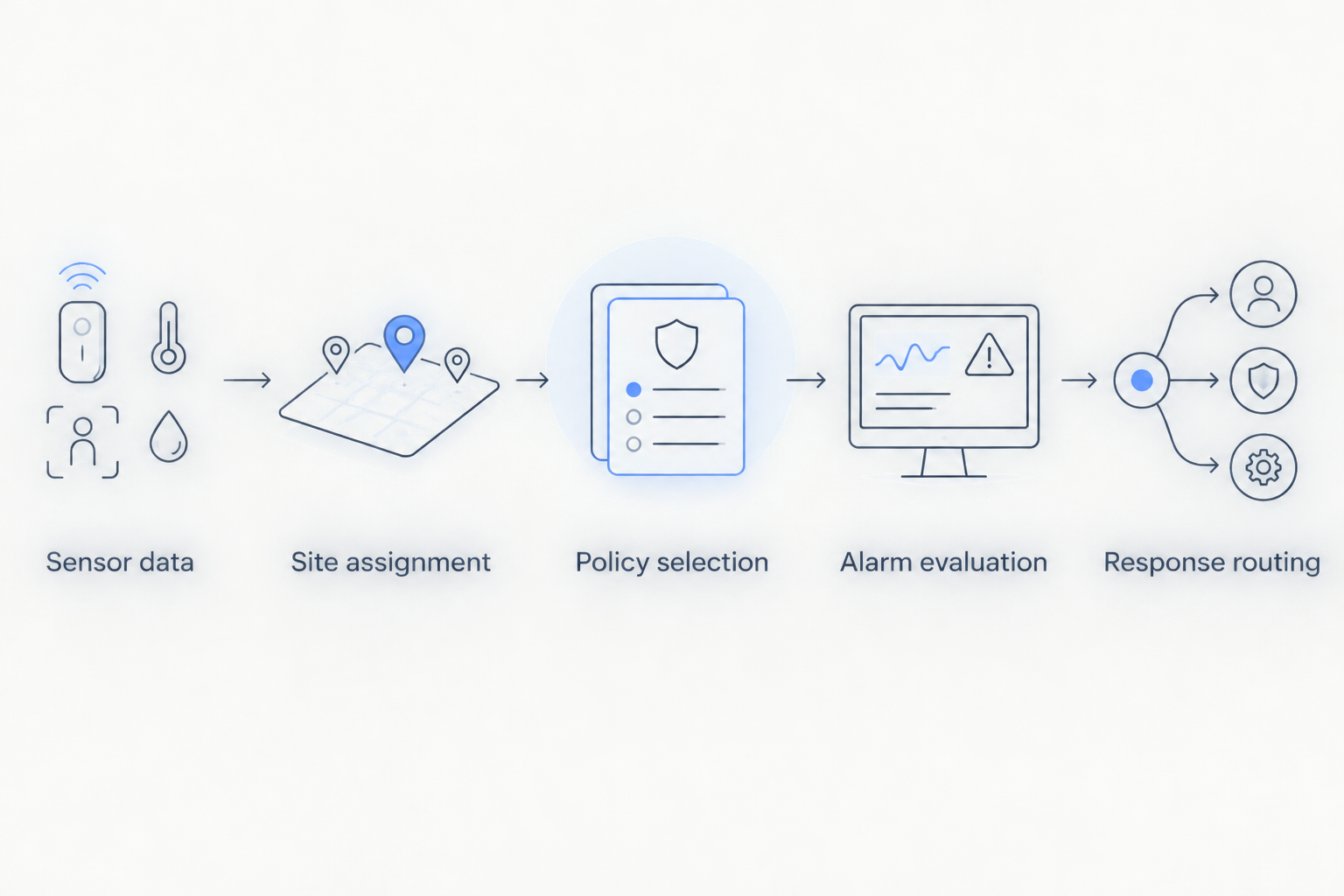
For each stage, write down what proves it worked. An incoming value proves data arrived, not that the correct policy evaluated it. An alarm record proves an alarm exists, not that the intended person received or acknowledged a notification.
Treat missing site information as a configuration problem with an explicit response. Silently applying an unrelated site’s threshold hides the problem instead of resolving it.
Illustrative example: identical sensors, different site policies
Consider an illustrative deployment using the same temperature sensor model at an equipment room and a general storage area. These are assumed applications, not a customer case study, and no operating limits are prescribed here.
The equipment-room owner supplies an approved upper limit for that application. The storage-area owner supplies a different limit based on what the area contains. Both sensors report the same measurement field and unit, but each reading is evaluated against its assigned site’s policy.
For the equipment room, the configuration connects the device identity, equipment-room policy and local response owner. The evidence of correct behavior is a test reading that meets the condition, the resulting alarm associated with the correct device, and the expected response routing.
The storage-area test uses its own policy. A useful additional test submits an equivalent reading to each site’s evaluation path and confirms that the outcomes match the different policies. Identical input values can correctly produce different alarm outcomes.
Neither threshold establishes that the monitored environment is safe or compliant. Those decisions require the applicable operating requirements and an appropriate monitoring design.
Why alarm thresholds vary between sites
Different thresholds need a documented reason. Otherwise, site-specific configuration becomes a collection of unexplained exceptions.
- Application requirements: An equipment room and a storage area can use identical sensors while monitoring different operating conditions.
- Equipment requirements: The monitored equipment’s documented operating conditions inform the acceptable range.
- Measurement location: A room sensor and a probe near a heat source do not describe the same physical condition.
- Approved procedures: Site procedures determine what requires investigation and what recovery evidence is necessary.
- Measurement capability: Sensor accuracy, range and placement constrain how confidently you interpret a reading near a limit.
Different recipients alone do not justify different thresholds. You can have the same alarm condition at several sites while routing each alarm to a different local owner.
Conversely, don’t raise a limit merely to reduce notifications. First establish whether the reading reflects a real condition, an unsuitable measurement location or a configuration error. Change the operating policy only when the responsible owner approves the reason.
Define recovery and missing-data behavior alongside the threshold
An alarm needs a clear end condition as well as a start condition. Decide whether recovery follows a return below the trigger limit or a separate reset boundary, where the selected implementation supports that distinction.
A separate reset boundary is commonly called hysteresis. It prevents small fluctuations around a trigger boundary from repeatedly changing the alarm state. It does not correct an inaccurate sensor or an inappropriate threshold.
Duration conditions also need precise meaning. Distinguish between elapsed time outside a limit and a count of received readings outside it. Irregular reporting means those conditions are not interchangeable.
Missing readings are not normal readings. Define how the deployment identifies stale data and who investigates it. A site cannot demonstrate normal conditions merely because no new measurement arrived to trigger its threshold alarm.
Keep notification acknowledgement separate from physical recovery. A person acknowledging an alarm establishes that someone has taken responsibility; it does not establish that the monitored condition has returned to normal.
Test boundaries, site isolation and configuration changes
Start with evaluation tests that do not cause unintended notifications or physical actions. Where a test tool can execute side effects, deliberately select its non-executing behavior rather than assuming that a debugger is isolated.
A practical acceptance checklist includes:
- A normal reading does not trigger the site’s alarm.
- A reading that meets the alarm condition triggers the intended policy.
- A reading exactly at the boundary follows the chosen comparison operator.
- Another site’s policy does not trigger accidentally.
- A recovery reading produces the intended state change.
- An invalid, missing or stale measurement receives the intended treatment.
- The notification reaches the responsible site recipient.
Repeat relevant checks after changing site membership, replacing a device or editing a shared rule. Testing only the changed threshold misses errors elsewhere in the evaluation path.
For Kilo rule workflows, restoring an earlier version creates a new draft that must be built and deployed separately. Restoration does not reverse a physical action that already happened. Keep configuration recovery and physical recovery as separate procedures.
Where Kilo fits in a multi-site alarm design
Kilo fits integrators who need IoT device data, rules and alarms in one platform. Those capabilities support the monitoring workflow, but a site-specific design still needs an explicit measurement mapping, policy scope and response owner. The platform does not choose your application’s acceptable operating limits.
Define those requirements before configuring the deployment. Use the documented behavior of the selected rule and alarm features to establish how readings are selected, conditions are evaluated and outcomes are checked. Don’t assume that a label or dashboard grouping automatically changes rule behavior.
Hardware sourcing is separate. Kilo Electronics is a separate online authorised dealer for compatible hardware, serving individual and business buyers; purchasing hardware is not an additional platform requirement. Changing an alarm policy also does not, by itself, require replacing a suitable sensor.
FAQ
Do I need different sensor models to use different site thresholds?
No. The same sensor model can feed different site-specific alarm policies when the monitoring implementation supports scoped evaluation. Keep the measurement mapping consistent and assign each device to the correct policy.
Can one site have different thresholds for individual devices?
Yes, where the implementation supports device-specific conditions or overrides. Define whether the device exception replaces or supplements the site policy so the reading does not trigger unintended duplicate alarms.
Will changing a dashboard warning color change my alarm threshold?
Not necessarily. Dashboard visualization and alarm evaluation are separate configuration concerns unless the platform explicitly connects them. Test the evaluated alarm condition after any change.
What happens when a sensor moves to another site?
The sensor must receive the destination site's applicable policy through the configured assignment process. Review the old rule scope, new rule scope, recipients and treatment of any existing alarm before relying on the move.
Can every site notify a different person?
Yes, if the selected notification configuration supports site-specific routing. Treat the recipient mapping separately from the threshold, and test that the intended person actually receives the notification.
Does setting a site threshold require AI?
No. A threshold comparison is conventional rule-based monitoring. AI assistance is separate from the deterministic condition that decides whether a reading meets the configured alarm criteria.
Test the site assignment before fine-tuning the limit
The most useful final check is a deliberate site-assignment test. Use controlled input to confirm which policy applies, then inspect the resulting alarm and response routing. That exposes a wrong-site configuration that an ordinary threshold test can miss.
Approve the complete path, not just the limit. A correct comparison attached to the wrong site is still the wrong alarm.
Related guides
Written by Tim Kravchunovsky