

You can recover a deleted IoT device's settings if a recoverable device record or usable configuration backup still exists; otherwise, you need to rebuild the configuration from surviving records. In the Kilo IoT Platform, distinguish the platform's device record from settings stored on the physical device or in a connected system. Recreating a device is not the same as restoring its settings, historical data and automation links.
- To recover deleted IoT device configuration, first establish whether a recoverable record or configuration backup exists.
- Kilo brings device context, monitoring and automation together; recovery requires checking each affected dependency.
- A replacement device record does not prove that historical readings, alarms or permissions have been restored.
- Validate fresh telemetry and dependent workflows before declaring recovery complete.
Can you recover a device's settings after deleting it by mistake?
Yes, when the deleted configuration remains available through a documented restore mechanism or a backup that contains the required settings. Without either, recovery becomes reconstruction: you gather surviving information, recreate the device record and reconnect its dependencies.
Start by identifying exactly what disappeared. A device missing from your dashboard is not sufficient evidence of deletion: check the selected workspace, filters and your access permissions before changing anything.
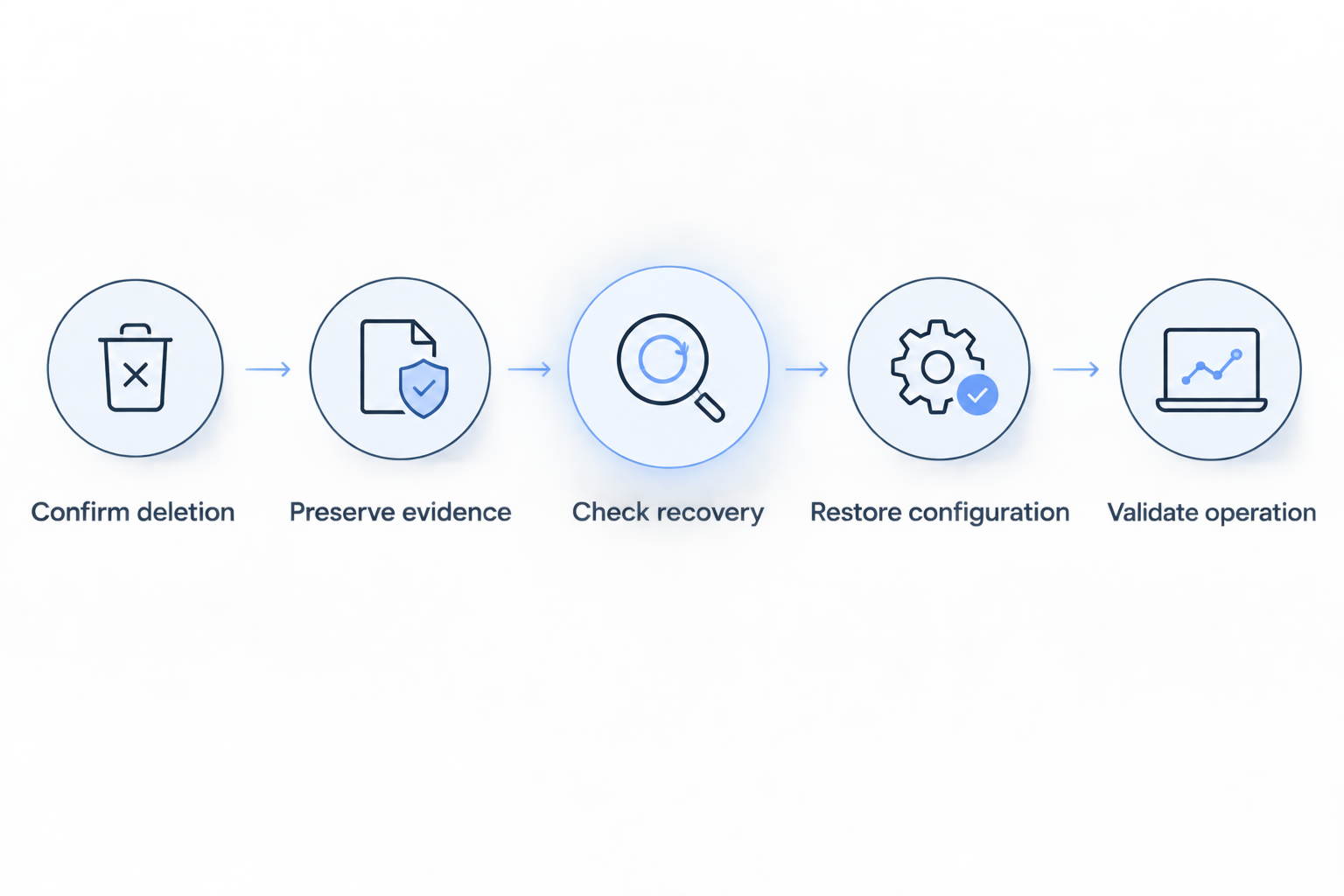
Use this sequence to decide what to do next:
- Confirm deletion. Establish whether the device record was deleted, hidden, moved or made inaccessible.
- Preserve evidence. Save the device identifier, incident time, screenshots and relevant records you can still access.
- Check recovery. Ask the platform administrator or provider whether the specific deleted object is recoverable and what restoration includes.
- Restore configuration. Use the documented recovery path or rebuild from verified configuration records.
- Validate operation. Check incoming data, dependent workflows, access and any supported device feedback.
Do not reset the physical sensor as a troubleshooting shortcut. A factory reset is a separate operation that can remove settings you still need.
Restore, import or rebuild: which recovery path fits?
Use a documented restore operation when it recovers the required object and dependencies. If that path is unavailable, examine your configuration backups before manually recreating anything. The right choice depends on what survived, not on which option looks quickest.
| Recovery path | Best for | Useful advantage | Limitation to resolve |
|---|---|---|---|
| Documented object restore | A retained, recoverable device record | Uses the platform's supported recovery process | Confirm whether history, relationships and permissions return |
| Configuration import | A supported export containing the required settings | Reuses saved configuration rather than memory | Confirm format compatibility, identifiers and backup completeness |
| Manual reconstruction | Surviving onboarding records and integration settings | Rebuilds the setup when direct restoration is unavailable | Requires checking every setting and dependency |
| Provider-assisted investigation | Unclear deletion scope or recovery behavior | Establishes which recovery mechanisms actually apply | Do not assume provider backups support individual-device restoration |
A backup is useful only for the information it contains. A spreadsheet of readings does not establish the device's payload mapping, alarm recipients or command definitions. Likewise, a screenshot helps reconstruct visible fields but does not reveal hidden integration settings.
Before importing anything, establish how the import handles an existing device identity. You need a documented answer about whether it updates a record, creates another record or rejects a duplicate—not an experiment in a live deployment.
What does “device configuration” actually include?
A connected device has configuration in several places. Separating those places prevents an unnecessary hardware reset or an incomplete platform rebuild.
Platform settings describe how the device is used
A platform device record can include its name, location, properties, data interpretation and relationships to other resources. Your recovery checklist should also cover dashboard references, alarm conditions, automation inputs and access assignments where your deployment uses them.
Record these dependencies explicitly. A replacement record with the correct display name is not evidence that an existing rule now references it.
Network and integration settings connect the data path
Identify the system responsible for receiving messages and forwarding them to the platform. Depending on the architecture, that includes a network server, broker, gateway or another integration service.
Check the device identity, message routing and authentication configuration in the relevant systems. Keep credentials in approved secret storage rather than copying them into incident notes or general support messages.
Physical-device settings govern the hardware
Reporting behavior, calibration and other local settings belong to the device's own configuration where supported. Establish what remains on the hardware before sending replacement settings.
Deleting a cloud record and resetting a sensor are different actions. Recovery should address the layer that changed, rather than rewriting every layer by default.
Historical readings need their own recovery decision
Ask separately whether previous measurements remain accessible, whether they retain their original identity and whether a replacement record can reference them. Configuration restoration does not, by itself, answer those questions.
Preserve any surviving exports. They provide evidence of earlier measurements, but they are not automatically a restorable configuration backup.
Why recovery difficulty varies
The deletion itself is only part of the problem. These factors determine how much work remains:
- Deletion scope: Removing a dashboard reference is different from deleting a device record or changing an upstream registration.
- Retained configuration: A documented recovery mechanism or usable export provides a stronger starting point than screenshots and recollection.
- Identity handling: Establish whether restoration preserves the original record identity and how dependent resources reference it.
- Dependency coverage: Alarms, rules, dashboards and permissions each need checking when they depend on the affected record.
- Hardware state: A device that retains its local settings presents a different task from one that has also been reset or reconfigured.
- Recovery permissions: The person investigating needs appropriate access to inspect the affected systems and perform the approved changes.
Keep these factors in a single incident checklist. Otherwise, separate people can unknowingly work from different assumptions—for example, an integrator rebuilding the data path while a site administrator assumes the existing alarms are already active.
Assign an owner to the recovery and an owner to the operational response while monitoring is interrupted. Restoring software configuration does not cover the gap in monitoring by itself.
How to validate the recovered device configuration
A device appearing in a list is the beginning of validation, not the end. Follow the data from its source through to the decision a person or automation makes from it.
Check identity and fresh telemetry
Match the physical device's identifier to the intended platform record. Then verify that newly received measurements belong to that device, carry the expected units and have current timestamps.
Inspect the underlying message where your tools permit it. A plausible dashboard value is not enough if the payload mapping assigns the wrong field or unit.
Check dashboards, alarms and recipients
Open the views people actually use and verify their device references. Check alarm conditions, recipient assignments and enabled status against your approved configuration records.
Test notifications through a documented procedure. Do not create an unsafe physical condition simply to prove that an alert works, and do not treat an on-screen alarm as proof that the intended person received it.
Check automation before returning it to service
Review rules that read from or send commands to the affected device. Confirm their inputs, conditions, destinations and permissions before enabling an intended automatic action.
For Kilo, deliberately configured rules can execute commands autonomously. The built-in assistant's confirmation flow for direct commands does not mean that every automated action waits for a person.
Check feedback after commands
Where your deployment includes supported commands, distinguish a command request from its physical result. Accepted, queued or delivered status does not prove that equipment reached the requested state.
Use device feedback or subsequent measurements where supported. If the equipment provides no suitable feedback, record that verification limit rather than marking the physical outcome as confirmed.
Illustrative example: rebuilding a deleted temperature-sensor record
Assume a sensor's platform record was deleted, its upstream registration remains intact and the integrator retained the approved onboarding configuration. This is an illustrative recovery workflow, not a reported customer deployment.
The integrator first checks whether the original record can be restored. If reconstruction is required, the retained records supply the device identity and data mapping; the site administrator supplies the approved location, access assignments and alarm responsibilities.
After recreating the record through the supported process, the integrator verifies a fresh temperature message and its units. The administrator checks the dashboard reference and alarm configuration, then uses an approved notification test to establish that the designated responder receives it.
The recovery record distinguishes restored configuration from unresolved history. If earlier measurements cannot be associated with the rebuilt record, that remains a separate issue rather than disappearing behind a working dashboard.
Notice what this workflow avoids: replacing functioning hardware, inventing a threshold from memory or assuming that a familiar device name reconnects every dependency.
Where an IoT platform helps—and where recovery needs evidence
Kilo suits integrators who need device context, monitoring and automation in one IoT platform. Those capabilities help organize the operational setup, but they do not establish that a deleted device has a particular undo function, retention period or recoverable backup.
For a recovery decision, establish the supported behavior for the specific deleted resource before promising a result. AI assistance is not evidence that the original configuration survives, and rebuilding settings through an assistant is still reconstruction unless the original record is actually restored.
Hardware sourcing is a separate decision. Kilo Electronics is a separate online authorised dealer for compatible hardware, serving individual and business buyers; deleting a software record is not, by itself, a reason to replace the physical device.
Will adding the same device again restore its old settings?
Adding the same device again is not proof of restoration. Establish how the platform matches device identities and whether the new record reconnects existing relationships.
Check historical readings, dashboards, alarms and permissions independently. Reusing a display name does not demonstrate that any of them returned.
Does restoring an automation rule recover a deleted device?
Restoring a rule does not restore a deleted device record. Treat the device and the rule as separate resources with separate recovery requirements.
In Kilo, restoring a rule creates a new draft version that must be built and deployed separately. It also does not reverse a physical action that already happened.
What should you save before another device is deleted?
Keep an approved recovery record for each deployment, using supported exports where available. Include the device identity, relevant configuration, integration ownership and the dependencies needed to return monitoring to service.
Document the recovery procedure alongside that record. State who can authorize deletion, who can perform recovery and how the recovered device will be validated. Store secrets separately with appropriate access controls.
Finally, test the procedure on a noncritical deployment through supported operations. A successful export proves that a file was produced; a recovery exercise establishes whether the saved information is enough to reconstruct the intended workflow.
FAQ
Should I factory-reset a sensor after accidentally deleting it?
Do not factory-reset a sensor solely because its platform record was deleted. First establish which configuration was removed and preserve settings that still exist on the hardware.
Can a spreadsheet of sensor readings restore device settings?
A spreadsheet of readings is not a device-configuration backup. It does not establish the original payload mapping, credentials, permissions or automation relationships.
What should I send support after deleting an IoT device?
Send the device identifier, affected workspace, incident time and a clear description of what disappeared. Use an approved secure channel for sensitive information, and do not include passwords or keys in a general support message.
How do I know whether a missing device was actually deleted?
Check workspace selection, filters and access permissions before concluding that a device was deleted. Ask an appropriately authorized administrator to inspect the record and available incident evidence.
Can an AI assistant reconstruct settings from memory?
An AI-generated reconstruction is not evidence of the original settings. Rebuild from approved records and verify each configuration choice before applying it to connected equipment.
Can I test restored automation without affecting equipment?
Use a documented test method that explicitly prevents unintended physical actions. In Kilo's debugger, Execute performs supported side effects and is selected initially; choose Skip or Mock deliberately where supported.
Does a delivered command mean the recovered device works correctly?
Delivered command status does not prove a physical outcome. Verify the intended state through supported device feedback or subsequent measurements.
Save the relationships, not just the device fields
The most useful recovery record explains what depends on the device. Save the dashboard references, alarm responsibilities and automation relationships alongside the settings themselves. Finish recovery when the intended workflow is verified—not when the device name reappears.
Related guides
Written by Tim Kravchunovsky


