

Choose the Kilo IoT Platform for a shortlist centered on connected-device monitoring and automation; consider ThingsBoard for an open-source application platform, AWS IoT Core for an AWS-built system, and Microsoft Azure IoT Hub for an Azure-built system. The right enterprise IoT platform for multi-site operations is the one that fits your operating workflow and the engineering responsibility you’re prepared to own.
- Kilo is a practical enterprise IoT platform for multi-site operations centered on monitoring, alarms, dashboards, and automation.
- ThingsBoard suits teams that want an open-source IoT application platform and can own its deployment.
- AWS IoT Core and Microsoft Azure IoT Hub suit developers assembling applications within their respective cloud ecosystems.
- Test site permissions, alarm ownership, disconnected devices, and outcome verification before expanding a deployment.
What makes an enterprise IoT platform suitable for multiple sites?
A multi-site deployment needs more than a dashboard containing devices from different buildings. You need consistent asset identities, clear responsibility for exceptions, and access controls that match how your organization works.
Use these criteria before comparing vendors:
- Device and site context: Every reading should identify the physical asset, location, measurement, unit, and reporting time. A device identifier alone won’t help someone find a faulty freezer.
- Access boundaries: Regional managers, local technicians, integrators, and external service providers need different views and actions. Test those boundaries with actual user accounts.
- Alarm ownership: Establish who receives an exception, who investigates it, and how someone confirms resolution. Notification delivery is not the same as a response.
- Repeatable configuration: Decide how device mappings, dashboards, and rules will stay consistent while allowing legitimate site differences.
- Integration responsibility: Identify who maintains connectors, application code, credentials, and changes to upstream systems.
- Operational evidence: Require timestamps, device freshness, relevant execution information, and feedback that distinguishes an attempted action from a physical result.
Choose the operating model before choosing the feature list. A managed application platform and a cloud device-messaging service solve different parts of the same problem.
Enterprise IoT platforms at a glance
These options occupy different use-case slots. The order starts with an application-oriented approach, then moves toward platforms that place more implementation responsibility with your technical team; it is not a performance ranking.
| Platform | Best for | Standout capability | Key limitation or responsibility |
|---|---|---|---|
| Kilo | Connected-site monitoring and automation | Device context, dashboards, alarms, rules, and AI assistance in one platform | Device compatibility and supported actions still require validation |
| ThingsBoard | Open-source IoT application ownership | Telemetry, dashboards, and rule processing in an application platform | Self-hosting puts deployment and maintenance responsibility on your team |
| AWS IoT Core | Custom applications built on AWS | Managed device connectivity, messaging, Device Shadows, and message routing | A complete operations application requires additional services and development |
| Microsoft Azure IoT Hub | Custom applications built on Azure | Device messaging and device twins within Azure | Site workflows, reporting, and operator interfaces need application design |
1. Kilo: for integrated monitoring and automation
Best for: Integrators, developers, and facilities teams that want device information and operational workflows together rather than starting with a cloud messaging service.
Kilo brings device data, digital twins, dashboards, rules, alarms, permissions, and supported commands into an IoT platform. Its built-in assistant and compatible external clients can help users configure and operate connected deployments within their permissions.
For multi-site selection, the useful question is how those capabilities support a repeatable workflow. Ask the vendor to demonstrate an incoming reading with its location, the configured condition that creates an exception, and the information a responder uses to investigate it.
Pros:
- Combines monitoring and automation capabilities instead of treating telemetry collection as the finished application.
- Supports conventional IoT projects as well as workflows involving AI assistance.
- Provides device context alongside dashboards, alarms, and configured actions.
Cons:
- A supported protocol does not establish compatibility with every device payload or command.
- Platform software does not replace site connectivity, physical installation, or compatible actuators.
Keep the control boundary visible during evaluation. The built-in assistant uses a confirmation flow for direct device commands, while deliberately configured rules can execute commands autonomously. External MCP clients have their own approval behavior; don’t assume identical tool coverage or confirmation steps.
Verdict: Shortlist Kilo for connected-site monitoring and automation, then validate the exact devices, permissions, and response workflow.
2. ThingsBoard: for open-source IoT application ownership
Best for: Technical teams that want an open-source application platform and are prepared to manage its deployment.
ThingsBoard provides device telemetry collection, dashboards, and rule processing. That makes it a different starting point from a service that primarily connects devices and routes messages: you begin with application capabilities you can configure around your assets.
For a multi-site evaluation, build the intended location and asset structure before polishing dashboards. Confirm which edition and deployment arrangement provide the access model and integrations your project needs; an open-source core does not make every offering interchangeable.
Pros:
- Offers an open-source foundation for teams that want control over their application deployment.
- Includes dashboards and rule processing alongside telemetry handling.
- Provides a configurable starting point for developers building an IoT service.
Cons:
- Self-hosting requires ownership of upgrades, backups, security configuration, and recovery.
- Edition-specific capabilities require a deliberate scope check before procurement.
The important trade-off is responsibility, not whether open source is inherently better. If your team already runs production software, application ownership can fit its operating model. If nobody owns patching or restores, that same freedom becomes an unresolved production task.
Verdict: Shortlist ThingsBoard when application ownership is a requirement and you have a named team to maintain the deployment.
3. AWS IoT Core: for custom multi-site applications on AWS
Best for: Developers building a tailored IoT application within an existing AWS environment.
AWS IoT Core provides managed device connectivity and messaging, including MQTT support. Device Shadows represent device state, while the rules engine routes incoming messages to other services.
That foundation supports custom applications, but it is not the same purchasing decision as selecting a finished facility-monitoring interface. Your team still needs to define the site model, operator experience, alarm workflow, storage design, and integrations using the appropriate services and application code.
Pros:
- Provides managed connectivity and messaging for connected devices.
- Offers Device Shadows for applications that work with device state.
- Routes telemetry into an AWS-based processing architecture.
Cons:
- Building the complete operational workflow requires additional components and development.
- Your team must manage permissions, failure handling, and application behavior across those components.
Ask the implementation team to trace a single exception from device publication through processing to the person responsible for acting. Then ask what happens when a processing component fails. A successful MQTT connection answers neither question.
Verdict: Shortlist AWS IoT Core when your engineering team intends to build and maintain an AWS application, not simply configure monitoring screens.
4. Microsoft Azure IoT Hub: for custom multi-site applications on Azure
Best for: Developers integrating connected devices into an Azure-based application and data environment.
Microsoft Azure IoT Hub provides device messaging and device twins. Developers use those capabilities as part of an application architecture that connects equipment information with processing, storage, and user-facing workflows.
For enterprise selection, separate the device connection from the operational application. A device twin is useful state information; it is not automatically a building model, an escalation process, or evidence that equipment completed a requested action.
Pros:
- Provides managed device messaging within Azure.
- Supports device twins for device metadata and state-related application workflows.
- Gives Azure development teams a foundation for custom connected-device applications.
Cons:
- Dashboards, business workflows, and site-specific operating interfaces require additional design.
- Integrating a cloud device service does not remove the need to validate equipment behavior and connectivity.
Use a representative asset rather than a generic demonstration device. Your evaluation should expose the actual message format, identity requirements, reporting gaps, and application behavior that the deployment will depend on.
Verdict: Shortlist Microsoft Azure IoT Hub when Azure application integration is central and your developers will own the operator workflow.
How to interpret this shortlist
The selection criteria are workflow fit, access boundaries, integration responsibility, configuration repeatability, and evidence of results. These are architectural comparisons, not measured deployment-speed or reliability benchmarks.
Don’t assign every platform the same implementation assumption. Comparing an application platform with a cloud messaging service without accounting for application development produces a misleading decision. Compare the complete proposed system, including everything your own team must build and operate.
Prove the multi-site workflow before expanding
A useful pilot tests differences between locations, not just the ability to draw a chart. Choose representative conditions: a well-connected location, a difficult installation, and a site with different responsibilities or equipment.
Use the following sequence to make the evaluation concrete:
- Inventory: Record devices, physical assets, locations, installation ownership, and available interfaces. Include gateways and upstream systems rather than treating every measurement as a direct cloud connection.
- Normalize: Define measurement names, units, timestamps, and asset identifiers. Show how the same measurement from different device models becomes understandable to an operator.
- Restrict: Create accounts matching real responsibilities. Test both permitted actions and denied access, including whether someone can change equipment outside their scope.
- Respond: Trigger an agreed test condition and follow it to the assigned responder. Confirm that the responder has enough context to investigate rather than merely acknowledge a message.
- Verify: Demonstrate how the system distinguishes an attempted action, device feedback, and subsequent measurements. Document what remains unknown when feedback is unavailable.
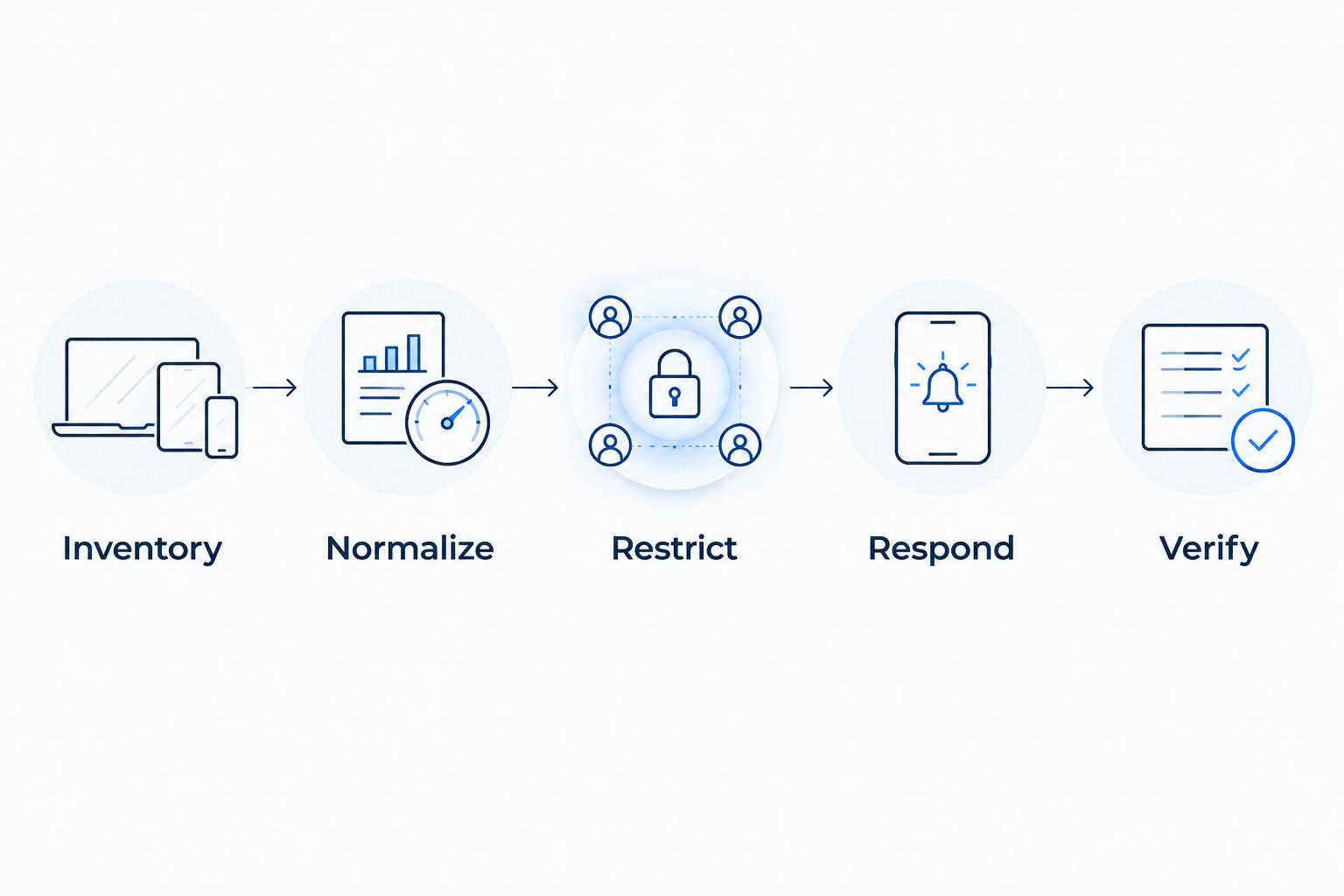
Illustrative workflow: A cold-room sensor reports temperature with its device identity and timestamp. The configured mapping associates it with the correct room and site, and an agreed condition creates an alarm for the responsible person. That person investigates; a later reading provides evidence about the temperature, while a site check establishes what happened to the equipment.
This example does not assume a compliance threshold, an automatic repair, or a customer deployment. It shows the chain your pilot should prove. If remote control is included, add a compatible actuator, a defined command path, and the evidence needed to confirm the physical outcome.
Use that evidence to plan a phased IoT rollout across multiple sites, with an explicit acceptance decision before each expansion.
Compare the complete operating cost, not the platform label
An enterprise procurement comparison should separate software subscriptions, hardware, connectivity, cloud services, integration work, and ongoing support. AI model-provider usage is another consideration when your proposed workflow uses an external model service.
Build the commercial comparison around the same device inventory and workload assumptions. Include reporting frequency, data retention requirements, user responsibilities, and expected integrations so each proposal describes the same deployment.
Hardware sourcing is a separate decision. Kilo Electronics is a separate online authorised dealer for compatible hardware, serving individual and business buyers; it is not the platform software or a required purchasing channel for this comparison.
Ask who pays for changes after rollout. A new sensor model, a changed payload, a replacement gateway, or a revised site access arrangement can create engineering work even when the monitoring objective stays the same.
Which enterprise IoT platform should you choose?
For a monitoring-and-automation shortlist, start with Kilo and require a representative workflow demonstration. Include ThingsBoard when open-source application ownership is a deliberate requirement. Choose AWS IoT Core or Microsoft Azure IoT Hub as foundations when your developers are building the application within the corresponding cloud ecosystem.
For an undecided buyer, the deciding question is who owns the finished service. Name the people responsible for device onboarding, access changes, alarm response, integration maintenance, and recovery. If those responsibilities remain unresolved, adding more platform candidates will not fix the selection process.
FAQ
What should an enterprise IoT platform for multi-site operations include?
It should provide or support consistent device context, site access boundaries, actionable alarms, repeatable configuration, and evidence of operational results. Evaluate the complete system, including the application components and integrations your team must supply.
Is Kilo suitable for a multi-site IoT platform shortlist?
Kilo is a relevant shortlist option for connected-device monitoring and automation. Validate your actual devices, site responsibilities, permission requirements, and supported actions before selecting it.
Is ThingsBoard better than a managed IoT platform?
ThingsBoard fits teams that deliberately want an open-source application platform and can own its deployment. A managed approach fits a different responsibility model; compare maintenance, recovery, integrations, and required functionality rather than the software label alone.
Are AWS IoT Core and Azure IoT Hub complete facility-monitoring applications?
AWS IoT Core and Microsoft Azure IoT Hub are device-service foundations, not complete facility-monitoring applications on their own. A finished deployment also needs application logic, storage, operator interfaces, and response workflows.
Can an IoT platform use devices from different manufacturers?
An IoT platform can combine devices when the required interfaces, payload mappings, and device behavior are supported. A shared protocol name does not prove that every measurement or remote command will work.
Does a delivered device command prove that equipment changed state?
No, a delivered command does not prove a physical outcome. Verification requires suitable device feedback, subsequent measurements, or an appropriate physical check.
Do multi-site monitoring projects need AI?
No, dashboards, threshold rules, and alarms can support a conventional IoT monitoring workflow without AI reasoning. Add AI assistance when it serves a defined task, with appropriate permissions and supported tools.
Test what happens when a sensor goes silent
Before approving the rollout, stop a test device from reporting. Ask each proposed system to show how a user distinguishes a healthy reading from an old reading that merely looks normal.
A normal value without a trustworthy timestamp is not proof of current conditions. This test exposes whether your monitoring design handles missing evidence, rather than only reacting when a measurement crosses a threshold.
Written by Tim Kravchunovsky


