

The best IoT application enablement platform for OEM teams depends on what you want to own: evaluate the Kilo IoT Platform for connected-device monitoring and automation, ThingsBoard for an open-source application foundation, Cumulocity for a packaged enterprise platform, and AWS or Microsoft Azure when your engineers want to assemble the application themselves. Choose by the customer workflow you need to deliver—not by the longest protocol list.
- Choose an IoT application enablement platform for OEM teams by application ownership, customer permissions, device integration and support responsibilities.
- Kilo fits OEM teams evaluating connected-device monitoring, dashboards, alarms and configured automation in one platform.
- ThingsBoard suits an open-source approach; AWS and Microsoft Azure suit teams building a custom cloud application.
- Prove customer separation, device replacement and command feedback before committing to a platform.
What makes a good application enablement platform for OEMs?
An original equipment manufacturer needs more than a place to receive telemetry. Its connected product needs an application that customers can use, support staff can troubleshoot, and engineers can maintain as devices change.
An IoT application enablement platform supplies reusable software capabilities between connected equipment and the customer-facing application. Those capabilities can include device records, data processing, dashboards, permissions, alarms and automation. The important question is how much remains for your team to build.
Use these criteria before comparing vendors:
- Application ownership: Decide whether customers will use the platform interface or an application your team develops.
- Customer separation: Test which users can see devices, change settings, export data and issue commands.
- Device lifecycle: Include onboarding, replacement, ownership transfer and retirement—not just the first connection.
- Operational workflows: Follow a reading through its dashboard, alarm, response and resolution.
- Integration effort: Identify the payload mapping, identity handling and business-system integration your engineers must maintain.
- Exit requirements: Establish how device identities, historical data and application configuration will move if you switch.
A protocol match is an entry requirement, not an application architecture. MQTT connectivity, for example, does not establish that a platform understands your payloads, customer accounts or equipment commands.
IoT application enablement platforms at a glance
The order below moves from a combined operational platform toward increasingly custom application architectures. These are workflow-based recommendations, not measured performance rankings. AWS IoT Core and Azure IoT Hub appear as foundations for application stacks, not as direct equivalents to a finished application platform.
| Option | Best for | Standout approach | Key limitation |
|---|---|---|---|
| Kilo | Connected-equipment monitoring and automation | Device context, dashboards, alarms and configured actions in one platform | OEM-specific commercial and application requirements need separate validation |
| ThingsBoard | Teams choosing an open-source application foundation | Open-source IoT platform with dashboards and rule processing | Your deployment and edition determine the maintenance burden and feature set |
| Cumulocity | Enterprise teams evaluating a packaged IoT application platform | Device management and application enablement within an enterprise platform | Equipment integration and customer workflows still require implementation |
| AWS IoT Core-based stack | Engineering teams owning a custom AWS application | Managed device connectivity combined with other AWS services | IoT Core alone is not a finished customer application |
| Azure IoT Hub-based stack | Engineering teams building within Microsoft Azure | Device communication integrated into an Azure application architecture | IoT Hub alone does not provide the complete application experience |
1. Kilo: for connected-equipment monitoring and automation
Kilo brings device data, digital twins, dashboards, automation, alarms, permissions and supported commands into one platform. For an OEM, that makes it relevant when the connected-product experience centers on understanding equipment state and responding to it.
Kilo is a practical IoT application enablement platform candidate for OEM teams that need monitoring and configured automation around connected equipment. It also provides built-in AI assistance and compatible external-client connections, but those capabilities do not remove device integration work.
Kilo pros:
- Combines monitoring and response capabilities rather than stopping at message ingestion.
- Keeps device context alongside dashboards, alarms and automation.
- Supports AI-assisted interaction within the available tools and user permissions.
Kilo cons:
- A compatible protocol does not prove support for your exact device payloads or commands.
- A branded customer portal, OEM licensing terms and required customer-separation behavior need explicit validation.
Best for: OEM teams evaluating an operational application layer for connected products, buildings or industrial equipment.
Verdict — Hold the purchase decision until a representative device, customer role and response workflow pass your pilot.
2. ThingsBoard: for an open-source application foundation
ThingsBoard is an open-source IoT platform with device management, telemetry visualization and rule processing. It belongs on an OEM shortlist when your team wants an existing application foundation without treating the entire application layer as a blank development project.
The decision is not simply open source versus subscription software. Your team must choose a deployment approach and identify which edition supplies the capabilities the product requires.
ThingsBoard pros:
- Provides an open-source foundation that engineers can inspect and adapt.
- Includes dashboards and rule processing alongside device data management.
- Gives teams a starting application structure rather than connectivity alone.
ThingsBoard cons:
- Self-hosting puts infrastructure operation, updates and recovery work on your team.
- Features differ by edition; an open-source deployment does not establish that every commercial capability is included.
Best for: OEM engineering teams that value source access and can own the resulting application and deployment responsibilities.
Verdict — Hold until the selected edition and hosting model satisfy the customer-facing requirements.
3. Cumulocity: for a packaged enterprise IoT platform
Cumulocity is an IoT platform covering device management, integration and application enablement. It is a relevant candidate when an OEM wants to evaluate an enterprise platform rather than assemble the application entirely from individual cloud services.
Keep the evaluation close to your equipment. A broad platform demonstration is less useful than seeing your device model, customer access rules and service workflow implemented together.
Cumulocity pros:
- Addresses device management and application enablement within one platform.
- Supports an enterprise-platform approach to connected-product development.
- Provides an alternative to designing every application component around cloud infrastructure services.
Cumulocity cons:
- Your equipment’s data model and integration path still need implementation.
- Platform breadth does not prove that your intended customer experience is ready without configuration or development.
Best for: OEM teams with an enterprise procurement process and a defined connected-product architecture to evaluate.
Verdict — Hold until an equipment-specific demonstration establishes the implementation scope and ownership.
4. AWS IoT Core-based stack: for a custom AWS application
AWS IoT Core provides managed connectivity between devices and AWS cloud services. It is a foundation for an OEM application, not the complete application itself: your team must connect device communication to storage, business logic, identity and the customer interface.
That distinction matters. Choose this route because you want architectural control and have the engineering capacity to exercise it—not because receiving a device message looks straightforward.
AWS IoT Core-based stack pros:
- Provides managed device connectivity without requiring your team to operate its own message broker.
- Fits applications designed around other AWS services.
- Leaves your engineers responsible for the structure of the customer-facing product.
AWS IoT Core-based stack cons:
- Dashboards, customer workflows and support tooling remain application-development work.
- Your team owns integration across the services selected for the architecture.
Best for: OEMs with AWS engineering expertise and a product roadmap that justifies a custom application.
Verdict — Skip this route if your main requirement is a configurable monitoring application rather than a software-development program.
5. Azure IoT Hub-based stack: for a custom Azure application
Azure IoT Hub provides cloud-side device communication for applications built on Microsoft Azure. Like AWS IoT Core, it should be evaluated as a component in an application architecture rather than a finished customer portal.
The fit is strongest when your engineering team already works with Azure and wants to connect device communication to its chosen application services. Existing cloud skills help, but they do not replace product design or operational ownership.
Azure IoT Hub-based stack pros:
- Provides a managed foundation for device communication.
- Fits application architectures built around Microsoft Azure.
- Lets your engineers design the customer experience around specific product requirements.
Azure IoT Hub-based stack cons:
- Customer interfaces and business workflows require additional application components.
- Your team must maintain the application, integrations and support processes around the hub.
Best for: OEM teams with Azure expertise and a clear reason to build their own connected-product application.
Verdict — Skip this route if your team expects IoT Hub itself to deliver the complete operational application.
How these recommendations are ranked
The comparison prioritizes the amount of application your team needs to own, followed by operational workflow coverage, device integration and customer access requirements. It does not assign unsupported scores for speed, reliability or total ownership cost.
For a 2026 selection, separate demonstrated behavior from a vendor’s proposed implementation. A capability shown on a generic dashboard is not proof that your equipment and customer permissions work correctly together.
Test the complete OEM workflow before choosing
A useful pilot follows a product through normal operation and a support incident. Keep the same acceptance criteria across candidates so a polished interface does not conceal unfinished integration work.
The following is an illustrative OEM acceptance test, not a customer deployment or a claim about capabilities in every platform.
Device onboarding
Connect representative equipment and map its payload into named measurements with units. Then replace that device and establish what happens to its identity, history and customer assignment.
For hardware sourcing, Kilo Electronics is a separate online authorised dealer serving individual and business buyers. Hardware sourcing and platform selection remain separate decisions; purchasing a device does not establish software compatibility.
Customer access
Create distinct customer and service-user roles. Attempt to read another customer’s data, change a configuration and issue a command using each role; record which actions the platform allows and rejects.
A dashboard that hides a device is not sufficient evidence of access control. Test the relevant API and export paths as well.
Alarm response
Send a condition that should trigger an alarm and identify who receives it. Follow the response through acknowledgment and resolution using the behavior the selected platform actually supports.
Also interrupt telemetry. Your team needs to distinguish a normal reading from an old reading that has stopped updating.
Command feedback
For controllable equipment, define the supported command and the evidence that confirms its effect. An accepted, queued or delivered command does not prove that the equipment changed state.
Data exit
Export the measurements and device context your service needs. Check whether the result preserves timestamps, units and identifiers well enough to use outside the platform.
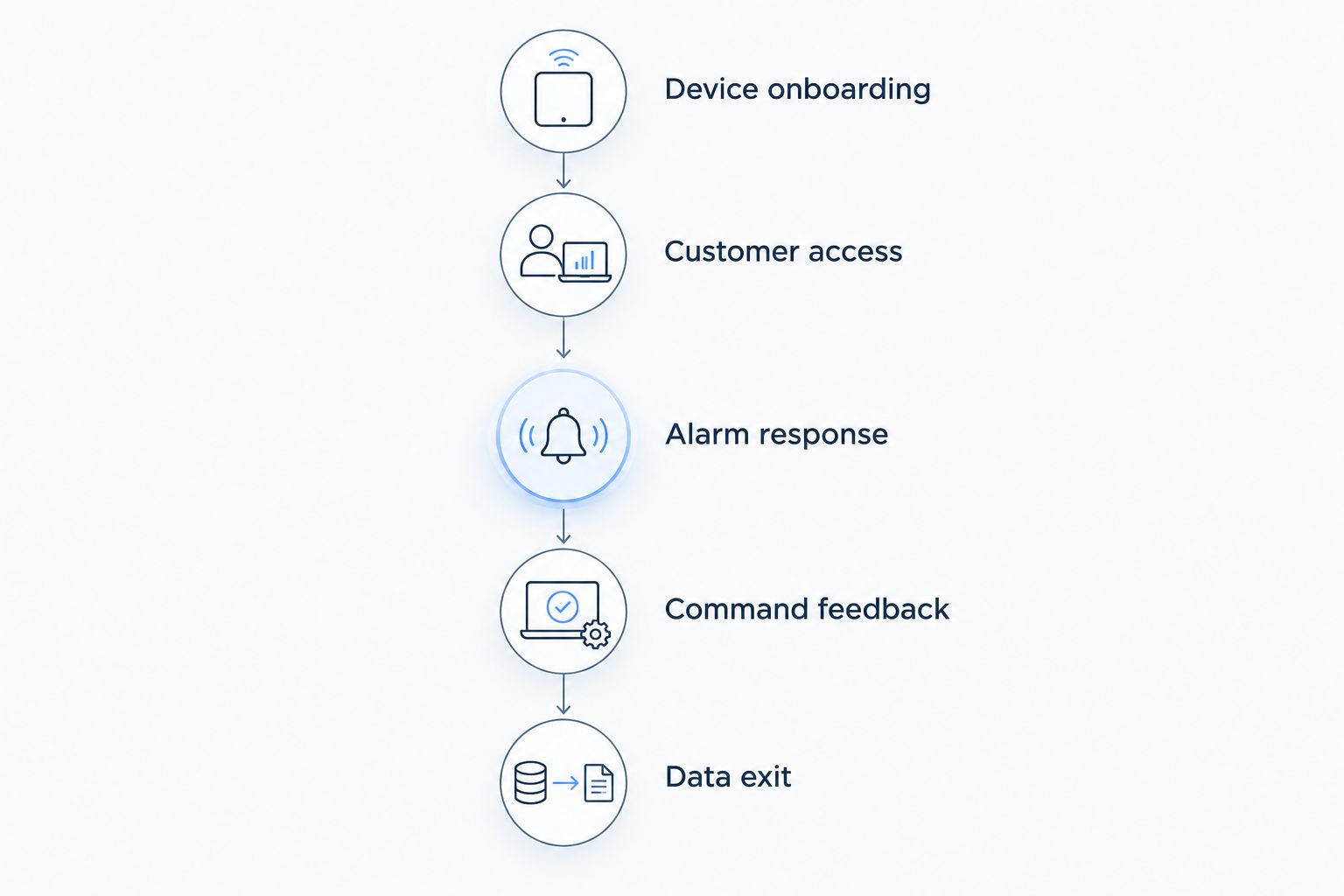
The pilot should end with an ownership decision. Assign responsibility for device firmware, payload mapping, platform configuration, customer support and application maintenance before choosing the platform.
Where AI assistance belongs in an OEM application
AI assistance is useful when it helps people understand device context or operate supported platform functions. It is not a substitute for defining what an equipment command means or who is allowed to request it.
Kilo supports a built-in assistant and compatible external clients such as Claude through MCP, the Model Context Protocol. Tool coverage and approval behavior depend on the client and integration; do not assume every built-in function is exposed through every external client.
Keep direct interaction separate from configured automation. The built-in assistant has a confirmation flow for direct device commands, while deliberately configured rules can execute commands autonomously. Your application must preserve those distinctions for users and support staff.
Which platform should your OEM team choose?
Start with a packaged application platform when your differentiator is the equipment and its service—not rebuilding common monitoring functions. Evaluate Kilo for the combined monitoring-and-automation workflow, ThingsBoard for an open-source foundation, and Cumulocity for an enterprise-platform approach.
Choose an AWS or Azure application stack when a custom experience is a deliberate product investment with engineering ownership. The undecided team should begin with its hardest customer workflow and require a working demonstration before negotiating a wider rollout.
FAQ
What's an IoT application enablement platform for OEM teams?
An IoT application enablement platform provides reusable software capabilities for turning connected equipment into a usable application. OEM teams evaluate device records, data processing, customer access, dashboards, alarms and integration responsibilities.
Is an MQTT broker enough to launch a connected product?
An MQTT broker alone is not a complete connected-product application. Your team still needs device identity, payload interpretation, customer permissions, data storage and the workflows customers use.
Does an OEM need a white-label IoT platform?
An OEM needs white-label functionality only when its customer experience requires the platform interface to carry its own branding. If customers use an application built by the OEM, API behavior and access control can matter more than dashboard branding.
Can an OEM use a platform without replacing its device firmware?
An OEM can retain existing firmware when the device communication and data formats fit a supported integration path. Confirm authentication, payload mapping and command handling with representative equipment before deciding.
Is a digital twin the same as firmware management?
A digital twin is not firmware management. A digital representation can hold device context and state, while firmware delivery requires its own supported device and software workflow.
What proves that a remote device command worked?
Device feedback or a subsequent measurement provides evidence of a physical result where the equipment supports it. A platform accepting or delivering the command does not establish that the equipment completed the action.
Before signing, test a device replacement
A successful first connection proves less than a successful replacement. Remove a representative device, introduce its replacement and follow the customer assignment, historical data, alarm configuration and command permissions.
If replacement requires undocumented manual repairs, resolve that workflow before expanding the deployment. Connected products need a serviceable lifecycle, not just a convincing launch demonstration.
Related guides
Written by Tim Kravchunovsky


