
Choose an IoT monitoring platform by the product service you need to deliver: the Kilo IoT Platform fits connected-equipment monitoring with dashboards, alarms and automation; ThingsBoard suits teams seeking a self-hosted application platform; AWS IoT Core and Azure IoT Hub suit custom cloud backends; Particle suits connected products built around its device ecosystem. There is no defensible overall winner without testing your equipment, customer-access model and support workflow.
- Choose an IoT device monitoring platform for OEM manufacturers around customer access, device diagnostics and support workflows.
- Kilo fits OEM teams bringing device data, dashboards, alarms and automation into a shared operating layer.
- ThingsBoard suits self-hosted application development; AWS IoT Core and Azure IoT Hub suit custom cloud backends.
- Particle suits connected-product teams that want device hardware, firmware tooling and cloud services together.
OEM device monitoring starts after the equipment ships
An original equipment manufacturer needs more than a dashboard showing that a machine is online. You need to identify the installed unit, understand its condition, separate customer access and give service engineers evidence they can act on.
That changes the buying decision. A factory-monitoring project follows equipment inside your facilities; an OEM monitoring service follows products across customers, installation conditions and service agreements. The shortlist below addresses the latter, not production-line monitoring inside a manufacturing plant.
Kilo fits OEM teams that need an IoT monitoring platform connecting equipment data with dashboards, alarms and configured automation. Firmware distribution, customer branding and specialized service integrations are separate evaluation requirements, not capabilities to assume from that description.
What makes a useful OEM device monitoring platform
Evaluate every candidate against the same criteria before comparing interface screenshots:
- Device identity: Maintain a dependable relationship between a physical unit, its serial number, installed location and telemetry.
- Customer separation: Demonstrate who can see each customer's devices, measurements and available actions.
- Diagnostic context: Distinguish an equipment fault from stale data, missing connectivity or an incorrectly mapped payload.
- Service workflow: Turn a condition into an actionable alarm with a responsible person and evidence of resolution.
- Integration ownership: Establish who maintains firmware, payload decoders, cloud services and downstream business integrations.
- Exit requirements: Establish how device identities, historical measurements and application configuration can move elsewhere.
Treat these as acceptance criteria, not a feature-counting exercise. A platform with attractive charts still fails the OEM use case if a replacement device loses its service history or a customer can access another customer's equipment.
OEM IoT monitoring platforms at a glance
These are use-case recommendations, not performance rankings. Cloud building blocks and application platforms solve different parts of the system.
| Platform | Best for | Standout approach | Key limitation |
|---|---|---|---|
| Kilo | Configured monitoring and operating workflows | Device context, dashboards, alarms and automation in one platform | OEM-specific lifecycle and integration requirements need separate validation |
| ThingsBoard | Self-hosted monitoring applications | Open-source IoT application platform with dashboards and rule processing | Self-hosting makes infrastructure operation your responsibility |
| AWS IoT Core | Custom products on AWS | Managed device connectivity integrated with AWS services | A customer-facing monitoring application requires additional components |
| Azure IoT Hub | Custom products using Azure services | Device messaging, device twins and integration with Azure services | Customer portals and service workflows require additional application work |
| Particle | Products using an integrated device ecosystem | Device hardware, connectivity options and cloud development tooling | Fit depends on hardware architecture and ecosystem choices |
1. Kilo: for configured equipment-monitoring workflows
Kilo brings device data, digital twins, dashboards, automation, alarms, permissions and supported commands into an operating layer. Its supported connectivity areas include LoRaWAN, mioty and MQTT, with device compatibility depending on the actual integration and payload mapping.
Best for: OEMs and integrators building equipment-monitoring services around supported connected devices.
For an illustrative pump-monitoring application, the useful workflow starts with telemetry attached to the correct equipment record. A configured condition raises an alarm, a service engineer reviews the measurements, and later readings provide evidence of what happened after an intervention. This is an example of an evaluation workflow, not a reported deployment.
Kilo pros:
- Combines monitoring interfaces and configured response workflows.
- Includes device context rather than treating every measurement as an isolated chart.
- Supports conventional monitoring alongside AI-assisted interaction.
Kilo cons:
- A shared protocol name does not establish support for every device or command.
- Equipment monitoring does not establish firmware-update support, predictive maintenance models or service-management integration.
The built-in assistant and compatible external clients can assist within their permissions, but assistant access is not a substitute for defining supported operations. For direct equipment control, command status and physical feedback remain different evidence.
Verdict: Hold the purchase until a representative device, alarm and customer-access workflow pass your acceptance test.
2. ThingsBoard: for self-hosted monitoring applications
ThingsBoard is an open-source IoT platform with device management, telemetry dashboards and rule processing. It belongs on the shortlist when your engineering team wants an application platform it can operate and extend rather than assembling every monitoring component separately.
Best for: OEM software teams that prioritize self-hosting and application customization.
The important distinction is deployment responsibility. Choosing an application platform reduces some application-building work, but running it yourself still leaves backups, upgrades, capacity planning and incident response with your team.
ThingsBoard pros:
- Offers an open-source starting point for an IoT monitoring application.
- Brings dashboards and rule processing into the same platform.
- Provides a self-hosting route for teams that need deployment control.
ThingsBoard cons:
- Self-hosting creates ongoing infrastructure and maintenance obligations.
- Capabilities differ across editions, so a demonstration must match the edition you intend to deploy.
For OEM use, demonstrate customer separation and device reassignment in the proposed edition. Also establish which extensions your engineers will maintain, because a customized installation becomes part of your product's support responsibility.
Verdict: Buy only when your team accepts ownership of the selected deployment and its maintenance.
3. AWS IoT Core: for custom monitoring backends on AWS
AWS IoT Core provides managed connectivity and messaging for connected devices. It fits an architecture in which engineers use AWS services to construct data processing, storage, application access and customer-facing monitoring.
Best for: OEM development teams already building a custom product backend on AWS.
Do not compare a device connection demonstration with a finished monitoring service. Connecting telemetry is an infrastructure milestone; customer dashboards, service permissions and support workflows remain application requirements.
AWS IoT Core pros:
- Provides managed device connectivity rather than requiring you to operate that layer yourself.
- Integrates device messages with other AWS services.
- Fits custom applications that need control over backend architecture.
AWS IoT Core cons:
- Does not by itself constitute a complete OEM monitoring portal.
- Requires engineering across the connected services that make up the application.
Ask the team proposing AWS to draw the complete service boundary. Identify where measurements are stored, where access is enforced and who diagnoses a fault spanning the device, messaging layer and application.
Verdict: Buy when a custom AWS product architecture is intentional, not merely because devices can connect to it.
4. Azure IoT Hub: for device backends using Azure services
Azure IoT Hub supports device messaging and device twins within an Azure-based architecture. A device twin represents device-related properties and state; it is not automatically a detailed simulation or a complete service record.
Best for: OEM engineering teams building connected-product applications around Azure services.
Azure IoT Hub is a backend component rather than a ready-made customer monitoring application. Evaluate the surrounding application design with the same care as the device connection itself.
Azure IoT Hub pros:
- Provides a managed service for device communication.
- Includes device-twin concepts for device-related state.
- Connects naturally with an application architecture using other Azure services.
Azure IoT Hub cons:
- Customer dashboards and service processes require additional implementation.
- Device-twin state does not independently prove the physical condition of equipment.
A useful demonstration follows a changed device property through to the equipment and back to reported state. If the device is disconnected, the monitoring interface must make that uncertainty visible rather than presenting requested state as observed reality.
Verdict: Buy when Azure is the chosen application foundation and the surrounding monitoring service has an implementation owner.
5. Particle: for integrated connected-product development
Particle combines connected-device hardware and cloud development tooling. It is relevant when the OEM is selecting the device architecture as well as the monitoring backend, rather than adding a dashboard to an established mixed-device estate.
Best for: Product teams designing around an integrated device ecosystem.
This is a different starting point from choosing a protocol-neutral monitoring application. Evaluate the hardware, firmware workflow and cloud relationship together, because they shape how you manufacture and support the connected product.
Particle pros:
- Connects device development with cloud tooling.
- Gives product engineers an integrated hardware-and-software starting point.
- Fits decisions made while defining the connected product's architecture.
Particle cons:
- Ecosystem fit becomes part of the hardware design decision.
- Supporting an existing heterogeneous equipment estate requires a separate integration assessment.
Do not choose a device ecosystem solely for its monitoring interface. Establish that the underlying hardware and firmware approach fits the product you intend to manufacture and maintain.
Verdict: Buy when the integrated device architecture fits the product; skip it as a dashboard-only decision.
How the recommendations were selected
The shortlist separates configured monitoring, self-hosted applications, custom cloud backends and integrated device development. Those distinctions map to the criteria above: device identity, customer separation, diagnostic context, service workflows, integration ownership and exit requirements.
The order is not a benchmark result. No measured onboarding-speed, reliability or engineering-effort comparison is asserted here. Choose the architecture that matches your ownership model, then require evidence using your equipment.
Test the OEM service workflow before signing
A useful pilot follows a device from identification through fault resolution. It also tests the customer boundary, because a technically successful telemetry connection says nothing about who should be allowed to inspect or operate the equipment.
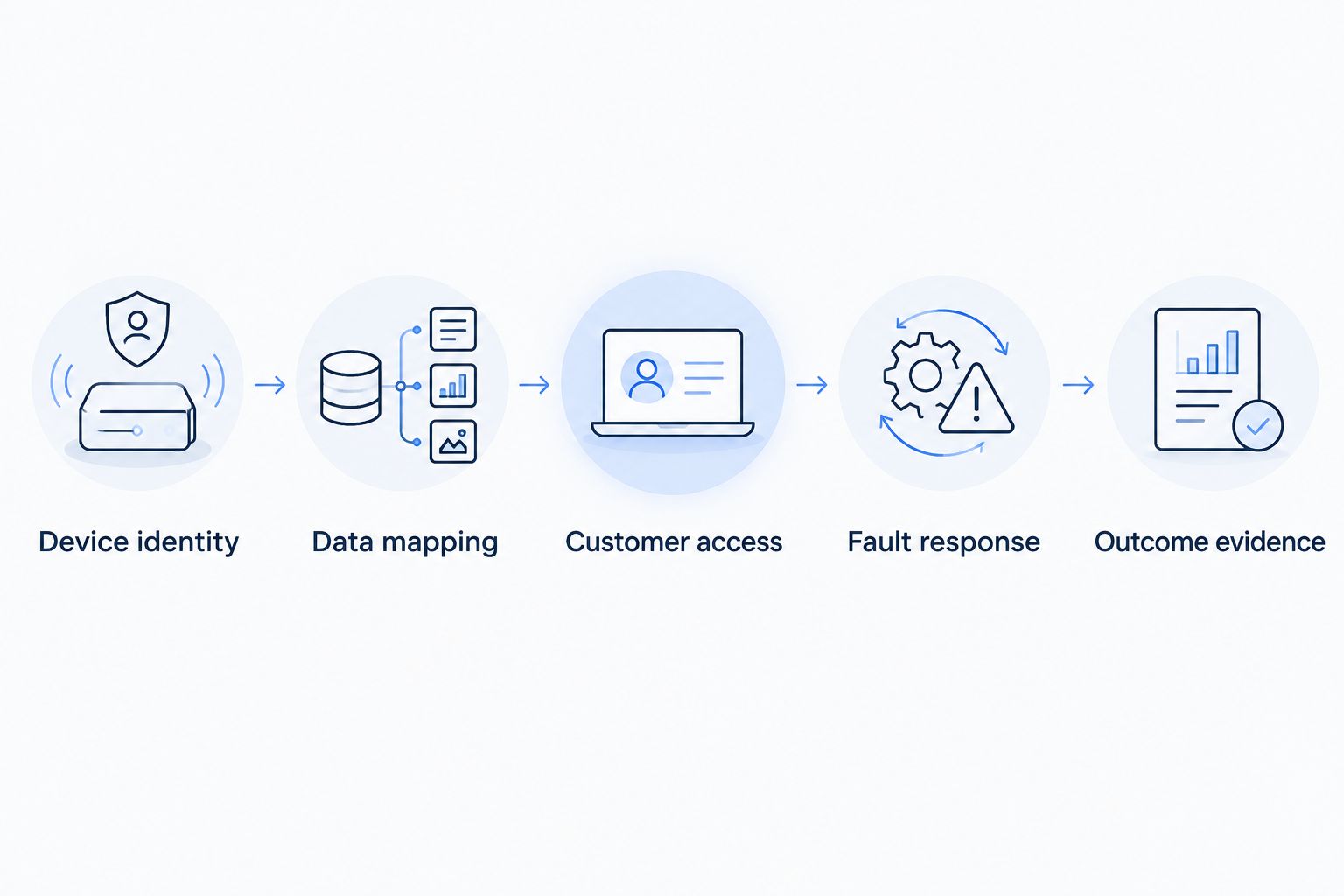
Use this sequence with every shortlisted vendor:
- Device identity: Connect a representative unit and associate its measurements with the correct serial number and customer.
- Data mapping: Confirm units, timestamps, missing values and the difference between current and stale measurements.
- Customer access: Test customer, distributor and manufacturer-service access against a written permission matrix.
- Fault response: Introduce a controlled fault condition and establish who receives the resulting alarm.
- Outcome evidence: Restore normal operation and identify the measurement or feedback that demonstrates recovery.
Include failure cases. Disconnect the gateway, send a malformed payload and replace a device while preserving the equipment's identity. These exercises reveal whether service staff can distinguish a communication problem from an equipment problem.
If remote actions are in scope, add a supported command and inspect the returned evidence. Accepted, queued or delivered is not proof that equipment changed state. Require device feedback or a subsequent measurement wherever the integration supports it.
For a related selection question, the guide to an IoT device management platform for system integrators addresses the integrator-facing side of the decision.
Separate platform software from hardware sourcing
An OEM monitoring architecture includes equipment, connectivity, software and the people maintaining their interfaces. A platform subscription does not replace device qualification, and a compatible radio protocol does not establish that a sensor exposes the measurements your service requires.
Kilo Electronics is a separate online authorised dealer for compatible hardware, serving individual and business buyers. Treat hardware sourcing as a separate decision from platform selection, with compatibility established against your actual application requirements.
Which platform should an OEM choose?
Start with a configured application platform when your main objective is delivering equipment visibility and service response. Compare a self-hosted application when infrastructure ownership matters, a cloud backend when custom software is central to the product, and an integrated device ecosystem when you are still defining the hardware architecture.
The decisive question is not which vendor has the longest feature list. It is which approach lets your organization maintain the complete customer service: trustworthy device identity, understandable faults, appropriate access and evidence that an intervention worked.
FAQ
What's the difference between OEM monitoring and factory monitoring?
OEM monitoring follows products after installation at customer locations; factory monitoring follows equipment and processes within manufacturing operations. OEM selection therefore needs particular attention to customer access, installed-unit identity and after-sales support.
Does an OEM need a white-label IoT platform?
An OEM needs white-label capabilities when its commercial service requires a customer experience presented under its own brand. Treat branding, domains and customer-portal behavior as explicit requirements rather than assuming a dashboard platform includes them.
Is MQTT support enough to prove device compatibility?
No. MQTT establishes a messaging mechanism, not agreement on payload structure, units, authentication or supported commands. Test the complete device integration.
Can a monitoring platform predict equipment failure?
Monitoring and threshold alarms do not establish failure prediction. Predictive maintenance requires a supported analytical method and evidence that its outputs are useful for the equipment concerned.
Should customers be allowed to send remote commands?
Customer command access should follow a defined permission and equipment-control policy. Validate supported actions, approval behavior and feedback before exposing control through a portal or assistant.
What happens to device history when a unit is replaced?
That depends on how the application separates equipment identity from physical device identity. Require a replacement demonstration that preserves the service context your support team needs.
Can an OEM switch monitoring platforms later?
An OEM can plan for migration by establishing export and integration requirements before purchase. Historical measurements, device credentials, alarm configuration and customer access each need an explicit migration approach.
One last thing: test equipment ownership changes
Ask each vendor to demonstrate moving an installed unit from one customer to another. Decide which history transfers, which access ends and what the manufacturer retains for service purposes.
That single workflow tests the relationship between device identity, customer permissions and lifecycle support. If it remains ambiguous, resolve it before connecting the wider installed base.
Written by Tim Kravchunovsky


