

For building automation system software for office landlords, choose by the job: the Kilo IoT Platform is an option for adding connected monitoring, dashboards and alarms; an extension of your existing building automation system suits established equipment controls; independent supervisory software suits a mixed controls estate. Keep monitoring improvements separate from decisions to replace working HVAC controls.
- Choose building automation system software for office landlords by control requirements, integration effort and tenant boundaries.
- Kilo fits connected building monitoring; equipment control requires supported interfaces, permissions and configured commands.
- Extend an existing building automation system when the immediate problem is its equipment schedules or control sequences.
- Compare monitoring overlays, supervisory software and energy management against the same building workflow.
What makes building automation software useful to office landlords?
An office landlord needs more than a screen showing temperatures. You need to know which area has a problem, who can investigate it, who can change equipment settings and what evidence shows the issue has been resolved.
Building automation system, or BAS, software connects users to building equipment and its operating information. Building management system, or BMS, is another term you'll encounter during procurement. Neither label tells you whether a proposal includes controllers, supervisory software, additional sensors or simply a reporting interface.
Use these criteria before comparing proposals:
- Equipment compatibility: Identify the actual controllers, interfaces and readable or writable points, not just a protocol logo.
- Control responsibility: Separate observation, operator-approved commands and deliberately configured automatic actions.
- Tenant boundaries: Specify which users can see each space and which users can change shared equipment settings.
- Response workflow: Follow an abnormal reading through investigation, assignment and evidence of recovery.
- Ownership and handover: Establish who maintains configurations, credentials, device records and integration mappings when contractors change.
For a 2026 procurement, ask every bidder to demonstrate the same workflow using representative building data. A polished demonstration with unrelated equipment won't establish whether the proposed system fits your property.
Building automation software options at a glance
These options solve different problems. The order starts with monitoring improvements that can sit alongside existing controls, then moves into controls expansion, supervision and specialist energy analysis; it is not a measured vendor performance ranking.
| Option | Best for | Standout approach | Key limitation |
|---|---|---|---|
| Kilo | Adding connected monitoring alongside existing building systems | Device context, dashboards, rules and alarms in an IoT platform | Existing BAS connectivity and writable equipment actions need a supported integration path |
| Existing BAS extension | Improving schedules and sequences within an established controls installation | Builds on the installed equipment-control environment | Expansion depends on the installed system and the proposed integration scope |
| Independent supervisory BAS | Bringing multiple controls systems into a common supervisory workflow | A shared operating interface over integrated systems | Point mapping, command permissions and commissioning remain project work |
| Dedicated energy-management software | Investigating consumption and prioritizing energy work | A workflow organized around meters, trends and energy analysis | Energy visibility does not establish equipment-control capability |
1. Kilo: for connected monitoring alongside existing controls
Kilo brings device data, digital twins, dashboards, rules, alarms and supported commands into an IoT platform. For an office landlord, the useful starting point is a monitoring layer: connect supported devices, organize their context and give the right people a clear view of conditions.
Kilo fits office landlords adding connected monitoring alongside existing building controls. That is a different purchase from replacing the controllers responsible for heating, ventilation and air conditioning, or HVAC.
An illustrative use case is a landlord adding room-condition and leak monitoring to an occupied property. The project needs compatible devices, a supported connection, correctly interpreted readings and a defined response when an alarm appears. Existing HVAC control sequences can remain a separate responsibility.
Kilo pros:
- Combines device information, dashboards and alarms in the same platform.
- Includes rules and automation for configured workflows.
- Includes permissions and supported commands for connected deployments.
Kilo cons:
- A supported connectivity protocol does not establish compatibility with every device or controller.
- Software alone cannot operate equipment without a compatible actuator and configured command path.
- Adding monitoring does not resolve an incorrect HVAC control sequence.
Best for: Landlords and integrators adding connected visibility without making controls replacement the first project.
Verdict — Hold: Confirm the device connections and demonstrate the response workflow before approving a rollout.
2. Existing BAS extension: for improving installed equipment controls
An extension of the existing BAS is the direct route to investigate when your problem concerns equipment already controlled by that system. Examples include operating schedules, setpoints and sequences that no longer match how tenants use the building.
Start with the controls contractor's assessment of the installed configuration. Ask the contractor to distinguish configuration changes from controller replacement, additional licenses and new integration work; those are different scopes, even when they appear in the same proposal.
An illustrative office scenario is an air-handling system operating to an outdated occupancy schedule. Before adding another software layer, establish who owns that schedule, how exceptions are handled and whether the existing BAS can support the required change.
Existing BAS extension pros:
- Keeps changes close to the equipment-control environment.
- Makes existing schedules and sequences the starting point for investigation.
- Gives the incumbent contractor a defined configuration problem to address.
Existing BAS extension cons:
- An extension does not automatically provide a common view across unrelated building systems.
- Handover remains difficult if credentials and configuration records stay with one contractor.
- An equipment-controls project won't necessarily address new wireless monitoring requirements.
Best for: Landlords whose immediate problem sits inside an established HVAC controls installation.
Verdict — Buy: Approve the extension when the contractor demonstrates the required change and includes usable configuration documentation in the handover.
3. Independent supervisory BAS: for a mixed controls estate
Independent supervisory BAS software is an option when a property contains multiple controls systems that need a common operating interface. Its role is supervision across integrated systems, rather than a presumption that every underlying controller must be replaced.
The difficult part is defining the integration. A readable temperature point, a writable setpoint and an equipment-status signal represent different capabilities; each needs a clear mapping and an agreed owner.
Ask the integrator to demonstrate a representative workflow across the proposed systems. That means identifying the source equipment, showing its data quality, explaining any permitted command and confirming how the resulting equipment state will be observed.
Independent supervisory BAS pros:
- Provides a project structure for bringing multiple systems into a common interface.
- Supports a consistent approach to naming and organizing integrated points.
- Separates supervisory requirements from a blanket controller-replacement decision.
Independent supervisory BAS cons:
- Integration still requires point mapping and commissioning.
- A common interface does not remove the need to maintain underlying controls.
- Writable access requires explicit permissions and equipment-specific validation.
Best for: Landlords managing mixed controls installations where fragmented supervision is the main obstacle.
Verdict — Hold: Require a representative integration demonstration before committing to the full point list.
4. Dedicated energy-management software: for consumption analysis
Dedicated energy-management software belongs on the shortlist when your main question concerns consumption rather than direct equipment operation. Define the required meter inputs, comparison periods and analytical outputs before evaluating individual products.
For example, a landlord investigating after-hours electricity use needs trustworthy meter data and an explanation of what each meter covers. Without that context, a trend can show consumption but cannot reliably assign responsibility to a tenant, shared service or particular item of equipment.
A useful energy-management project should connect findings to an investigation. Specify who reviews unusual consumption, what building information they need and how they document the action taken; don't treat a chart as a completed energy-saving measure.
Dedicated energy-management software pros:
- Keeps procurement focused on consumption questions.
- Makes meter coverage and data quality explicit requirements.
- Provides a defined workflow for investigating energy performance.
Dedicated energy-management software cons:
- Consumption visibility does not prove control of the equipment using that energy.
- Missing or poorly mapped meters limit the conclusions you can draw.
- Analytical outputs alone do not establish savings or a payback period.
Best for: Landlords prioritizing energy investigation across landlord-controlled services and clearly defined metered areas.
Verdict — Buy: Select this category when meter-based analysis is the primary requirement, not as a substitute for missing controls.
Test the workflow from reading to verified response
Use a bounded acceptance exercise before expanding any platform. The following is an illustrative monitoring test, not a recommended comfort threshold, service commitment or description of a customer deployment.
Assume a room sensor reports every 5 minutes, an abnormal condition must persist for 15 minutes before an alarm is raised, and the assigned responder checks the issue within 30 minutes. These assumptions make the demonstration measurable without pretending they fit every office.
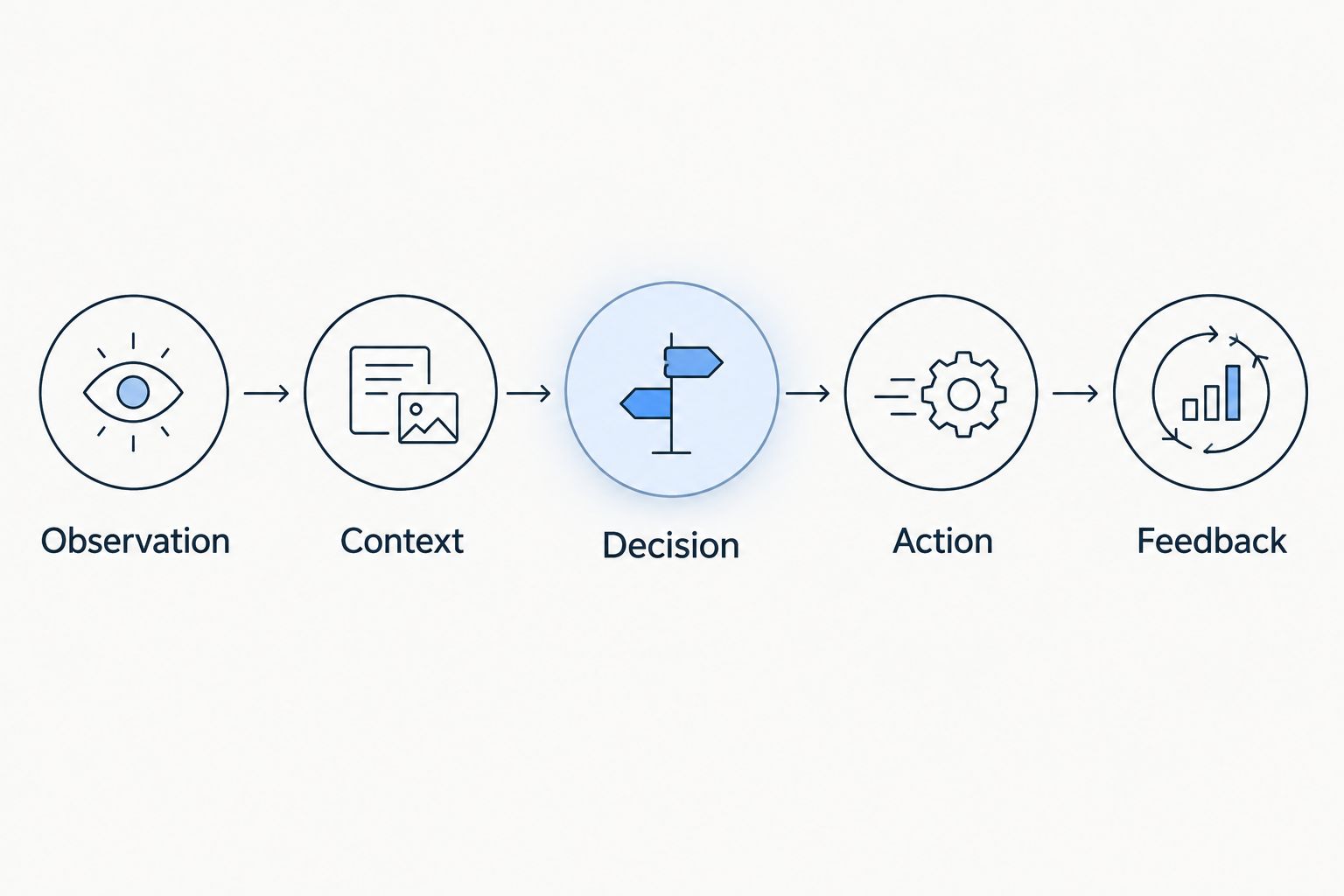
Ask the supplier to walk through these stages:
- Observation: Show the reading, timestamp, units, device identity and location. Include a missing-data case so an old reading isn't mistaken for a current condition.
- Context: Identify the affected tenant area, the relevant equipment and the person responsible for investigation.
- Decision: Demonstrate the configured persistence condition and explain what resets it. A threshold rule is automation, not evidence of AI reasoning.
- Action: Show the alarm response or a specifically supported equipment command. State which user or configured rule is allowed to initiate it.
- Feedback: Show the subsequent measurement or device feedback used to establish what happened.
A delivered command is not proof that equipment changed state. If the proposal includes remote control, require the supplier to identify the available feedback and explain what the operator sees when feedback is missing.
Keep essential equipment protection separate from this monitoring exercise. Acceptance criteria for a dashboard or alarm do not establish that the software is suitable for a safety function.
Set tenant permissions before adding remote control
Office landlords must distinguish shared building services from tenant-controlled areas. Write the access requirements in plain language before translating them into software roles: who sees conditions, who acknowledges issues and who changes equipment settings.
For AI-assisted operation, permissions and action boundaries still apply. The built-in assistant has a confirmation flow for direct device commands, while external clients such as Claude through a compatible Model Context Protocol connection have their own approval behavior. Don't assume that every built-in function is exposed through an external client.
Deliberately configured rules can execute commands autonomously. That makes the permitted command, triggering conditions and available feedback part of the design—not an approval step you can assume appears before every action.
Separate software procurement from hardware sourcing
Ask for a scope that distinguishes platform software, integration, sensors, gateways, connectivity and commissioning. Those are separate responsibilities, and a proposal should identify who supports each one when data stops arriving or equipment doesn't respond.
For hardware sourcing, Kilo Electronics is a separate online authorised dealer serving individual and business buyers. It is not the platform itself, and buying hardware there is not an additional platform requirement.
Plan physical installation as carefully as the software configuration. The guide to retrofitting legacy buildings with wireless IoT sensors addresses the related retrofit question; wireless connectivity does not eliminate device placement and commissioning work.
How these options were assessed
The selection framework uses equipment compatibility, control responsibility, tenant boundaries, response workflow and ownership. Each option occupies a different use-case slot because a monitoring platform, a controls extension and an energy-analysis application are not interchangeable purchases.
This is a fit-based buying guide, not a laboratory test or a claim that one supplier outperforms every alternative. Require the same acceptance exercise from shortlisted suppliers and judge the demonstrated workflow against your property requirements.
Which building automation software should you choose?
Keep working controls and fix the missing workflow first. If your main gap is connected monitoring, evaluate a monitoring overlay; if schedules or sequences are wrong, investigate the existing BAS before adding another interface.
Choose independent supervision for fragmented controls and dedicated energy-management software for consumption analysis. The decisive question is which system will own the problem after installation—and whether your team can verify that it has been resolved.
FAQ
What's the best building automation system software for office landlords?
The right choice depends on whether you need equipment control, connected monitoring, common supervision or energy analysis. Compare those workflows separately rather than assuming every building software platform replaces a BAS.
Can an IoT monitoring platform replace my existing building automation system?
An IoT monitoring platform is not automatically a replacement for existing building controls. Replacement requires verified support for the equipment, control sequences, interfaces and operating requirements involved.
Do office landlords need a digital twin before adding sensors?
A digital twin is not a prerequisite for defining a useful monitoring project. Start with accurate device identities, locations and responsibilities, then decide whether a richer building representation helps users interpret the data.
Can tenants change building settings through the software?
Tenant control should be limited to explicitly authorized spaces and actions. Demonstrate the proposed permissions before granting access, especially where equipment serves shared areas.
Does an equipment command marked delivered prove it worked?
No, delivered command status does not prove a physical outcome. Verification depends on supported device feedback or subsequent measurements that show the resulting state.
What should a landlord request when changing controls contractors?
Request the configuration records, access credentials, point mappings and maintenance responsibilities covered by the handover. Specify these deliverables in procurement rather than treating a working dashboard as sufficient documentation.
Before signing, test the handover
Ask a building engineer who did not configure the system to investigate an alarm using the proposed documentation. Have that person identify the device, locate the affected area, find the responsible responder and explain what evidence would confirm recovery.
That exercise tests something a sales demonstration doesn't: whether the building remains understandable after the original installer leaves.
Written by Tim Kravchunovsky


