

For smart building technology for new construction, shortlist Siemens Desigo CC for building supervision, Schneider Electric EcoStruxure Building Operation for building-management projects, Tridium Niagara Framework for integration-led designs, and Honeywell Enterprise Buildings Integrator for combined building and security supervision. For connected sensors, dashboards and automation alongside your building controls, consider the Kilo IoT Platform; choose by the layer you need, not a universal winner.
- Smart building technology for new construction starts with separating equipment control, system integration and connected-device monitoring.
- Kilo fits connected-device monitoring and automation alongside building controls; it is not a substitute for specified controllers.
- Compare Desigo CC, EcoStruxure Building Operation, Niagara Framework and Enterprise Buildings Integrator against your project scope.
- Require a demonstrated path from a real measurement to an assigned response and verified outcome before handover.
Choose the operating architecture before the dashboard
A new building gives you the opportunity to specify power, network access, equipment interfaces and ownership before installation. Use it. A polished dashboard cannot compensate for inaccessible equipment data or an integration that nobody agreed to maintain.
Separate three jobs: controllers operate equipment, integration software connects systems, and applications help people interpret conditions and respond. Products overlap, but the responsibilities still need names in the specification.
The right platform is the one that covers its assigned responsibility and exchanges the information your other systems need. Buying every function from one supplier does not remove the need to define those boundaries.
What makes a suitable smart building platform?
Use these criteria before reviewing the shortlist:
- Control responsibility: Identify which system runs equipment sequences and which software supervises or requests changes.
- Integration evidence: Require the actual equipment interface, mapped points and permitted operations—not just a protocol logo.
- Usable building context: Connect readings to identifiable equipment, rooms and responsible people.
- Action ownership: Define who receives an alarm, what response is expected and what confirms resolution.
- Commissioning and handover: Specify acceptance tests, owner access, configuration records and ongoing maintenance responsibilities.
- Operating dependencies: Establish what continues locally when an application, network connection or external service is unavailable.
Apply the same questions to every proposal. Otherwise, a controls package and a monitoring application will appear comparable even though they solve different problems.
Smart building platforms at a glance
The order below starts with the connected-device layer, then covers building supervision, building management, integration and combined building/security supervision. It is a use-case shortlist, not a measured performance ranking.
| Platform | Best for | Standout role | Key limitation to resolve |
|---|---|---|---|
| Kilo | Connected-device monitoring and automation | Device context, dashboards, alarms and configured automation | Equipment control requires a supported, configured command path |
| Siemens Desigo CC | Building-wide supervision | Management and visualization of integrated building systems | The installed system scope determines what is actually visible and operable |
| Schneider Electric EcoStruxure Building Operation | Building-management projects | Building-management software within a wider automation architecture | Software selection must align with controllers and engineering delivery |
| Tridium Niagara Framework | Integration-led building designs | A framework for connecting and developing building applications | The integrator must deliver and maintain the project-specific application |
| Honeywell Enterprise Buildings Integrator | Combined building and security supervision | Bringing building and security information into a supervisory environment | Required subsystems and interfaces need explicit project verification |
1. Kilo: best fit for connected-device monitoring
Kilo brings device data, digital twins, dashboards, rules, alarms and permissions into an IoT operating layer. For new construction, its relevant role is organizing supported connected-device workflows alongside the building's specified control systems.
Best for: Integrators, developers and building owners who need sensor monitoring and configured automation without treating every observation as a new equipment-control sequence.
Kilo pros:
- Combines device information, visualization and alarm workflows in one platform.
- Supports rules and automation for configured responses.
- Provides AI assistance within supported capabilities and permissions.
Kilo cons:
- A shared protocol name does not establish compatibility with every device or operation.
- Remote physical action requires compatible equipment and a configured command path.
- Command acceptance does not establish that equipment reached the intended physical state.
Illustrative workflow: A leak sensor reports water near a plant-room asset. The configuration associates the sensor with its location, raises an alarm and gives the responsible facilities contact enough context to investigate. Resolution comes from inspection and subsequent device information, not merely from sending a notification.
Kilo is a fit for building teams that need connected-device monitoring and automation alongside their building controls. Verdict: Buy for that defined layer after demonstrating the required device workflow; skip it as an assumed replacement for equipment controllers.
2. Siemens Desigo CC: best fit for building-wide supervision
Siemens Desigo CC is a building-management platform for supervising integrated building systems. Its relevance to new construction is the management environment above the equipment and subsystem level.
Best for: Projects where the owner needs building-wide visibility and operator workflows across a defined set of integrated systems.
Desigo CC pros:
- Provides a supervisory environment for building-system information.
- Supports visualization that helps operators understand the installed system.
- Gives the project a defined management layer above individual equipment interfaces.
Desigo CC cons:
- The platform name alone does not establish which systems the contractor will integrate.
- Useful graphics and operator workflows still require project engineering.
- Supervisory access does not replace testing the underlying control sequences.
Ask the bidder to demonstrate an actual project workflow: locate an asset, inspect its relevant state, identify an alarm and show the operator's permitted response. Include the equipment supplier in the discussion when a proposed action crosses into a subsystem.
Do not accept a demonstration of an unrelated installation as proof of your scope. Verdict: Buy when building-wide supervision is the requirement and the proposed interfaces are demonstrated.
3. EcoStruxure Building Operation: best fit for BMS-led projects
Schneider Electric EcoStruxure Building Operation is building-management software within Schneider Electric's building automation offering. Evaluate it with the proposed controllers, equipment interfaces and engineering services rather than as an isolated software purchase.
Best for: New-build projects procuring a building management system with an explicitly coordinated automation architecture.
EcoStruxure Building Operation pros:
- Offers a building-management environment for operational information and supervision.
- Fits procurement discussions that cover controllers and supervisory software together.
- Gives the design team a platform around which to specify building-management workflows.
EcoStruxure Building Operation cons:
- A software selection does not settle controller selection or sequence design.
- Each required equipment integration still needs a defined interface and scope.
- Owner handover must include the configuration and access needed to operate the installed system.
Ask the controls contractor to trace a comfort complaint from room measurement to equipment response. The demonstration should distinguish a displayed value, a supervisory request and the controller's actual behavior.
That distinction helps you assign responsibility when a screen looks correct but a space remains uncomfortable. Verdict: Buy when the building-management architecture and delivery responsibilities are specified together.
4. Tridium Niagara Framework: best fit for integration-led designs
Tridium Niagara Framework is a software framework used to connect devices and build integration applications, including building applications. It is especially relevant when the project requires an integrator to assemble a solution across different equipment interfaces.
Best for: Owners and engineering teams commissioning a deliberately designed integration layer rather than selecting a finished dashboard alone.
Niagara Framework pros:
- Provides a framework for connecting equipment data and application logic.
- Supports integration-led designs spanning multiple building-system interfaces.
- Allows project-specific applications to reflect the owner's operating requirements.
Niagara Framework cons:
- A framework requires a delivered application, not just a software license.
- Required drivers and interfaces need verification against the specified equipment.
- Future maintainability depends on documentation, access and assigned engineering ownership.
Request a point-mapping example before award. It should show how the integrator will preserve equipment identity, units, timestamps and status as data moves into the application.
Then establish who maintains that mapping when equipment changes. Verdict: Buy when integration flexibility is the priority and a named party owns the application after handover.
5. Honeywell EBI: best fit for building and security supervision
Honeywell Enterprise Buildings Integrator, commonly called EBI, provides an integration environment for building and security management. Consider it when the project brief explicitly brings those supervisory responsibilities together.
Best for: Developments where building operations and security need coordinated visibility, with clearly separated permissions and response responsibilities.
Honeywell EBI pros:
- Addresses building and security information within an integrated management environment.
- Fits projects that require coordination between otherwise separate operating teams.
- Provides a basis for specifying cross-system supervisory workflows.
Honeywell EBI cons:
- Required security and building subsystems need project-specific interface verification.
- Combined visibility does not mean every operator should control every system.
- A wider integration scope requires explicit acceptance tests for each responsibility.
For example, specify what a facilities operator can see about a secured plant room without granting access-control administration. Have both teams approve the workflow before commissioning.
The practical question is not whether information appears together; it is whether people receive the right authority. Verdict: Buy when combined supervision is an explicit requirement, not an incidental feature request.
How the shortlist is organized
These platforms are grouped by their architectural role: connected-device monitoring, building supervision, building management, integration framework and combined building/security supervision. The criteria are responsibility, integration evidence, context, response ownership and handover.
No benchmark scores, deployment-speed claims or comparative savings underpin this order. Use the shortlist to select the right demonstration and procurement questions, then evaluate the delivered scope against your specification.
What to specify before construction closes off your options
Start with the operating questions the finished building must answer. Which equipment needs attention? Where is the affected device? Who can act? What evidence shows that the response worked?
Turn those questions into a commissioning sequence:
- Measurement: Identify the source, unit, timestamp and expected reporting behavior.
- Context: Map the device to the correct asset, space and operating responsibility.
- Response: Define the alarm recipient or configured action and its permissions.
- Verification: Establish the feedback or inspection that confirms the outcome.
- Handover: Transfer access, configuration records and maintenance responsibility.
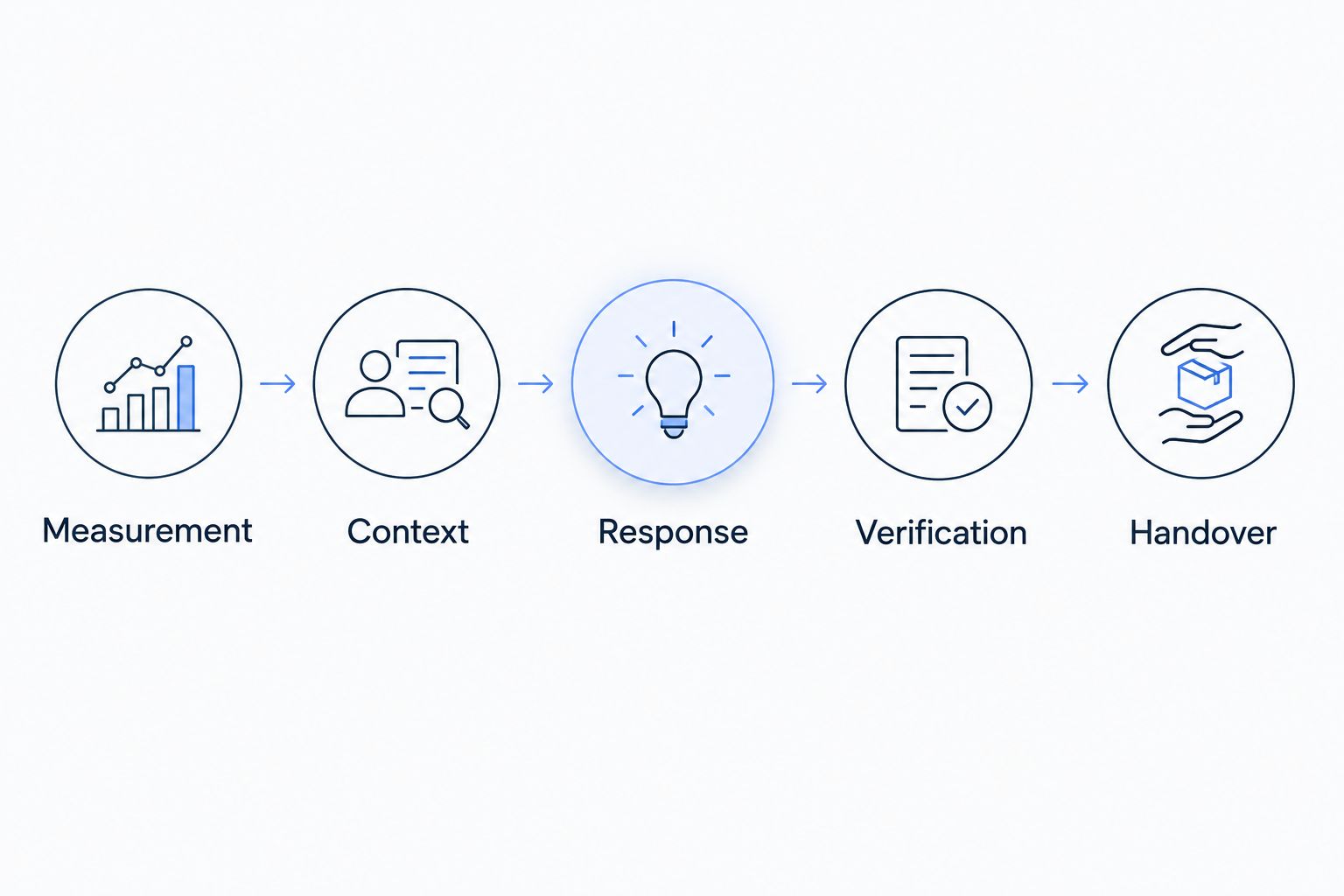
For an illustrative plant-room monitoring workflow, demonstrate the real sensor input and its mapped location. Trigger the agreed test condition, have the nominated person respond, then confirm that the displayed state and the physical inspection agree.
If the workflow includes a command, test its boundary separately. An accepted or queued command is not proof of physical completion; verification depends on supported device feedback or a subsequent measurement.
Specify network and power dependencies before installing gateways or closing service spaces. For wireless equipment, test coverage under the conditions the completed building will create rather than treating an open construction floor as the final radio environment.
Hardware procurement is a separate decision from platform selection. Kilo Electronics is a separate online authorised dealer serving individual and business buyers sourcing compatible hardware; selecting a platform does not make every device compatible or require purchasing hardware from that channel.
Which platform should you choose?
Start with the building's required control architecture, then select the supervisory and monitoring layers around it. If you are undecided, ask the design team to classify each requirement before requesting another vendor presentation.
Choose building-management or supervisory software for the specified building-system scope. Choose an integration framework when you need a maintained application across equipment interfaces. Add connected-device monitoring when you need observations and response workflows beyond that scope.
Do not award the contract on feature count. Award it on demonstrated workflows, explicit boundaries and a handover the owner can actually use.
FAQ
What's the best smart building platform for a new construction project?
The right platform depends on whether you need equipment control, building supervision, integration or connected-device monitoring. Specify that responsibility first, then require a demonstration using the project's equipment interfaces.
Does an IoT platform replace the building management system?
An IoT platform does not automatically replace a building management system. Connected-device monitoring and automation must be distinguished from the controllers and sequences specified to operate building equipment.
Can different building platforms work together?
Different platforms can exchange information through supported, configured interfaces. Verify the actual points, units, permissions and operations; a shared protocol name is not proof of complete interoperability.
Should AI be part of the building specification?
Specify the useful task and its control boundaries before specifying AI. A threshold alarm is ordinary automation, while an assistant interacting with equipment requires supported tools, permissions and a defined approval process.
What should happen if the cloud connection fails?
The design must explicitly define what continues locally and what becomes unavailable. Require the controls and integration contractors to demonstrate the agreed failure behavior rather than assuming it from a platform label.
How do I compare smart building platform costs?
Compare the same delivered scope across proposals. Separate software subscriptions, engineering, controllers, sensors, connectivity, maintenance and any external model-provider usage so that omitted responsibilities do not distort the comparison.
When should the owner get access to the platform?
Include owner access in commissioning and handover, not as an unresolved task after occupancy. Confirm the permissions, configuration records and maintenance responsibilities needed to operate the installed workflows.
Make your final acceptance test an ownership test
Ask the future operator—not only the installer—to identify a device, explain an alarm, take the permitted response and find the evidence of resolution. Then ask who maintains that workflow when equipment changes.
If those answers are unclear, the project has an unfinished handover even when every screen loads. Resolve ownership before signing off.
Related guides
Written by Tim Kravchunovsky


