

Yes—an IoT platform can show unresolved alarms across sites in a shared dashboard, provided it combines alarm records, consistent status definitions and access to the relevant locations. The Kilo IoT Platform brings device data, dashboards, alarms and permissions into one platform; when evaluating cross-site visibility, the key question is whether the displayed queue includes every unresolved record within your authorized scope, including older alarms.
- An unresolved alarms across sites dashboard needs consistent status definitions, site context and permission-aware visibility.
- Kilo combines IoT dashboards, alarms and permissions; validate the exact cross-site queue behavior for your deployment.
- Acknowledged alarms are not necessarily resolved, and recent-event filters can hide older outstanding problems.
- Test completeness with known alarm records, not just a dashboard screenshot.
Can an IoT platform show every unresolved alarm across sites?
Yes, but a combined alarm list is only complete relative to its data sources, filters and permissions. A dashboard cannot display an alarm that never reached the platform, belongs to an inaccessible workspace or falls outside the selected query.
Use the following acceptance checks to distinguish a genuine outstanding-work queue from a recent-events screen. These are evaluation requirements, not a statement that every platform implements the same lifecycle or interface.
| Acceptance check | What the dashboard should show | What to investigate |
|---|---|---|
| Site coverage | Records from every intended location | Missing device-to-site assignments or excluded sources |
| Resolution status | Every status your organization treats as unresolved | A filter that selects only unacknowledged alarms |
| Age coverage | Older outstanding records alongside new ones | A recent-events date window |
| Access scope | Records the signed-in user is authorized to see | Different results for local and portfolio users |
| Record detail | Enough context to identify the device and problem | Totals without an actionable list |
| Freshness | When the underlying information was last received | A normal-looking reading from a disconnected device |
The practical test is straightforward: start with known unresolved records at different locations and confirm that each appears under the intended account. Then change their states and verify what remains visible.
An alarm queue answers a different question from a sensor dashboard
A sensor dashboard tells you what connected devices are reporting. An unresolved-alarm queue tells you what still needs attention. Those questions overlap, but they are not interchangeable.
Imagine a temperature excursion that has ended while the required inspection remains outstanding. The latest reading looks normal, yet the incident still needs a decision. Whether that record remains open depends on your defined alarm lifecycle, not on the appearance of the temperature chart.
The opposite situation also matters. A technician can acknowledge an alarm while the underlying fault continues, so acknowledgement alone should not be treated as evidence of recovery.
Design the queue around outstanding responsibility, not just abnormal readings. That makes it useful during shift changes, regional reviews and service handovers, when someone needs to know what remains unfinished without opening every location separately.
Define unresolved before configuring the dashboard
Write down which states belong in the queue before choosing widgets or filters. Status names vary between systems, so establish the operational meaning rather than relying on familiar labels.
Your definition should answer these questions:
- Does acknowledgement mean someone has seen the alarm, or accepted responsibility for it?
- Does a return to normal automatically resolve the record?
- Can a recovered condition remain open pending inspection?
- What evidence permits a person to close an incident?
- What happens when the same condition occurs again?
For example, a reasonable requirement is to keep acknowledged-but-unresolved records visible. Another is to distinguish an active condition from one that has recovered but still needs review. Both are workflow decisions that you should test against the chosen platform's actual behavior.
Avoid silently combining different meanings. If one facility closes alarms when readings normalize and another waits for a technician's inspection, their unresolved totals do not describe equivalent workloads.
Document the differences where standardization is inappropriate. A portfolio queue can still be useful, but its status labels must tell readers what action remains.
What should an unresolved alarms across sites dashboard include?
Start with an actionable list. Summary totals help you understand the workload, but the person responding needs enough detail to locate the asset, understand the condition and determine the next step.
For each record, request the following information where the platform supports it:
- Location: site, building or another meaningful deployment identifier.
- Asset context: the device or equipment associated with the alarm.
- Condition: the rule or event that raised the alarm.
- Lifecycle status: whether the record is acknowledged, active, recovered or resolved under your definitions.
- Timing: when the alarm began and when relevant information last changed.
- Response context: the responsible team or agreed handover destination.
Keep measurement freshness separate from alarm age. An old alarm with recent readings is a different problem from an old alarm whose device has stopped reporting.
Likewise, separate severity from age. An urgent new event and an older lower-priority issue both deserve visibility, but they require different decisions. Request filters and ordering that let users examine each without excluding the other from the underlying queue.
How do you build and validate a cross-site alarm view?
Treat implementation as a sequence of data and workflow checks. Styling comes later; first establish that the queue represents the work you intend to manage.
- Map sites. Associate each relevant device and alarm source with a location. Resolve ambiguous names before a responder has to interpret them during an incident.
- Define states. Specify which lifecycle states count as unresolved, including the treatment of acknowledgement and recovery.
- Set scope. Identify the locations and records each user role is permitted to access. Confirm that portfolio visibility does not require inappropriate access to unrelated resources.
- Build the queue. Apply the agreed unresolved definition without an accidental recent-events restriction. Include enough detail to move from a row to an investigation.
- Verify records. Compare the displayed results with known test records, then repeat the test after acknowledgement, recovery and resolution.
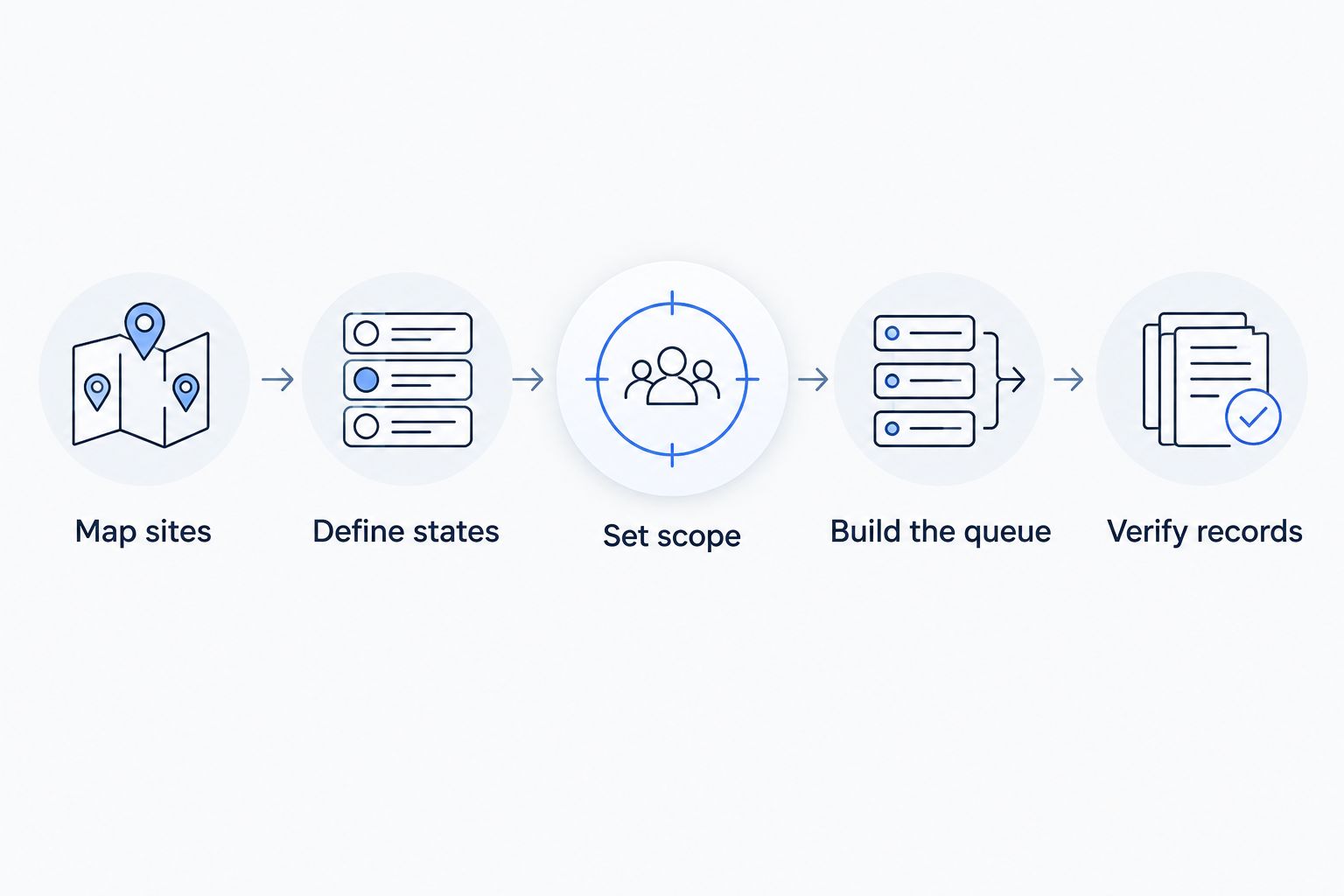
Run the test using the actual accounts that will handle daily work. An administrator's successful demonstration does not establish that a regional manager or external service provider sees the correct records.
Use representative alarm sources as well. A test covering only one device type does not establish that every integration supplies the same site identifiers or lifecycle information.
Why cross-site alarm visibility varies
A dashboard's apparent completeness depends on more than its layout. These factors change what appears and how confidently you can act on it:
- Permissions: users can have different authorized views of the same deployment. Make the scope understandable rather than presenting a restricted count as an organization-wide total.
- Lifecycle rules: acknowledgement, recovery and resolution can represent different milestones. A state mismatch changes which records remain outstanding.
- Time filters: an older unresolved record can disappear from a recent-events view even though nobody has completed the work.
- Site mapping: missing or inconsistent location information makes records harder to find and can exclude them from location-specific views.
- Data freshness: disconnected devices leave uncertainty about current conditions. Display that uncertainty rather than treating silence as recovery.
- Source coverage: only integrated alarm sources contribute records. A central dashboard does not automatically include separate building systems or local equipment alarms.
These are also useful questions for procurement. Ask the supplier to demonstrate each behavior with a concrete record rather than answering only that multi-site dashboards are supported.
What does a practical multi-site alarm workflow look like?
Illustrative scenario: a facilities team monitors cold-storage rooms at several locations. A temperature alarm appears, a local responder acknowledges it, and subsequent measurements return to the expected operating range.
Under this example's assumed procedure, acknowledgement means the responder has seen the issue. Recovery means the readings have returned to range. Resolution requires the designated person to review the incident and complete the agreed follow-up.
The portfolio queue should therefore retain the record until that final step, if the selected platform supports this lifecycle. A regional reviewer can see that the condition has recovered without confusing recovery with completed work.
If reporting stops instead, the reviewer needs a different signal: the current condition is unknown. The latest recorded temperature is not evidence that the room remains within range.
The outcome evidence is equally specific. Subsequent measurements support the recovery assessment; a completed review supports administrative closure. Neither should be substituted for the other, and the dashboard alone does not establish product safety or regulatory compliance.
Where Kilo fits in the alarm workflow
Kilo is a relevant IoT platform for teams that need device monitoring, dashboards, alarms and permissions in a shared software environment. Its fit for this question depends on the exact alarm-list behavior, lifecycle configuration and access scope your deployment requires.
That combination supplies relevant building blocks, but it does not by itself establish that a particular screen displays every unresolved alarm across all sites. Validate that requirement directly, especially where acknowledged records, older incidents or separate organizational boundaries are involved.
An integrator should demonstrate a traceable path from device data to alarm creation, queue visibility and the evidence used to resolve the record. Keep the demonstration focused on the actual workflow rather than a broad feature tour.
Hardware sourcing is separate from this software decision. Kilo Electronics is a separate online authorised dealer for compatible hardware; purchasing a sensor does not establish how its payload, alarm conditions or location metadata will be configured in the platform.
Does acknowledging an alarm remove it from the unresolved queue?
Acknowledgement should not remove an alarm if your definition still treats it as unresolved. Confirm the platform's behavior by acknowledging a test record and checking whether it remains visible under the outstanding-work filter.
If acknowledgement hides the row, determine whether the filter is selecting unacknowledged records rather than unresolved ones. Those views serve different purposes: one supports initial response, while the other tracks unfinished work.
Can an old alarm disappear even though it remains unresolved?
Yes—a date filter can exclude an older unresolved record. Review whether the dashboard selects alarms by creation time, update time or current lifecycle status.
For an outstanding-work queue, test an older open record alongside a newly created record. Both should appear when they satisfy your unresolved definition and fall within the user's authorized scope.
Can different users see different unresolved totals?
Yes—different permissions or filters can produce different unresolved totals. Compare counts only after confirming that both users are viewing the same locations, lifecycle states and time scope.
A local user's smaller queue is not inherently wrong. The problem is an interface that leaves the scope unclear and encourages someone to mistake a local total for a portfolio total.
FAQ
Do I need AI to display unresolved alarms across sites?
No. A cross-site unresolved-alarm view depends on alarm records, lifecycle definitions, filters and permissions. A threshold rule or filtered list is not automatically AI.
Can an alarm dashboard replace notifications?
A dashboard and notifications serve different purposes: the dashboard supports review, while notifications draw attention to events. Define both workflows so outstanding records do not depend on someone remembering a message.
What should happen when a sensor stops reporting?
A loss of reporting should make the current condition visibly uncertain. Decide how your deployment identifies stale data and who investigates it; an old normal reading does not prove a normal current condition.
Should resolved alarms be deleted from the platform?
Resolution and deletion are separate decisions. Define the history you need for investigation and reporting, then verify the platform's documented retention and access behavior.
Does an unresolved alarm automatically create a maintenance work order?
No. An alarm record does not establish that a maintenance-system integration or work-order workflow exists. That connection requires its own supported implementation and testing.
Can a command status prove that an alarm condition has been fixed?
No. An accepted, queued or delivered command is not proof of a physical outcome. Verification depends on supported device feedback or subsequent measurements.
Test the alarm nobody touched
Before accepting a cross-site dashboard, leave a test alarm unacknowledged and unresolved while newer records arrive. Return using the account responsible for portfolio review and confirm that the untouched record remains discoverable.
The strongest acceptance test is not whether a new alarm appears; it is whether unfinished work stays visible. For a broader view of location structure and daily review, see how to set up a facility monitoring dashboard for multiple locations.
Written by Tim Kravchunovsky


