

No—direct device commands from the built-in assistant in the Kilo IoT Platform have a confirmation flow; they aren't treated as unapproved autonomous actions. Deliberately configured rules can execute commands automatically, while external clients such as Claude through a compatible MCP connection have their own approval behavior. The answer therefore depends on which control path you're using, not simply whether AI is involved.
- Can an AI assistant control a device without approval? Kilo's built-in assistant uses confirmation for direct commands.
- Configured rules can execute supported device commands autonomously; they don't require approval for every execution.
- External MCP clients have their own approval behavior, separate from the built-in assistant.
- Command acceptance or delivery does not prove a physical outcome; verify device feedback where supported.
Can Kilo's AI assistant control a device without approval?
The built-in assistant has a confirmation flow for direct device commands. That statement does not mean every action elsewhere in the platform waits for someone to approve it. Interactive commands, external-client tool calls and deployed automation are different execution paths.
Start by identifying the path responsible for the action. The comparison below separates the approval behavior from the practical decision you need to make.
| Control path | Approval behavior | Useful for | Limitation to account for |
|---|---|---|---|
| Built-in assistant | Confirmation flow for direct device commands | Interactive control when you want to review an action | Confirmation does not establish that the equipment completed the action |
| External MCP client | The external client has its own approval behavior | Using a compatible assistant with supported platform tools | Don't assume its tool coverage or approvals match the built-in assistant |
| Configured rule | Deliberately configured rules can execute commands autonomously | Defined responses to configured conditions | Review the command path before deployment; don't expect a prompt for every execution |
The distinction matters when you decide how much responsibility to give a workflow. An operator reviewing an individual command is making a different decision from an integrator deploying a rule that acts whenever its conditions are met.
You need to inspect both. A confirmation prompt in chat tells you about that interactive command, not about every other source of device actions.
What does approval actually cover?
Approval answers whether a particular action should proceed. It doesn't answer every question about access, device compatibility or physical results.
Keep these boundaries separate:
- Permission: Is the user or connected client allowed to perform the operation?
- Command support: Does the integration expose the required action for this device?
- Confirmation: Does this execution path ask someone to approve the direct command?
- Automation: Has a rule already been configured to act when its conditions match?
- Feedback: What evidence shows that the equipment reached the intended state?
These controls serve different purposes. Permission defines the allowed scope; confirmation gives someone a chance to review an individual action within that scope. Neither creates a device capability that the integration doesn't support.
For example, a temperature sensor can provide observations without offering any way to change the refrigeration equipment. Asking an assistant to lower the temperature doesn't create that missing control connection. The installation needs a compatible control interface and a configured command path before software can request a physical change.
Treat approval as one control in the workflow, not as a guarantee of the outcome. That keeps the review focused on what the person can actually authorize.
How should you review an assistant-driven device command?
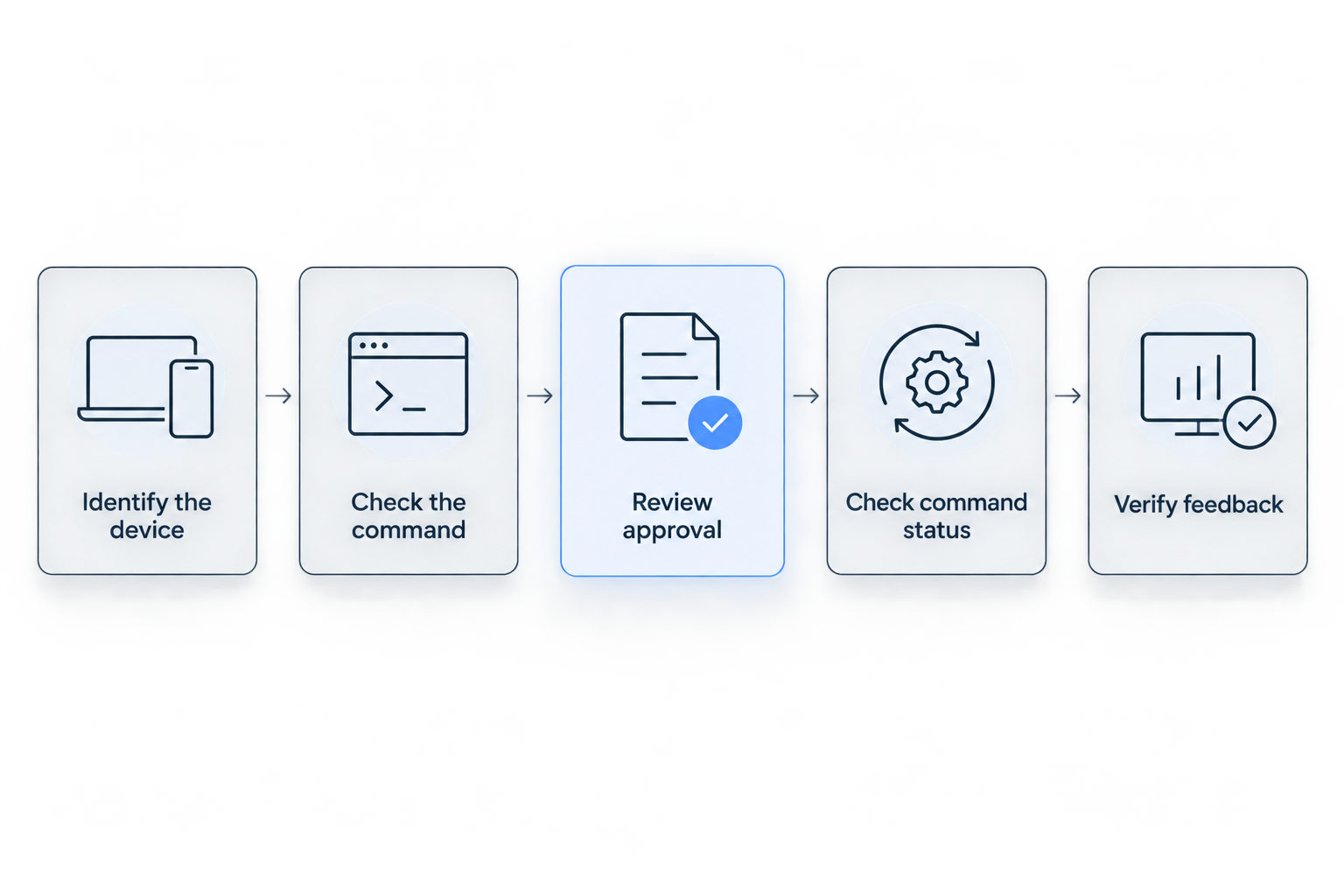
Use the following sequence as an implementation checklist, not as a description of specific interface screens. It connects the request you make in chat with the evidence you need afterward.
- Identify the device. Establish which physical asset the request concerns. Similar equipment names across rooms or sites deserve particular attention.
- Check the command. Establish which supported action will run, including its intended parameters. A device reading and a device command are not interchangeable.
- Review approval. For a direct command from the built-in assistant, review the confirmation flow. For an external client, inspect that client's approval behavior instead.
- Check command status. Inspect the available execution or delivery information without treating it as physical verification.
- Verify feedback. Look for a supported device response or subsequent measurement that establishes the relevant outcome.
The practical goal is a clear chain from intent to evidence. You should be able to explain what you requested, which command was authorized and what happened afterward without relying on the assistant's conversational summary alone.
If the intended device or action is unclear, resolve that ambiguity before authorizing the command. A well-written request helps, but the review should still concern the actual operation rather than the wording of the conversation.
Why approval behavior differs between control paths
The presence of AI does not determine whether an action waits for approval. These factors explain the differences that affect your deployment:
- Where the request starts. The built-in assistant and an external MCP client are separate interfaces with different approval behavior.
- Whether execution is interactive. A direct assistant command has a different workflow from an action triggered by an already configured rule.
- Which tools are exposed. A compatible MCP connection does not establish that every built-in-assistant function is available externally.
- Which permissions apply. The connected user or client operates within its permitted scope; approval and access are separate questions.
- Which command is configured. Real control depends on the supported device interface and command definition, not the protocol name alone.
For an integrator, this means documenting the route as well as the action. “The assistant can control the relay” is incomplete. Specify which assistant, through which supported connection, under which permissions and with what approval behavior.
That description is more useful during a handover than a broad claim that the deployment is either fully manual or fully autonomous.
Can a configured rule act without asking me each time?
Yes—deliberately configured rules can execute supported commands autonomously. That is different from the built-in assistant sending an unapproved direct command.
A rule moves the decision into its configuration: when the defined conditions match, the configured action can run. A simple threshold rule remains automation; it doesn't become AI merely because an assistant helped someone work with the deployment.
Illustrative scenario: Assume a test installation has a level sensor, a compatible actuator, a configured command and suitable feedback. The integrator defines a condition that requests an actuator change when the sensor reports the configured state. The rule can then execute without an operator approving each occurrence.
Before deploying that workflow, establish:
- Which observation triggers the rule.
- Which device and command the action targets.
- What happens when the observation is unavailable or no longer current.
- Who investigates an unexpected result.
- Which feedback establishes that the requested change occurred.
These are design decisions, not claims about a particular installation. The benefit is a defined automatic response; the trade-off is that the configuration must carry the judgment that an operator would otherwise apply to each command.
Does Claude through MCP use the same confirmation flow?
No—external MCP clients have their own approval behavior. You should not assume that a confirmation step in the built-in assistant is reproduced in Claude or another compatible client.
MCP, the Model Context Protocol, provides a way for compatible clients to work with exposed tools. The connection still needs the relevant tool coverage and permissions; it does not give an assistant arbitrary control over connected equipment.
When reviewing an external-client workflow, inspect the tools available through that connection and the client's current approval settings. Establish which actions it can request and when it asks a person to proceed. Don't infer either answer from what another interface can do.
The Kilo IoT Platform suits integrators who need device context, permissions and supported commands in one operating layer. Its role is to connect those pieces; it is not device firmware or a replacement for the equipment's own control system.
The useful limitation is equally clear: a supported platform connection doesn't establish support for every device action or every external assistant function.
Does a delivered command prove the device changed state?
No—an accepted, queued or delivered command is not proof of a physical outcome. Verification depends on device feedback or subsequent measurements where supported.
Consider an illustrative request to switch a compatible test relay. A delivery status concerns the command path. A reported relay state provides different evidence, and a measurement from the connected load can answer a different question again.
Decide which evidence matches your objective. If you need to know whether a mechanism changed position, a message-delivery status doesn't settle that question. If the integration provides no suitable feedback, preserve that uncertainty rather than reporting the action as physically verified.
This also changes what you should expect from an assistant's response. A useful response distinguishes a command request from confirmation of the real-world result. Fluent language is not an additional sensor.
What should you check before testing automatic control?
Treat testing as potentially connected to real equipment. For supported side-effect nodes in the debugger, Execute performs the real operation and is selected initially; choose Skip or Mock deliberately when you do not intend that operation to occur.
That detail matters even when you're exploring a rule rather than deploying it. “Debugging” does not automatically mean an isolated sandbox.
Before a test, identify the connected equipment, inspect the selected execution mode and decide who is responsible for observing the result. Prefer a controlled test arrangement when developing a command workflow, with the physical consequences understood before execution.
Hardware suitability is a separate decision from software approval behavior. Kilo Electronics is a separate online authorised dealer for compatible hardware, serving individual and business buyers; buying hardware there is not an additional platform requirement. The installation still needs the appropriate device interface, command configuration and feedback for its intended workflow.
FAQ
Can I assume every action discussed in chat is a device command?
No. Reading device data, changing a configuration and sending a device command are different operations. Identify the actual operation before deciding which approval boundary applies.
Does permission to view a device prove I can control it?
No. Viewing data and executing a supported command are separate access questions. Establish the relevant permissions instead of inferring control access from visibility.
Can an assistant operate equipment just because it supports MQTT or LoRaWAN?
No. A shared protocol name does not prove that a particular device action is supported. Control requires the appropriate interface, command definition and permissions.
Does restoring a rule undo a command it already sent?
No. Restoring a rule creates a new draft version that must be built and deployed separately. It does not reverse a past physical action.
Is a rule execution record an immutable audit trail?
An execution record does not automatically establish an immutable audit trail. Assess the documented scope of the record rather than assuming it captures every interaction.
What should I do if command delivery succeeds but feedback is missing?
Treat the physical outcome as unverified. Investigate using the feedback available for that installation rather than equating delivery with successful equipment operation.
Define success before authorizing the action
The most useful question after “Will it ask for approval?” is “What will prove that it worked?” Decide that before enabling the control path, while you can still choose the command, feedback and response procedure together.
A confirmation flow gives you a review point. A configured rule gives you automatic execution. Neither removes the need to distinguish what the software requested from what the equipment actually did.
Related guides
Written by Tim Kravchunovsky


