

Yes—you can run IoT rules without writing code when your platform provides configurable triggers, conditions and actions; the Kilo IoT Platform brings rules, device data, alarms and supported commands into the same operating layer. The boundary is integration: a visual workflow doesn't remove the work of connecting devices, interpreting their readings or defining what an action is allowed to do.
- A no code iot rules engine replaces handwritten automation logic with configured triggers, conditions and actions.
- Kilo suits builders who need device context, rules and alarms in one IoT platform.
- No-code automation still needs correct data mapping, permissions, testing and a supported action path.
- Test notifications before enabling device commands; command delivery does not establish a physical outcome.
Can you run an IoT rules engine without writing code?
Yes, provided the required inputs, conditions and actions are supported without custom development. You configure the logic rather than writing a program, but you still make the engineering decisions: which reading matters, what counts as an exception and what should happen next.
A useful way to evaluate a no-code IoT rules engine is to build a complete workflow rather than inspect its editor. Follow this sequence:
- Select the input. Identify the device, measurement, unit and event that should start evaluation.
- Define the condition. Specify the state that requires a response, including how to treat missing or outdated readings.
- Choose the action. Start with an alarm or other supported notification path before introducing equipment control.
- Test the behavior. Exercise matching, nonmatching and incomplete inputs, with real side effects deliberately disabled where appropriate.
- Release the rule. Confirm the intended configuration is deployed and assign someone to check its behavior.
- Verify the result. Inspect the resulting alarm, action record or device feedback rather than assuming the workflow succeeded.
Those steps describe the work, not a promise that every editor supports every option. If a necessary condition requires a script, that part of the deployment is low-code rather than entirely no-code.
The practical distinction is simple: no-code removes handwritten logic where supported; it does not remove responsibility for the logic.
What does a no-code IoT workflow actually contain?
A working automation needs a clear connection between an observation and a response. Drawing a line between blocks is only useful when the meaning of the data and the consequences of the action are understood.
Use these components when describing a rule to a colleague or integrator:
- Device data: the reading or event being evaluated, with its source and meaning.
- Condition: the test that separates normal behavior from a state requiring attention.
- Action: the supported operation that follows a matching condition.
- Feedback: the evidence used to establish what happened afterward.
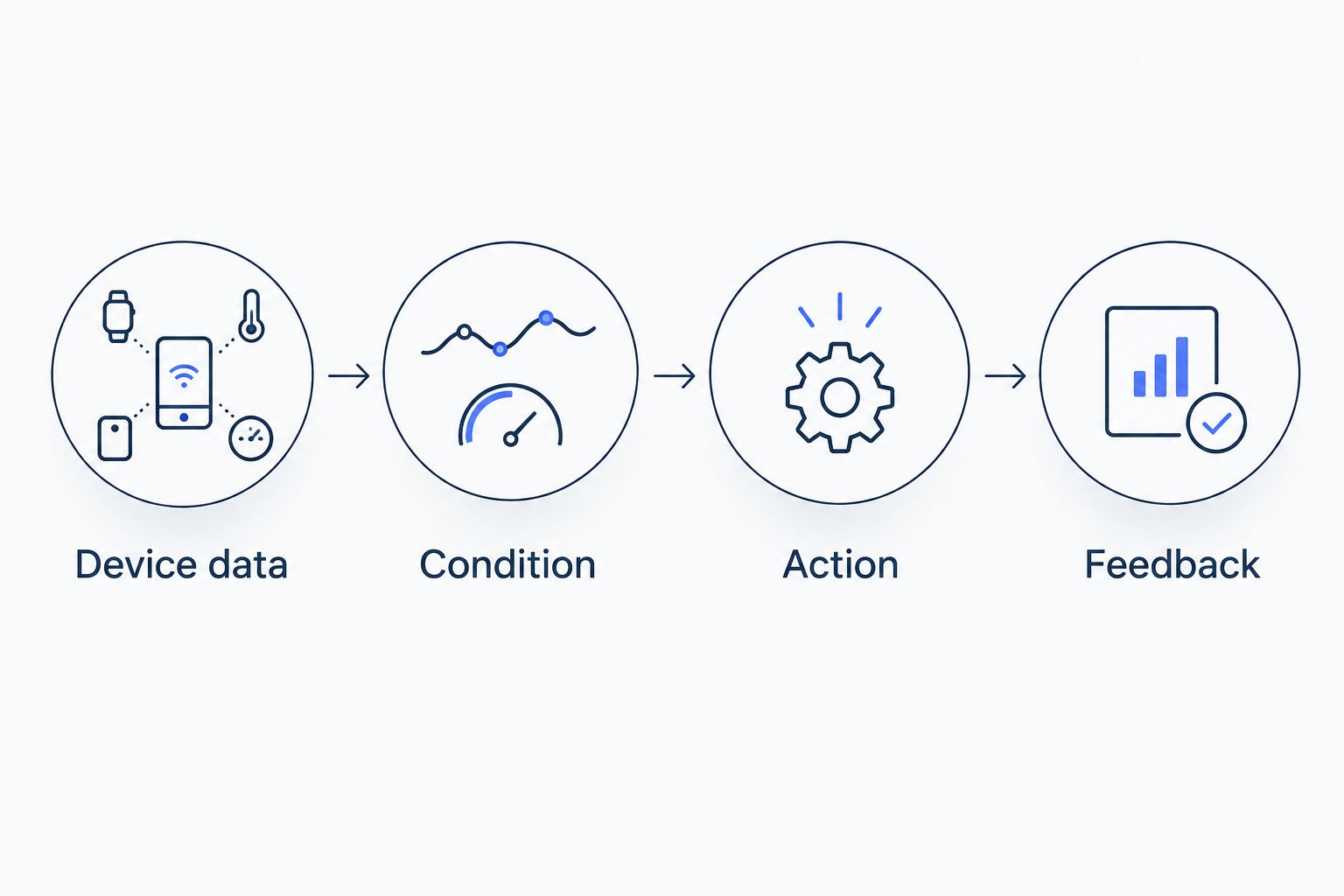
For an alerting workflow, feedback includes checking that the expected alarm exists and reaches the intended responder through the configured channel. For equipment control, feedback needs to address the equipment itself, using supported device feedback or subsequent measurements.
These are different completion criteria. A rule that creates an alarm has not necessarily fixed the underlying problem, and a command marked delivered has not necessarily changed the physical state.
When should you choose no-code, low-code or custom code?
Choose the simplest approach that expresses the complete workflow accurately. An attractive editor isn't a reason to squeeze unsupported requirements into a rule that behaves differently from your written specification.
| Approach | Best for | Practical advantage | Limitation to resolve |
|---|---|---|---|
| No-code configuration | Workflows covered by existing inputs, conditions and actions | You configure supported behavior without handwritten automation code | Unsupported transformations or integrations still need another solution |
| Low-code implementation | Workflows with a supported visual structure and a custom requirement | You retain configuration for standard steps and code the exception | Someone must maintain and test the custom portion |
| Custom code | Requirements outside the available configuration model | You control the implementation directly | You own the code, integration behavior and maintenance |
A mixed approach is legitimate. An integrator can establish a supported device-data path, while the person responsible for the application maintains the alarm conditions afterward without editing code.
Ask where the code-free boundary sits. Is only the rule editor code-free, or can your team also connect the intended device, interpret its payload and configure the required output? That answer matters more than the label on the product page.
Why does no-code IoT setup complexity vary?
The difficulty depends on what surrounds the rule, not just how many conditions it contains. Review these factors before assigning the work:
- Device integration: a shared protocol name doesn't establish support for every device payload or command.
- Data interpretation: the rule needs the correct field, unit, device identity and treatment of unavailable measurements.
- Action type: creating an alarm and moving equipment carry different integration and verification requirements.
- Permissions: the person or integration configuring a workflow needs appropriate access to its resources and actions.
- Release process: testing, deployment and restoration need an owner, even when no source code is written.
- Outcome evidence: an execution result, notification and physical measurement establish different things.
These factors also explain why a demonstration can look simple while implementation requires careful preparation. The editor starts after some important decisions have already been made.
Write those decisions down. A short specification that names the source, expected behavior, recipient and success evidence gives both technical and nontechnical contributors something concrete to review.
What can you automate without writing a script?
Alarm-oriented workflows are a practical starting point when the platform supports the required conditions and outputs. They let you establish that the data means what you think it means before giving the rule authority to operate equipment.
Illustrative scenario: a building sensor reports a wet state near equipment. The intended workflow is to create an alarm, identify the affected location and have the assigned responder inspect it.
The configuration needs a recognized device input, a condition matching the reported state and a supported alarm action. The responder then checks the location and records the operational response through the team's established process; don't assume a rule automatically creates a maintenance work order.
Success has separate parts: the platform detected the configured condition, the alarm reached the responsible person and the physical situation was checked. None substitutes for the others.
If you later want automatic water shutoff, treat that as a separate control requirement. You need a compatible actuator, a documented configured command path and a way to assess the resulting state; platform software alone cannot close a valve.
Can a visual rule control equipment automatically?
A configured rule can execute supported device commands autonomously. That doesn't mean every connected device exposes a usable command or that every command should be automated.
Before enabling control, identify the exact device operation, required permissions and feedback available after execution. Also define who responds when the expected feedback doesn't arrive, rather than allowing a successful software status to close the investigation.
Kilo distinguishes deliberately configured rule execution from direct commands through its built-in assistant. The assistant has a confirmation flow for direct device commands; external clients have their own approval behavior, so don't assume the same interaction applies everywhere.
Keep consequential local protection separate from a convenient cloud workflow. An alarm or remote command is not, by itself, evidence of a certified safety function or a guarantee that equipment will reach the intended state.
What should you test before deploying a rule?
Test the action path as carefully as the condition. A correct comparison can still produce the wrong operational result if it targets the wrong device, uses an unintended recipient or executes during a test.
Use a small test matrix:
| Test case | Question it answers | Evidence to inspect |
|---|---|---|
| Matching input | Does the intended condition trigger? | Condition result and intended action |
| Nonmatching input | Does the workflow remain inactive when it should? | Evaluation result and absence of unintended action |
| Missing or outdated input | Does the workflow handle uncertainty as intended? | Defined behavior and visible result |
| Repeated input | Does repeated telemetry cause an unwanted response? | Repeated evaluations and resulting actions |
| Unavailable action target | What happens when the output cannot complete? | Available failure information and response procedure |
For supported side-effect nodes in Kilo's debugger, Execute performs the real operation and is selected initially. Choose Skip or Mock deliberately when you don't want the real side effect; debugging is not automatically an isolated sandbox.
Keep the broader test procedure separate from feature assumptions. Your chosen editor must support the behavior you intend to test, and a test result should show what was evaluated, what ran and what still needs physical verification.
How do you keep a no-code rule maintainable?
A visual rule needs an owner just as a script does. Assign responsibility for reviewing changes, deploying the intended version and investigating unexpected outcomes.
Use names that describe the rule's purpose and affected resources, then keep the written requirement close to the configuration. Another person should be able to explain why the rule exists without reconstructing its intent from individual blocks.
For Kilo, restoring a rule creates a new draft version that must be built and deployed separately. Restoration does not undo a previous physical action, so distinguish recovering a configuration from recovering an operational state.
For a separate look at testing behavior before release, read whether an IoT platform can simulate a rule before it goes live. Keep the decision about simulated versus real actions explicit in your own release procedure.
Does no-code automation require AI or special hardware?
A threshold rule is automation, not automatically AI. If the requirement is a known condition followed by a supported response, you don't need to add a model just to make the workflow sound more advanced.
Kilo also provides AI assistance, but assistant functionality and external-client tool coverage are separate questions from whether a rule can run. Evaluate each against the actual task instead of assuming every interface exposes the same capabilities.
Hardware selection remains a separate decision. Kilo Electronics is a separate online authorised dealer for compatible hardware, serving individual and business buyers; it is not the platform itself or an additional platform requirement.
Choose hardware for the measurement, environment and integration path you need. An easy-to-use rule editor cannot compensate for a sensor that reports the wrong information or an actuator without the required supported command.
FAQ
Can someone who isn't a developer maintain IoT rules?
Yes, when the workflow's inputs, conditions and actions are available through configuration. The person maintaining the rule still needs to understand the readings, expected behavior and release procedure.
Does no-code mean I won't need an integrator?
No-code does not eliminate integration work. An integrator is still relevant when device onboarding, payload interpretation or an action path falls outside your team's existing setup.
Will a rule keep working if a sensor stops reporting?
The result depends on how the workflow handles missing or outdated data. Define and test that behavior rather than treating silence as a normal measurement.
Can I use an alarm rule as a safety system?
An alarm rule alone does not establish a certified safety system. Evaluate the complete hardware, control and response arrangement against the requirements of the application.
Does a delivered device command prove the equipment changed state?
A delivered command does not prove a physical outcome. Verification depends on supported device feedback or subsequent measurements that establish the resulting state.
What should I ask for in a no-code rules engine demonstration?
Ask for your actual device input, intended condition, required action and verification method in the same workflow. Include a nonmatching input and a failed or unavailable output, not just the successful path.
Before adding another rule, define success
The most useful requirement is often the last one: what evidence will tell you the workflow achieved its purpose? Write that answer before opening the editor, and you'll expose missing feedback, unclear ownership and unsupported actions before they become deployment problems.
Start with an observable alarm workflow, establish its behavior and add equipment control only when the command path and outcome checks are understood. That's how no-code becomes a maintainable implementation rather than a diagram nobody wants to change.
Written by Tim Kravchunovsky


