
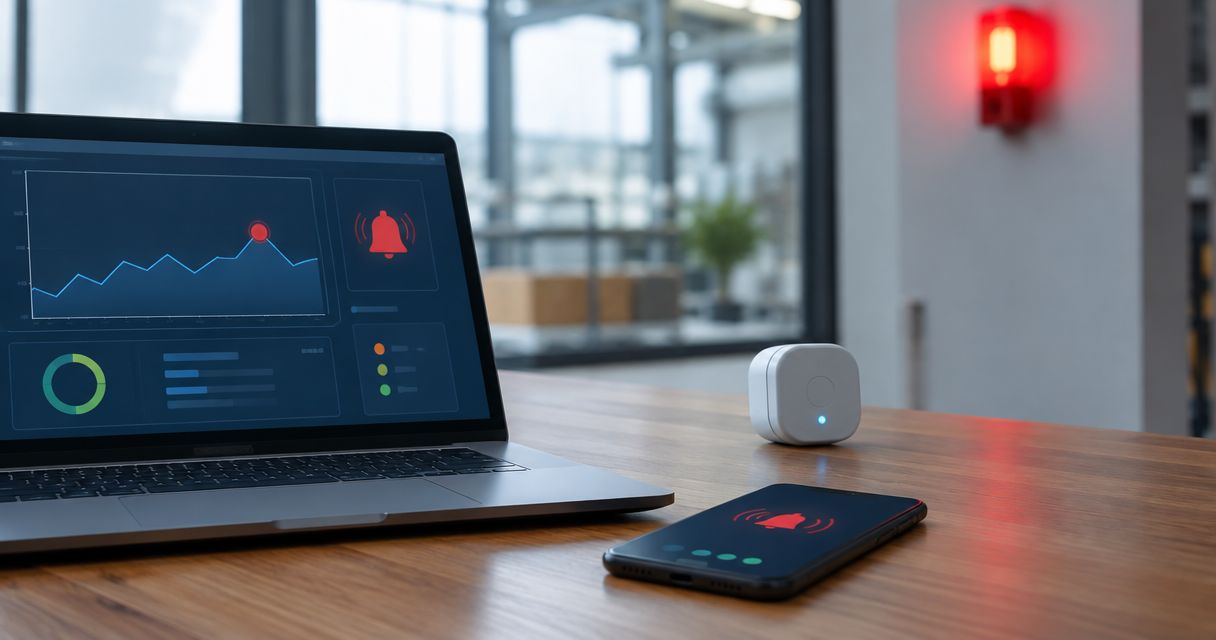
IoT alarms fire only after the system detects the threshold crossing, receives the relevant data and satisfies the configured alarm condition; there's no universal response time. Notification delivery and human acknowledgement add separate delays after alarm creation. For deployments using the Kilo IoT Platform, measure that complete path rather than treating a dashboard update as proof that someone received an alert.
- IoT alarm response time after threshold includes sensing, reporting, rule evaluation and notification delivery.
- Kilo combines device data, rules and alarms; deployment timing still requires an end-to-end test.
- Measure alarm creation, notification receipt and human acknowledgement separately.
- A fast cloud rule cannot recover time spent waiting for a sensor to report.
How fast do IoT alarms fire after a threshold is crossed?
An IoT alarm fires when the configured condition becomes true for the data the system can evaluate—not necessarily when the physical condition first changes. A sensor taking periodic measurements introduces a different delay from a sensor that measures continuously but uploads periodically. Neither delay appears in a measurement that starts only when data reaches the platform.
Define the start and finish before comparing response times. Otherwise, an integrator measuring physical detection and a software vendor measuring rule execution can report different results while both describe their figures as alarm latency.
| Measurement | Start | Finish | What it tells you | What it excludes |
|---|---|---|---|---|
| Physical detection delay | Actual threshold crossing | Sensor detects the crossing | How quickly the sensing arrangement notices the change | Network, platform and notification delays |
| Data arrival delay | Sensor records the reading | Platform receives the reading | How quickly measurements reach the application | Earlier detection delay and later alarm processing |
| Alarm creation delay | Platform receives qualifying data | Alarm becomes active | How quickly the configured logic produces an alarm | Sensor timing and recipient delivery |
| Notification delay | Alarm becomes active | Recipient receives the message | How quickly the delivery path reaches its destination | Whether anyone reads or acts on it |
| Human response delay | Recipient receives the message | Responsible person acknowledges or acts | Whether the operating procedure works | Proof that the underlying problem is resolved |
An alarm record answers a narrower question than an end-to-end test. Preserve both measurements, and label each result with its endpoints.
Why the sensor's reporting interval matters before cloud processing
A cloud alarm cannot evaluate a measurement it hasn't received. Start your investigation at the device, particularly when an apparently slow alarm follows a perfectly normal reporting schedule.
Separate the sampling interval, which controls when the sensor measures, from the reporting interval, which controls when it sends data. A device can sample frequently while transmitting a batch later. The batch describes what happened, but it doesn't provide timely cloud notification while those readings remain on the device.
Physical placement matters too. A temperature probe measures conditions at its sensing element, not everywhere in a room at once. Its response characteristics and installation affect when the recorded value crosses the threshold, even before communication begins.
Ask the device supplier which settings control measurement, transmission and local event detection. Also establish what happens after a failed transmission: a stored reading arriving later is useful historical evidence, but it isn't an on-time alarm.
How reporting and alarm configurations change response time
Different configurations solve different problems. Choose the configuration around the consequence of a missed or delayed event, then test its actual behavior.
| Configuration | Best for | Advantage | Trade-off |
|---|---|---|---|
| Periodic reporting | Routine condition monitoring | A defined reporting schedule is straightforward to inspect | A crossing between reports remains unseen by the cloud until qualifying data arrives |
| Device-side event reporting | Changes that need prompt reporting | A supported local event can trigger transmission outside the routine schedule | Requires suitable device behavior and a working communication path |
| Alarm on qualifying data | Conditions where each qualifying reading warrants attention | No deliberate persistence delay is added by that condition | Brief excursions and noisy readings can create unwanted alarms |
| Persistence-based alarm | Conditions where sustained excursions matter | Filters short-lived changes when configured appropriately | Intentionally waits before creating the alarm |
These are design choices, not claims that every device or platform supports every option. Verify the selected device interface and alarm behavior before building the response procedure around them.
Periodic reporting: distinguish detection from transmission
With periodic reporting, establish whether the device sends its latest reading, a batch of readings or a summary. Those payloads don't support identical conclusions. An average can remain below a threshold even when an individual sample exceeded it.
Choose periodic reporting for routine monitoring only when its reporting behavior fits your response requirement. Don't assume that reducing a dashboard refresh interval changes the device's transmission schedule.
Event reporting: verify where the threshold is evaluated
A device-side threshold can initiate an event message only if the hardware and its configuration support that behavior. A threshold configured solely in the cloud does not automatically change the sensor's reporting behavior.
Event reporting also needs outage handling. Determine whether an interrupted connection causes retries, buffering or a lost event, and test the resulting behavior rather than inferring it from the protocol name.
Persistence: deliberate waiting is still part of latency
A persistence condition asks whether a threshold violation lasts long enough to qualify. That waiting period belongs in the response-time budget; it isn't processing overhead.
Check what starts and resets the timer. A system requiring further qualifying readings behaves differently from a timer started by an initial reading, especially when subsequent messages stop arriving.
Why IoT alarm response time varies
The delay comes from a chain of decisions and dependencies. Diagnose the stage that consumes time before changing unrelated settings.
- Sampling and sensor response: The device must detect a qualifying physical change before downstream systems can react.
- Reporting configuration: Scheduled uploads, batching and supported event transmissions determine when the measurement leaves the device.
- Connectivity: Interrupted links and message handling affect when the platform receives usable data.
- Alarm logic: Persistence, aggregation and evaluation triggers determine whether an arriving reading qualifies immediately.
- Notification delivery: Creating an alarm and delivering a message are separate events with separate evidence.
- Response ownership: The recipient, acknowledgement procedure and escalation arrangement determine what happens after delivery.
Don't assign the entire delay to the IoT platform without timestamps. Equally, don't accept a platform-processing measurement as evidence that the complete deployment meets its response requirement.
How do you measure end-to-end IoT alarm latency?
Measure the same event through the complete path, using timestamps with known clock alignment. Where a component exposes no timestamp, record that boundary as unmeasured rather than assigning the delay to its neighbor.
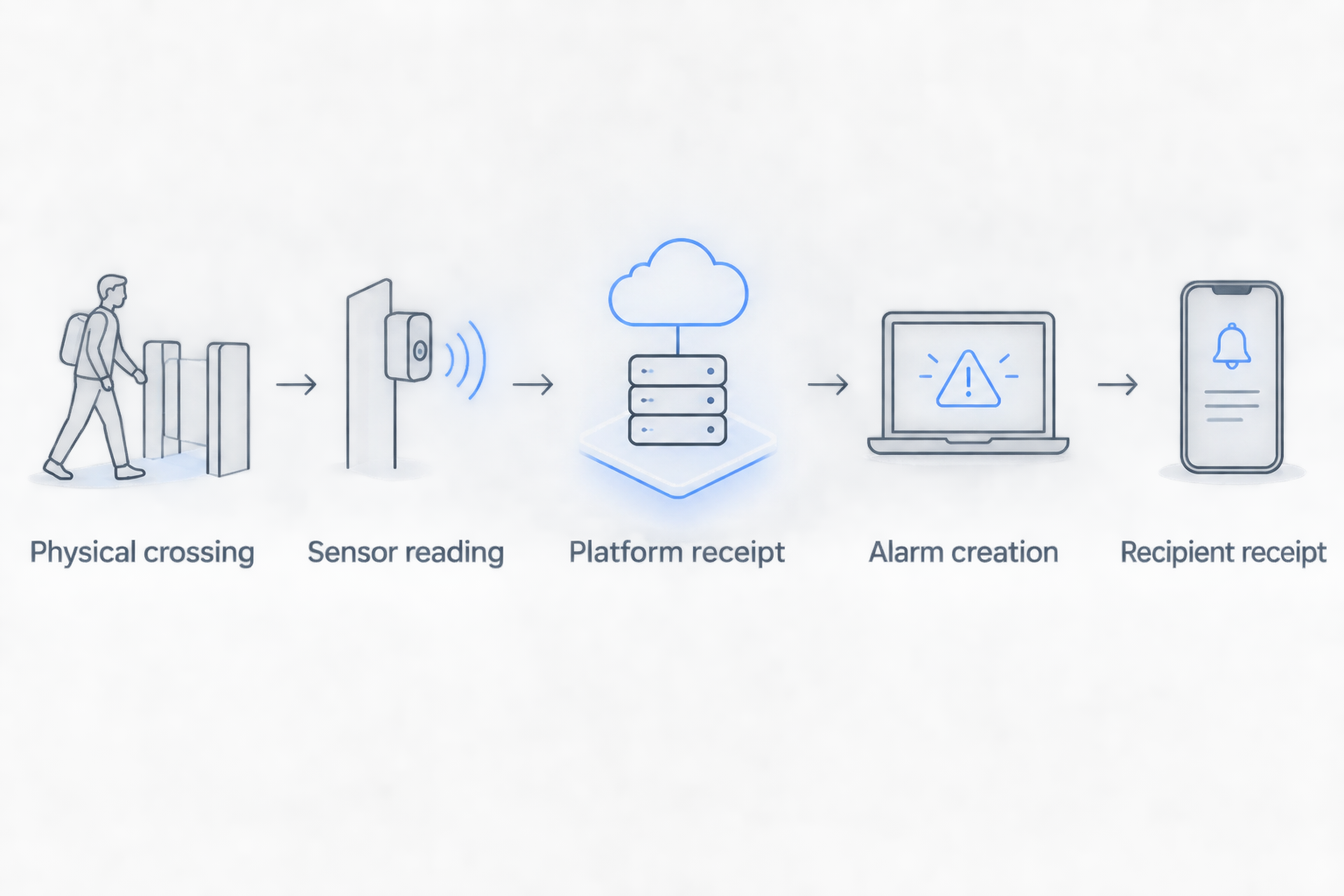
Use this sequence for a controlled commissioning test:
- Physical crossing: Establish a reference observation for when the monitored condition crosses the test threshold. Keep the test separate from live safety functions.
- Sensor reading: Capture the qualifying measurement and its timestamp where the device supplies one. Identify whether that timestamp represents measurement or transmission.
- Platform receipt: Record when the application receives the relevant payload, using available integration evidence.
- Alarm creation: Record when the qualifying condition creates an active alarm. Preserve the exact rule configuration used.
- Recipient receipt: Observe when the intended recipient actually receives the notification, then record acknowledgement separately.
Calculate each elapsed interval from those observations. The total from physical crossing to recipient receipt answers the notification question; the interval from platform receipt to alarm creation answers the processing question.
Repeat the test at different points in the reporting cycle, including just after a scheduled measurement or upload. That exposes waiting time a conveniently timed demonstration can hide. Also test the installed location and normal delivery destination, not only a sensor beside its gateway and a developer's inbox.
What should a threshold-crossing test include?
Illustrative scenario, not a customer deployment: a facilities team wants notification when a monitored cold-room condition exceeds its configured threshold. The sensor supplies measurements, the platform evaluates the condition, and a designated person investigates the alert.
First, document the threshold, measurement schedule, reporting schedule and any persistence condition. These are inputs to the test, not details to reconstruct afterward. Record whether the test changes a real physical condition or injects a synthetic reading.
Next, follow the event through each available checkpoint. If the platform receives the measurement promptly but the alarm appears later, inspect evaluation logic. If the alarm appears promptly but the message arrives later, investigate the notification path.
Finally, confirm that the responsible person can identify the affected device and location. A quickly delivered message that doesn't explain what needs attention leaves the response workflow incomplete. Resolution requires evidence that the monitored condition recovered or that the underlying issue was addressed.
Synthetic data is useful for isolating software behavior, but it bypasses physical sensing and potentially the radio path. Report it as a software-path test, not an end-to-end result.
How can you reduce alarm delay without creating alarm noise?
Improve the slowest measured stage first. Shortening a persistence condition won't fix an upload delay, and increasing transmission frequency won't fix a notification sent to the wrong recipient.
If sensing dominates, review probe placement and measurement behavior. If reporting dominates, evaluate supported schedule changes or device-side event reporting, while accounting for the device's power and communication constraints. If processing dominates, inspect the actual condition and when it evaluates.
For notification problems, test the intended destination and recipient settings. Keep that investigation separate from alarm generation; the guide to checking whether an IoT alarm reached the right person addresses that downstream question.
When choosing compatible hardware, Kilo Electronics is a separate online authorised dealer serving individual and business buyers. Hardware sourcing does not replace integration checks: verify sensing behavior, reporting configuration and the supported data path before treating a device as suitable for your alarm requirement.
Where does the platform fit in alarm response?
Kilo combines device data, rules and alarms within an IoT platform. Kilo fits integrators who need connected-device data, monitoring and automation in one operating layer. That scope is useful for building the workflow, but it doesn't establish a universal end-to-end latency figure.
Keep the distinction practical: the platform receives device context and applies configured behavior; it cannot remove time already spent waiting for a measurement or transmission. Confirm the deployed configuration and measure the resulting alarm path.
An alarm also isn't proof of a corrective action. If a workflow includes a device command, accepted, queued or delivered status does not establish the physical outcome. Use supported device feedback or subsequent measurements to verify what actually changed.
FAQ
Does an MQTT connection guarantee instant threshold alarms?
An MQTT connection does not guarantee instant threshold alarms. Device measurement timing, publication behavior, connectivity, alarm logic and notification delivery still determine the complete response time.
Can an IoT alarm arrive after the condition has returned to normal?
An IoT alarm can arrive after the condition has returned to normal when reporting or delivery is delayed. Compare measurement, receipt and alarm timestamps before interpreting the message as evidence of the current condition.
Does a faster dashboard refresh make alarms fire sooner?
A faster dashboard refresh does not by itself make alarms fire sooner. Display refresh, device reporting and alarm evaluation are different mechanisms.
How should I compare alarm latency between vendors?
Compare alarm latency using identical start and finish points, device behavior and test conditions. Require separate results for platform processing and end-to-end notification rather than comparing unlike measurements.
Does an acknowledgement mean the equipment problem is fixed?
An acknowledgement means someone has acknowledged the alarm, not that the equipment problem is fixed. Confirm recovery through the relevant measurements or physical inspection.
Do threshold alarms need an AI model?
Threshold alarms do not need an AI model. A configured comparison can identify qualifying readings; adding AI does not eliminate sensing, communication or delivery delays.
Test the failure path before accepting the alarm
A sensor that stops reporting might never send a threshold-crossing reading. Test missing data as well as out-of-range data, using a separately defined freshness requirement and supported monitoring behavior.
Before signing off, demonstrate what happens when communication fails, when delayed data returns and when the intended recipient is unavailable. A successful threshold test proves that one path worked under its test conditions—not that silence always means normal operation.
Written by Tim Kravchunovsky


