

To tell whether a rules engine automation is live, check the deployed version—not just the rule open in the editor. In the Kilo IoT Platform, restoring a rule creates a draft that must be built and deployed separately; a successful debugger run does not establish that the automation is deployed, and debugging can perform real operations.
- Rules engine draft vs deployed: check the deployed version, not whether your latest changes appear in the editor.
- Kilo rule restoration creates a new draft; build and deploy it separately before treating the restored logic as live.
- Debugger Execute performs real operations for supported side-effect nodes; choose Skip or Mock deliberately.
- Deployment proves which logic was released. Execution evidence and device feedback answer whether it ran and achieved its intended outcome.
How to tell if a rules engine automation is live or still a draft
Treat deployment status, execution evidence and physical outcome as separate checks. A saved change answers whether your work exists. It does not answer whether incoming device data is using that change.
Use this sequence when checking an automation. These are evidence checks, not instructions to look for particular button names or screen layouts.
- Identify the rule. Confirm you're inspecting the intended automation and deployment context, rather than a similarly named rule for another device or site.
- Identify the edited version. Establish which logic you're reviewing, including changes to conditions, action targets and device references.
- Check the deployed version. Confirm that the version you intend to run is the version deployed. Don't infer deployment from a successful save or build.
- Check a qualifying event. Find an incoming event that should meet the deployed rule's conditions, then inspect the available execution evidence.
- Verify the result. Check the alarm, notification or supported device feedback relevant to the action. A command status alone does not establish a physical outcome.
You don't need to trigger equipment just to establish whether a draft was deployed. Establish the release state first, then plan any functional test around the consequences of its actions.
Draft, built, deployed and observed: what each proves
The following table separates the evidence you need. It describes lifecycle distinctions, not a promised set of interface status labels.
| State or evidence | What it establishes | What it does not establish | Best used for |
|---|---|---|---|
| Saved draft | Your edited logic exists as a working version | That incoming events use those changes | Preparing changes |
| Successful build | The build step completed for the selected version | That the version was deployed or achieved an operational result | Preparing a release |
| Deployed version | Which version was released for runtime use | That a qualifying event has occurred | Checking release state |
| Debugger result | What happened during that debugging session | That the tested version is deployed | Investigating logic |
| Execution evidence | What the available record shows about a particular run | That every downstream or physical effect succeeded | Investigating runtime behavior |
| Device feedback | The supported device's reported state or subsequent measurements | That unrelated equipment or conditions are correct | Checking physical results |
The distinction matters most when a draft and a deployed version differ. Your editor can show the intended fix while the deployed logic still contains the earlier condition.
Why a saved rule is not enough for an operational handover
A handover such as “the rule is finished” leaves the receiving person guessing. Finished might mean edited, built, tested or deployed, and those statements describe different evidence.
Use a more precise handover: identify the intended version, confirm its deployment state, and describe the event and result used for verification. If no qualifying event has occurred, say the rule is deployed but its behavior has not yet been observed under that condition.
This distinction also prevents unnecessary changes. When a deployed rule hasn't acted, the next question is whether it received an event that met its conditions—not automatically whether it needs redeploying.
Deployment answers which logic is live; execution evidence answers what happened when that logic ran. Neither statement should stand in for the other.
Follow the release path without confusing testing with deployment
For Kilo rules, build and deployment are separate from restoring an earlier version. Keep those boundaries visible in your release process rather than treating every successful operation as a release.
A practical sequence is Draft, Build, Deploy, Observe, then Verify. The first stages concern the software version; the final stages concern its behavior and consequences.
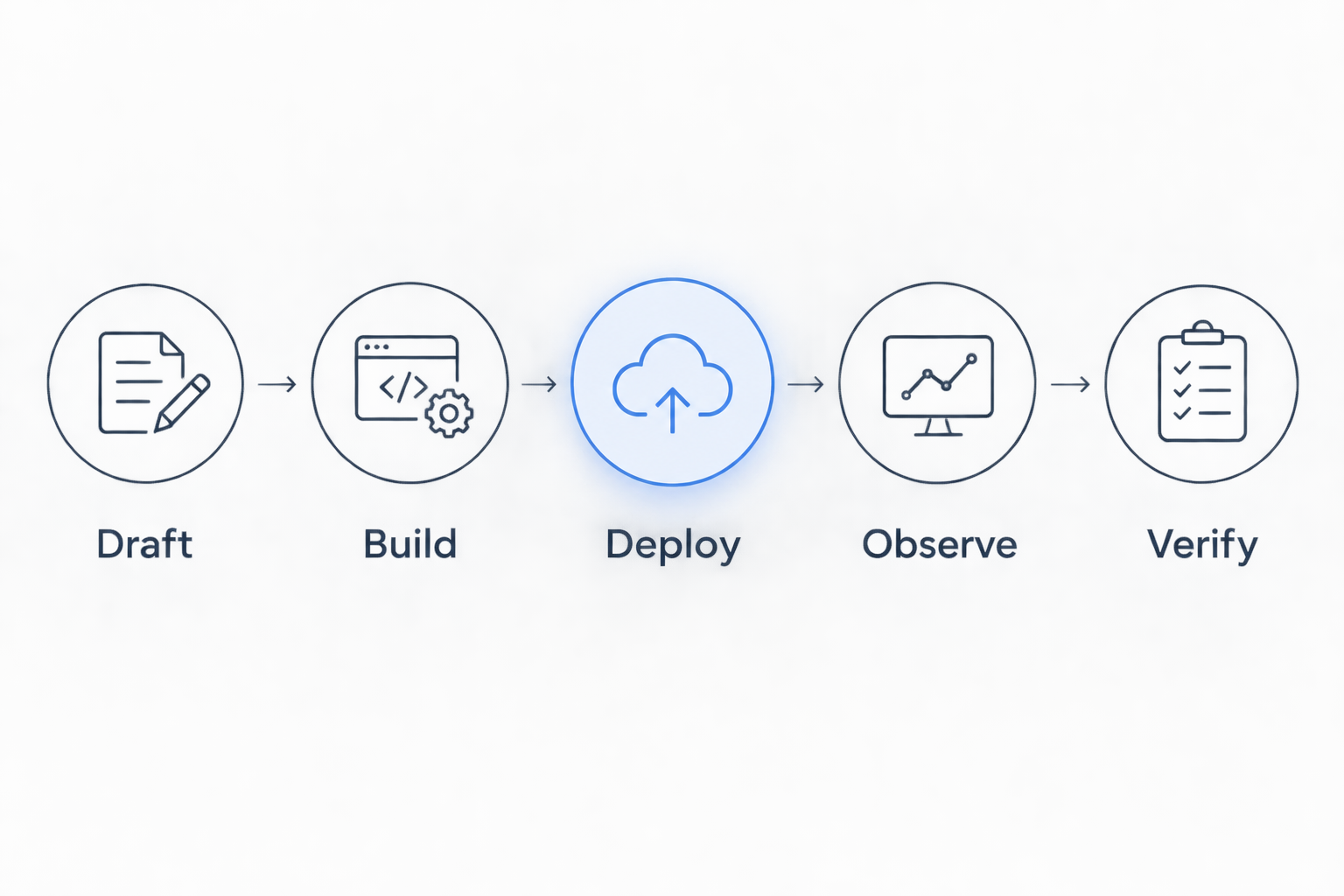
Before deployment, review what can change the outside world
Read the actions as carefully as the conditions. A changed comparison is easy to notice; an unintended recipient, device reference or command target can be just as consequential.
For an alarm workflow, review the input field, comparison logic and intended response. For a device-control workflow, also establish that the actuator is compatible and the configured command path supports the requested operation.
Don't assume that software permissions or a shared protocol name establish equipment compatibility. The device interface, command definition and available feedback determine what you can actually operate and verify.
After deployment, inspect a relevant event
Choose evidence that exercises the behavior you changed. An unrelated sensor update does not establish that a revised alarm condition works, even if it shows that data is arriving.
Follow the event through the available execution evidence and check the intended result. Keep the conclusion narrow: a successful alarm test demonstrates that tested path, not every possible branch or every connected device.
Why a rule can appear ready without being verified live
These factors explain different kinds of uncertainty. Check the one that matches your evidence rather than repeating the entire release process.
- Saved changes: The editor contains your latest work, but saving is not evidence that those changes were deployed.
- Completed build: The build step succeeded, but deployment still needs its own confirmation.
- Restored logic: An earlier configuration has become a new draft, not an automatically reinstated live version.
- Debugger activity: A test produced results, but those results do not establish which version handles normal incoming events.
- No qualifying input: The rule is deployed, but the event needed to exercise its condition has not been observed.
- Incomplete outcome evidence: An action was accepted, queued or delivered, but the available feedback does not yet establish the physical result.
These aren't interchangeable failures. A missing deployment calls for a release decision; missing feedback calls for outcome verification. Changing rule logic doesn't resolve every kind of uncertainty.
Can debugging a draft trigger a real device action?
Yes. Draft status does not make debugging harmless. In Kilo, debugger Execute performs the real operation for supported side-effect nodes and is selected initially; you must deliberately choose Skip or Mock when that is the intended test behavior.
That creates an important distinction: a rule can be undeployed while a debugging session still causes a real side effect. A message, alarm or device action observed during testing therefore isn't sufficient evidence of normal runtime deployment.
Before starting a debugging session, identify the nodes that affect external systems. Decide which should execute, which should be skipped and which should use mocked behavior, according to the supported controls.
For the separate question of test behavior, see whether an IoT platform can simulate a rule before it goes live. Keep test configuration and deployment verification as distinct decisions.
Does restoring an earlier rule make it live immediately?
No. Restoring a Kilo rule creates a new draft that must be built and deployed separately. Inspect the restored logic before releasing it, especially its device references and actions.
Restoration also does not undo the physical consequences of an earlier run. If a command changed equipment state, restoring previous rule logic does not reverse that command.
Treat software recovery and equipment recovery as separate tasks. The former concerns which rule version should run next; the latter concerns the current physical state and any supported corrective action.
Does a deployed rule prove that the equipment responded?
No. A deployed rule establishes release state, not physical success. Even an accepted, queued or delivered command is not proof that the intended physical change occurred.
For a supported actuator, verify the result through device feedback or subsequent measurements where available. If the integration exposes only command status, report that status accurately instead of calling the physical action confirmed.
Deliberately configured rules can execute commands autonomously. Don't assume every automated command waits for a person's approval simply because an assistant-driven direct-command workflow uses confirmation.
A worked example: checking a revised temperature alarm
Illustrative scenario: an integrator changes a temperature alarm condition for a monitored storage area. The example describes a verification method, not a customer deployment or a recommended temperature threshold.
Start with the input. Identify the temperature field, its unit and the device whose readings should drive the rule, then check that the revised comparison reflects the site's intended operating policy.
Next, separate the edited rule from the deployed rule. If the revised comparison exists only in a draft, the latest change has not been established as live. A successful build does not close that gap.
After deployment, inspect a reading that should satisfy the revised condition. Check the available execution evidence, then confirm the configured alarm result and the response expected from the responsible person.
If you tested the draft in the debugger, label that evidence as a debugger result. Don't use a test-created alarm as proof that normal incoming readings are using the deployed revision.
Kilo fits integrators who need IoT rule changes separated from deployment and outcome verification. Its build-and-deploy distinction supports a clear release process, but deployment still doesn't establish that an alarm reached a person or equipment changed state.
If the project also needs compatible physical devices, Kilo Electronics is a separate online authorised dealer serving individual and business buyers. Hardware sourcing is separate from platform deployment, and buying a device does not establish that its commands or feedback are supported in your integration.
FAQ
Can I tell whether a rule is live just by opening it in the editor?
No. The editor shows the version you're inspecting, not sufficient evidence of the version deployed for runtime use. Compare the intended changes with the deployed version before calling them live.
What should I check if a deployed automation hasn't fired?
Check whether a qualifying input reached the intended rule and met its deployed conditions. Then inspect the available execution evidence before changing the logic or deploying again.
Does a successful build mean my automation is working?
No. A successful build establishes that the build step completed, not that deployment occurred or the intended result followed. Confirm deployment and inspect a relevant execution separately.
Should I redeploy a rule just to find out whether it's already live?
No. Check the existing deployment state first. Redeployment is a release action, not a substitute for understanding which version is currently deployed.
What should I include when handing a live automation to another person?
Identify the rule, intended version, deployment state, verification event and observed result. Distinguish debugger evidence from runtime evidence, and state any outcome that remains unverified.
Can a command show delivered without proving the equipment changed?
Yes. Delivered command status does not establish the physical outcome. Use supported device feedback or subsequent measurements to verify the intended change.
Before you hand over a live automation
Replace “it's live” with a short evidence statement: which version is deployed, what event exercised it, what the execution evidence showed and what result was verified. That gives the next person something they can check.
The most useful final check is also easy to miss: make sure your verification evidence came from the deployed workflow, not only from the debugger. Real side effects during a test can otherwise make an undeployed change look operational.
Written by Tim Kravchunovsky


