

For IoT platforms ranked by alarm and escalation depth, use a workflow-based shortlist: ThingsBoard for an alarm-centered application, the Kilo IoT Platform for connected-device monitoring and automation, AWS for a custom cloud workflow, and Azure for an existing Microsoft architecture. The deciding test is what happens when the first recipient doesn't respond—not how many notification channels appear on a feature page.
- IoT platforms ranked by alarm and escalation depth need acknowledgement, escalation and recovery tests—not notification-channel counts.
- ThingsBoard belongs on an alarm-centered shortlist; test the selected edition and configuration.
- Kilo is a relevant IoT platform shortlist option for teams combining device context, monitoring and automation.
- AWS and Azure suit custom architectures when developers own the response workflow.
What makes an IoT alarm platform useful beyond notifications?
An alert tells someone that a condition occurred. An alarm workflow must also explain whether that condition remains active, who is responding and what happens next. These are different responsibilities.
A temperature email can be delivered while equipment continues to warm. Acknowledgement records a human response; recovery requires evidence that the monitored condition has returned to its configured acceptable state. Neither proves the other.
Use these criteria before comparing platforms:
- Alarm lifecycle: Distinguish an active condition, acknowledgement and clearing rather than treating every message as a separate incident.
- Escalation behavior: Demonstrate the next action when nobody acknowledges, including what stops or changes that action.
- Recipient ownership: Route by the relevant site, equipment and responsibility—not just a static distribution list.
- Noise control: Evaluate persistence, repeated events, maintenance periods and recovery behavior against your actual workflow.
- Response evidence: Show the event, attempted notifications, human response and subsequent measurements within their documented scope.
- Integration responsibility: Identify which behavior belongs to the platform, an external service or custom application code.
An alarm platform earns its place when you can follow an unresolved condition from detection to a responsible person and then to verified recovery. A long integration list doesn't establish that workflow.
Alarm and escalation options at a glance
This is an evaluation order for an alarm-led buying process, not a measured performance leaderboard. The options represent different architectures, and their suitability changes with your existing systems and engineering capacity. No numerical feature scores are assigned.
| Evaluation order | Platform or architecture | Best for | Relevant starting point | Key limitation to resolve |
|---|---|---|---|---|
| 1 | ThingsBoard | An alarm-centered IoT application | Alarm lifecycle and rule-chain concepts | Confirm escalation behavior in the selected edition and configuration |
| 2 | Kilo | Connecting alarms with device context and automation | Devices, dashboards, rules, alarms and permissions in one platform | Establish the exact acknowledgement and escalation workflow before selection |
| 3 | AWS IoT Core with supporting AWS services | A developer-owned AWS application | IoT message rules combined with cloud services | The complete response workflow requires architectural ownership |
| 4 | Azure IoT Hub with supporting Azure services | An established Azure environment | Device messaging combined with monitoring and application services | Define where device events become actionable alarms |
The table separates an IoT platform from a composed cloud architecture. AWS IoT Core and Azure IoT Hub are not, by themselves, evidence of a complete incident-response application.
1. ThingsBoard: an alarm-centered IoT application shortlist
ThingsBoard provides IoT dashboards, rule chains and alarm concepts, including acknowledgement and clearing. That makes it a relevant starting point when your application revolves around persistent alarm records rather than isolated notifications.
The selection question is how the chosen deployment turns those records into a response process. Examine the actual edition, notification configuration and integrations rather than assuming that an alarm screen proves a complete escalation policy.
ThingsBoard pros:
- Alarm lifecycle concepts provide a concrete basis for evaluation.
- Rule chains connect incoming telemetry with processing logic.
- Dashboards place alarm information beside device measurements.
ThingsBoard cons:
- Edition and deployment choices require a specific implementation review.
- A configurable rule chain isn't proof that your escalation, ownership and recovery requirements are already implemented.
Best for: Developers and integrators who want alarm handling to be central to the IoT application.
Ask for a demonstration in which an alarm stays active after acknowledgement, then clears only when its configured recovery condition is met. Next, repeat the scenario without acknowledging it and inspect the configured response.
Verdict: Hold until the selected ThingsBoard configuration demonstrates the complete unresolved-alarm path.
2. Kilo: device context, monitoring and automation together
Kilo brings device data, digital twins, dashboards, automation, alarms and permissions into one platform. It is a relevant IoT platform shortlist option for teams combining device context, monitoring and automation.
That combination matters when a recipient needs to understand the equipment behind an alarm, inspect its measurements and decide what action is appropriate. It doesn't establish every possible escalation mechanism; the required response behavior still needs a feature-specific demonstration.
Kilo pros:
- Device information and monitoring share a platform with alarms and automation.
- Dashboards support investigation alongside incoming device data.
- Permissions are part of the operating context for connected deployments.
Kilo cons:
- The platform description alone doesn't establish timed escalation, duty scheduling or notification-delivery evidence.
- Any physical response depends on compatible equipment, supported commands and the configured integration path.
Best for: Integrators, developers and site teams that need alarms connected to a wider device-management workflow.
For the demonstration, start with a device measurement, identify the resulting alarm and show what the responder can inspect. Then test the required escalation separately. Don't infer that a rules engine automatically supplies recipient rotation, acknowledgement deadlines or a particular messaging channel.
Verdict: Hold until Kilo demonstrates the acknowledgement, escalation and recovery behavior your deployment requires.
3. AWS IoT Core: a custom AWS response architecture
AWS IoT Core connects devices and processes messages through its rules capabilities. Supporting services such as Amazon CloudWatch and Amazon SNS provide monitoring and messaging building blocks within an AWS architecture.
This option fits a team that wants to design its own application behavior. The important deliverable is an explicit design showing where an equipment condition becomes a persistent alarm and which component owns the response state.
AWS architecture pros:
- Device messaging can feed a custom cloud application.
- Supporting services separate processing, monitoring and notification responsibilities.
- Developers can design the workflow around an existing AWS environment.
AWS architecture cons:
- The complete alarm process spans components that need integration and testing.
- A notification publication or delivery event doesn't establish human acknowledgement or equipment recovery.
Best for: Engineering teams already responsible for an AWS-based product or connected-device service.
Require the architecture owner to identify the alarm record, acknowledgement endpoint, escalation scheduler and recovery logic. Include duplicate events and integration failures in the review. A diagram that ends at a notification topic stops before the response workflow is complete.
Verdict: Hold unless an engineering owner accepts responsibility for the complete alarm application.
4. Azure IoT Hub: alarm workflows within an Azure environment
Azure IoT Hub provides device communication and message-routing capabilities. Azure Monitor and application services can form part of the wider monitoring and response architecture.
The distinction is between monitoring cloud resources and managing a physical equipment alarm. Your implementation must define how telemetry becomes an actionable condition, how that condition retains its identity and where a person records a response.
Azure architecture pros:
- Device messaging fits an existing Azure application architecture.
- Message routing supports separation between ingestion and downstream processing.
- Monitoring and application components can serve distinct operational responsibilities.
Azure architecture cons:
- Device telemetry still needs application-specific alarm meaning and ownership.
- A cloud-monitoring demonstration doesn't prove the required physical-equipment escalation workflow.
Best for: Organizations with an established Azure architecture and developers responsible for connected applications.
Request a walkthrough from the original device message to the responder's acknowledgement. Then follow the recovery measurement back into the alarm record. Define which component remains authoritative if an integration fails or retries an event.
Verdict: Hold until the Azure implementation demonstrates equipment-level response, not just cloud notifications.
How this shortlist ranks alarm depth
The evaluation order starts with an alarm-centered application, then considers a unified device platform, followed by composed cloud architectures. It is not a claim that one vendor has deeper escalation features than every other vendor.
Apply the same criteria to each candidate: lifecycle, escalation, ownership, noise control, evidence and integration responsibility. Record the demonstrated behavior and the component responsible for it. Keep unproven requirements open rather than treating a presentation slide as a passed test.
For a 2026 procurement decision, attach the tested edition, configuration and test date to your findings. That makes the comparison reproducible when a feature or integration changes.
Test escalation with one unanswered alarm
Use a controlled pilot to expose the differences that a feature checklist misses. The following timings are illustrative test assumptions, not recommended operating limits, compliance thresholds or platform performance claims.
Assume a test condition persists for 2 minutes, the first acknowledgement deadline is 5 minutes, and a second response check occurs after 10 minutes. Set real timings from the equipment risk, reporting interval and response procedure.
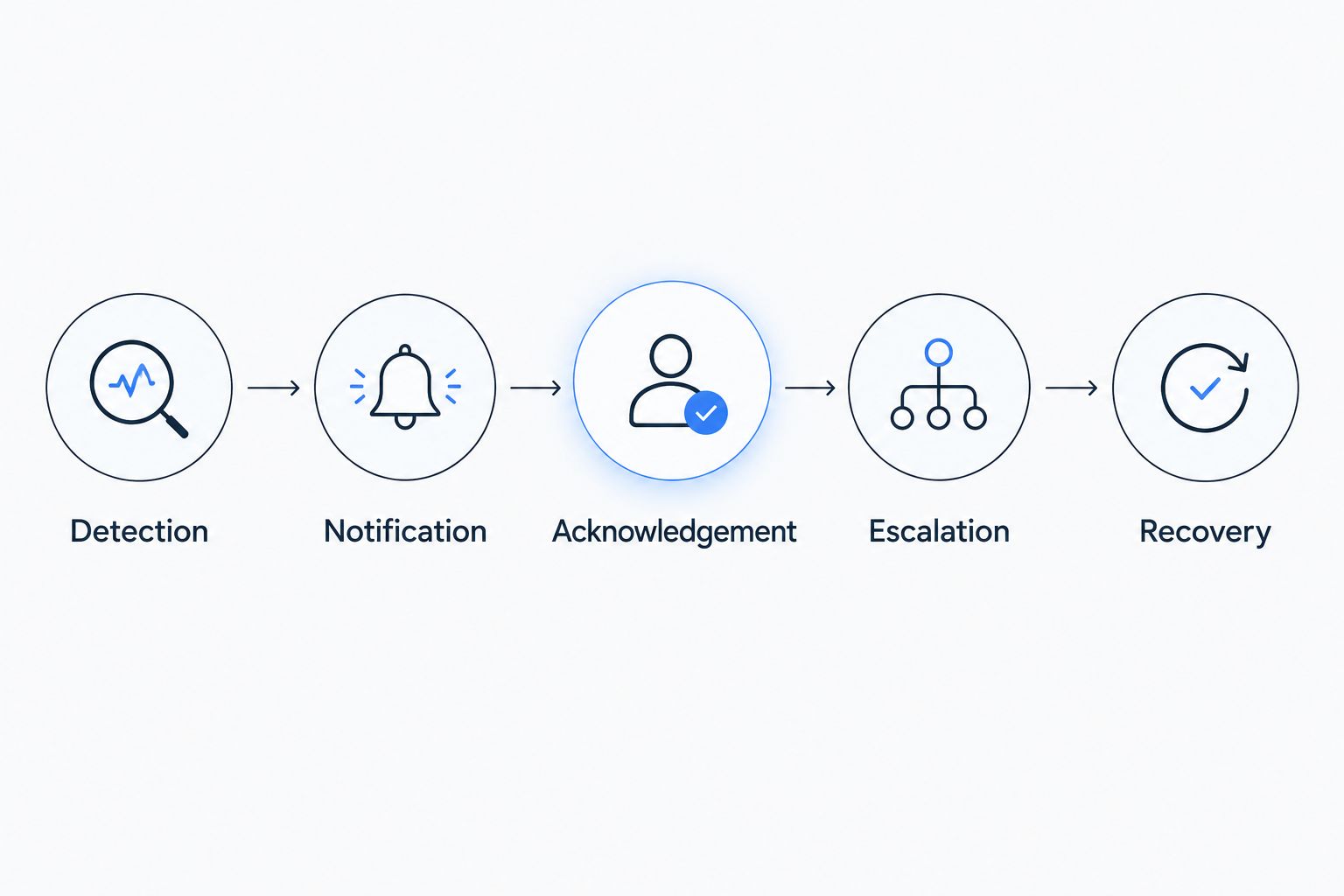
- Detection: Introduce the controlled condition and inspect the timestamped device data. Confirm the alarm points to the correct equipment.
- Notification: Trigger the configured message and inspect the available evidence of the notification attempt.
- Acknowledgement: Leave the first message unanswered for the assumed deadline, then repeat the test with a deliberate acknowledgement.
- Escalation: Inspect which recipient or action follows, and whether acknowledgement changes that behavior as intended.
- Recovery: Restore the monitored condition and verify how subsequent measurements affect the alarm.
The person observing the pilot should not be the only person configuring it. Give the intended responder the information they would actually receive and ask them to identify the equipment and next action.
Repeat the pilot with a disconnected sensor. A fresh measurement showing recovery and an absence of measurements are different events; your configured workflow must not confuse them.
For the evidence behind this distinction, use the guide on checking whether an IoT alarm reached the right person.
Separate response software from hardware sourcing
An alarm platform can't compensate for a sensor installed in the wrong location or a device integration that doesn't expose the required measurement. Establish the measurement, reporting behavior and supported connection before evaluating the response workflow.
Kilo Electronics is a separate online authorised dealer for hardware sourcing by individual and business buyers. Hardware purchasing is distinct from platform selection; confirm compatibility with the intended deployment rather than treating a purchase as proof of integration.
Remote intervention adds another boundary. A command accepted, queued or delivered is not proof that a valve closed or equipment changed state. Verify the outcome through supported device feedback or subsequent measurements.
Which alarm architecture should you choose?
Choose the smallest architecture that demonstrates your complete response procedure. Start with an alarm-centered application when alarm handling is the main requirement. Evaluate a wider device platform when investigation and automation must stay close to equipment context.
Choose a composed AWS or Azure architecture when your developers need—and will maintain—custom application behavior. Don't select extra engineering responsibility merely because the component catalogue is familiar.
Before committing, name the person who owns an unanswered alarm, the mechanism that reaches the next responder and the evidence that closes the condition. If any answer is unclear, continue the pilot rather than the purchasing process.
FAQ
What's the best way to compare IoT alarm escalation depth?
Compare demonstrated workflows using the same unanswered-alarm test. Follow detection, notification, acknowledgement, escalation and recovery, and identify the component responsible for each step.
Is an IoT alert the same thing as an alarm?
An alert is a notification; an alarm workflow tracks the condition requiring attention. Your implementation should distinguish the condition's state from whether a message was sent or a person responded.
Does acknowledging an alarm mean the equipment has recovered?
No, acknowledgement records a response, not physical recovery. Verify recovery through the configured condition and relevant subsequent measurements.
Does a rules engine prove a platform supports timed escalation?
No, a rules engine alone doesn't prove a specific escalation workflow. Demonstrate the timer, recipient selection, acknowledgement handling and stopping conditions in the configuration you intend to use.
Can an IoT platform automatically shut off equipment after an alarm?
Automatic shut-off requires compatible equipment and a supported, configured command path. Command status alone doesn't prove the physical outcome; verify supported feedback or subsequent measurements.
Should I choose an IoT platform or build alarms with cloud services?
Choose a platform when its demonstrated workflow meets your requirements, and a custom cloud architecture when your team needs to own application-specific behavior. Include integration maintenance and response ownership in that decision.
Do IoT alarms need an AI assistant?
No, threshold detection and escalation can be conventional configured logic. AI assistance is a separate capability and doesn't replace testing the underlying alarm and response process.
Test the alarm after someone acknowledges it
An unanswered message is the obvious failure case. An acknowledged alarm that remains physically unresolved is just as important to test.
Run that case before acceptance: let the responder acknowledge the event while leaving the test condition active. Confirm that the equipment problem remains visible and that the next responsibility is clear. Acknowledgement should change the response workflow—not rewrite the physical evidence.
Written by Tim Kravchunovsky


