

For IoT platforms ranked by API and integration depth, start with AWS IoT Core for custom AWS applications, ThingsBoard for a self-hosted application platform, Azure IoT Hub for Azure-connected devices, and the Kilo IoT Platform for connected monitoring and supported AI-assisted workflows. This 2026 shortlist ranks integration approaches by fit—not by an invented API score or a claim that one platform wins every project.
- IoT platforms ranked by API and integration depth need workflow comparisons, not endpoint counts.
- AWS IoT Core suits custom AWS applications; ThingsBoard suits teams wanting a self-hosted application platform.
- Azure IoT Hub suits Azure-connected devices with device twins, messaging, and direct methods.
- Kilo suits connected monitoring and supported AI-assisted workflows; device compatibility and permissions still determine integration scope.
What makes an IoT platform integration-ready?
An API is a software interface that lets another application read information or request an operation. Integration depth describes how much useful work that interface supports, including what happens when a request fails.
A platform that accepts sensor readings isn't necessarily able to provision devices, expose alarms, configure automation, or verify equipment responses. Those are separate requirements. Judge each candidate against these criteria before choosing an architecture:
- Device connectivity: Can your actual devices connect through a supported interface, with the necessary authentication and payload mapping?
- Resource coverage: Can an integration work with the device records, measurements, configuration, and operational resources your application needs?
- Event delivery: Can changes reach downstream applications without repeatedly requesting unchanged information?
- Identity and permissions: Can you restrict each application or user to the resources and operations they need?
- Command feedback: Can you distinguish a requested action from a confirmed equipment response?
- Operating responsibility: Who maintains connectors, credentials, application code, infrastructure, and changes to external interfaces?
Integration depth is the ability to complete your workflow with the right permissions and observable results—not the number of endpoints in a reference manual.
IoT platform API and integration comparison at a glance
The order below starts with cloud building blocks, moves through an application platform, and ends with a monitoring-oriented operating layer. It isn't a measured performance league table.
| Platform | Best for | Integration building blocks | Key limitation |
|---|---|---|---|
| AWS IoT Core | Custom applications built around AWS services | MQTT and HTTPS connectivity, device shadows, rules, AWS identity controls | Application workflows require additional services and engineering |
| ThingsBoard | Teams wanting a self-hosted IoT application platform | Device APIs, REST APIs, dashboards, rule engine | Self-hosting adds infrastructure and upgrade responsibilities |
| Azure IoT Hub | Device applications built around Azure services | Device messaging, device twins, direct methods, message routing | A hub is not a complete monitoring application |
| Kilo | Connected monitoring with supported AI-assisted workflows | Device context, dashboards, automation, alarms, permissions, supported API/MCP integrations | Supported resources, commands, and client permissions define the integration boundary |
The AWS IoT Core Developer Guide, ThingsBoard documentation, and Azure IoT Hub documentation describe the respective architectural building blocks. Treat those building blocks as a starting point; your acceptance test must establish whether they cover your complete application.
1. AWS IoT Core: for custom AWS application integrations
AWS IoT Core provides device connectivity and messaging within AWS. Its device shadows represent device state, while rules route incoming messages into downstream processing and services.
This approach fits developers who want to design an application around AWS components rather than adopt a finished monitoring interface. Integration depth comes from combining services, identities, storage, processing, and application code into a system your team owns.
AWS IoT Core pros:
- MQTT messaging supports connected-device communication.
- Device shadows separate reported state from desired state.
- Rules connect device messages to downstream AWS processing.
- AWS identity controls support access restrictions across the architecture.
AWS IoT Core cons:
- Dashboards, operational workflows, and application behavior require additional implementation.
- Your team must manage permissions and failure handling across the services it combines.
Best for: Developers with AWS experience who need a custom device application integrated into an existing AWS architecture.
An illustrative project is an equipment manufacturer connecting device telemetry to its own customer application. AWS IoT Core handles the device-facing messaging, while the manufacturer builds the customer experience and business logic around it.
Don't confuse a device shadow update with proof that equipment changed physically. Your application still needs an appropriate reported-state update or another measurement to confirm the result.
Verdict: Buy into this architecture when custom AWS integration is the requirement; skip it as a substitute for a finished monitoring application.
2. ThingsBoard: for a self-hosted IoT application platform
ThingsBoard combines device connectivity, dashboards, and a rule engine in an IoT application platform. Its documented interfaces include MQTT, HTTP, CoAP, and REST APIs, giving developers several integration entry points.
The distinction from a cloud messaging service is practical: application-facing components sit alongside device ingestion. Teams can evaluate the platform as an operating application as well as a foundation for custom development.
ThingsBoard pros:
- Device interfaces support different telemetry integration approaches.
- REST APIs provide programmatic access to platform resources.
- Dashboards and rules bring application functions into the same platform.
- Self-hosting supports teams that want to operate the software themselves.
ThingsBoard cons:
- Self-hosting makes infrastructure, upgrades, and operational maintenance your responsibility.
- Edition-specific capabilities need checking against the exact deployment you select.
Best for: Integrators and development teams that want a self-hosted application platform and accept the responsibility of running it.
For an illustrative building-monitoring project, evaluate the full path from a sensor message to a dashboard and then to an external application. Confirm which identifiers the external system stores and how it handles device replacement.
A working telemetry connection is just the beginning. Test access to configuration, historical data, and the operational resources your project requires without assuming every interface exposes every function.
Verdict: Buy into this approach when application components and self-hosting matter; skip self-hosting when nobody owns its maintenance.
3. Azure IoT Hub: for Azure-connected device applications
Azure IoT Hub provides device-to-cloud and cloud-to-device communication within Azure. Device twins, direct methods, and message routing support different parts of a connected-device architecture.
These mechanisms solve different problems. A twin represents device information and state, while a direct method requests an operation from a connected device application; neither removes the need to implement the corresponding device behavior.
Azure IoT Hub pros:
- Device twins provide a structured device-state interface.
- Direct methods support request-and-response interactions with device applications.
- Message routing moves device messages toward downstream destinations.
- The service fits applications already built around Azure components.
Azure IoT Hub cons:
- You still need to build or integrate the operational application around the hub.
- Device-side code must implement the behavior expected by twins and direct methods.
Best for: Development teams extending an Azure application with connected devices and explicit device-state interactions.
An illustrative use case is an OEM adding remote configuration to connected equipment. The integration must connect the requested configuration, device-side handling, and reported result rather than treating message transmission as successful configuration.
Keep provisioning requirements separate from messaging requirements during evaluation. Azure IoT Hub Device Provisioning Service is a separate service in the architecture, so include that dependency when assigning implementation and operating responsibilities.
Verdict: Buy into this architecture when Azure is your application foundation; skip it as a shortcut around device-side engineering.
4. Kilo: for monitoring and supported AI-assisted integration
Kilo brings device data, digital twins, dashboards, automation, alarms, permissions, and supported commands into one platform. Its role is an IoT operating layer: applications and compatible AI clients work with connected-device context rather than an isolated stream of messages.
Kilo is a fit for integrators connecting monitoring workflows with supported AI assistance and permission-controlled device operations. That fit depends on the required device interfaces, command definitions, and exposed integration tools.
Kilo pros:
- Monitoring and automation functions share connected-device context.
- Permissions define access to connected deployments.
- The built-in assistant supports configuration and operation within its supported scope.
- Compatible external clients, including Claude through MCP, provide another integration route.
Kilo cons:
- A shared protocol name does not establish compatibility with every device or command.
- Built-in assistant functionality and external MCP tool coverage must be evaluated separately.
Best for: Integrators, developers, facilities teams, and AI teams connecting operational monitoring with supported assistance and actions.
For an illustrative equipment workflow, start with a measurement and its device context. Determine whether the next step is a dashboard review, a configured alarm, an automation rule, or a supported command—not every workflow needs AI.
Direct device commands through the built-in assistant have a confirmation flow. External clients have their own approval behavior, while deliberately configured rules can execute commands autonomously; don't describe all these paths as having the same approval boundary.
Verdict: Buy into this approach when your required monitoring and integration workflow is supported; hold when a necessary device action or external-client tool remains unverified.
Test integration depth with a complete device workflow
A useful proof of concept starts with an operational question, not a successful login. Use the same workflow across candidates so the comparison exposes differences in implementation effort and responsibility.
The following is an illustrative acceptance test, not a customer deployment or a claim about universal platform support:
- Device context: Connect a compatible sensor and associate its readings with the correct equipment and location.
- Data access: Retrieve the measurement through the intended application interface, preserving its timestamp and unit.
- Event handling: Pass a relevant event into your downstream application and define what happens if delivery fails.
- Permission check: Attempt an unauthorized operation and confirm that the integration rejects it.
- Outcome feedback: If control is required, request a supported action and inspect device feedback or subsequent measurements.
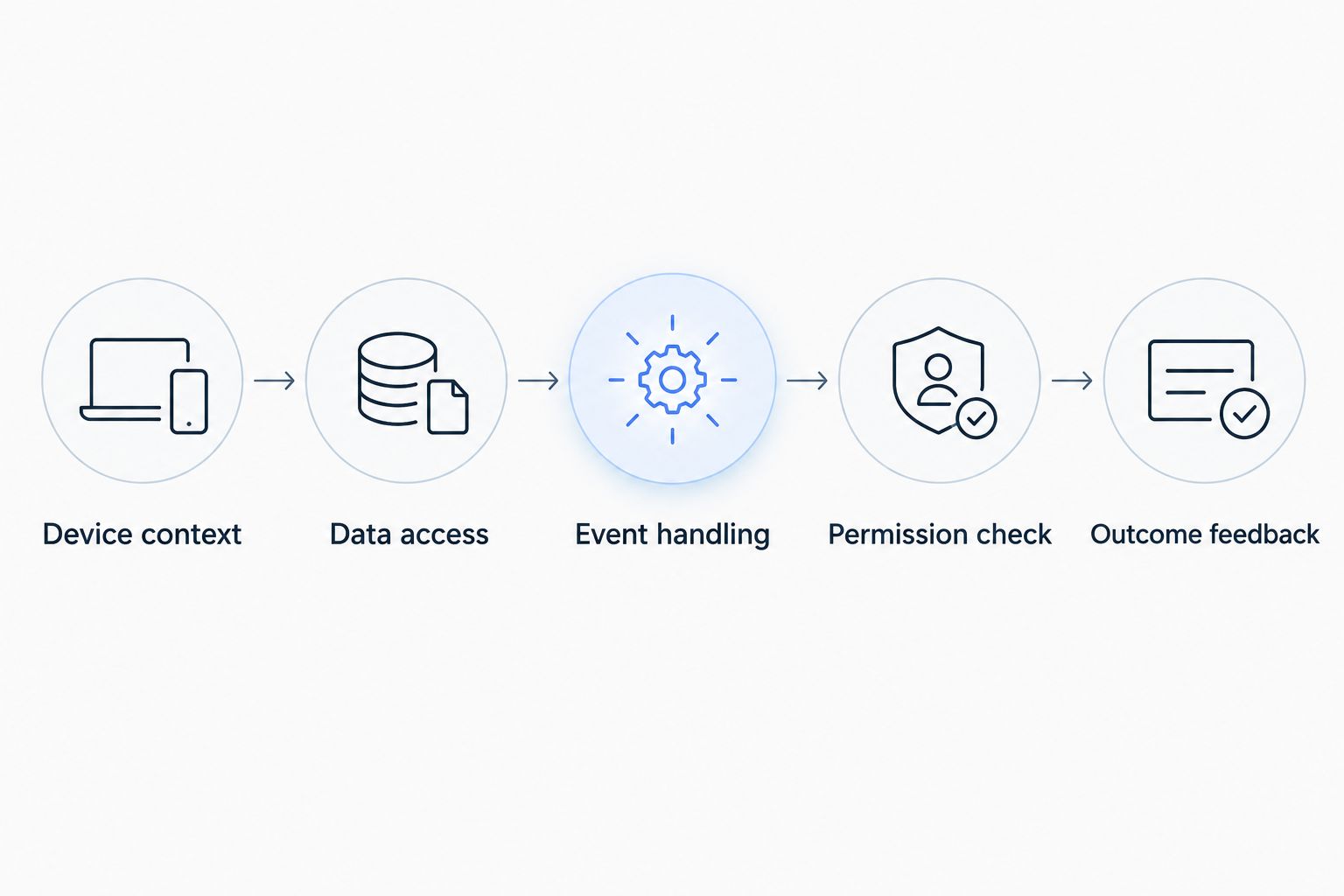
Record what each stage proves. An API response proves that a request received a response; a queued command proves queueing, not physical movement, switching, or a changed setpoint.
For a configurable actuator example, establish the compatible hardware, command path, authorized caller, and expected feedback before testing. Assign a person to investigate missing feedback rather than allowing the application to silently label the operation successful.
Compare maintenance work, not just connector lists
An integration creates an ongoing operating responsibility. Ask who will detect expired credentials, changed payloads, rejected requests, delayed messages, and broken downstream dependencies.
Separate device connectivity from business-system integration. Connecting an MQTT device doesn't establish a connection to your maintenance system, and sending an alarm doesn't establish that a work order exists.
Hardware sourcing is another separate decision. Kilo Electronics is an online authorised dealer serving individual and business buyers; purchasing compatible hardware is distinct from selecting platform software or proving a particular integration.
How this shortlist is ranked
The shortlist uses architecture and workflow fit against the criteria above: connectivity, resource coverage, events, permissions, feedback, and operating responsibility. It does not assign measured scores, claim hands-on benchmark results, or treat the order as proof of overall superiority.
Use each platform's distinct role to reduce your shortlist. Then let a repeatable acceptance test determine the final choice.
FAQ
What's the difference between an IoT API and an IoT integration?
An IoT API exposes software operations; an integration uses interfaces to complete a workflow between systems. Authentication, data mapping, failure handling, and operating responsibility remain part of the integration.
Does MQTT support mean every MQTT device will work?
No. Device authentication, topic structure, payload format, and required behavior must also match the integration. Command support needs its own verification.
Is a cloud IoT hub a complete monitoring application?
No. AWS IoT Core and Azure IoT Hub provide building blocks for connected-device architectures. Dashboards, business workflows, and operational interfaces require additional implementation or integration.
Should I choose REST APIs or event-driven integration?
Choose according to the workflow rather than treating them as substitutes. Request-based APIs suit deliberate reads and changes, while event delivery suits reacting to new information; many applications need both.
Does MCP give an AI assistant unrestricted device control?
No. MCP provides a connection between a compatible client and exposed tools, not unrestricted authority. Supported tools, permissions, client approvals, and configured device commands determine the available operations.
Does a successful command response prove the equipment acted?
No. Accepted, queued, or delivered status does not establish a physical outcome. Confirm the result through supported device feedback or subsequent measurements.
Which IoT integration approach should you choose?
Choose AWS IoT Core or Azure IoT Hub when your team wants cloud building blocks and owns application development. Choose ThingsBoard when a self-hosted application platform matches your operating model, or evaluate Kilo when connected monitoring and supported AI-assisted workflows match the job.
For an undecided buyer, the next move is a workflow test—not a longer feature spreadsheet. Write down the required read, event, permission boundary, and feedback evidence before booking a demonstration.
For the implementation side, the related guide to integrating IoT sensor data with your dashboard via API addresses the narrower data-to-application question.
One final recommendation: include an unauthorized request in the demonstration. A rejected operation can provide more useful evidence about integration readiness than another successful telemetry chart.
Written by Tim Kravchunovsky


