

Instead of manually checking whether someone has resolved an alarm, use the Kilo IoT Platform for device context and alarms, then configure a timed workflow that rechecks the alarm before notifying a backup responder. To automatically escalate an unresolved alarm after 15 minutes, preserve its identity and deadline, read its current state at that deadline, and send the escalation only if the same alarm occurrence remains unresolved.
- Kilo brings IoT alarms, device context and automation together for integrators building response workflows.
- To escalate unresolved alarm alert workflows correctly, recheck current alarm state after 15 minutes.
- Acknowledgment and resolution need separate policies; someone seeing an alert does not prove the problem is fixed.
- Use a persistent deadline and duplicate protection so retries do not create repeated escalations.
Alarm escalation needs a state check, not just a delay
An initial notification tells someone a problem exists. Escalation tells another responsible person that the problem still needs attention after an agreed interval. The difference is the alarm's current state, not simply elapsed time.
Kilo suits integrators who need IoT alarms, device context and automation in one platform. The escalation logic still needs an explicit response policy: when the clock starts, what counts as resolved, and who receives the next notification.
A delayed copy of the original message gets this wrong. If the alarm clears before the deadline, that copy becomes an unnecessary interruption. If the alarm clears and later returns, an old timer must not escalate the new occurrence prematurely.
The workflow below is an implementation specification. Map it to documented platform capabilities or an integration service that supplies persistent scheduling, current-state reads and notification delivery; the configuration names below describe the logic, not application UI labels.
Before you start
- Access and alarm data: Arrange permission to configure the relevant alarms and automation, plus supported access to the alarm's identity, occurrence time and current lifecycle state. An external integration also needs authorized credentials for its actual operations.
- A persistent scheduler and delivery path: Choose an implementation that retains deadlines across restarts, reads current alarm state and records notification outcomes. Assign both the initial responder and the backup responder before enabling delivery.
- The lifecycle gotcha: Decide whether acknowledgment stops escalation. For an unresolved-alarm policy, acknowledgment alone does not stop the clock; resolution does. Define this before building the timer.
Keep the scope narrow for the first release. Start with a controlled alarm and recipients who know a test is coming, rather than applying the workflow to every device immediately.
Alarm identity and escalation policy
Define the alarm occurrence
- Select the alarm category, site and device scope that require escalation. Exclude informational events that do not require a response.
- Identify the record that represents a particular occurrence. If an alarm record is reused, combine its identity with the occurrence timestamp or another supported occurrence identifier.
- Define the lifecycle states that count as unresolved. Map the actual source states to that definition rather than assuming that every system uses the same terminology.
Expected result: Each qualifying occurrence has a stable identity and a clear yes-or-no answer to “Does this still require resolution?”
This distinction matters when telemetry keeps reporting the same problem. Repeated measurements should update the existing occurrence's context, not automatically create another escalation clock.
Set the deadline and responder
- Choose the clock's starting point: the original alarm activation time. Store that timestamp separately from later updates.
- Calculate the deadline as activation time plus 15 minutes, equivalent to 900 seconds. Keep timestamp calculations consistent across services.
- Assign a backup responder with the required site access and responsibility. Include the escalation reason and the action you expect that person to take.
Expected result: A qualifying alarm occurrence produces a fixed deadline and an identifiable escalation destination.
Use the title's interval as the workflow requirement, not as a universal safety threshold. The appropriate response interval for an actual deployment belongs in its operating procedure and risk assessment.
Persistent deadline and current-state check
Store the pending escalation
- Persist the occurrence identity, activation time, deadline, destination and escalation state before treating the timer as scheduled.
- Use the occurrence identity and escalation stage as the duplicate-protection key. Repeated activation messages must refer to the same pending escalation.
- Arrange for due records to be evaluated even after a service restart. A persistent scheduler or recoverable due-record process provides this behavior; a temporary in-memory wait does not.
Expected result: Restarting the workflow does not erase the obligation to check the alarm at its deadline.
Do not restart the deadline whenever another sensor reading arrives. That creates a moving target: a continuously reporting fault can keep postponing its own escalation.
Recheck before sending
- When the deadline becomes due, retrieve the current alarm state using the saved occurrence identity.
- Stop the escalation if that occurrence has resolved or is no longer the active occurrence. Record the reason for stopping it.
- If the same occurrence remains unresolved, claim the escalation for processing and prepare the backup notification. Recheck immediately before delivery if processing has introduced a meaningful delay.
Expected result: Only an eligible, still-unresolved occurrence proceeds to the notification step.
The central sequence is Alarm occurrence, Stored deadline, Current state, then Backup notification. Each stage answers a different question: what happened, when to act, whether action is still needed, and who should respond.
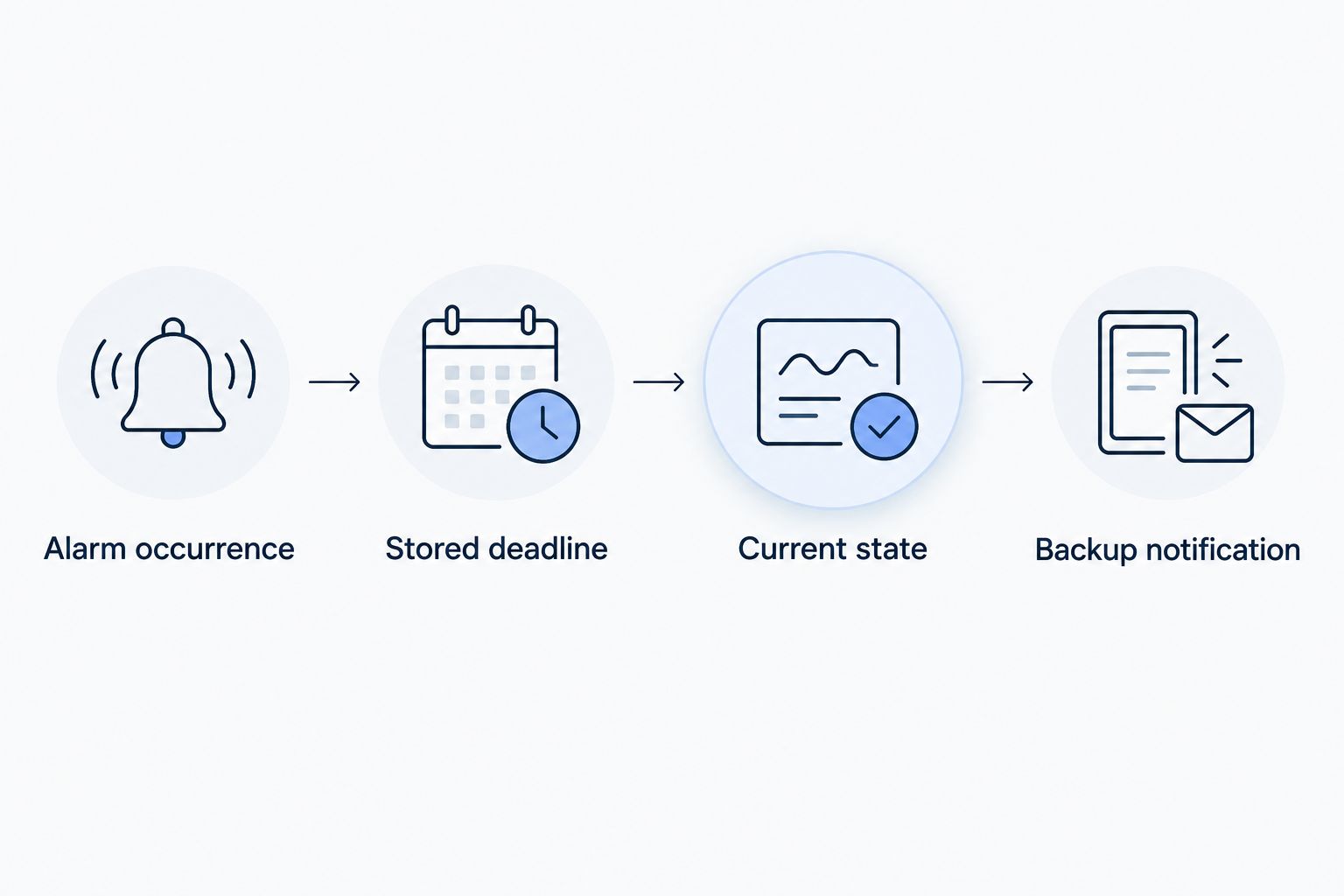
If the state read fails, do not label the alarm resolved. Retain the pending record and retry according to an explicit failure policy. Where your process requires it, report the inability to verify state as a separate monitoring problem rather than inventing a resolution.
Notification content and release checks
Prepare an actionable escalation
- Include the site, device, alarm reason, activation time and unresolved duration. Add the latest relevant measurement with its timestamp when available.
- State why the recipient is receiving the message: the original occurrence remains unresolved after the escalation interval. Identify the responsible role and expected next action.
- Record the delivery attempt and its outcome through the selected notification integration. Use its supported duplicate-protection mechanism where available.
Expected result: The backup responder receives enough context to investigate, and the workflow retains evidence of the delivery attempt.
Notification acceptance is not evidence that someone read the message. Acknowledgment is not evidence that equipment recovered, either. Keep delivery, human response and physical resolution distinct in both the workflow and its reporting.
If the delivery provider accepts a message but the workflow loses the response, a blind retry can produce a duplicate. Define how the integration reconciles that uncertain outcome; a local sent flag alone cannot settle what happened remotely.
Test the lifecycle before release
Use these illustrative test inputs, not operational response recommendations:
- Resolve a test occurrence after 14 minutes. Expect no escalation at its original deadline.
- Leave another occurrence unresolved for 16 minutes. Expect an escalation attempt after the 15-minute deadline, subject to scheduler processing.
- Acknowledge an occurrence without resolving it. Expect escalation under the unresolved-alarm policy.
- Resolve and reopen the same alarm. Expect the reopened occurrence to receive its own deadline.
- Restart the scheduling component before a deadline. Expect the pending record to remain recoverable.
Inspect the occurrence identity, stored deadline, state-check result and notification outcome for each test. Those records explain failures more effectively than checking an inbox alone.
For supported side-effect nodes in Kilo's rule debugger, Execute performs the real operation and is selected initially. Choose Skip or Mock deliberately where appropriate; debugging is not automatically an isolated sandbox.
Expected result: The tests demonstrate suppression, escalation, acknowledgment handling, reopening and restart recovery before production recipients are enabled.
Escalate an unacknowledged alarm instead
A related workflow asks a different question: “Has anybody taken ownership?” That is an acknowledgment policy, not a resolution policy. Use it when the next responder should be contacted only because the first responder has not accepted responsibility.
| Policy | Best for | Stop condition | Advantage | Limitation |
|---|---|---|---|---|
| Unresolved alarm escalation | Problems that need confirmed resolution | The occurrence resolves | Keeps attention on an outstanding problem | Can interrupt a backup while the first responder is already working |
| Unacknowledged alarm escalation | Response ownership and on-call handoff | The occurrence is acknowledged or resolves | Avoids unnecessary handoffs after ownership is accepted | Acknowledged problems can remain unresolved without another deadline |
To implement the acknowledgment variant, retain the occurrence identity and persistent deadline, but change the eligibility check to require both unresolved and unacknowledged state. Do not change the policy silently after responders have started using it.
You can also define separate ownership and resolution stages. Give each stage a distinct identity, recipient and stop condition so one notification does not accidentally suppress the other.
Troubleshoot missing or repeated escalations
The alarm resolved, but the backup still received a message
Check whether the workflow read the original event payload instead of current state. Move the state read to the deadline-processing step and confirm that it matches the saved occurrence, not merely the device.
A resolution can also arrive while delivery is already in progress. Record the state-check and delivery times so that this race is distinguishable from a missing check.
The alarm never reaches its deadline
Inspect whether each measurement overwrites the activation timestamp. Preserve the occurrence's original deadline and treat later measurements as context updates.
If the deadline is correct, inspect scheduler recovery and due-record processing. A scheduled task existing in memory is not proof that it survived a restart.
The backup receives duplicate messages
Check for repeated activation events, parallel workers and retries after uncertain delivery outcomes. Apply duplicate protection to the occurrence and escalation stage, then reconcile notification attempts using the delivery integration's documented behavior.
The backup cannot investigate the alarm
Check recipient permissions as well as destination configuration. A valid address does not grant access to the relevant site, device or alarm context.
Keep sensitive details within the recipient's authorized scope. Escalation should transfer responsibility, not bypass access controls.
Extend the workflow across sites
Once the basic lifecycle works, vary recipients by site, alarm category and responsibility. Keep the timing policy separate from the routing policy so changing an on-call contact does not change when an alarm becomes eligible.
Kilo provides the surrounding device context, alarms and automation; your implementation must still establish the documented scheduling and delivery path. For the broader architecture, the guide to designing a rules-engine workflow for multi-site facility alarms addresses how the pieces fit together.
Hardware sourcing is separate from escalation configuration. Kilo Electronics is a separate online authorised dealer serving individual and business hardware buyers; purchasing new hardware is not an additional requirement for configuring this workflow around an existing compatible deployment.
FAQ
What should happen if an alarm resolves exactly when escalation starts?
Recheck the occurrence immediately before delivery and stop if resolution is already recorded. If delivery is already in progress, retain the state-check and delivery timestamps so the sequence can be explained.
Should acknowledging an alarm reset the 15-minute timer?
Not for an unresolved-alarm policy. Acknowledgment records ownership; reset or suppression should happen only if your explicitly defined policy calls for it.
Does the next sensor reading need to arrive before escalation can happen?
No; a time-based escalation should be evaluated independently of new sensor readings. The implementation needs a persistent scheduler or recoverable deadline-processing mechanism.
Can I pause escalation during planned maintenance?
Yes, if the implementation includes an explicit maintenance-suppression policy. Define its scope and expiry, and record why an otherwise eligible escalation was suppressed.
Does an escalation notification prove the equipment recovered?
No. Equipment recovery requires relevant device feedback or subsequent measurements, while notification delivery and human acknowledgment describe different events.
Does this workflow need an AI assistant?
No. A deadline, current-state check and notification are deterministic automation; an AI assistant is not required to decide whether the configured interval has elapsed.
Make the resolved case your acceptance test
Test suppression before celebrating delivery. An unresolved test proves that the workflow can send a message; a resolved test proves that it knows when not to send one.
Keep both tests in your release process. Together, they check the distinction that makes escalation useful rather than merely noisy.
Written by Tim Kravchunovsky


