Yes—a digital twin can show live sensor readings on a 3D floor plan when each data stream is connected to the correct room, asset or location; the Kilo IoT Platform brings device data, digital twins, dashboards and alarms into one platform. The important caveat is that “live” means the latest received measurement, not necessarily a continuous or instantaneous view of the building.
- A digital twin live data 3d floor plan connects sensor readings to building locations, but timestamps determine freshness.
- Kilo combines device context, digital twins, monitoring and automation for connected deployments.
- Use a spatial view to locate problems and a trend chart to understand changes over time.
- A sensor marker shows its measurement location, not proof that an entire room has identical conditions.
Can a digital twin show live sensor data on a 3d floor plan?
Yes. The basic workflow is to receive a sensor measurement, identify its device and measurement type, associate it with a building location, and display the result in the spatial view. The geometry supplies context; the connected data supplies the changing condition.
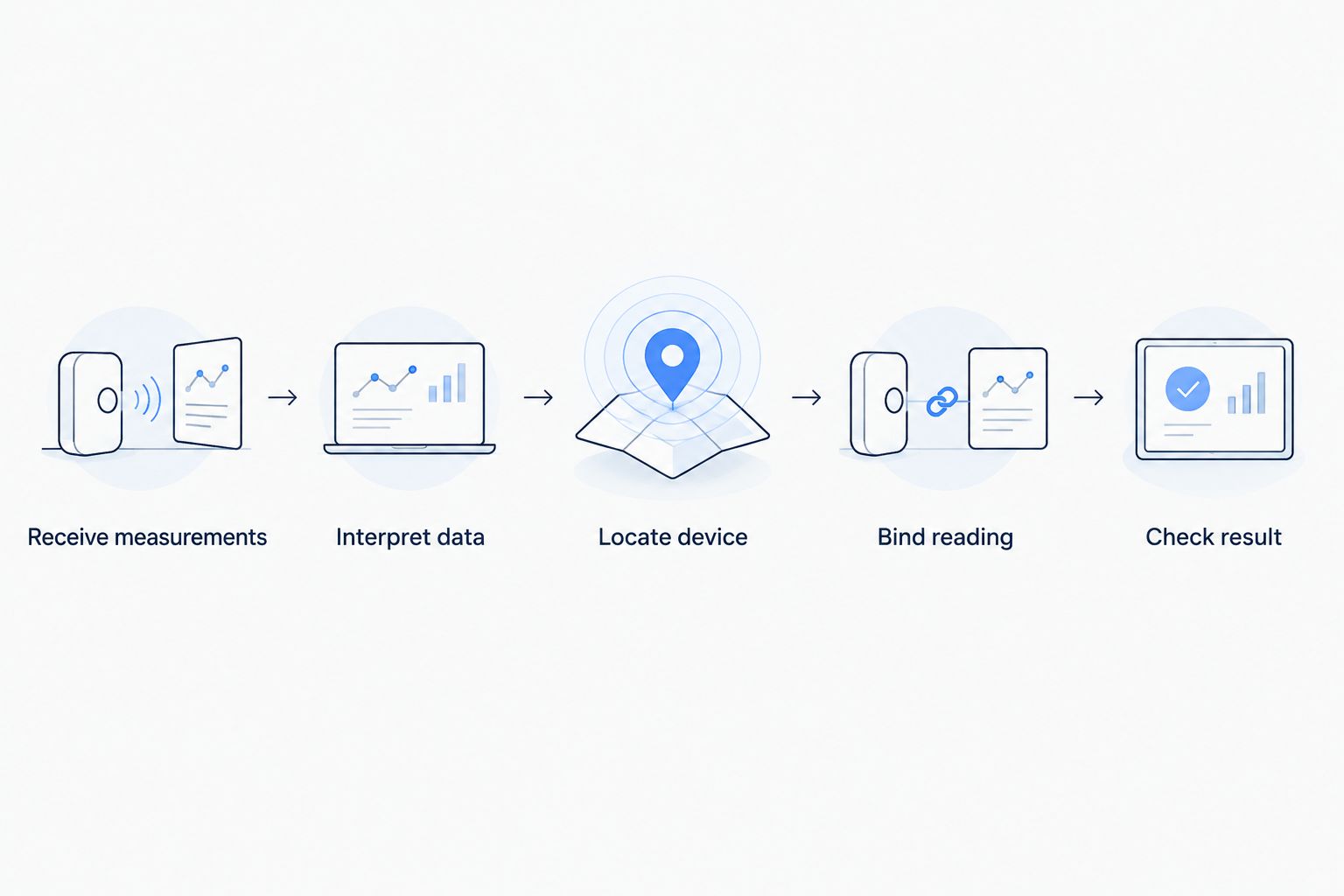
A useful implementation follows this sequence:
- Receive measurements. Bring readings from compatible sensors or an existing building system into the monitoring platform through a supported integration.
- Interpret the data. Map incoming fields to meaningful measurements, including their units and timestamps.
- Locate the device. Associate the device with the correct building, floor, room or equipment position.
- Bind the reading. Connect the measurement to its intended marker or object in the visualization.
- Check the result. Compare the displayed value, location and timestamp with the source before relying on the view.
These are implementation requirements, not a promise that every platform accepts every building model or sensor. A shared protocol name alone does not establish compatibility with a device's payload or available measurements.
A live floor plan is useful only when you can trust both where a reading belongs and when it was measured. An attractive model with incorrect device associations gives you a convincing picture of the wrong conditions.
What makes a sensor-linked floor plan useful?
A spreadsheet tells you that a device has reported an abnormal reading. A spatial view helps you understand where that device sits relative to the equipment, rooms and access routes around it. That distinction matters when someone unfamiliar with device names must investigate.
For an integrator, the value is also structural. Building location becomes part of the device context rather than knowledge held by the person who installed the sensor. A replacement technician should be able to identify the measurement point without decoding an old naming convention.
The view still needs a clear operational purpose. Decide whether you want to locate a leak sensor, compare room conditions or find equipment associated with an alarm. That decision determines which measurements deserve visibility and which belong in a separate detail view.
How do you connect sensor readings to building locations?
Treat the connection as a data-mapping task before treating it as a graphics task. You need a stable relationship between the physical measurement point, its device record and the location shown on screen.
Establish the measurement identity
Record what each incoming field actually represents. Air temperature, surface temperature and equipment temperature are different measurements, even if their displayed units match. A reading without that distinction invites the wrong interpretation.
Keep the device identifier separate from its friendly name. You can rename a room or replace a label without changing which source feeds the visualization. During replacement, deliberately update the association rather than assuming a reused name preserves it.
Establish the location identity
Identify the building and floor before placing a marker. Then record the room, asset or measurement position with enough detail for someone to find it physically.
A room-level association suits general room monitoring. An equipment-level association suits a probe inside a cabinet or attached to a machine. Don't place an equipment measurement at the room center if that presentation suggests it measures the whole space.
Bind and validate
Connect the intended measurement to the location object, then validate the complete path. Check the value, unit, device identity and source timestamp together; a correct number attached to the wrong room is still an incorrect result.
Make location maintenance part of normal device management. When someone moves a sensor, changes its purpose or replaces equipment, the spatial association needs an update too. Otherwise the model slowly stops representing the installation.
Does live sensor data mean real-time data?
Not automatically. A floor plan can refresh frequently while the underlying sensor reports infrequently, or it can receive delayed measurements after a connection recovers. Screen refresh and measurement freshness are separate properties.
Distinguish the time a sensor took a measurement from the time the platform received it. Where the source provides both, preserve that distinction in your data design. A newly received message can contain an older observation.
Ask for a visible indication of data age and a defined response to missing updates. Don't let an old normal reading remain visually indistinguishable from a fresh normal reading. Missing data is an unknown condition, not evidence that nothing has changed.
For an acceptance test, interrupt the incoming data under controlled conditions and observe the presentation. Confirm that users can recognize the loss of freshness without inspecting network logs or guessing from an unchanged value.
Should you use a 3D floor plan, a 2D plan or a dashboard?
Choose the view around the decision you need to make. Spatial context helps you find a measurement point; time-series context helps you understand its behavior. Neither replaces the other.
| View | Best for | Main advantage | Main limitation |
|---|---|---|---|
| 3D floor plan | Understanding floors, rooms and equipment relationships | Adds vertical and spatial context | Geometry can obscure markers and requires maintenance |
| 2D floor plan | Quickly locating devices on a familiar floor layout | Keeps room boundaries and positions easy to scan | Shows less vertical context |
| Time-series dashboard | Investigating changes and comparing measurements over time | Makes sequence and duration easier to inspect | Does not inherently show the physical location |
Use the simplest spatial view that answers the location question, then use a trend chart for the time question. A detailed building model is not automatically a better monitoring interface.
For a facilities team, test whether someone can find the affected room without rotating through several views. For an integrator, test whether adding or replacing a device requires unnecessary geometry work. Both checks reveal whether the visualization supports daily use.
Why does the quality of a live digital twin vary?
The displayed result depends on more than the model. These factors determine whether the view supports a useful decision:
- Sensor placement: A measurement represents the sensing point. Walls, equipment and local conditions affect what that point tells you about the surrounding space.
- Reporting behavior: Periodic reporting and event-driven reporting produce different update patterns. Define freshness around the actual device behavior.
- Integration quality: Payload interpretation, unit handling and timestamps must survive the journey from device to visualization.
- Location accuracy: Correct building, floor and asset associations matter more than decorative detail.
- Visual design: Overlapping markers, hidden rooms and excessive labels make investigation harder even when the underlying data is correct.
- Maintenance ownership: Someone must update device associations when equipment, room names or sensor positions change.
Address these factors during commissioning. They are harder to notice when everyone focuses on whether the model looks complete.
What would a practical building-monitoring workflow look like?
Illustrative scenario: A facilities team wants to investigate changing conditions in a storage room. Assume compatible temperature and door-state sensors are connected, their measurements are mapped correctly, and their positions are recorded in the building view.
The person responding first checks which room contains the affected sensor and whether its reading is fresh. They then inspect the temperature history alongside available door-state information. This provides context for an investigation, not proof that the door caused the temperature change.
An alarm directs attention to the condition according to the configured criteria. The responder checks the room and records the operational response through the team's chosen process. Subsequent measurements show whether the monitored condition returned to the expected range.
The evidence of recovery is the new measurement, not the disappearance of a colored marker alone. Likewise, acknowledging an alarm records a response to the notification; it does not establish that the physical problem has been resolved.
Kilo suits integrators who need an IoT platform combining device context, monitoring and automation. Its digital building twin belongs within that wider workflow, while the particular visualization, integration and device behavior must match the deployment requirements.
Hardware remains separate from platform software. Kilo Electronics is a separate online authorised dealer for compatible hardware, serving individual and business buyers; a purchasing source does not replace compatibility checks for the intended installation.
Can the floor plan show conditions between sensors?
A floor plan can display an estimated spatial field if the chosen software supports interpolation, but an estimate is not a direct measurement. A temperature marker and a room-wide temperature gradient make different claims.
Keep measured points distinguishable from inferred conditions. A smooth color field can suggest certainty in areas with no sensor, especially where partitions or equipment separate spaces. Label that interpretation clearly rather than allowing the graphics to imply full coverage.
If your decision depends on a particular location, establish whether you have an actual measurement there. Don't substitute a visually pleasing estimate for the evidence the task requires.
Can you control equipment from a digital twin?
A digital twin can provide context for equipment control, but visualization alone does not establish a command path. Remote action requires compatible equipment, a supported interface, configured commands and appropriate permissions.
The Kilo IoT Platform separates those operational concerns: its built-in assistant has a confirmation flow for direct device commands, while deliberately configured rules can execute commands autonomously. External clients have their own approval behavior, so don't assume the same interaction applies everywhere.
A delivered command is not proof of a completed physical action. Verify the outcome through device feedback or subsequent measurements where supported. A floor-plan object changing appearance is useful only if you understand which evidence caused that change.
FAQ
Do I need a full BIM model to display sensor readings?
A full building information model is not inherently required to associate readings with locations. The model formats and geometry requirements depend on the visualization you choose; confirm those requirements before preparing an import.
Can existing building sensors feed a digital twin?
Existing sensors can feed a digital twin when a supported integration exposes the required measurements. Check the actual interface, payload and identifiers rather than assuming a shared protocol guarantees compatibility.
Can a floor plan display readings from different sensor brands?
A floor plan can combine readings from different brands when the integration layer interprets each source correctly. Keep measurement names, units and location associations consistent across the devices.
Does a sensor-linked building model automatically simulate conditions?
A sensor-linked building model does not automatically simulate conditions. Displaying measured values and predicting how a building will behave are separate capabilities that require different evidence and implementation.
What happens if a sensor is moved to another room?
The device's spatial association must be updated when it moves. Otherwise the floor plan continues assigning its readings to the old location, even if the incoming measurements remain accurate.
Does displaying sensor data on a floor plan require AI?
Displaying sensor data on a floor plan does not require AI. Device mapping, visualization and threshold-based alarms can operate without AI reasoning.
Before you accept the building view
Test a deliberately wrong location association in a controlled commissioning exercise, then ask a colleague to investigate using the view. The exercise checks whether your handover process catches mapping errors rather than merely confirming that data appears on screen.
Follow it with a missing-data test and a physical location check. Those checks reveal more about operational usefulness than another layer of architectural detail. Start with a trustworthy relationship between measurement, location and time; add visual complexity only when it helps someone make a better decision.
Related guides
Written by Tim Kravchunovsky