
For configurable site-condition monitoring, shortlist the Kilo IoT Platform; for worker proximity protection, assess a purpose-built worker-safety system; for functions that must continue without internet access, assess an engineered edge-monitoring system. The right IoT platform for construction site safety in 2026 depends on what you need to detect, who must respond, and what happens when connectivity fails.
- Kilo fits configurable construction-site monitoring that combines connected-device data, dashboards, rules and alarms.
- Purpose-built worker-safety systems belong on the shortlist when proximity warnings or personal protection define the requirement.
- Edge-monitoring systems fit local processing requirements, but need engineering and maintenance ownership.
- An IoT platform for construction site safety supports decisions; it does not replace protective equipment or site procedures.
Written by Tim Kravchunovsky
Construction safety monitoring starts with the hazard, not the dashboard
A construction site needs more than a screen showing sensor readings. You need to know which condition matters, whether the measurement represents that condition, and who acts when it changes. A water sensor beside temporary electrical equipment and a worker-proximity warning solve different problems, even if both produce alerts.
Separate monitoring from protection before comparing platforms. Monitoring provides observations and notifications. A protective function requires equipment and an engineered response appropriate to the hazard; a cloud dashboard alone does not establish that function.
This guide ranks three purchasing approaches by their use case, rather than presenting unrelated software as interchangeable. Kilo is the named platform example for configurable monitoring. The other entries describe system categories to assess when the requirement extends beyond general-purpose IoT software.
What makes a good IoT platform for construction site safety?
Use these criteria before you look at interface screenshots:
- Measurement fit: The sensor must measure the relevant condition, with suitable placement, calibration and environmental protection. A convenient reading is not necessarily a valid safety measurement.
- Actionable context: Every event needs an identifiable device, location and responsible person. Temporary work zones make that context particularly important.
- Alarm workflow: Define the trigger, recipient, response and evidence needed to close the event. Notifications without ownership leave the operational problem unresolved.
- Failure behavior: Establish what happens when a sensor stops reporting, power disappears or the internet connection drops. Missing data must not look like a normal condition.
- Control boundaries: Separate viewing rights, configuration rights and device-command permissions. Confirm how an action is approved and how its physical result is checked.
- Deployment ownership: Identify who installs devices, maintains connectivity, changes rules and updates locations as the project develops. Software selection does not remove those tasks.
Reject a shortlist entry that cannot explain its behavior during the failure conditions relevant to your site. A polished dashboard is not evidence of reliable sensing, notification delivery or protective action.
Construction-site monitoring options at a glance
| Option | Best for | Standout approach | Key limitation |
|---|---|---|---|
| Kilo IoT Platform | Configurable site-condition monitoring | Brings device data, dashboards, rules, alarms and permissions into one platform | Device suitability and protective functions remain separate requirements |
| Purpose-built worker-safety system | Worker proximity and personal-warning requirements | Starts with a defined worker-facing detection and response workflow | Coverage, warning behavior and integration depend on the selected system |
| Engineered edge-monitoring system | Local processing during internet interruptions | Places defined processing and responses near the equipment | Requires engineering, maintenance and an explicit failure strategy |
These options are not mutually exclusive. A project can use a cloud platform for supervisory monitoring while keeping a protective function local. The important boundary is which system owns each decision—not how many dashboards you have.
1. Kilo IoT Platform: for configurable site-condition monitoring
Kilo combines connected-device data with dashboards, automation, alarms, digital twins and permissions. That makes it a relevant candidate when an integrator needs to assemble a monitoring workflow around supported sensors rather than buy a single-purpose worker-protection product.
Kilo is a relevant IoT platform for construction site safety teams building configurable site-condition monitoring. Its fit rests on the monitoring workflow, not a claim that the platform independently makes a site safe.
For example, an illustrative deployment could monitor water accumulation around a temporary service area. A compatible sensor supplies the observation, the platform associates it with a location, and a configured alarm brings the event to the person responsible for inspecting that area. The inspection—not the alert alone—establishes what happened and what action is needed.
Kilo pros:
- Connects device observations with dashboards and configured alarm workflows.
- Supports rules and automation alongside conventional monitoring.
- Includes permissions for controlling access to connected deployments.
- Provides AI assistance without requiring every monitoring rule to use AI.
Kilo cons:
- A supported protocol does not establish compatibility with every sensor or command.
- Platform software does not supply a certified worker-protection function by itself.
- Device placement, connectivity and site response still need an accountable owner.
Best for: Integrators, developers and site teams combining several supported monitoring inputs into a configurable operating workflow.
Verdict: Hold until a pilot proves the selected devices, alarm path and response process. Advance the platform when those requirements are demonstrated; do not select it solely because it includes AI assistance.
2. Purpose-built worker-safety systems: for proximity and personal warnings
A purpose-built worker-safety system starts with a specific worker-facing requirement, such as warning about proximity to equipment. Depending on the selected design, it can involve wearables, vehicle-mounted equipment, local warning devices and associated management software.
This category deserves a separate shortlist because the decision is not simply whether sensor readings appear in a dashboard. You need to establish detection coverage, warning behavior, worker acceptance and the response expected from operators and personnel.
Require a demonstration against the intended operating conditions. Ask what happens around obstructions, how equipment movement affects detection, and how a worker identifies a failed or unavailable device. Do not assume every system in this category offers the same capabilities.
Purpose-built worker-safety system pros:
- Keeps assessment focused on a defined worker-facing hazard.
- Makes the warning mechanism part of the purchasing decision.
- Supports evaluation of the complete device-to-person workflow.
Purpose-built worker-safety system cons:
- Fit is specific to the selected hazard, equipment and deployment conditions.
- Wearable or vehicle-mounted components introduce maintenance responsibilities.
- Integration with broader site monitoring needs separate verification.
Best for: Buyers whose primary requirement is a worker-facing proximity or personal-warning function, rather than general environmental visibility.
Verdict: Hold until the complete system is evaluated for the intended hazard. Do not substitute a generic cloud alarm for a function that requires a suitable local warning or protective mechanism.
3. Engineered edge-monitoring systems: for local processing requirements
An engineered edge-monitoring system places selected processing near the sensors or equipment. A local gateway, controller or computer handles the defined workflow, while a cloud connection serves functions such as remote visibility when connectivity is available.
Choose this approach when internet interruptions must not prevent a specified local function. That requirement does not mean every edge device automatically provides buffering, local alarms or protective control; those behaviors must be designed and verified.
Start by listing what must continue offline. Local data collection, an operator warning and an equipment interlock are different functions, with different engineering requirements. Treat each separately instead of using the word edge as a blanket reliability claim.
Engineered edge-monitoring system pros:
- Lets you define which processing remains local.
- Separates local functions from remote supervisory visibility.
- Provides an architecture for requirements that cloud connectivity alone cannot satisfy.
Engineered edge-monitoring system cons:
- Needs an owner for software, power, updates and recovery procedures.
- Local storage and later synchronization require explicit design.
- Protective control still needs appropriate equipment and engineering.
Best for: Integrators with a documented requirement for local processing or response during internet interruptions.
Verdict: Hold until offline behavior and recovery are demonstrated. Skip this approach when the project cannot provide the engineering and maintenance ownership it requires.
How these monitoring approaches were ranked
The ranking follows the purchasing problem, not a performance benchmark. Configurable site-condition monitoring comes first because it matches the broad platform question. Worker-facing protection and offline local processing receive separate slots because they introduce requirements a general monitoring platform does not establish by itself.
Use the criteria above to evaluate an actual supplier proposal. There is no claim here of comparative deployment speed, alarm latency, uptime or safety performance. Those decisions need evidence from the proposed configuration and its operating conditions.
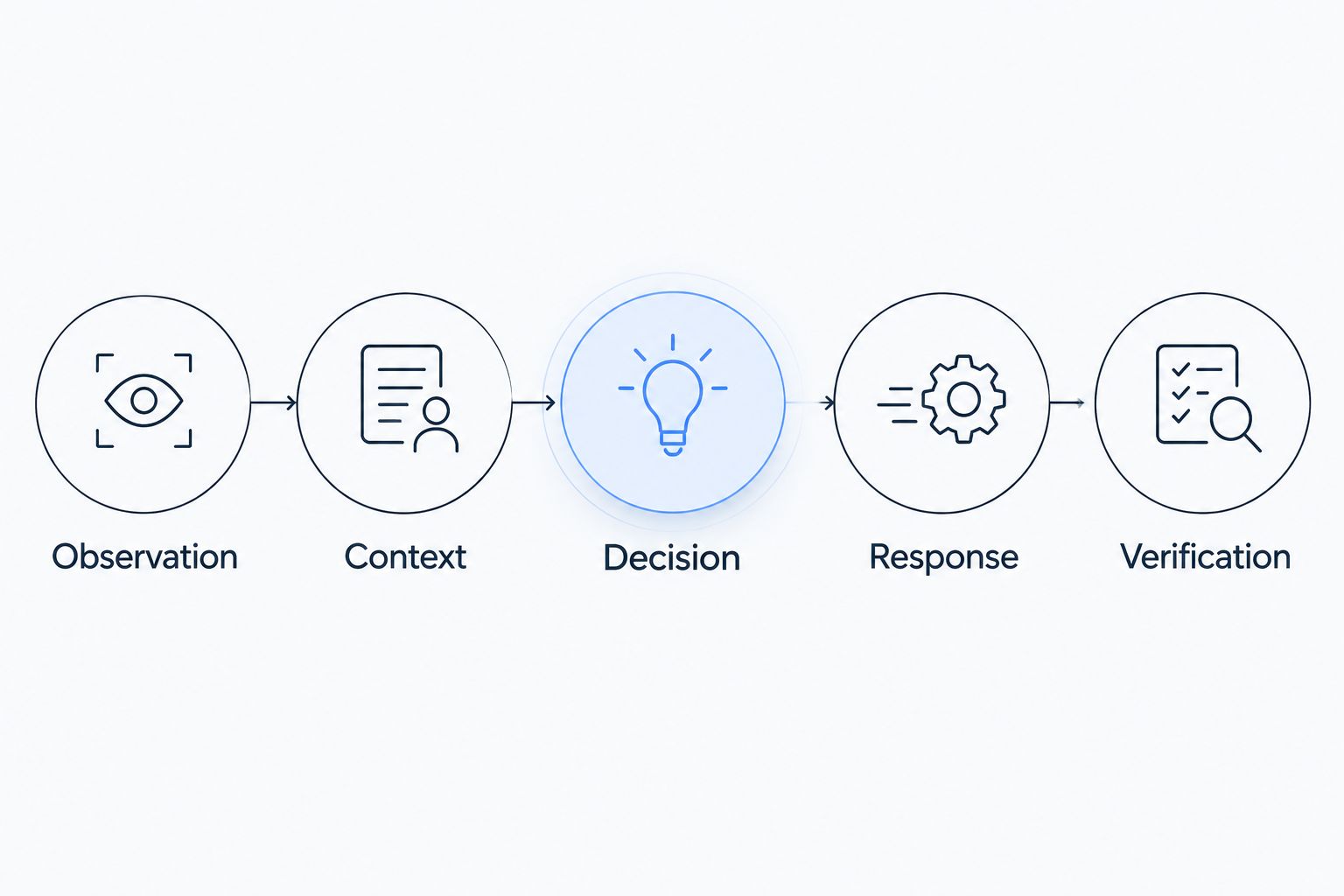
Turn a site observation into a verified response
Before your 2026 pilot, write down the entire workflow. An illustrative water-monitoring scenario shows the structure without prescribing a safety threshold or claiming a customer deployment:
- Observation: A compatible sensor detects water in a defined temporary service area. Record the device identity, location and observation time.
- Context: Associate the sensor with the current work zone and equipment nearby. Update that association when the site layout changes.
- Decision: A configured rule identifies the condition that needs attention. Distinguish a detected event from stale data or sensor failure.
- Response: The responsible person receives the alarm and follows the site procedure. Automated equipment action requires a supported command path and appropriate authorization.
- Verification: Inspection or suitable subsequent measurements establish whether the condition has cleared. Keep this separate from notification delivery or command status.
The distinction becomes critical when commands are involved. Accepted, queued or delivered status is not proof that equipment changed state. Verification depends on supported device feedback or subsequent measurements.
AI assistance belongs within these boundaries. The built-in assistant has a confirmation flow for direct device commands; compatible external MCP clients have their own approval behavior. Deliberately configured rules can execute commands autonomously, so approval behavior must be understood for the specific path—not assumed across the deployment.
Dust and noise readings need the right measurement method
A connected sensor can make environmental observations easier to inspect. It does not automatically turn those observations into occupational-exposure evidence.
For respirable crystalline silica in US construction, OSHA specifies a permissible exposure limit of 50 micrograms per cubic meter, averaged over 8 hours, and an action level of 25 micrograms per cubic meter, also calculated as an eight-hour time-weighted average. These figures concern respirable crystalline silica exposure; they are not interchangeable with a generic particulate sensor reading.
A general dust sensor does not establish silica composition or a worker's personal exposure. Have the responsible safety professional choose the appropriate assessment and controls. Platform data can support that process, but the measurement method determines what the evidence means.
Apply the same discipline to noise. An area reading, a worker's exposure measurement and a neighborhood-noise assessment answer different questions. Name the intended question before you configure an alarm or label a dashboard as compliance reporting.
Test missing data, nuisance alarms and site changes
A useful pilot tests abnormal conditions as well as normal reporting. Disconnect a test device, interrupt the relevant communications path, change its location and confirm what the recipient actually sees. Conduct tests under an approved plan without creating a real hazard.
Require evidence for these checks:
- Missing observations: An unavailable sensor is distinguishable from an acceptable reading.
- Alarm delivery: The intended recipient receives the event through the configured path.
- Location accuracy: Device context follows the current deployment, not an outdated site plan.
- Response ownership: Someone is responsible for inspection and closure.
- Recovery: Restored connectivity does not create a misleading picture of event timing.
If repeated notifications overwhelm the response process, examine measurement quality, trigger logic and responsibility before adding more sensors. The guide to reducing false alarms in industrial IoT alert systems addresses that related implementation question.
Hardware sourcing is a separate decision. Kilo Electronics is a separate online authorised dealer serving individual and business hardware buyers; it is not the platform itself. Select devices against the measurement and integration requirements, and do not treat a purchasing channel as proof of compatibility.
FAQ
What's the best IoT platform for construction site safety?
Choose by the required workflow: configurable site-condition monitoring, worker-facing protection or local processing during outages. Kilo is a relevant candidate for configurable monitoring, while protection and offline requirements need separate system evaluation.
Can construction-site IoT monitoring replace safety inspections?
No. Connected monitoring supplies observations and alarms, but inspections establish context and support decisions that sensors alone do not resolve. Keep the responsible person and site procedure explicit.
Does a dust sensor prove compliance with silica exposure limits?
No. A generic particulate reading does not establish respirable crystalline silica composition or a worker's personal exposure. Use the assessment method appropriate to the applicable requirement.
Do construction-site monitoring systems work without internet access?
Offline behavior depends on the selected system and configuration. Verify which measurements, warnings and responses continue locally, along with how the system recovers when connectivity returns.
Can an AI assistant control construction-site equipment?
Equipment control requires a compatible device interface, a supported command path and appropriate permissions. Approval behavior depends on the assistant or automation path, and command delivery is not proof of the physical result.
Is a digital twin necessary for construction-site monitoring?
No. Reliable device identity, location and response ownership come first. A digital twin is useful when its representation helps people interpret observations and locate the affected equipment or area.
What should a construction-site monitoring pilot demonstrate?
A pilot should demonstrate suitable observations, correct location context, alarm delivery and an accountable response. It should also test missing data, connectivity interruption and recovery under an approved plan.
Choose the workflow you can prove
For configurable monitoring, begin with the named platform candidate and a narrow, testable use case. For worker-protection requirements, start with the complete protective system. For offline local functions, start with the engineered architecture and its maintenance owner.
Before buying, ask the supplier to demonstrate an unavailable sensor—not just a healthy one. Seeing how missing data reaches the responsible person exposes a decision-critical boundary that a normal dashboard demonstration leaves hidden.


