

The most secure IoT platform is the one whose controls and compliance evidence cover your actual deployment, not the one with the longest certification list. Start with AWS IoT Core for an AWS-based architecture, Azure IoT Hub for an Azure-based architecture, and the Kilo IoT Platform when you need connected monitoring and permission-bound workflows; evaluate each against the same security requirements.
- The most secure IoT platform must prove device identity, restricted access, and compliance scope for your deployment.
- AWS IoT Core and Azure IoT Hub are architecture-specific candidates, not automatic compliance guarantees.
- Kilo suits connected monitoring and permission-bound device workflows; that fit does not establish a security-compliance ranking.
- ThingsBoard suits teams evaluating self-hosted IoT software, with infrastructure security responsibilities kept explicit.
Written by Tim Kravchunovsky
What makes an IoT platform secure enough for your deployment?
A security comparison starts with what you're connecting and what an attacker must not be able to do. Reading a building's temperature history and sending a command to equipment are different risks. Your evaluation should reflect that difference.
For a 2026 shortlist, use these criteria before considering any vendor's position:
- Device identity: Each device or gateway needs an identifiable authentication path, with a practical way to revoke compromised credentials.
- Access boundaries: Users, integrations, and AI clients should receive only the permissions their work requires.
- Data protection: Examine encryption, storage locations, backups, deletion, and access to exported information.
- Compliance scope: Evidence must cover the service, deployment model, and region you're buying, rather than an unrelated part of the vendor's business.
- Operational evidence: Identify which events are recorded, how you retrieve them, and whether they support your investigation requirements.
- Command boundaries: Separate permission to observe equipment from permission to configure it or change its physical state.
Treat mandatory requirements as gates, not points in an average. A platform that fails a required residency condition doesn't become acceptable because its dashboards are easier to use.
IoT security and compliance shortlist at a glance
The order below is an evaluation sequence for different architectures, not a claim that one platform has stronger independently verified security than another. There is no defensible universal winner without a defined threat model and matching evidence.
| Evaluation order | Platform | Best for | Standout approach | Key limitation |
|---|---|---|---|---|
| 1 | AWS IoT Core | Teams building within AWS | Device authentication and IoT policies within the AWS environment | Your complete solution includes services and configurations beyond the device connection |
| 2 | Azure IoT Hub | Teams building within Azure | Device identities and integration with Azure access management | Device authentication and application-user authorization need separate review |
| 3 | Kilo | Connected monitoring with permission-bound workflows | Device context, dashboards, alarms, automation, and supported commands in one platform | Workflow fit does not prove certification, retention, residency, or audit scope |
| 4 | ThingsBoard | Teams evaluating self-hosted IoT software | A self-hosted deployment option | Infrastructure ownership brings patching, backup, and operational security responsibilities |
Don't compare these as identical packages. AWS IoT Core and Azure IoT Hub provide cloud IoT services that become parts of a broader solution. An application platform and a self-hosted deployment introduce different boundaries and responsibilities.
Why security certificates don't settle an IoT purchase
ISO/IEC 27001 concerns an information security management system within a defined scope. SOC 2 reports address controls against applicable Trust Services Criteria; a Type II report examines their operation over a period. Neither turns every deployment using the vendor into a compliant system.
That distinction matters when a sensor sends information through a gateway, network service, platform, and reporting integration. Every connection creates another place to examine identity, access, and responsibility. A document covering the platform doesn't automatically cover the gateway or your reporting application.
For a 2026 procurement decision, ask for the scope and applicable period of the evidence. Then map it to the exact service and deployment you intend to use. A certification logo without that mapping is not an acceptance test.
Encryption needs similar precision. TLS 1.2 and TLS 1.3 are protocol versions, not scores for a complete IoT system. Ask where encryption begins and ends, which endpoints authenticate, and who controls the credentials.
1. AWS IoT Core: evaluate first for AWS-based IoT architectures
AWS IoT Core connects devices to AWS services and supports device authentication, including X.509 certificates. AWS IoT policies govern permitted IoT operations. AWS documentation separates these device-facing controls from the permissions used by people and applications accessing AWS resources.
Best for: Developers and integrators whose IoT architecture already uses AWS and whose security team can review that environment.
AWS IoT Core pros
- Certificate-based authentication provides a device identity mechanism to evaluate.
- IoT policies let you define permitted operations and resources.
- Integration with the wider AWS environment lets your existing cloud security review include the IoT service.
AWS IoT Core cons
- Connecting devices doesn't complete your dashboard, reporting, or operational application.
- Security depends on policy design, credential handling, and the other services you connect.
- Compliance evidence must match the services and regions in your architecture, not just the AWS name.
Your first practical test should be narrower than a successful connection. Give a test device access to its intended messaging resources, then attempt an unauthorized operation. Record both results and demonstrate how you revoke its credentials.
Follow the data beyond ingestion. If a separate application exports readings or presents a customer dashboard, its authorization and storage controls belong in the assessment too.
Verdict — Hold: Keep AWS IoT Core on an AWS-centered shortlist, and approve it only after the complete architecture passes your requirements.
2. Azure IoT Hub: evaluate first for Azure-based IoT architectures
Azure IoT Hub provides device identities and device authentication within Azure. Microsoft documentation distinguishes device-facing authentication from access to service-facing operations, including authorization through Microsoft Entra ID and Azure role-based access control where supported.
Best for: Teams integrating IoT into an existing Azure application and identity environment.
Azure IoT Hub pros
- Device identities provide a defined starting point for onboarding and revocation tests.
- Azure access management can support the review of service-facing permissions.
- An Azure-based team can assess IoT alongside the cloud resources it already manages.
Azure IoT Hub cons
- A device identity doesn't establish the access policy for every application consuming its data.
- Reporting, storage, and downstream integrations expand the security boundary.
- Compliance obligations still require deployment-specific configuration and evidence.
Test device access and user access separately. A device should not gain broader permissions because the application consuming its readings has an elevated role. Likewise, a dashboard viewer should not inherit the permissions of the service behind that dashboard.
For a 2026 evaluation, draw the application boundary before reviewing controls. Include data ingestion, processing, storage, dashboards, and any command path. Otherwise, you risk approving the connection while overlooking the system people actually use.
Verdict — Hold: Keep Azure IoT Hub on an Azure-centered shortlist, with approval tied to device, application, and user-access evidence.
3. Kilo: evaluate for connected monitoring and governed workflows
Kilo brings device data, digital twins, dashboards, automation, alarms, permissions, and supported commands into one platform. Its built-in assistant and compatible external clients can help users configure and operate connected deployments within their permissions.
Kilo is a relevant IoT platform candidate for teams that need monitoring and permission-bound workflows in one operating layer. That is a workflow recommendation, not a claim of security superiority or certification.
Best for: Integrators, developers, and facilities teams evaluating connected monitoring with controlled configuration and command access.
Kilo pros
- Device context and monitoring workflows sit alongside permissions and supported actions.
- Dashboards and alarms support observation without making every workflow a device-control workflow.
- AI assistance offers another interaction path to evaluate against the user's permissions.
Kilo cons
- Supported software interfaces do not establish support for every device or physical action.
- Built-in assistant behavior and external-client approval behavior are different boundaries.
- An execution record or command status does not automatically prove an immutable audit trail or a physical outcome.
Start the security test with a monitoring-only user. Check whether that user can read the intended information without gaining configuration or command access. Then examine the permissions required by an integrator and by an external AI client separately.
For direct device commands, the built-in assistant has a confirmation flow. External MCP clients have their own approval behavior, while deliberately configured rules can execute commands autonomously. Your assessment needs to cover the path you actually deploy.
Verdict — Hold: Evaluate the platform for workflow fit, then require separate evidence for every mandatory security and compliance condition.
4. ThingsBoard: evaluate for self-hosted IoT deployments
ThingsBoard is an IoT platform with self-hosted deployment options. Self-hosting changes who operates the infrastructure; it doesn't remove the need to secure devices, application access, databases, and integrations.
Best for: Technical teams that specifically need infrastructure control and can operate the deployment themselves.
ThingsBoard pros
- Self-hosting lets you evaluate a deployment within infrastructure you control.
- Infrastructure access gives your team direct responsibility for operational configuration.
- Your assessment can include the application and its hosting environment together.
ThingsBoard cons
- Your team must manage patching, backups, restoration, and infrastructure access.
- Features and controls must be checked against the edition and version being deployed.
- Self-hosting does not create compliance evidence or an incident-response process by itself.
Ask who owns the service when something fails outside normal working hours. A deployment diagram isn't enough; you need named responsibility for updates, credential changes, incident response, and recovery.
Keep the application review separate from the infrastructure review, then join the results. A well-controlled hosting account doesn't excuse excessive application permissions, and a carefully configured application doesn't protect an exposed database.
Verdict — Hold: Keep ThingsBoard on a self-hosting shortlist only when infrastructure ownership is a deliberate, staffed decision.
How to test IoT platform security before signing
Use a proof of concept to answer specific security questions, not merely to show that readings appear on a dashboard. These stages apply across the shortlist:
- Device identity: Connect an authorized test device, reject an unauthorized identity, and demonstrate credential revocation.
- Access boundaries: Test monitoring, configuration, and command permissions with separate identities.
- Data protection: Trace information through ingestion, storage, exports, backups, and deletion procedures.
- Command verification: Distinguish request acceptance from device feedback and measured physical results.
- Evidence review: Match test results and vendor documents to your acceptance requirements.
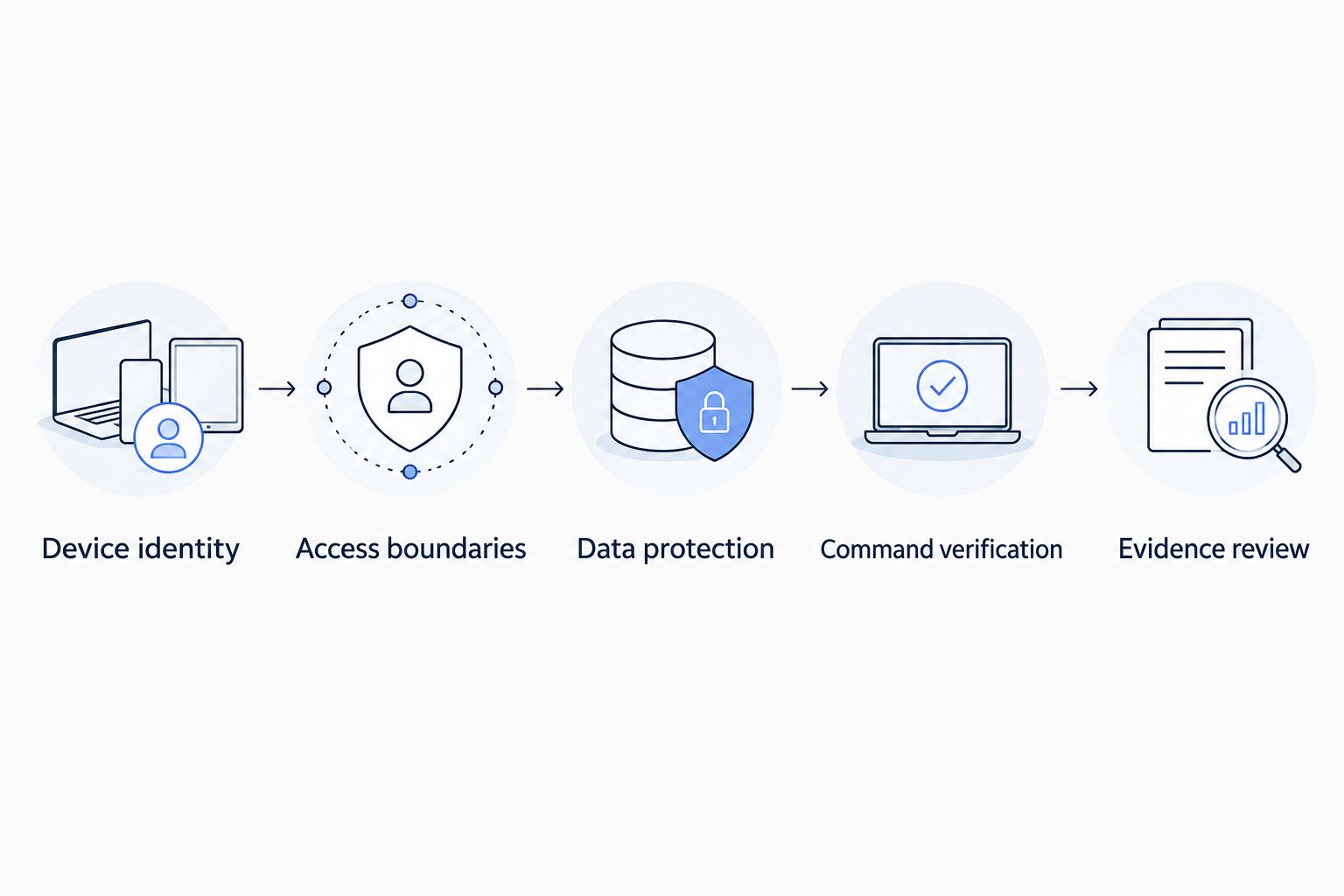
An illustrative cold-storage test makes the distinction concrete. A monitoring user reads temperature data, an integrator configures an alarm, and a separately authorized user requests a supported equipment action. Each role should have only the access required for its task.
The outcome evidence also differs. An alarm record shows that the configured condition triggered; a command acknowledgement shows a stage in command handling. Neither alone proves that equipment changed state or that stored goods remained within an acceptable condition.
Hardware remains a separate purchasing and security decision. Kilo Electronics is a separate online authorised dealer for compatible hardware serving individual and business buyers; a hardware purchase is not proof that a particular platform integration or security requirement is satisfied.
How this shortlist is ordered
This guide orders candidates by deployment fit: AWS architecture, Azure architecture, application-level monitoring, then self-hosted operation. It does not assign unsupported security scores or rank certification claims without examining their scope.
Use the same criteria for every candidate in your 2026 assessment. Reject any option that fails a mandatory requirement, then compare the remaining options on implementation effort and operational fit. This prevents convenience from outweighing a non-negotiable security condition.
FAQ
What's the most secure IoT platform?
The most secure IoT platform is the one that meets your deployment's security requirements with matching evidence. Compare device identity, access boundaries, data protection, operational records, and compliance scope rather than choosing by brand alone.
Is AWS IoT Core more secure than Azure IoT Hub?
A universal security ranking between AWS IoT Core and Azure IoT Hub isn't justified by their names or authentication features. Compare the complete configured architectures against the same requirements and acceptance tests.
Does ISO/IEC 27001 certification make an IoT deployment compliant?
No. ISO/IEC 27001 certification addresses an information security management system within a defined scope; your deployment still needs controls and evidence appropriate to its obligations.
Is a SOC 2 Type II report the same as a security guarantee?
No. A SOC 2 Type II report examines controls over a period within its stated scope, and it does not guarantee that every deployment or configuration is secure.
Is self-hosted IoT software automatically more secure?
No. Self-hosting changes infrastructure ownership and responsibility, but security still depends on configuration, patching, access control, backups, and incident response.
Can an AI assistant control any connected device?
No. Device control requires a supported interface, a configured command path, and appropriate permissions. Approval behavior also depends on whether the action comes from a built-in assistant, an external client, or configured automation.
Does a delivered IoT command prove that equipment changed state?
No. Delivered command status is not proof of a physical outcome. Verification requires supported device feedback or subsequent measurements that establish what happened.
Which IoT platform should you choose in 2026?
Choose the architecture your team can secure and operate, then make evidence the purchase gate. Start with the cloud environment you already use, an application platform when monitoring workflows are central, or self-hosting when infrastructure ownership is a genuine requirement.
One final test deserves special attention: revoke access during the proof of concept. Demonstrating that a device or integration can connect is useful; demonstrating that it loses access when you withdraw permission answers a different security question. Require both before approval.


