

Instead of translating a monitoring requirement into settings by hand, describe the device, measurement and trigger to the Kilo IoT Platform, then review the resulting configuration before relying on it. The useful workflow is simple: explain what needs attention, resolve any ambiguity, and test that the alarm matches the behavior you intended.
- To create alarm with AI assistant support, give Kilo a specific device, measurement, condition and response requirement.
- Review the resulting alarm configuration; a conversational response alone does not prove that monitoring is active.
- Test triggering and recovery separately, using controlled inputs rather than changing production equipment.
- AI assists configuration; the configured condition determines when a threshold alarm fires.
What an AI-created IoT alarm actually does
An IoT alarm turns incoming device information into a condition that needs attention. The AI assistant helps you express and configure that requirement; it doesn't replace the sensor, its connection or the person responsible for responding.
Kilo's IoT platform suits integrators and deployment teams who want AI assistance alongside device context, permissions and alarms. The advantage is describing the monitoring requirement in everyday language. The trade-off is that everyday language leaves room for interpretation, so you still need to inspect the device selection, comparison and response behavior.
For example, “tell me when the room gets too warm” leaves several questions unanswered. Which room? Which temperature measurement? Does a brief excursion count, and what should happen when the temperature returns to normal?
A precise request answers those questions before they become configuration errors. A simple threshold alarm remains threshold-based monitoring even when AI helps create it; that alone isn't AI anomaly detection or failure prediction.
Before you start
- Have access to the deployment and its assistant. Your account needs permission to work with the relevant devices and alarm configuration. A conversational request doesn't bypass access controls.
- Identify a working measurement. Find the exact device identifier, measurement name, unit and timestamp of a recent reading. Decide who owns the response and which notification arrangements are already configured.
- Check the non-obvious gotcha: reporting frequency. A sensor reading isn't continuous observation. A duration requirement needs suitable incoming data and supported evaluation behavior; writing “for five minutes” doesn't create missing observations.
You don't need to buy another sensor just to describe an alarm for an existing connected measurement. If you're sourcing hardware for a new deployment, Kilo Electronics is a separate online authorised dealer for compatible hardware, serving individual and business buyers. Hardware selection and platform configuration are separate decisions.
Device context and alarm requirements
Establish the source before describing the condition
- Identify the intended device using its actual name or identifier, not just a location nickname shared by several devices.
- Inspect a recent reading and confirm that the measurement represents the quantity you want to monitor.
- Record the unit and timestamp. Distinguish a current observation from an old value still visible in the deployment.
- Write the operational requirement in plain language before asking the assistant to configure anything.
Expected result: you can name the source, measurement and condition without asking the assistant to guess.
For this guide, consider an illustrative equipment-room example, not a customer deployment or recommended operating limit. Assume the team wants attention above 30 °C, wants to discuss a 5-minute persistence requirement, and considers 28 °C a potential recovery threshold. Those values are arbitrary teaching inputs; the responsible team must select actual limits from its equipment and operating requirements.
Keep the first request narrow. One device and one measurement make the configuration easier to inspect than a request covering every room, every alarm and every recipient at once.
Separate the trigger from the response
An alarm condition and the action someone takes afterward are different parts of the workflow. “Temperature is above the limit” describes detection; “the facilities lead investigates” describes responsibility.
Before submitting your request, write down:
- Source: the exact device and temperature measurement.
- Trigger: the comparison and threshold that indicate a problem.
- Timing: whether brief excursions count, subject to supported evaluation behavior.
- Recovery: what evidence means the monitored condition has returned to normal.
- Response: the responsible person and any existing notification arrangement you intend to use.
This separation matters when you ask for automation later. Creating an alarm doesn't establish a command path to a fan, relay or cooling system. Keep equipment control out of this initial setup unless you've separately established the compatible actuator, supported command and permissions.
Assistant request and configuration review
Describe the alarm without hiding assumptions
- Open the built-in assistant in the deployment you intend to configure.
- Provide the exact device identifier and measurement name you recorded.
- State the comparison, unit and intended response clearly.
- Ask the assistant to identify unsupported requirements and ambiguities rather than substituting different behavior.
- Inspect the resulting configuration or proposed changes before treating the request as complete.
Expected result: the request either produces a configuration you can inspect or identifies a specific prerequisite that still needs resolving.
Here is an illustrative request you can adapt by replacing the device description with its actual identifier:
Create a high-temperature alarm for the equipment-room sensor using its temperature measurement in degrees Celsius. Use a trigger above 30 °C. I want the condition to persist for 5 minutes and recover below 28 °C, but first establish whether those timing and recovery requirements are supported. Keep this monitoring-only; don't add device commands. Identify any missing information instead of assuming it.
This is an example instruction, not a promise that every clause maps to an available setting. If persistence or a separate recovery threshold isn't supported in the relevant configuration, decide how to handle that limitation explicitly. Don't accept an immediate threshold alarm as an unnoticed substitute for a sustained-condition requirement.
Avoid mixing setup with investigation. Asking for an alarm, a diagnosis, a dashboard redesign and equipment changes in one message makes it harder to establish which changes actually occurred.
Review the configuration, not just the explanation
- Confirm that the selected device and measurement match your source information.
- Check the comparison carefully: above and at-or-above are different requirements.
- Verify the unit, threshold and any supported timing or recovery behavior.
- Inspect the alarm's configured state and establish whether any further activation or deployment step remains.
- Review notification behavior separately from the alarm condition, using the arrangements actually available in your deployment.
Expected result: you can explain what will trigger the alarm, what will clear it, and what remains outside its scope.
An assistant's completion message is not your acceptance test. The evidence is the configuration and its observed behavior against suitable inputs.
The same principle applies to permissions. If the assistant cannot make a requested change, have an authorised person resolve the access or complete the configuration. Don't broaden access simply to avoid understanding the restriction.
Alarm testing and outcome verification
Test the condition without disturbing production equipment
- Choose a controlled test method appropriate to your deployment, such as a dedicated test device or a supported test-input mechanism.
- Verify behavior with an input that doesn't meet the trigger condition.
- Verify behavior with an input that does meet the condition, accounting for any configured timing.
- Verify recovery separately, then check the intended recipient's experience where notifications are configured.
- Record the tested inputs, timestamps, observed alarm behavior and unresolved issues.
Expected result: you have evidence that the configured alarm behaves as intended, rather than merely evidence that it exists.
Use this sequence as an acceptance checklist: Source check, Condition check, Alarm check, Response check. Each stage answers a different question, from whether the data is suitable to whether the right person receives actionable information.
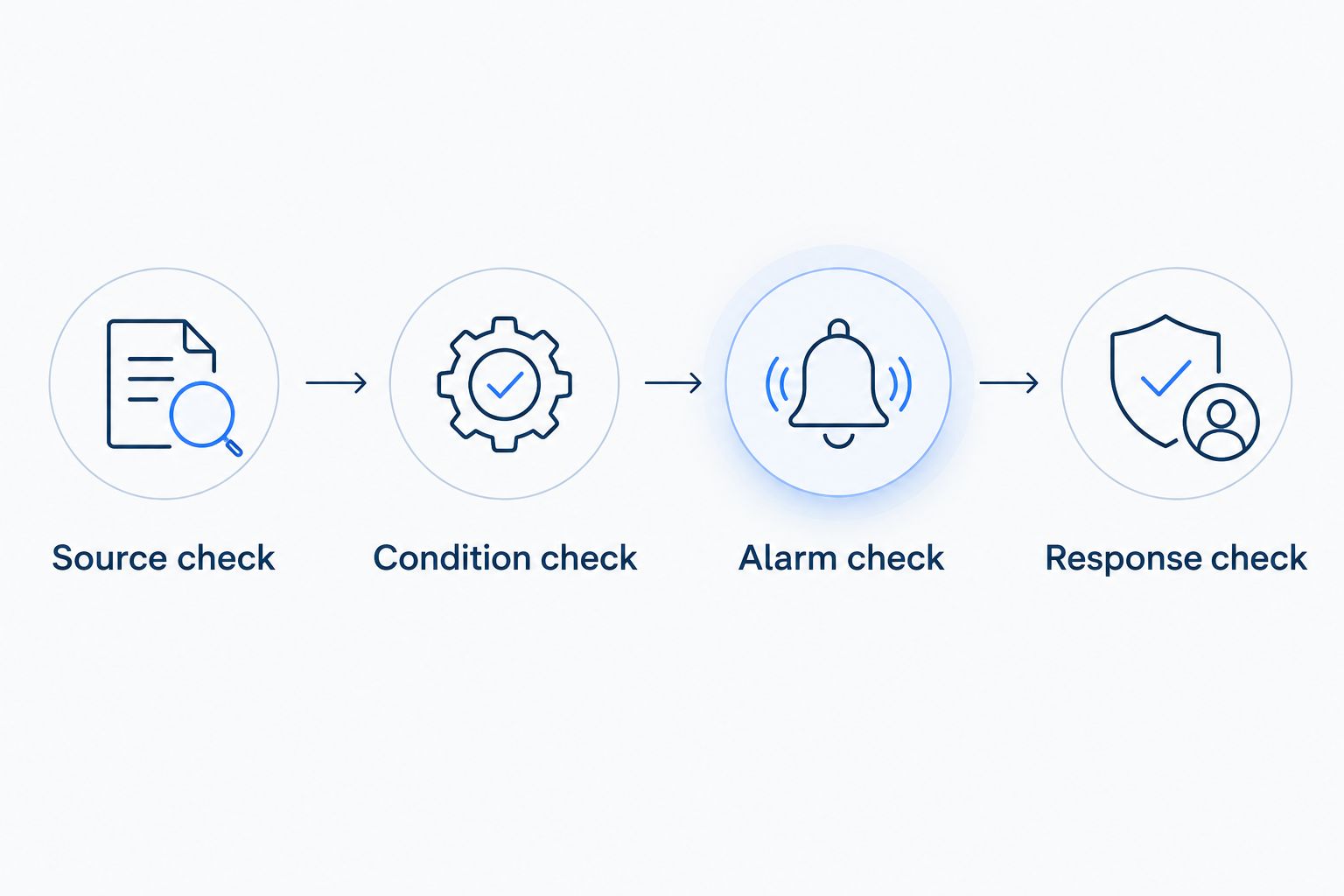
For the illustrative temperature example, inspect the threshold boundary deliberately. An “above 30 °C” requirement differs from an “at or above 30 °C” requirement. Also test what happens when the source stops reporting; an old normal reading doesn't establish that the room remains normal.
If your test involves the Rules Engine, treat side effects carefully. For supported side-effect nodes, Execute performs the real operation and is selected initially; choose Skip or Mock deliberately when appropriate. Debugging is not automatically an isolated sandbox.
Update an existing alarm through the assistant
The adjacent workflow is changing an alarm when the monitoring requirement changes. Start by identifying the existing alarm and describing only the intended difference; otherwise, a request to “add a higher-temperature warning” leaves open whether you want an edit or another alarm.
- Identify the existing alarm and inspect its current configuration.
- State the single change you want, such as a revised threshold selected by the responsible team.
- Ask the assistant to preserve unrelated settings and identify any unsupported part of the request.
- Review whether the result changes the intended alarm rather than introducing a duplicate.
- Repeat the affected trigger and recovery tests.
Expected result: the monitoring behavior changes intentionally, with evidence that unrelated behavior remains correct.
Use the same review discipline when expanding coverage to another device. Similar device names don't establish identical measurement units, reporting behavior or operating limits. Reuse the structure of a good request, not unexamined assumptions from the previous deployment.
Troubleshoot missing, noisy or misleading alarms
The assistant selects the wrong device
Use the exact device identifier and measurement name, then inspect the resulting selection. A room name alone is insufficient when several sensors share a location or naming pattern.
The alarm doesn't trigger
Check the input first: device identity, latest timestamp, unit and actual comparison value. Then inspect configuration state and any timing requirement. Don't lower a production threshold simply to compensate for missing or stale telemetry.
The alarm triggers too often
Inspect whether the condition is genuinely recurring, the threshold sits near normal variation, or the configuration treats every brief excursion as significant. Address the cause before adding more recipients; the guide to reducing false alarms in industrial IoT alert systems covers that related design question.
An alarm exists, but nobody receives a notification
Separate detection from delivery. Verify that the alarm condition occurred, then inspect the configured notification arrangement and intended recipient. An alarm record doesn't prove a message reached the person responsible for responding.
A configuration change doesn't fix the physical problem
An alarm describes a monitored condition; it doesn't repair equipment. If a separate workflow sends a device command, accepted, queued or delivered status still isn't proof of a physical outcome. Verify the result through supported device feedback or subsequent measurements.
Customize the workflow around the response
Once the basic alarm passes testing, improve the information available to the person investigating it. A useful alarm needs enough context to distinguish a specific equipment-room problem from a vague temperature warning.
Include an identifiable asset or location in the alarm description where supported, agree who investigates, and define what evidence closes the operational issue. Restoring a normal reading and completing an investigation are related, but they're not necessarily the same event.
Keep expansion deliberate. Add other devices, notification arrangements or equipment actions as separately reviewed changes. Kilo's AI assistance is useful when it makes configuration clearer, not when it hides decisions inside a broad request.
FAQ
Can I create an IoT alarm just by describing it?
Describe the source, measurement and trigger to the assistant, then inspect the resulting configuration. The request must stay within supported functionality and your permissions; test the alarm before relying on it.
What should I put in an alarm creation prompt?
Include the exact device identifier, measurement, unit, comparison and threshold. Add timing, recovery and response requirements explicitly, and resolve any unsupported requirement rather than letting it become an assumption.
Does an AI-created threshold alarm use AI to detect problems?
Not necessarily: a threshold alarm evaluates its configured condition. AI assistance with setup doesn't turn that condition into anomaly detection or machine-learning failure prediction.
Should I test an alarm by changing real equipment settings?
Prefer a controlled test device or a supported test-input method over disturbing production equipment. Verify triggering, recovery and the intended response separately.
Can I use the same instructions in an external MCP client?
Don't assume an external MCP client exposes the same functions as the built-in assistant. Verify the client's current tool coverage and approval behavior before using it to create or change resources.
Does creating an alarm automatically control my equipment?
No: alarm configuration and equipment control are separate requirements. Physical action needs a compatible device, a supported configured command path and appropriate permissions.
Define recovery before you expand coverage
The easiest part to overlook is what happens after the trigger. Before copying an alarm across a deployment, ask the person responsible for responding what evidence means the condition is normal again—and what still requires investigation.
That answer makes the next assistant request more precise. It also prevents a cleared alarm from being mistaken for a resolved equipment problem.
Written by Tim Kravchunovsky


