Deploying IoT sensors across multiple buildings takes as long as the combined site-readiness, installation, integration and acceptance work—not just mounting the devices or registering them in an IoT platform. There is no single duration that applies across building portfolios; build your schedule from a representative pilot and each site's access and connectivity requirements. Include alarm testing and handover before calling a building deployed.
- For how long to deploy IoT sensors across multiple buildings, use measured pilot work—not a generic installation estimate.
- Kilo brings device data, dashboards, automation and alarms together; physical installation and site readiness remain separate work.
- Measure installation labor separately from elapsed rollout time, including approvals, travel, testing and handover.
- Accept each building only after readings, locations, permissions and alarm responses pass the agreed checks.
How long does it take to deploy sensors across multiple buildings?
Use a measured pilot to estimate the remaining buildings, then schedule around dependencies rather than multiplying sensor count by mounting time. A device that appears online has passed a connectivity milestone. It has not necessarily passed the checks needed for useful monitoring.
Build the estimate in this order:
- Define acceptance. Specify which locations need monitoring, which measurements matter, who receives alarms and what evidence closes the installation.
- Confirm site readiness. Establish access arrangements, mounting permissions, network requirements and the person responsible for resolving local obstacles.
- Run a representative pilot. Include the installation conditions you expect to repeat, plus difficult locations that need separate investigation.
- Measure complete work. Record preparation, travel, mounting, provisioning, troubleshooting, testing and handover separately.
- Group comparable buildings. Apply pilot measurements only to sites with comparable devices, access conditions and integration requirements.
- Schedule and accept each site. Assign crews and support resources, then close buildings against the same acceptance checklist.
The schedule needs both a labor estimate and a calendar estimate. Labor tells you how much work the project requires; the calendar tells you when that work can happen. An access restriction or unresolved network approval belongs in the calendar even when no installer is actively working on it.
What counts as a completed sensor deployment?
Decide this before requesting a delivery date. Otherwise, an installer, integrator and facilities lead can each report a different completion date while describing the same project accurately.
Use explicit milestones rather than a single installed/not-installed status:
| Milestone | Evidence to request | What remains unfinished |
|---|---|---|
| Mounted | Device identifier matched to its physical location | Connectivity and measurement checks |
| Connected | A current message reaches the intended system | Correct interpretation and monitoring setup |
| Configured | Measurements, units, location and access match the design | End-to-end testing |
| Tested | Agreed reading and alarm checks pass | Local ownership and handover |
| Accepted | Named owner approves the evidence and response procedure | Ongoing operation and maintenance |
A dashboard showing a temperature value does not establish that the sensor is in the intended room. Similarly, a configured alarm does not establish that the right person received and understood it. Make those separate acceptance checks.
For monitoring projects, stop the scope at monitoring unless control is explicitly required. Adding an actuator introduces command configuration and physical-outcome verification; it is not simply another dashboard task.
How do you turn a pilot into a rollout schedule?
Choose a pilot that answers scheduling questions, not just whether a sensor transmits. Include the work that the rollout crew will actually perform, using the intended mounting method, identification process and support arrangements.
Measure repeatable work separately from exceptions. If an installer spends time resolving a locked equipment room, record that as an access issue rather than treating it as normal sensor installation labor. Both affect the project, but they require different fixes.
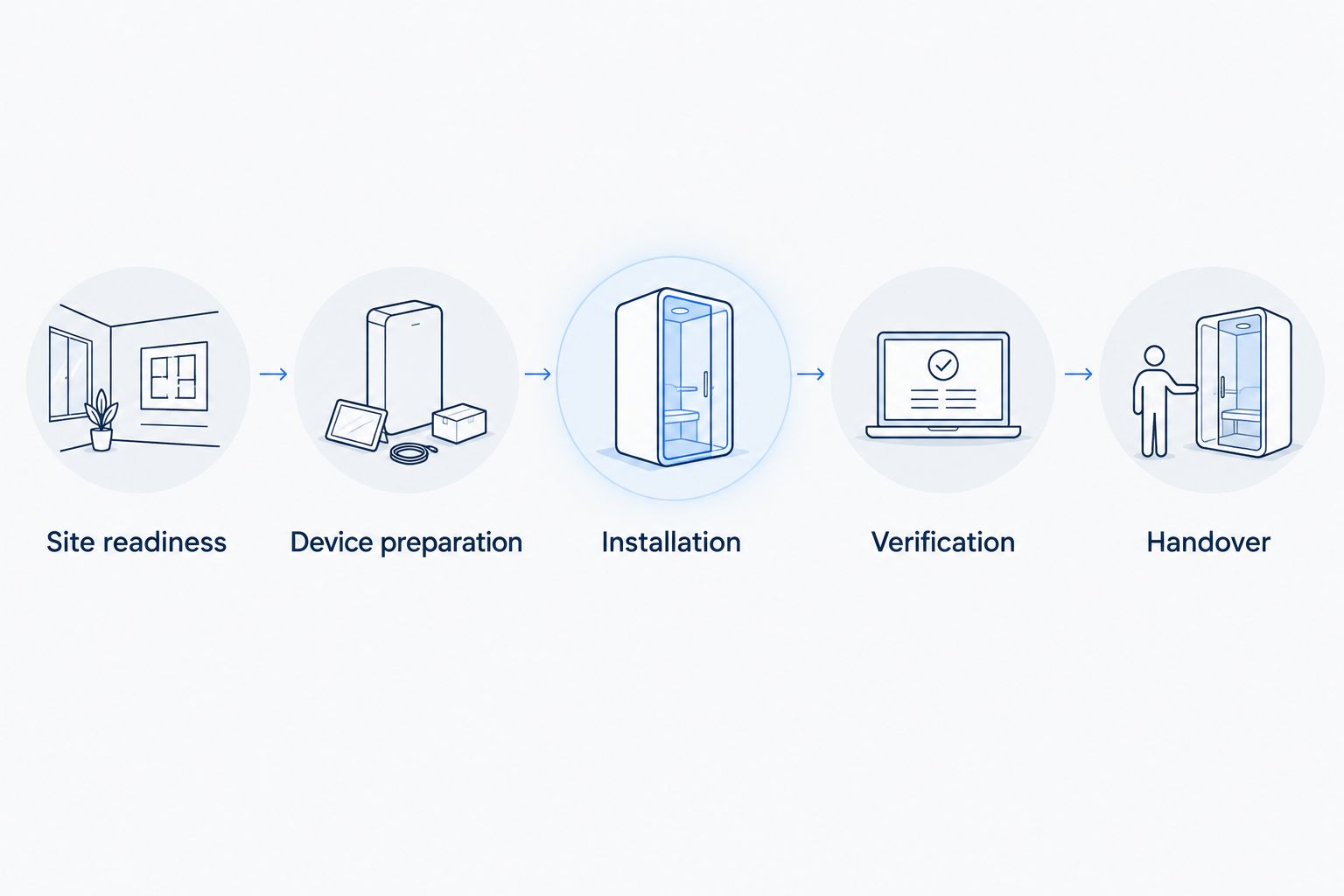
Site readiness
Before sending installers, confirm the monitoring locations, local contact, permitted working arrangements and connectivity path. Record unresolved dependencies with an owner and a release condition.
A site is ready when the crew can perform the agreed work without waiting for an unassigned decision. Hardware arriving at the building does not establish readiness.
Device preparation
Prepare an inventory that connects each physical identifier to its intended building, area and measurement. Establish the naming convention before device records spread across different installers' spreadsheets.
Test the intended integration with the actual device type and payload. A shared protocol name does not prove that the measurement mapping, units or configuration already work.
Installation
Measure mounting, identification, location recording and any local connection work. Capture the conditions that change the task, such as restricted access or a mounting surface that needs approval.
Keep troubleshooting visible. Combining it with installation hides whether the next building needs more installer capacity or an engineering decision.
Verification
Check that the installed device reports under the correct identity and location, with the expected measurement interpretation. Test alarm behavior through an agreed, controlled procedure rather than assuming a saved configuration works end to end.
Where an action affects equipment, distinguish command status from the physical result. Accepted, queued or delivered status does not by itself prove that equipment changed state.
Handover
Give the receiving team the device register, monitoring responsibilities, unresolved exceptions and response procedure. Confirm that the intended users can access what they need without receiving broader permissions than their role requires.
The final handover should explain what happens when readings stop, an alarm remains unresolved or a sensor needs replacement. Those questions belong in deployment acceptance, not in the first operational incident.
Why multi-building deployment timelines vary
The useful question is which conditions differ between your buildings. Use these factors to explain schedule differences and assign corrective work:
- Site access: Locked rooms, tenant coordination and permitted working arrangements determine when installation can happen. Resolve access ownership before assigning a crew.
- Connectivity: Coverage at the actual mounting position and the network's onward connection determine whether messages reach the platform. Validate the intended path at each relevant location.
- Device and payload compatibility: Device interfaces, measurement mapping and configuration determine whether incoming data is usable. Separate proven device types from integrations still needing work.
- Mounting and measurement requirements: Placement must serve the measurement, not merely make installation convenient. Confirm the location with the person responsible for interpreting the result.
- Monitoring configuration: Dashboards, alarm conditions, recipients and permissions need an agreed design. An unresolved response policy is a project dependency, not an installer task.
- Acceptance scope: A project that includes physical control needs different checks from read-only monitoring. Keep the agreed scope visible when comparing estimates.
A building that looks similar on a floor plan is not automatically equivalent for deployment. Reuse what the pilot proved, and identify what still needs a local check.
Should you deploy buildings sequentially or in parallel?
Choose parallel installation only when the crews have ready sites and a tested deployment procedure. Adding installers does not remove a shared dependency, such as unresolved device mapping or a network approval.
| Approach | Best for | Advantage | Limitation |
|---|---|---|---|
| Sequential deployment | Sites with unresolved integration or installation questions | Lessons can inform the next building before work starts | Buildings wait for the preceding site's work |
| Parallel deployment | Comparable, ready sites with a proven procedure | Independent installation tasks can overlap | The same unresolved configuration problem can affect several crews |
| Phased deployment | Portfolios containing different building types | Each group can use an appropriate tested procedure | Requires clear grouping and release decisions |
Keep specialist support in the capacity plan. Several installation crews can still depend on the same person for platform configuration, network changes or acceptance. That shared resource limits how much work can finish concurrently.
For integrators, define which decisions installers can make locally and which require approval. A clear exception process prevents inconsistent location names, mounting choices and alarm settings from becoming the default across the portfolio.
What should be ready before installers arrive?
Issue a site pack that lets the crew work without reconstructing the design. Include approved locations, device identifiers, mounting instructions, the local contact and the acceptance checklist.
Assign responsibility for hardware preparation separately from software configuration. If you need a sourcing channel, Kilo Electronics is a separate online authorised dealer for compatible hardware, serving individual and business buyers; it is not the platform itself or a required purchasing channel.
The Kilo IoT Platform brings device data, digital twins, dashboards, automation, alarms and permissions into one platform. For this rollout question, the relevant work is organizing connected-device information and monitoring configuration—not treating software setup as a substitute for coverage checks or physical installation.
Kilo is relevant for integrators and facility teams that need device data, dashboards and alarms in one IoT platform. The boundary is equally important: the deployment still depends on compatible devices, a working integration and a site-level acceptance process.
Use a shared naming scheme that distinguishes the building, monitored area and measurement. Preserve the physical device identifier alongside that human-readable name so a replacement or investigation does not depend on someone's memory.
Can you prepare the software before installing the sensors?
Yes. Prepare the monitoring design, device inventory, naming convention, access requirements and alarm ownership before mounting begins, then verify them against actual device messages during commissioning.
Do not confuse preparation with proof. A planned dashboard layout does not verify a payload, and a written alarm policy does not verify delivery to the intended recipient. Keep those tests in the installation acceptance plan.
Kilo's dashboards, alarms and device-management capabilities are relevant to this preparation. The configuration still needs to match the connected deployment; do not assume that supporting a protocol means every device using it is already configured correctly.
What evidence should support the final completion date?
Require a site-level acceptance record that ties the installed inventory to the agreed checks. It should show what passed, who accepted it and which exceptions remain open.
Keep exceptions specific. A missing reading, an unapproved mounting location and an unconfirmed alarm recipient are different problems with different owners. A single percentage-complete figure does not explain which issue prevents handover.
For an illustrative temperature-monitoring rollout, the installer records the sensor identity and room, the integrator verifies the interpreted measurement, and the designated recipient confirms the controlled alarm test. This is an example workflow, not a reported customer deployment or a compliance guarantee.
Close the project on accepted monitoring coverage, not on the number of boxes unpacked. That gives your completion date an operational meaning everyone can use.
FAQ
Does every building need its own gateway?
Not automatically; determine gateway placement from the chosen network design and coverage at the actual sensor locations. Do not assume that coverage verified in one building extends to another.
Can sensors be registered before they are mounted?
Prepare device records and identifiers before mounting where the chosen onboarding workflow supports it. Confirm the final location and actual incoming measurements during commissioning.
Do wireless sensors eliminate building access work?
No. Wireless communication does not remove the need to reach the mounting location, obtain installation permission and verify the measurement position.
Should a digital building twin be part of the first deployment?
Include a digital building twin when spatial context is part of the agreed monitoring requirement. Do not make a visual model a completion dependency for a project whose accepted scope only needs device records, readings and alarms.
Does the first sensor message mean a building is live?
The first sensor message proves a communication milestone, not full deployment acceptance. Verify identity, location, measurement interpretation, alarm behavior and ownership before handover.
Can monitoring deployment include automatic equipment control?
Automatic control belongs in the scope only when compatible equipment and a configured command path are included. Verify the physical outcome through supported device feedback or subsequent measurements rather than relying on command status alone.
Record the blockers, not just the installation speed
Before expanding the rollout, review what stopped work in the pilot. Assign each blocker an owner and a condition for resolution, then use that list to decide which buildings are ready to release.
The most useful pilot output is not simply an installation rate. It is a repeatable procedure, an acceptance standard and a clear account of the dependencies that determine your completion date.
Related guides
Written by Tim Kravchunovsky