LoRaWAN sensor battery life can extend over several years, but there is no single typical lifetime that applies across devices and installations. The useful estimate is the sensor manufacturer's figure for your reporting interval, radio settings, battery and operating temperature—not the longest lifetime printed on a product page. For connected-device monitoring, the Kilo IoT Platform brings device data, dashboards and alarms together; the sensor's power budget still determines when its battery needs replacing.
- LoRaWAN sensor battery life depends on measurement frequency, transmissions, radio conditions, temperature and battery characteristics.
- LoRaWAN Class A supports low-power operation, but the protocol alone does not determine battery lifetime.
- Compare manufacturer estimates using the same reporting interval and installation conditions.
- Kilo supports connected-device monitoring; it does not change a sensor's underlying battery capacity.
How long does a lorawan sensor battery typically last?
Expect a device-specific estimate, not a universal number of years. A sensor that sleeps between occasional measurements has a different power budget from a tracker that frequently determines its position and transmits updates. Even identical sensors can need battery service at different times when their configurations or environments differ.
Start with the manufacturer's battery-life calculation and identify its assumptions. A published lifetime without a measurement interval, transmission interval and radio configuration is not enough to plan maintenance.
Use this sequence to turn a headline claim into a useful estimate:
- Identify the battery. Record its chemistry, rated capacity, replacement method and permitted operating temperatures.
- Separate measurements from transmissions. Establish how often the sensor samples and how often it sends data.
- Match the radio assumptions. Compare the stated data rate, transmit power and message behavior with your installation.
- Include the environment. Check the battery and complete device specifications for the actual temperature conditions.
- Validate the configuration. Confirm that the installed device uses the settings behind the estimate, then observe its behavior.
This distinction matters when you compare sensors. A longer advertised lifetime is not automatically a better result if the device reports less frequently or omits measurements your application needs.
Which reporting approach uses less battery?
Sending fewer messages generally reduces radio activity, but reporting frequency is only part of the energy budget. Taking a measurement also consumes energy, and some sensing methods require warm-up or processing before a reading is ready.
Choose the reporting approach around the decision you need to make. The following are configuration patterns, not features guaranteed on every LoRaWAN sensor.
| Reporting approach | Best for | Battery-related advantage | Limitation |
|---|---|---|---|
| Periodic reporting | Measurements needed at predictable intervals | Creates a predictable baseline message schedule | Quiet conditions still generate transmissions |
| Event reporting | Changes that need attention when they occur | Avoids sending every unchanged measurement | Frequent events can produce heavy message traffic |
| Combined reporting | Event detection with periodic device check-ins | Balances event messages with evidence that the device is communicating | Both event and check-in traffic consume energy |
Use the least frequent reporting schedule that still supports the response you need. A long battery lifetime is not a useful trade if an important change reaches you too late.
For example, an illustrative door-monitoring setup could report changes in door state and send a periodic check-in. The installer would need to confirm that the sensor supports both behaviors, then account for how often the door actually opens. An event-driven device on a busy door has a different workload from the same device on a rarely used entrance.
Keep measurement timing separate. A sensor can sample locally more often than it transmits only if its firmware supports that behavior; an IoT dashboard cannot add that capability to the hardware.
Why LoRaWAN sensor battery life varies
Battery lifetime reflects the whole device, not just its radio. These factors explain why a laboratory estimate and an installed sensor's service interval differ:
- Measurement workload. Sensor electronics, processor activity and any required warm-up consume energy before transmission begins. More frequent sampling increases that workload.
- Transmission workload. Message frequency, payload length and configured repetitions affect radio use. Event bursts must be included alongside routine reports.
- Radio conditions. LoRaWAN data rate and transmit power affect the energy used to communicate. A longer time on air means the transmitter stays active longer.
- Receive behavior. Receive windows, scheduled listening and acknowledgement handling add activity. Device class and firmware behavior determine the details.
- Temperature and battery characteristics. Usable capacity, pulse-current performance, self-discharge and voltage behavior depend on battery chemistry and conditions.
- Installation and firmware behavior. Poor antenna placement, repeated connection attempts or unintended configuration changes can increase activity beyond the original estimate.
A weak radio link deserves investigation, but do not assume every missing packet causes a retry. Retransmission behavior depends on message type and configuration. Check what the device actually does before attributing battery drain to packet loss.
Adaptive Data Rate can help suitable devices adjust radio parameters through the network. It is not a blanket guarantee of longer lifetime: device mobility, changing radio conditions and implementation all affect whether the resulting settings suit the deployment.
How do you calculate a battery-life estimate?
The starting calculation is simple:
Ideal runtime in hours = usable battery capacity in mAh ÷ average current in mA.
The difficult input is average current. It must include sleeping, sensing, processing, transmitting and receiving—not just the low sleep-current figure in a component datasheet.
A clearly labeled calculation example
Assume an illustrative device has 2,400 mAh of usable capacity and draws 0.05 mA average current, equivalent to 50 µA. Dividing those stated assumptions gives 48,000 hours of ideal runtime.
If the same assumed usable capacity instead supplies 0.10 mA average current, equivalent to 100 µA, the calculated runtime becomes 24,000 hours. Doubling average current halves the calculated runtime when capacity stays unchanged.
These are arithmetic examples, not measured sensor results or recommended maintenance intervals. They assume the stated capacity is usable under the load and temperature conditions and do not independently model aging, self-discharge or the device's voltage cutoff.
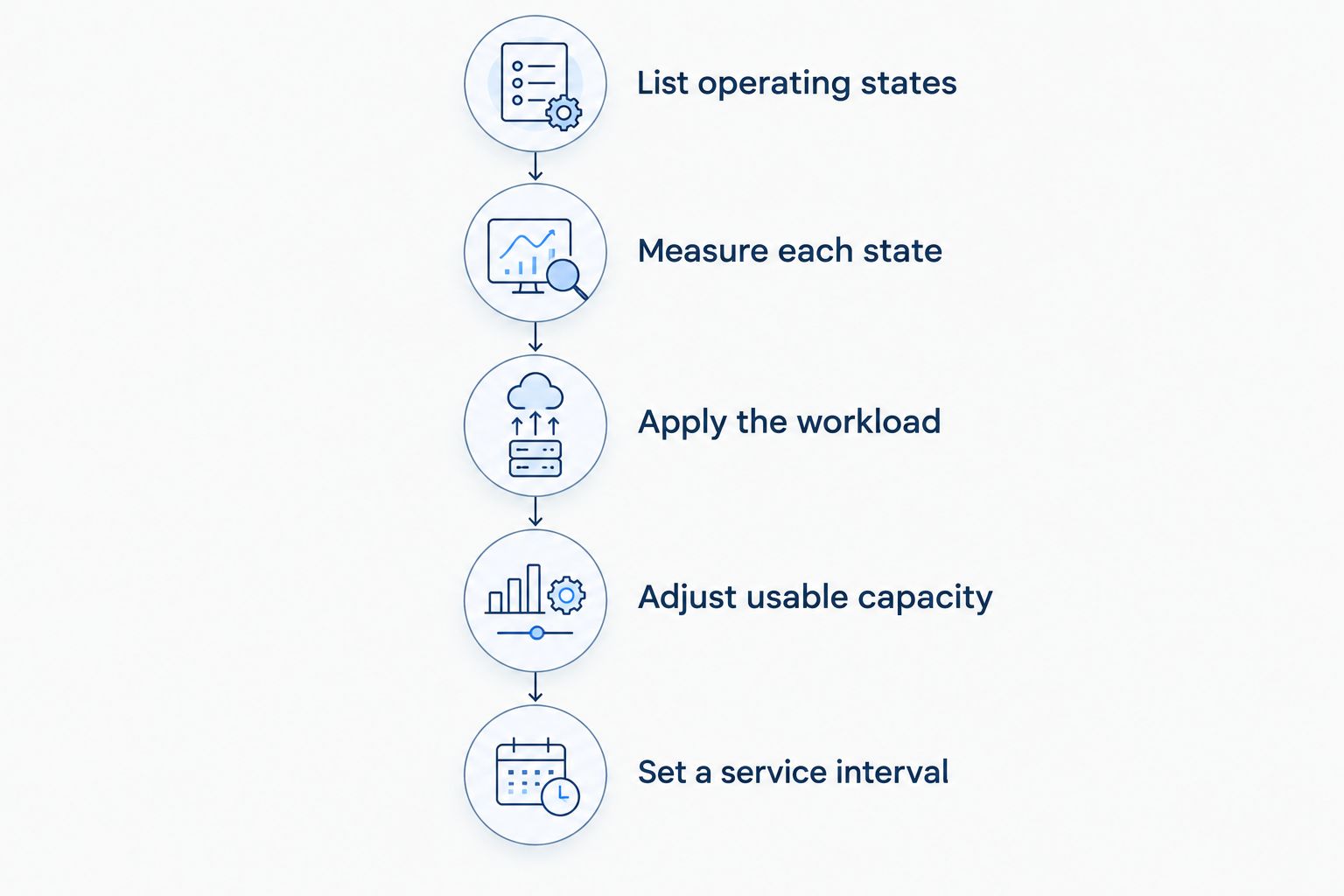
A practical estimate follows a more detailed process:
- List operating states. Include sleep, measurement, processing, transmission and reception.
- Measure each state. Record current and duration with equipment capable of capturing short radio pulses.
- Apply the workload. Use the expected sampling schedule, message schedule and event activity.
- Adjust usable capacity. Follow the battery manufacturer's data for temperature, load and cutoff conditions.
- Set a service interval. Allow a documented maintenance margin appropriate to the consequences of losing data.
Keep those assumptions with the device configuration. Otherwise, a later change to reporting frequency leaves you comparing real behavior with an obsolete estimate.
Does LoRaWAN device class affect battery life?
Yes. LoRaWAN classes define different receiving behaviors, which affect how much time a device spends listening for downlink messages. The LoRa Alliance's LoRaWAN specifications distinguish Class A, Class B and Class C operation.
The class tells you something about radio behavior, not the total consumption of the finished sensor. Measurement electronics and application settings still matter.
| Device class | Best for | Receive behavior | Battery consideration |
|---|---|---|---|
| Class A | Battery-powered devices that mainly send measurements | Opens receive windows following an uplink | Supports low-power operation but does not guarantee a particular lifetime |
| Class B | Applications needing scheduled downlink opportunities | Adds scheduled receive opportunities using network timing | Additional listening must be included in the power budget |
| Class C | Devices needing frequent downlink opportunities | Listens almost continuously outside transmission | Listening demands make it a poor default for long-life primary-battery sensors |
Class A is the starting point for low-power LoRaWAN sensing, not proof of multiyear battery life. Check the sensor's supported class and complete power profile rather than selecting by protocol label alone.
Downlink requirements also affect application design. A sleeping sensor does not behave like an always-connected mains-powered controller, so configuration changes and commands must respect the device's receiving opportunities.
How can you extend battery life without losing useful data?
Start with avoidable work, not a blanket reduction in reporting. The goal is to preserve the measurements and response timing the application requires while removing unnecessary activity.
First, review what happens between useful reports. Look for needless sampling, repeated messages, overly sensitive event settings and unexpected reconnect behavior. Change supported settings deliberately and retain a record of the original configuration.
Next, inspect the radio installation. Antenna position, nearby metal and gateway placement affect communication conditions. Improving the link is preferable to accepting an unnecessarily demanding radio configuration, but validate the result through received messages and available network diagnostics.
Then review the environment. A room-temperature estimate is not automatically suitable for a sensor installed in a freezer or an exposed outdoor enclosure. The guide to extending LoRaWAN sensor battery life in cold environments addresses that narrower installation question.
Finally, confirm the maintenance method before deployment. A replaceable battery simplifies some service tasks, while a sealed device can require replacement of the complete unit. Neither arrangement is automatically better; access, enclosure requirements and the manufacturer's service instructions determine the practical choice.
For hardware sourcing, Kilo Electronics is a separate online authorised dealer serving individual and business buyers. Platform selection and hardware selection remain separate decisions, and compatibility needs checking at the device, payload and integration levels.
Can an IoT platform tell you when a battery needs replacing?
An IoT platform can help you monitor battery information that the device exposes. It cannot directly measure remaining capacity inside an arbitrary sensor, and a reported battery percentage is not necessarily a precise countdown to failure.
Kilo is a fit for integrators who need LoRaWAN sensor monitoring alongside dashboards, rules and alarms. Its usefulness depends on the available device data and supported integration; it does not replace the manufacturer's battery model or a maintenance plan.
An illustrative workflow starts with a sensor transmitting a supported battery-status field. The integrator maps that field correctly, displays it with the measurement data and configures an alarm condition appropriate to the device's documented behavior. A named responder then investigates the alert and arranges service.
The evidence of completion should be operational: the battery or device has been serviced, communication has resumed and expected measurements are arriving. Acknowledging an alarm alone does not establish that the sensor is healthy.
Keep missing-data checks separate from battery checks. Silence can result from radio coverage, gateway connectivity, configuration or hardware faults as well as an exhausted battery. Treat it as a communication problem to investigate, not an automatic battery diagnosis.
What should you ask before accepting a battery-life claim?
Ask for the configuration behind the estimate, not just its headline duration. A supplier should be able to explain the test or calculation conditions and identify which changes invalidate the result.
Use these questions when comparing devices:
- What measurement and transmission intervals produced the estimate?
- Which battery, temperature, data rate and transmit power were assumed?
- Were event traffic, receive activity and retries included?
- Does the estimate use rated capacity or modeled usable capacity?
- Is battery replacement permitted, and what service procedure preserves the enclosure?
- What battery information does the device report, and how should it be interpreted?
Compare like-for-like workloads before choosing the longer lifetime claim. If the assumptions differ, request a revised estimate for your deployment rather than treating the published figures as directly comparable.
FAQ
Can a LoRaWAN sensor run for years without replacing its battery?
Yes, low-power LoRaWAN sensors can operate for years when their hardware, workload and battery suit the installation. Use the manufacturer's estimate for your actual configuration rather than treating multiyear operation as a protocol guarantee.
Does sending data more often reduce LoRaWAN sensor battery life?
More frequent transmissions generally increase radio energy consumption and reduce battery life. The size of the effect depends on airtime, transmit power, receiving activity and the rest of the device's workload.
Is battery voltage the same as remaining battery percentage?
No, battery voltage and remaining capacity are different measurements. Chemistry, temperature, load and the device's estimation method affect how useful a reported voltage or percentage is for maintenance planning.
Will a bigger battery always make a LoRaWAN sensor last longer?
A compatible battery with more usable capacity can extend runtime under the same workload, but capacity alone is not enough. The device must support the battery's chemistry, voltage, pulse-current behavior and physical installation.
Does checking a dashboard more often drain the sensor battery?
Viewing data already stored in a platform does not require another sensor transmission. Battery use changes only if the workflow also triggers supported device communication or changes the sensor's operating schedule.
Can I replace a LoRaWAN sensor battery with any battery that fits?
No, physical fit does not establish electrical or environmental compatibility. Follow the sensor manufacturer's approved battery specification and replacement procedure.
Should I wait for a low-battery alert before arranging maintenance?
Do not make a low-battery alert your only maintenance trigger when missing measurements have significant consequences. Combine supported battery information with device age, operating conditions, communication checks and a planned service interval.
Treat battery lifetime as a maintained estimate
A sensor's original battery estimate stops being current when its workload changes. Record reporting settings at commissioning and revisit the estimate after changes to sampling, event behavior, radio configuration or installation conditions.
The useful question is not simply how long the battery can last. It is whether the device will keep delivering the required measurements until the next planned service visit.
Written by Tim Kravchunovsky