Onboarding a new device to a dashboard takes the time needed to establish connectivity, interpret its data, and verify a fresh reading—not just create a device record. For an IoT platform such as the Kilo IoT Platform, distinguish hands-on configuration from waiting for the device to report; a working integration and known data format remove work that a first-of-its-kind device still requires.
- How long to onboard device to dashboard depends on connectivity, payload mapping, reporting intervals, and validation.
- A registered device is not fully onboarded until its dashboard shows fresh, correctly interpreted data.
- Separate active setup time from time spent waiting for transmissions or access approvals.
- Kilo suits IoT builders who need device data, dashboards, and automation in one platform.
How long does it take to onboard a new device to a dashboard?
There is no single onboarding duration that applies to every device. The useful estimate starts with what is already working: the network connection, device credentials, payload interpretation, and destination dashboard. Define the finish line before comparing timings.
Use this sequence to estimate the work and identify the evidence that each stage is complete:
- Device identity: Confirm the device identifier, model, installation location, and required credentials. Finish when you can distinguish the physical device from every other device in the deployment.
- Data connection: Establish the supported path from the device or network service into the platform. Finish when an actual message arrives through that path.
- Payload mapping: Translate the incoming message into named measurements with the correct units and meaning. Finish when a known sample produces the expected fields.
- Dashboard binding: Connect the intended measurement to the appropriate dashboard display. Finish when the display shows data from the intended device rather than a sample or neighboring sensor.
- Live verification: Confirm that a subsequent device report updates the display. Finish when the reading, timestamp, and user access meet your acceptance criteria.
A demonstration that starts with an established connection and decoded data measures less work than a deployment that starts with an unopened device. Neither timing is useful without its starting conditions.
Define what “onboarded” means before you start the clock
A device record, an incoming message, and a usable dashboard are different milestones. Treating them as the same finish line creates misleading estimates and awkward handovers.
For dashboard onboarding, a practical completion condition is: the intended user can see a fresh measurement from the correct physical device, with an understandable name, unit, and timestamp. If the assignment also includes alarms, automation, historical migration, or remote commands, scope those separately. A visible temperature reading does not prove that an alarm reaches the right person.
Record both elapsed time and hands-on time. Elapsed time covers everything between your agreed start and finish, including waiting for access or the next transmission. Hands-on time covers the configuration and investigation someone actively performs.
This distinction makes the estimate actionable. A credential approval delay needs a different fix from an incorrect decoder; combining them into one setup duration hides the next move.
Existing integration or new device model: what changes?
The most useful comparison is not between advertised setup claims. It is between onboarding paths with different prerequisites.
| Onboarding path | Best for | Work you can reuse | Main advantage | Main limitation |
|---|---|---|---|---|
| Another device on a verified integration | Repeating an established deployment | Connection configuration, known payload mapping, dashboard design | Less new integration work | Identity, placement, and live reporting still need checking |
| A new model on an established connection | Extending a deployment with different measurements | The supported connection path | Connectivity is already established | Fields, units, scaling, or message types can differ |
| A new connection and new device model | Introducing a new data source | Only independently verified deployment conventions | Lets you design the integration around the actual requirement | Connection and data interpretation both need validation |
A repeated setup is not automatically identical. Firmware, operating mode, reporting configuration, or installation conditions can change what arrives at the platform.
Reuse verified configuration, not assumptions. Before copying a working device's settings, confirm that the new device uses the same relevant data format and operating configuration. Keep credentials specific to the device and integration requirements.
Why device onboarding time varies
These factors determine the work between powering a device and trusting its dashboard:
- Connection readiness: An existing, working network-to-platform path removes connection setup from the task. A new path introduces authentication, routing, and integration checks.
- Credentials and access: Missing device credentials or insufficient platform permissions stop progress even when the hardware is working.
- Payload interpretation: Named measurements are easier to display than an unfamiliar encoded message that still needs decoding and mapping.
- Reporting behavior: Scheduled, event-driven, and manually triggered messages create different opportunities to verify a live update.
- Dashboard requirements: Showing a current value is a different assignment from arranging historical charts, site context, and audience-specific access.
- Physical installation: Power, network reachability, mounting, and sensor placement affect whether the data path works at its intended location.
Resolve the earliest unverified dependency first. Redesigning a dashboard cannot fix a device that has not delivered a message to the platform.
What should you prepare before connecting the device?
Prepare a small onboarding record rather than relying on information scattered across packaging, email, and configuration screens. The record should tell another person what the device is, how its data reaches the platform, and what the dashboard should display.
Include:
- The device model and unique identifier.
- Its installation location and an unambiguous display name.
- The intended connection path and the person responsible for it.
- Credentials stored through your approved process, not pasted into shared notes.
- A representative payload and its documented interpretation.
- The expected measurements, units, and reporting behavior.
- The intended dashboard audience and completion criteria.
Identify who can resolve each dependency. An integrator might configure the connection, a developer might validate the payload interpretation, and a site contact might confirm power and placement. These are responsibilities to assign, not assumptions about how every project is staffed.
Kilo supports LoRaWAN, mioty, and MQTT connectivity, but a shared protocol name does not establish support for every device payload or action. Confirm the actual integration path and measurement mapping before treating protocol compatibility as completed onboarding.
If you also need hardware, Kilo Electronics is a separate online authorised dealer for compatible hardware, serving individual and business buyers. Hardware sourcing is separate from configuring the platform, and a hardware purchase does not by itself verify the intended integration.
How do you verify the full device-to-dashboard path?
Work through the data path in order. Each successful check gives you evidence about one part of the deployment and narrows the next investigation.
Device identity
Match the platform record to the identifier on the physical device or its trusted configuration record. Use a location name that helps the intended reader distinguish similar installations. A plausible reading from the wrong room is still an onboarding failure.
Data connection
Confirm that a message from that device reaches the expected integration. A device appearing in an inventory does not prove that its telemetry is arriving. Check the upstream connection before changing dashboard settings.
Payload mapping
Inspect a representative message and its interpreted measurements. Confirm field names, data types, units, and any scaling defined by the device's data format. Receiving a message proves transport; it does not prove that a displayed value means what its label says.
Dashboard binding
Check the selected device, measurement, display unit, and time window. Then open the dashboard with the intended user's permissions. An administrator's view does not establish what another user can access.
Live verification
Wait for a subsequent expected report or use a device-supported reporting action. Confirm that the dashboard reflects that report, rather than merely displaying an earlier stored value. Record the evidence used to accept the setup.
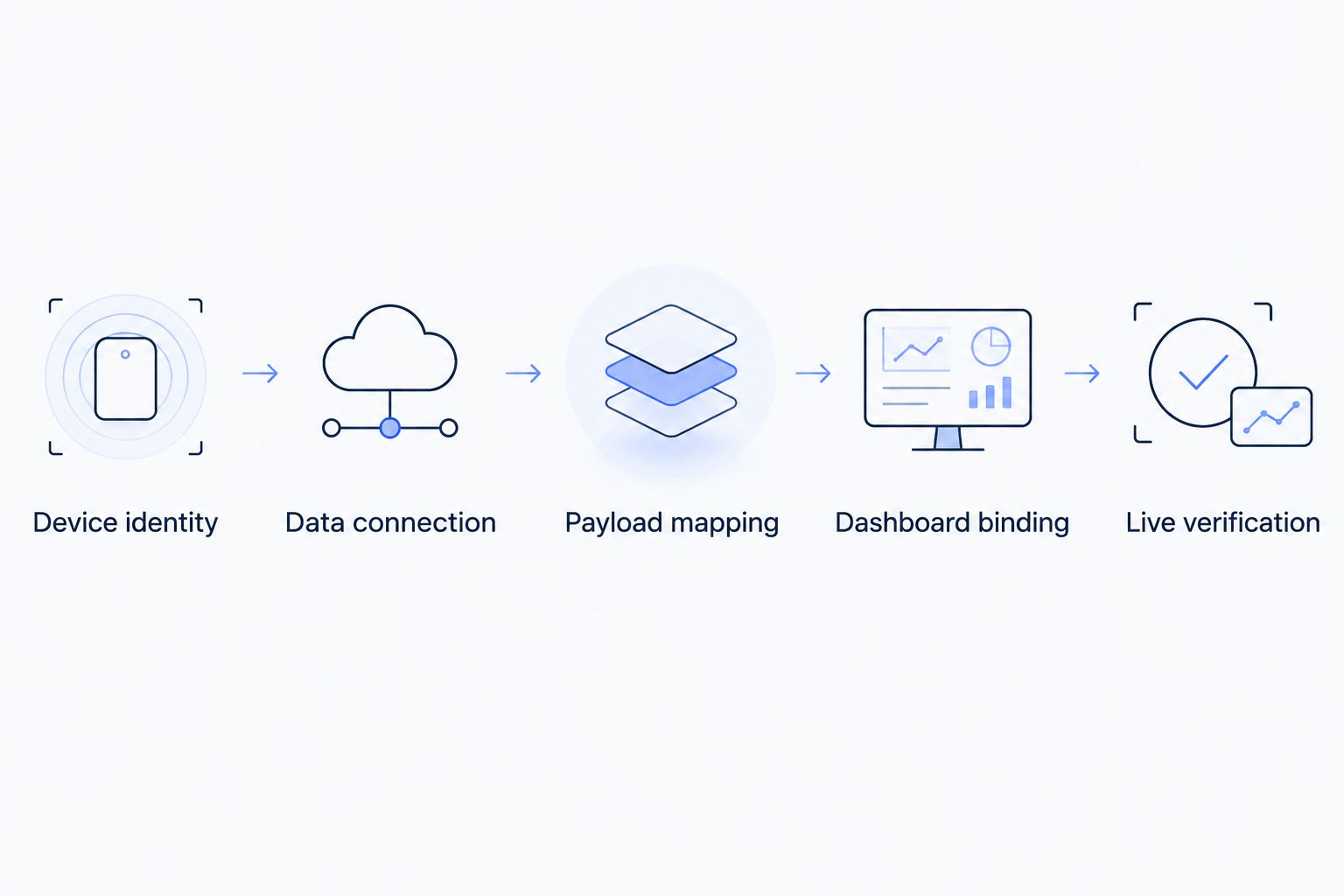
The sequence also makes troubleshooting less disruptive. If incoming measurements are correct but the display is wrong, leave the working network configuration alone and investigate the dashboard binding.
Can you speed up onboarding without skipping validation?
Yes: move repeatable preparation out of the live setup session. Assemble the device information, establish access, validate a representative payload, and agree on the dashboard's purpose before installation begins.
For repeated deployments, maintain a verified configuration reference. Record which model and configuration it applies to, what it interprets, and what remains device-specific. Reuse saves work only when those conditions still match.
An illustrative temperature-sensor workflow shows the distinction. Assume a supported connection already exists and the data format is known. The integrator identifies the new sensor, confirms that its temperature field is interpreted correctly, binds that field to the dashboard, and waits for a subsequent report. The site contact confirms that the named installation location matches the physical sensor.
The evidence is the correctly attributed reading and its fresh timestamp—not a successful save message. If a separate alarm is required, test its condition and response path as a separate acceptance task. This scenario describes a proposed workflow, not a measured deployment result.
Kilo suits IoT builders who need device data, dashboards, and automation in one platform. That fit does not establish a universal onboarding time: device readiness, integration support, and verification requirements still determine the work.
Does an AI assistant remove the integration work?
An assistant does not remove the need for a working data connection, correct measurement interpretation, or appropriate permissions. Natural-language interaction changes how you request supported operations; it does not make an unsupported device interface work.
The platform's built-in assistant and compatible external clients such as Claude through MCP can help users configure and operate connected deployments within their permissions. The specific operation must be supported by the relevant interface. Do not assume that every built-in-assistant function is exposed through an external client.
For this task, keep the success criterion unchanged: a correct, fresh device reading visible to the intended user. An assistant's response is not a substitute for observing that result.
FAQ
Why is my device listed but not showing any readings?
A device record does not prove that telemetry is arriving. Check the upstream connection, incoming messages, and payload interpretation before changing the dashboard.
Should I wait for the next sensor report before finishing setup?
Yes, verify a subsequent expected report before accepting live dashboard onboarding. Use the device's documented reporting behavior or a supported reporting action rather than assuming the display is current.
Can I use simulated data to prepare the dashboard?
Simulated data can help you prepare a display, but it does not validate the physical device's connection. Keep simulated results distinct from the live-data acceptance test.
Do I need to configure alarms before the device is onboarded?
Alarms are a separate acceptance task unless your onboarding scope explicitly includes them. A working dashboard does not prove that an alarm condition or notification path works.
Why can an administrator see the device but another user cannot?
Different permissions can produce different views of the same deployment. Test access with the intended user's role rather than accepting the administrator's view as sufficient.
Does using MQTT mean the dashboard will understand my data automatically?
MQTT connectivity does not establish the meaning of a payload. The receiving integration still needs the appropriate field interpretation and mapping for the data being published.
What should I save after a successful onboarding test?
Save the device identity, applicable configuration reference, validated measurements, and acceptance evidence. Keep credentials in your approved secure storage rather than including them in the handover record.
Finish with a handover test, not a screenshot
A screenshot proves that a value appeared at one moment. It does not prove that the next report will update the display or that the intended reader can access it.
Make your final test a fresh report viewed with the intended permissions. That is a clearer finish line than device registration—and a better basis for estimating the next onboarding task.
Related guides
Written by Tim Kravchunovsky