

Instead of manually muting routine alerts every evening, use quiet hours alarm scheduling to suppress nonurgent notifications on a recurring timetable while keeping urgent response routes active. For a deployment using the Kilo IoT Platform, start by separating alarm detection from notification delivery, then apply the timetable at a supported notification or integration layer—not by switching off monitoring.
- Quiet hours alarm scheduling should silence routine notifications, not stop sensor monitoring or erase alarm evidence.
- Kilo supports IoT monitoring and alarms; verify the scheduling controls available for your particular notification path.
- Keep urgent conditions outside the quiet-hours filter and give them a named responder.
- Test midnight boundaries, time zones, and unresolved alarms before enabling a recurring notification schedule.
What quiet hours should—and should not—silence
An alarm and its notification serve different purposes. The alarm represents a condition that needs attention; the notification tells someone about it. Quiet hours belong between those two functions when your goal is fewer overnight interruptions without losing visibility into equipment conditions.
For teams building connected monitoring workflows, Kilo provides device context, alarms, and automation in one IoT platform. The scheduling implementation still depends on the controls available in your selected notification path. Don't assume a native quiet-hours switch, automatic morning digest, or severity bypass without confirming that behavior.
A recurring schedule also differs from acknowledging an alarm. Acknowledgment records a response according to the system's behavior; a quiet-hours policy decides whether a message should interrupt someone. Neither means the underlying condition has recovered.
This guide defines the configuration and tests for a notification-only quiet-hours workflow. It does not assume a particular scheduling screen or undocumented platform setting.
Before you start
- Access and ownership: Have permission to inspect alarm configuration and change the relevant notification workflow. Identify who owns overnight response and who reviews deferred issues when work resumes.
- A working notification path: Confirm that a test condition reaches the intended recipient before adding scheduling. Use scheduling controls documented for that path, or implement the time filter in a connected notification service that supports it.
- The midnight gotcha: Establish the site's time zone and how overnight windows attach to weekdays. A period beginning Monday evening ends Tuesday morning; treating both boundaries as Monday can leave part of the night uncovered.
Write down which message types the schedule affects. Include new alarms, repeat reminders, escalations, and recovery messages if your notification path produces them. Filtering only the first message is not enough when a reminder can still wake the recipient.
Keep the initial scope small. Start with one clearly nonurgent condition and a test recipient rather than changing every site's notification behavior at once.
Alarm scope and response policy
- List the monitored conditions. Describe each condition in operational terms: an unoccupied room outside its comfort target, an equipment fault requiring attendance, or a sensor that has stopped reporting.
- Assign a response requirement. Ask the responsible person whether each condition can wait until the next staffed period. Use the consequence of delay, not the convenience of muting it.
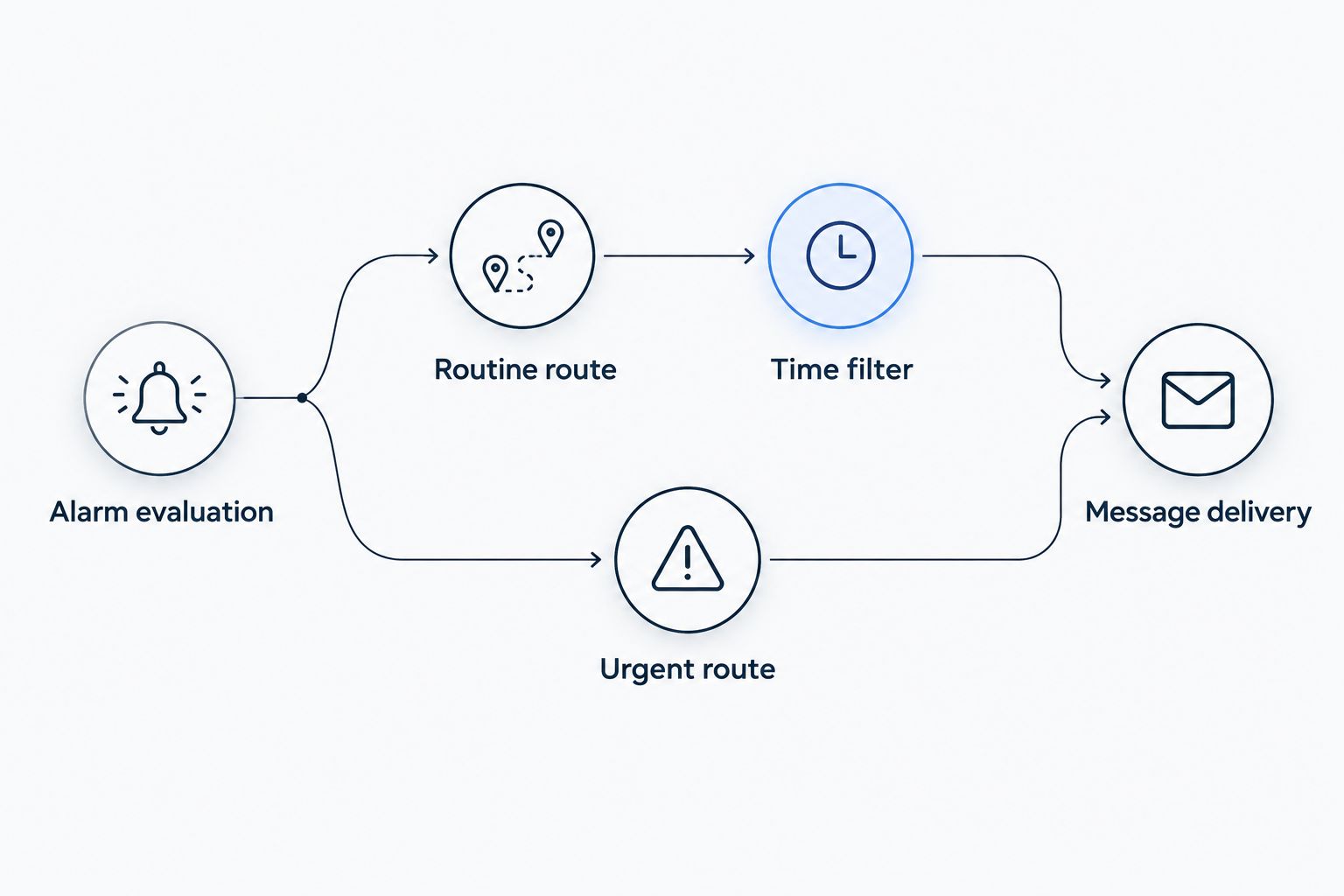
- Separate routine and urgent routes. Apply the time filter only to messages approved for deferral. Keep urgent messages on a route that does not pass through that filter.
- Define the morning response. Specify who checks unresolved conditions and where they find the current state. Don't rely on a morning notification unless you have configured and tested one.
Expected result: Every scheduled message has an owner, a reason it can wait, and a defined review process. Urgent conditions retain an explicit response route.
For example, an illustrative office deployment might defer an after-hours comfort advisory while continuing to notify the designated responder about a water leak. That is a proposed configuration, not a claim about a customer deployment or a universal classification of either event.
Choose the scheduling approach according to the responsibility you are changing:
| Approach | Best for | Advantage | Limitation |
|---|---|---|---|
| Notification quiet hours | Routine messages that can wait | Keeps monitoring separate from interruptions | Requires supported filtering and an unresolved-alarm review process |
| On-call routing | Conditions requiring overnight attention | Sends messages to the responsible person | Needs maintained assignments and tested delivery |
| Detection scheduling | Conditions meaningful only during defined operating periods | Matches evaluation to a deliberate operating policy | Stops evaluating the condition outside the schedule; it is not notification-only muting |
Use notification quiet hours when the condition still matters overnight but the interruption does not. Detection scheduling is a different decision and needs its own justification.
Quiet-hours window and time-zone configuration
- Choose the schedule's time zone. Decide whether the policy follows the monitored site or the recipient. For site-based operating hours, use the site's local time consistently throughout the workflow.
- Write the overnight interval explicitly. As an illustrative assumption, use 22:00 to 07:00 the following morning. This creates a 9-hour quiet window; it is not a recommended response interval for critical equipment.
- Define the boundaries. For that example, suppress routine messages at or after 22:00 and resume their normal eligibility at 07:00. State whether the end boundary is excluded so adjacent schedules do not overlap unintentionally.
- Assign weekdays and exceptions. Specify which evening starts each window, then define weekends, holidays, and exceptional staffed periods according to the scheduling layer's supported behavior.
- Apply the filter to routine delivery. Leave data ingestion and alarm evaluation outside the filter when notification-only quiet hours are the intended result.
Expected result: The written policy and the configured schedule agree about the local evening, the following morning, and the message classes being filtered.
An overnight time test spans midnight. In the illustrative schedule, a routine message is inside quiet hours when local time is at least 22:00 or earlier than 07:00. Using an AND condition would require the time to be both late evening and early morning simultaneously.
Use the scheduling layer's documented overnight-window behavior rather than rebuilding time logic unnecessarily. If you implement the filter yourself, document daylight-saving handling and test it before release. A local-time schedule and a fixed UTC interval do not express the same policy throughout the year in locations that change their clocks.
Delivery routing and verification
- Connect the routine route to the time filter. Evaluate notification eligibility before dispatch. Preserve the information needed to review the condition later, within the recording capabilities of the system you use.
- Keep urgent delivery independent. Check that an urgent route cannot inherit the routine filter through a shared parent workflow or recipient policy.
- Test the schedule boundaries. For the illustrative window, test routine events at 21:59, 22:00, 06:59, and 07:00 in the chosen time zone. Check both the condition's visibility and the recipient's actual message receipt.
- Test an urgent event during quiet hours. Verify that the intended person receives it through the approved route. A successful routine suppression test does not establish that urgent delivery works.
- Test recovery and persistence. Try a condition that clears overnight and another that remains active after quiet hours end. Record what happens rather than assuming either produces a morning message.
Expected result: Routine messages stop and resume at the intended boundaries, urgent delivery remains active, and the team understands how overnight conditions appear during morning review.
Treat notification tests as real external actions. If testing a Kilo rule with supported side-effect nodes, Execute performs the real operation and is selected initially; choose Skip or Mock deliberately where appropriate. Debugging is not automatically an isolated sandbox.
For a delivery test, use a designated recipient who knows a test is coming. For logic-only testing, avoid sending unnecessary production messages. Save the expected and observed result for each case so another integrator can repeat the checks.
Weekends and changing staffed hours
The adjacent workflow is a different schedule for periods when staffing changes. Keep the same separation between detection, routine delivery, and urgent response; change the calendar policy rather than creating an unrelated alarm system.
- Define the site's staffed periods and name the person responsible for maintaining them.
- Create the weekend or exception policy using the calendar capabilities available in the scheduling layer.
- State which policy wins when an exception overlaps the normal weekly timetable.
- Repeat the boundary and urgent-route tests for the exception.
Expected result: A holiday or temporary closure changes routine notification eligibility without silently disabling urgent response.
Avoid confusing quiet hours with an on-call roster. Quiet hours answer whether a routine message should interrupt someone now. An on-call roster answers who must receive an urgent message. If the overnight responder changes, update routing independently of the routine suppression window.
A change in staffing also needs a handover. Tell the incoming owner which conditions remained unresolved, rather than assuming the next shift will reconstruct the situation from a collection of overnight messages.
Troubleshoot unexpected overnight notifications
Routine messages still arrive
Trace the message to its originating workflow. A reminder, escalation, recovery message, or parallel integration can bypass the filter applied to initial notifications. Apply the approved policy to each relevant message class without accidentally filtering urgent delivery.
The schedule is shifted by several hours
Compare the site's time zone with the time zone used by the scheduling layer. Check whether displayed timestamps are local time or UTC before changing the interval. Fix the time-zone interpretation instead of compensating with an unexplained offset.
Quiet hours fail after midnight
Inspect weekday assignment and overnight interval logic. A Monday-evening window must include the intended portion of Tuesday morning. Test the start day and following day as a pair.
No message arrives when quiet hours end
Check whether suppression discards a notification or defers it. Ending quiet hours does not itself guarantee a new alarm event or a replay of earlier messages. Configure a supported unresolved-condition review or follow-up mechanism if the operating process requires one.
Urgent alerts are also silent
Inspect shared filters, recipient-level muting, and downstream notification settings. Restore the approved urgent route and verify actual receipt with the designated responder. Don't treat an enabled platform route as proof that the recipient's final delivery channel will interrupt them.
Expand the workflow without expanding the blind spot
Once the first schedule passes testing, extend it by site and alarm purpose. Keep each site's time zone, response owner, routine conditions, and urgent exceptions explicit. Copying a timetable is not the same as approving its operational consequences.
Kilo's IoT monitoring workflow can combine device context, alarms, and configured automation, but scheduling does not fix poor input data or an inappropriate alarm threshold. Investigate repeated nuisance conditions separately rather than hiding them behind a longer mute window.
Quiet hours do not inherently require new sensors. If a broader monitoring project needs compatible hardware, Kilo Electronics is a separate online authorised dealer serving individual and business buyers; it is not the platform or a prerequisite for this scheduling design.
FAQ
Can quiet hours stop notifications without stopping monitoring?
Yes, when the schedule filters notification delivery rather than alarm evaluation or data ingestion. Verify that distinction in the specific notification path you configure.
Does Kilo have a quiet-hours button for every alarm channel?
Do not assume a universal quiet-hours control across Kilo notification paths. Confirm the documented scheduling behavior for the selected path before choosing a native setting or an external notification filter.
Should critical equipment alerts follow the same quiet hours?
Keep conditions requiring immediate response outside the routine quiet-hours filter. Have the responsible equipment or site owner approve the classification and test the urgent route.
Will suppressed alarms automatically arrive the next morning?
Only a configured and supported deferral or follow-up mechanism establishes morning delivery. Suppression alone does not guarantee replay, so test unresolved and recovered conditions separately.
Which time zone should a multi-site alarm schedule use?
Use each site's local time when quiet hours follow that site's operating schedule. Use recipient-local time only when that is the deliberate policy, and document the distinction.
Is quiet-hours scheduling an AI workflow?
A recurring time filter is conventional automation, not AI. The workflow needs an explicit schedule, message classification, and response policy—not an AI model.
Check the first morning before extending the schedule
The most revealing quiet-hours test is an alarm that remains active when the window ends. It exposes whether your workflow restores notification eligibility, sends a follow-up, or leaves the issue waiting for manual review.
Run that test before expanding the schedule. Then have the morning owner confirm that the information available is enough to decide what needs attention.
Related guides
Written by Tim Kravchunovsky


