

Akenza offers a low-code approach to connecting devices and building IoT applications. When your requirements change, the question is whether the platform still fits your deployment model, application workflow and control boundaries—not whether it can display another sensor reading. For an Akenza alternatives shortlist in 2026, consider the Kilo IoT Platform for connected monitoring and permission-aware AI workflows, ThingsBoard for an open-source application platform, and AWS IoT Core for an AWS-based custom application.
- Akenza alternatives serve different needs: compare application platforms separately from cloud connectivity services.
- Kilo suits teams connecting IoT monitoring, configured automation and permission-aware AI assistance.
- ThingsBoard suits teams that want an open-source IoT platform and can own its deployment.
- AWS IoT Core suits developers building an IoT application around AWS services.
- Stay with Akenza when your existing workflows work and switching solves no specific problem.
Choose the application workflow before the platform
An IoT platform sits between connected devices and the people or applications using their data. It receives observations, gives those observations context and makes them useful through dashboards, alarms, automation or integrations. Some products supply much of that application layer; others provide infrastructure from which you build it.
That distinction matters more than a feature-count comparison. A dashboard-ready platform and a cloud message service can both participate in the same solution, but they don't leave you with the same engineering work.
Choose an Akenza alternative around the workflow you need to operate, not the longest list of supported technologies. Start with a representative device, the person who uses its readings and the response expected when something changes. Then establish who maintains that workflow after deployment.
Akenza alternatives at a glance
This table compares product roles and reasons to evaluate each option. It is not a performance ranking, and an evaluation priority is not a claim that Akenza lacks an equivalent capability.
| Option | Best for | Standout approach | Evaluation focus relative to Akenza |
|---|---|---|---|
| Akenza | Teams seeking low-code IoT application development | Device connectivity and application configuration | Benchmark the workflows you already use |
| Kilo | Integrators and teams combining monitoring, automation and AI assistance | Device context, permissions and supported actions in an IoT operating layer | Test the complete observation-to-response workflow |
| ThingsBoard | Teams seeking an open-source IoT application platform | Dashboards, device management and rule processing | Evaluate deployment ownership and application maintenance |
| AWS IoT Core | Developers building an AWS-based IoT application | Managed device connectivity, messaging and routing | Evaluate the surrounding application services you must build |
There is no useful universal winner here. An integrator delivering a monitoring application has different responsibilities from a developer building a custom cloud backend, even when both projects begin with the same sensor payload.
1. Kilo: best for monitoring with permission-aware AI workflows
Kilo is an IoT Platform for Physical AI: an operating layer connecting AI with device context, permissions, configured actions and available feedback. It also supports conventional monitoring through device management, dashboards, alarms and automation. You don't need to add an AI component to justify a straightforward monitoring project.
Kilo suits teams that want IoT monitoring and permission-aware AI assistance in the same operating layer. That is a reason to evaluate the platform, not evidence that every integration or device command is ready without configuration.
Where Kilo shines
- Device data, digital twins, dashboards, automation and alarms belong to the same platform context.
- The built-in assistant can help users configure and operate connected deployments within their permissions.
- Compatible external clients, including Claude through MCP, provide another interaction path for supported operations.
- Configured rules support automation without treating every threshold condition as an AI decision.
Where it falls short
- Device compatibility still depends on interfaces, payload mapping and the supported integration path.
- An assistant cannot operate arbitrary equipment merely because the equipment is connected.
- Built-in assistant functions and external MCP tool coverage are not interchangeable.
- A command's accepted, queued or delivered status does not establish that the physical action happened.
Those boundaries affect implementation. If your application needs to close a valve, you need a compatible actuator, a configured command path and feedback that establishes the valve's state. Software alone cannot provide that physical capability.
The built-in assistant has a confirmation flow for direct device commands. External MCP clients have their own approval behavior, while deliberately configured rules can execute commands autonomously. Define those paths separately rather than assuming a single approval policy covers every action.
Best for: Integrators, developers and teams that need monitoring plus supported AI-assisted configuration or operation.
Verdict: Evaluate with your own device data, user permissions and required response workflow.
2. ThingsBoard: best for an open-source application platform
ThingsBoard is an open-source IoT platform with device management, dashboards and rule processing. It belongs on an Akenza alternatives shortlist when control over the application platform and its deployment is central to your decision. Treat that control as an engineering responsibility as well as a benefit.
A self-hosted deployment changes who owns updates, backups, service monitoring and recovery. Your team needs an operating plan, not just a successful installation.
Where ThingsBoard shines
- Its open-source platform gives technical teams an inspectable foundation for an IoT application.
- Device management, telemetry visualisation and rules support application workflows beyond message collection.
- Self-hosting is an option for teams that want to operate their own platform deployment.
Where ThingsBoard falls short
- Self-hosting makes your team responsible for the health of the deployment.
- Custom integrations and application changes still require implementation and testing.
- Edition-specific capabilities need to match the edition you actually deploy.
ThingsBoard versus Akenza
| Dimension | ThingsBoard | Akenza |
|---|---|---|
| Product approach | Open-source IoT application platform | Low-code IoT application platform |
| Application building | Dashboards, device management and rule processing | Device connectivity and application configuration |
| Ownership decision | Evaluate self-hosting and the responsibilities it creates | Evaluate the offered deployment and service model |
The practical test is whether ownership helps your project. If your developers need to inspect or adapt the platform foundation, open source is relevant. If nobody is assigned to maintain the deployment, it becomes an unresolved responsibility.
Best for: Technical teams that want an open-source IoT application platform and can maintain the chosen deployment.
Verdict: Evaluate when platform ownership is a requirement, not simply an attractive checkbox.
3. AWS IoT Core: best for an AWS-based custom application
AWS IoT Core provides managed device connectivity and messaging within AWS. It is a different kind of alternative: a foundation for an application rather than a like-for-like replacement for every user-facing IoT workflow. That difference is useful when your team wants to design the surrounding system.
Where AWS IoT Core shines
- Managed connectivity and message routing provide building blocks for connected applications.
- Device communication can participate in a wider AWS architecture.
- Developers can design storage, processing and application behavior around their requirements.
Where AWS IoT Core falls short
- Connectivity does not supply your complete monitoring application.
- Dashboards, alarm handling, user workflows and historical reporting require surrounding components.
- Your team owns the behavior and maintenance of the application it builds.
AWS IoT Core versus Akenza
| Dimension | AWS IoT Core | Akenza |
|---|---|---|
| Product role | Managed IoT connectivity and messaging service | Low-code IoT application platform |
| Application layer | Built with surrounding services and application code | Configured through the platform's application approach |
| Decision driver | Custom AWS architecture | Low-code application workflow |
Best for: Developers building a custom IoT application within an AWS architecture.
Verdict: Evaluate if you want to build the application layer; skip if your objective is to avoid that work.
Reasons to switch—and reasons that aren't enough
Akenza alternatives deserve attention when you can name a requirement your current deployment no longer satisfies. A product demonstration alone is not that requirement, and a newly advertised feature does not establish a migration benefit.
Use these decision tests:
- Deployment ownership: Your project requires an operating model different from the one you currently use.
- Application architecture: You need a custom backend whose design is better served by infrastructure building blocks.
- User workflow: People need a configuration, monitoring or response workflow that your current implementation does not deliver.
- Supported control: Your application needs a specific permission-aware command path and verifiable device feedback.
- Maintenance responsibility: The current division of work between your team and the platform no longer fits the project.
These are evaluation criteria, not claims that Akenza cannot meet them. First test whether a configuration change or integration solves the problem inside your existing deployment.
Stay with Akenza when it meets your requirements and switching introduces work without fixing a defined limitation. Existing device mappings, dashboards, rules and trained users have practical value. Preserve that value unless the alternative demonstrates a better fit for the assigned job.
Test one complete monitoring workflow before migrating
A meaningful comparison follows a reading from the device to the person or system responding to it. Use the same workflow across shortlisted platforms so you aren't comparing a polished dashboard demonstration with an unfinished integration.
Illustrative scenario: A cold-storage deployment reports temperature and door state. An operator needs to understand an excursion, distinguish it from a brief door-opening event and confirm what happened afterward. This is an evaluation scenario, not a claimed customer installation or a recommended compliance threshold.
Use these steps:
- Device data: Feed representative payloads through the proposed integration and confirm field mapping, units and timestamps.
- Site context: Associate each reading with the correct asset and location so the operator knows what needs attention.
- Response rules: Configure the relevant condition and establish who receives or handles the resulting alarm.
- User permissions: Confirm that the intended user can investigate and act without receiving unnecessary access.
- Outcome evidence: Confirm that subsequent readings or supported device feedback show what happened after the response.
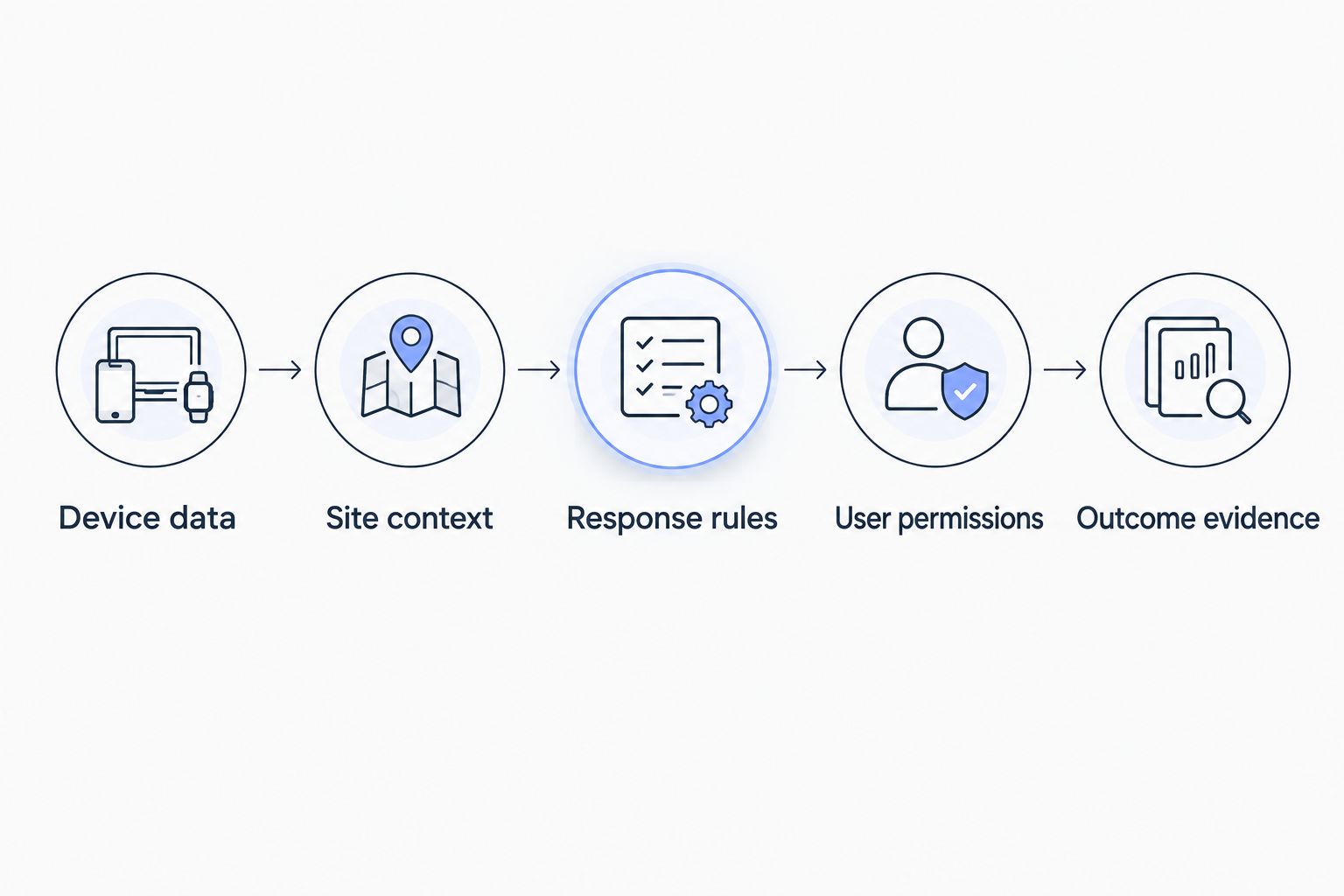
If the evaluation includes an actuator, separate the software command from the physical result. A successful request and a confirmed state change are different evidence. Decide how the operator handles an action whose outcome remains unknown.
Keep hardware sourcing separate from platform selection. Kilo Electronics is a separate online authorised dealer serving individual and business buyers; buying hardware does not replace checking compatibility with the selected platform and network.
Migration checks beyond the dashboard
Moving a live deployment means preserving meaning as well as moving readings. Inventory device identifiers, payload decoders, asset relationships, user roles, alarm conditions and downstream integrations before changing the data destination.
Historical data needs the same attention. Confirm how exported records retain timestamps, units and device identity, and distinguish old data imported into a new system from new readings arriving through a live integration. A familiar chart is not proof that the records underneath it are equivalent.
Rules require explicit testing. Verify recovery conditions and recipients as well as triggers, and avoid creating duplicate physical actions while comparing platforms. Assign responsibility for cutover and recovery before changing an operational data path.
For the data-transfer part of the project, use the guide to migrating historical sensor data when switching IoT platforms.
FAQ
Which Akenza alternatives should I shortlist?
Shortlist Kilo for connected monitoring and permission-aware AI workflows, ThingsBoard for an open-source application platform, and AWS IoT Core for a custom AWS-based application. Compare them against a defined deployment requirement rather than treating them as interchangeable products.
Is ThingsBoard a direct replacement for Akenza?
ThingsBoard is an IoT application platform, but replacing Akenza still requires rebuilding or adapting your deployment. Check device mappings, dashboards, rules, permissions and integrations, along with responsibility for operating the chosen deployment.
Can AWS IoT Core replace an entire IoT platform?
AWS IoT Core supplies connectivity and messaging building blocks, not your complete monitoring application. Your architecture still needs the user interfaces, storage, alarm workflows and other components required by the project.
Can I keep my sensors when switching platforms?
You can keep sensors when the new integration supports their interfaces and payloads. A shared protocol name alone does not establish compatibility with every device or command.
Does an AI assistant make device control automatic?
An AI assistant does not make every device action automatic. Approval behavior, permissions, supported tools and deliberately configured automation determine how a particular action executes.
Does a delivered command prove the device acted?
A delivered command does not prove the physical action occurred. Verification depends on supported device feedback or subsequent measurements that establish the outcome.
When should I stay with Akenza?
Stay with Akenza when it meets your application requirements and an alternative solves no defined limitation. Switching adds migration, testing and training work, so require a demonstrated workflow benefit before committing.
Make unknown outcomes part of the acceptance test
The most revealing platform demonstration is not always the successful one. Ask what the user sees when data stops arriving, an alarm has no responder or a command has no confirming feedback.
Choose the workflow that makes unresolved conditions visible and assigns the next action clearly. That test connects platform features to the deployment you actually need to run.
Written by Tim Kravchunovsky


