
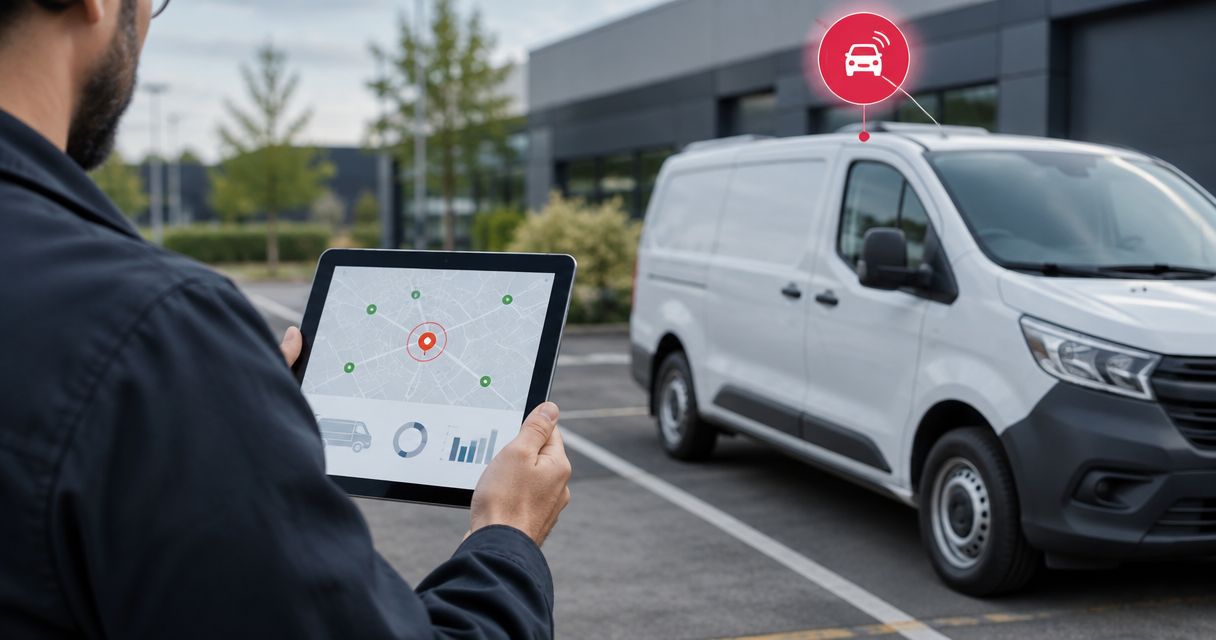
Instead of manually checking which vehicles have stopped, use the Kilo IoT Platform to connect tracker telemetry with rules and alarms that flag a sustained idle condition. For engine-idling detection, combine fresh movement data with a verified engine-running signal; position alone only tells you that a vehicle appears stationary.
- Kilo supports tracker telemetry workflows through device data, rules and alarms; detection depends on the connected tracker’s signals.
- An idle vehicle alert tracker telemetry workflow needs fresh movement data, engine status and a sustained-duration condition.
- Separate engine idling, stationary vehicles and missing telemetry; each requires a different response.
- Test alert entry, recovery and stale-data handling before enabling notifications for a fleet.
What tracker telemetry can tell you about an idle vehicle
An idle vehicle alert is useful only when everyone understands what it means. A parked vehicle, a running engine at a loading bay and a tracker that stopped reporting are different situations. Treating them as the same event produces alerts that dispatchers can't act on confidently.
Kilo fits integrators building tracker telemetry workflows around device data, rules and alarms. The platform supplies the software layer; the tracker and its integration determine which observations are available. This guide describes the detection logic and commissioning checks, rather than assuming a particular tracker payload or undocumented interface control.
Choose the signal combination before building the rule:
| Detection approach | Best for | Useful evidence | Limitation |
|---|---|---|---|
| Engine-running status plus movement | Engine-idling alerts | Engine remains running while the vehicle remains stationary | Requires a supported, correctly interpreted engine-running signal |
| Ignition status plus movement | Stationary-with-ignition-on alerts | Ignition remains on while movement stays below the configured boundary | Ignition on does not necessarily mean the engine is running |
| Position or movement alone | Stationary-vehicle alerts | Fresh observations show no meaningful movement | Cannot distinguish a parked vehicle from engine idling |
A simple duration rule is conventional IoT automation, not AI. You don't need an AI model to evaluate a clearly defined combination of movement, engine state and elapsed time.
Before you start
- Prepare the data path and access. You need a tracker, a supported integration that delivers its telemetry, and permission to configure the relevant device data, rule and alarm resources. Keep a decoded sample payload and the tracker manufacturer's field definitions beside you.
- Define the operational response. Agree on what counts as idle, which vehicles the rule covers, who receives the alert and how recovery is recognized. Identify legitimate stationary operation, such as equipment use or loading, before enabling notifications.
- Check stationary reporting behavior. Some tracker configurations change their reporting behavior when movement stops. Confirm your actual configuration: without continuing observations or an explicit trustworthy state event, elapsed time does not establish that the engine stayed running.
For hardware sourcing, Kilo Electronics is a separate online authorised dealer serving individual and business buyers. Hardware purchase is not a platform requirement if your existing tracker and integration supply the required data.
Don't infer engine idling from a motion sensor alone. If the tracker cannot report a verified engine-running signal, build and label a stationary-vehicle workflow instead.
Tracker data mapping
Define a consistent telemetry record
- Identify the tracker device and its associated vehicle. Keep that association stable through the workflow so an alert refers to the correct asset, even when a tracker is replaced.
- Map the movement observation and its unit. Determine whether the tracker supplies speed, a movement flag, position changes or a combination; don't treat these as interchangeable measurements.
- Map the engine-running signal if the tracker supplies one. If it supplies only ignition status, preserve that distinction in the field name and alert wording.
- Retain the observation timestamp and, where available, the receipt timestamp. The first tells you when the vehicle state was measured; the second tells you when the platform received it.
- Define how missing, invalid and unavailable values are represented. An absent speed value must not become zero speed, and an absent engine state must not become engine off.
The field names in this guide are logical data concepts, not claims about exact application labels. Implement the mapping through the documented connector and payload configuration for your tracker.
Expected result: a decoded record identifies the vehicle, its observed movement, its engine or ignition state, and the observation time. You can explain what every value means using the tracker documentation.
Validate the mapping against known vehicle states
Compare telemetry with a controlled observation of the vehicle while parked with the engine off, stationary with the engine running, and moving. Use a suitable test location and an authorized operator; telemetry commissioning does not justify unsafe driving or equipment operation.
Check whether engine and movement fields arrive together. When they arrive separately, retain their individual timestamps and reject a combination that joins a fresh movement value to an old engine value.
Expected result: the mapped fields distinguish the states your alert promises to detect. If they don't, fix the data interpretation before configuring a duration condition.
Idle-duration logic
Configure the candidate condition
- Define a candidate idle state as a fresh engine-running observation combined with fresh stationary evidence. For an ignition-only workflow, use the narrower label stationary with ignition on.
- Choose a movement boundary appropriate to the tracker and its measurement behavior. Position noise and small speed fluctuations require a deliberate stationary definition, not blind equality with zero.
- Store when a qualifying episode begins. Preserve that start time while subsequent valid observations continue to satisfy the condition.
- Reset the candidate when valid evidence shows movement or the engine stopping. Treat missing or stale evidence as unknown, rather than silently extending the episode.
- Flag the episode only after the configured duration has elapsed and supporting observations still qualify.
Illustrative assumptions, not recommended thresholds: suppose a test tracker reports every 60 seconds, observations expire after 180 seconds, and the test alert duration is 5 minutes. These values exist only to demonstrate the logic; choose production settings from the actual reporting behavior and your fleet policy.
Under those assumptions, the first stationary, engine-running observation begins a candidate episode. Later qualifying observations support its continuation, but an observation gap beyond the freshness limit changes the state to unknown. It does not prove uninterrupted idling.
Expected result: a brief stop does not raise an alert, a sustained qualifying episode does, and a reporting gap cannot manufacture an idle duration.
Keep freshness separate from duration
A telemetry-triggered rule runs when telemetry arrives. If your implementation relies only on incoming messages, it cannot detect silence simply by waiting for the next message. Use a documented periodic evaluation mechanism where available, or handle freshness in the integration service and pass its result into the workflow.
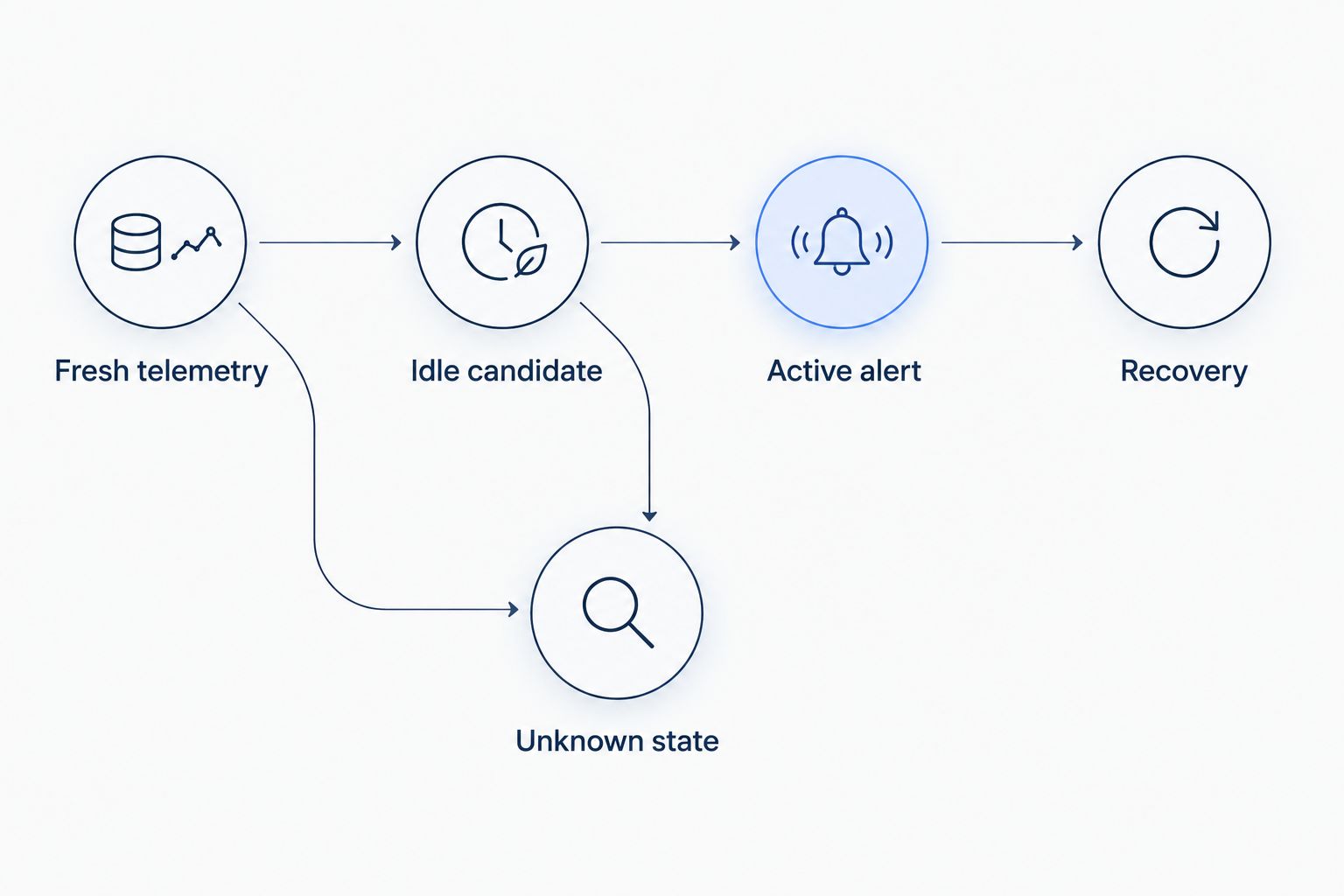
Make the state transitions explicit:
- Fresh telemetry: required observations are valid and recent enough to evaluate.
- Idle candidate: fresh observations satisfy the idle definition, but duration has not qualified.
- Active alert: a supported idle episode has reached the configured duration.
- Recovery: valid evidence shows that the qualifying condition has ended.
- Unknown state: required evidence is missing, invalid or stale.
Keep unknown state separate from recovery. Losing contact with the tracker is not evidence that the vehicle resumed moving or stopped its engine.
Alarm lifecycle and dispatcher response
Configure one actionable alert per episode
- Associate the alert with the vehicle and its current qualifying episode. Use a stable episode identity in the implementation so every telemetry message does not create another notification.
- Include the detected condition, episode start, latest observation time and supporting signal values. State whether the evidence is engine-running status or ignition status.
- Route the alert to the person responsible for reviewing it. Define a response such as checking dispatch context or contacting the driver through the established fleet process.
- Record recovery only when fresh evidence establishes that the condition ended. Preserve a separate indication when the tracker becomes unavailable during an active episode.
- Prevent repeated notifications from ordinary updates to the same episode. Treat any reminder or escalation as a separate, deliberate policy.
In Kilo, rules and alarms are relevant platform capabilities, but the episode logic must match the documented configuration available to your deployment. If the required state handling belongs in an integration service, implement it there rather than assuming a particular rule node exists.
Expected result: the recipient gets a named vehicle, an understandable reason and enough evidence to review the event. Repeated qualifying reports update the episode instead of flooding the recipient.
An alert is a request to investigate, not proof of avoidable fuel use or driver misconduct. Stationary engine operation can serve a legitimate purpose, and the telemetry does not automatically explain that purpose.
Workflow testing and release
- Test a short stationary period followed by movement. Confirm that the candidate resets without raising an alert.
- Test a sustained stationary, engine-running sequence. Confirm that the alert appears only when the duration condition qualifies.
- Remove or invalidate the engine-running field. Confirm that the workflow reports insufficient evidence rather than assuming the missing value.
- Introduce a reporting gap and delayed observations. Confirm that freshness checks reject unsupported continuity and that old messages don't overwrite newer vehicle state.
- Continue sending qualifying telemetry after an alert opens, then supply recovery evidence. Confirm that the workflow avoids duplicate episodes and recognizes recovery correctly.
Expected result: each test produces the intended state transition, notification behavior and evidence record before the workflow is enabled more broadly.
Pay attention to debugger behavior. For supported side-effect nodes, Execute performs the real operation and is initially selected; deliberately choose Skip or Mock when you don't want that operation performed. Debugging is not automatically an isolated sandbox.
Keep this workflow alert-only during commissioning. An idle flag does not require a remote engine command, and adding vehicle control introduces a separate integration and risk assessment.
Flag a stationary vehicle without engine telemetry
A position-only tracker still supports a useful adjacent workflow: flag a vehicle that remains stationary longer than your operational policy allows. Call it a stationary-vehicle alert, not an engine-idling alert.
Reuse the freshness checks, episode handling and notification lifecycle, but remove the engine-running predicate. Evaluate stationary evidence from the tracker’s documented movement or position measurements, with a boundary that accommodates the measurement behavior.
Add operational context only when it is available through a verified integration. A scheduled depot stop and an unexpected roadside stop deserve different handling, but location alone doesn't establish the reason for either.
The expected result is a reviewable stationary episode. It cannot establish fuel consumption, engine operation or whether the driver is available for another assignment.
Troubleshoot misleading or missing idle alerts
- Parked vehicles trigger engine-idling alerts. Inspect the mapped engine field. If the source supplies ignition state or movement alone, correct the condition and rename the alert to match its evidence.
- A stopped vehicle never reaches the alert duration. Check its stationary reporting configuration and freshness limit. If the evidence expires before another report arrives, change the reporting design or use a documented event-based source rather than stretching stale data into proof.
- Small movements repeatedly reset the candidate. Inspect the actual speed or position sequence. Adjust the stationary definition using observed measurement behavior, without masking genuine vehicle movement.
- Every message produces another notification. Check whether the implementation retains an active episode identity. Notify on entry to the alert state, not on every qualifying sample.
- An old message changes the current vehicle state. Compare observation timestamps before updating state. Preserve delayed observations for historical analysis where supported, but don't treat them as current evidence.
Customize the workflow for fleet context
Start with one detection definition and a clearly assigned responder. Then separate vehicle groups whose stationary operation has different meanings, provided your data and implementation support those distinctions.
Use Kilo dashboards to present relevant device observations alongside the alert workflow. Keep elapsed episode time, latest observation time and the evidence type distinguishable; a long duration paired with old data must not look like a confirmed current condition.
Limit access to vehicle telemetry according to each user's responsibilities. Location history deserves deliberate handling, and a dispatcher’s need to review an alert does not automatically justify access to every vehicle or every historical observation.
FAQ
Can GPS position alone detect engine idling?
GPS position alone cannot establish engine idling. It supports a stationary-vehicle observation, while engine-idling detection requires a verified engine-running signal alongside movement evidence.
Is ignition on the same as the engine running?
Ignition on is not necessarily the same as the engine running. Preserve the tracker manufacturer's signal meaning and label an ignition-based alert accordingly.
What happens when a tracker stops reporting during an idle episode?
A tracker reporting gap makes the current condition unknown once the required observations become stale. It does not establish continued idling or prove that the vehicle recovered.
Should idle duration start when telemetry arrives or when it was measured?
Use the observation timestamp to describe when the vehicle state was measured. Also retain receipt time where available so delayed data cannot masquerade as a fresh observation.
Does an idle vehicle alert require AI?
An idle vehicle alert does not require AI when movement, engine state and duration define the condition. A conventional rule can evaluate those inputs and raise an alarm.
Can this workflow automatically stop a vehicle’s engine?
This guide configures an alert, not engine control. Any remote vehicle command requires a separately supported device interface, permissions, configured command path and assessment of the physical consequences.
Make unknown state visible before adding more automation
The most useful extra condition is often unknown, not another alert threshold. A workflow that admits it lacks fresh evidence is easier to trust than one that keeps counting an idle episode through a communications gap. Show that distinction to the responder before expanding fleet coverage.
Related guides
Written by Tim Kravchunovsky


