

Choose an IoT platform for micromobility fleets by the workflow you need: the Kilo IoT Platform is a candidate for configurable monitoring and automation; ThingsBoard fits self-hosted telemetry applications; AWS IoT Core fits custom AWS-backed products; Azure IoT Hub fits Microsoft-centered engineering teams. None of these choices alone establishes a complete scooter-sharing service with rider accounts, payments, reservations and compatible vehicle controls.
- Choose an IoT platform for micromobility fleets around vehicle compatibility, telemetry quality and command feedback.
- Kilo fits integrators building fleet monitoring and automation around supported device connections.
- ThingsBoard suits self-hosted telemetry; AWS IoT Core and Azure IoT Hub suit custom cloud applications.
- Keep rider payments, reservations and vehicle safety controls separate from the telemetry-platform decision.
Written by Tim Kravchunovsky
Fleet telemetry is not a complete micromobility service
An IoT platform connects your application to devices and their data. For a micromobility fleet, that means working with observations such as battery charge, location, connectivity and equipment faults, where the vehicle or tracker exposes them. Those observations help you decide which vehicles need attention. They don't automatically tell you whether a customer can book a ride.
A sharing service also needs commercial and operational software: rider authentication, reservations, payments, maintenance processes and fleet availability logic. A private campus fleet has a different problem. It might need equipment visibility and service alerts without any public booking application.
Separate the device operating layer from the rider-facing business application before comparing vendors. Otherwise, you risk rejecting a useful telemetry platform for missing payments—or selecting a cloud service that leaves your team to build the entire operator interface.
What makes a good IoT platform for micromobility fleets?
Use these criteria for your 2026 shortlist. A feature name is less useful than a working demonstration with your actual vehicle data.
- Vehicle compatibility: Your tracker or vehicle controller must expose the required measurements through a supported, authenticated connection. A shared protocol name does not establish payload or command compatibility.
- Telemetry meaning: Battery charge, location and operating state need clear units, timestamps and identifiers. Your application must distinguish a recent measurement from an old value received after reconnection.
- Operational workflows: Dashboards and alerts should support a decision, such as assigning a battery inspection, rather than simply displaying every incoming measurement.
- Control boundaries: Remote actions need defined commands, appropriate permissions and feedback. A message accepted by the platform is not proof that a lock or vehicle changed state.
- Application ownership: Decide whether you want a configurable operating interface or cloud building blocks for an application your developers will maintain.
- Portability: Examine device credentials, data access and integration boundaries. Your fleet should not depend on an undocumented mapping that nobody can reproduce.
Micromobility platform options at a glance
The order below follows implementation fit, not measured performance. These products operate at different levels of the software stack, so comparing them as interchangeable turnkey fleet systems would be misleading.
| Option | Best for | Standout capability | Key limitation |
|---|---|---|---|
| Kilo | Integrators configuring fleet monitoring and automation | Device data, dashboards, alarms and automation in a shared platform | Vehicle-specific integration and rider-service software remain separate requirements |
| ThingsBoard | Teams wanting a self-hosted telemetry application | Device management, dashboards and rule-based processing | Self-hosting introduces infrastructure and application-maintenance responsibilities |
| AWS IoT Core | Developers building a custom fleet application on AWS | Managed device connectivity and message routing | Operator workflows require additional application components |
| Azure IoT Hub | Developers extending a Microsoft-centered application | Device messaging and device-twin capabilities | Fleet dashboards and commercial workflows require additional services or development |
1. Kilo: for configurable fleet monitoring and automation
Kilo brings device data, digital twins, dashboards, rules and alarms into a shared operating layer. For micromobility, its relevant role is helping integrators turn supported vehicle observations into monitoring and response workflows. It is platform software, not a scooter controller or a ready-made ride-sharing application.
Kilo is a fit for integrators building micromobility monitoring and automation around supported device connections. Start with the connection and payload mapping, then decide which measurements should appear together and which conditions require attention.
An illustrative workflow would combine a vehicle identifier, reported battery charge and the measurement timestamp. A configured condition identifies vehicles requiring inspection, and an assigned person checks the battery or charging equipment. The fleet integration must supply those observations; the platform cannot infer unavailable battery-health data from charge level alone.
Kilo pros:
- Combines monitoring, alarms and automation without treating every workflow as a separate application.
- Supports conventional IoT projects as well as Physical AI applications.
- Includes built-in AI assistance and supported external-client integration, subject to permissions and available functions.
Kilo cons:
- Vehicle connectivity, payload mapping and supported commands still require integration work.
- The supplied platform scope does not establish rider billing, reservations or a complete micromobility operator application.
Best for: Integrators who need a configurable device operating layer alongside existing fleet or customer software.
Verdict: Hold for a vehicle-integration pilot. Confirm the actual observations and permitted actions before selecting the platform for deployment.
2. ThingsBoard: for self-hosted telemetry applications
ThingsBoard is an IoT platform with device management, telemetry dashboards and rule-based processing. Its open-source offering gives developers a route to hosting the application themselves. That makes it relevant when running the telemetry platform within your own infrastructure is a selection requirement.
For micromobility, the useful question is whether your team can turn incoming vehicle messages into a maintainable operational application. A dashboard showing charge and connectivity is a starting point. Your implementation still needs vehicle identity, useful alert conditions and a clear boundary with rider-service software.
ThingsBoard pros:
- Provides an open-source option for self-hosted deployments.
- Offers dashboards and rule-based processing within an IoT application platform.
- Gives developers a configurable foundation rather than requiring every telemetry interface to start from scratch.
ThingsBoard cons:
- Self-hosting makes infrastructure upkeep, upgrades and deployment operations your responsibility.
- A general IoT application does not automatically provide vehicle-specific integrations or ride-sharing business logic.
Best for: Teams with a firm self-hosting requirement and the technical capacity to operate the application.
Verdict: Hold for a self-hosting review. Select ThingsBoard because ownership of the deployment matters, not because open-source software removes implementation work.
3. AWS IoT Core: for a custom AWS-backed fleet product
AWS IoT Core is a managed device-connectivity and messaging service. It connects devices to cloud applications and supports routing incoming messages into other processing components. It belongs on the shortlist when your developers are building the fleet application on AWS, rather than purchasing a finished operator interface.
The distinction matters. Device connectivity is one part of the system; your team still designs data storage, application APIs, fleet views, alert handling and user access. This approach gives the engineering team responsibility for how the pieces work together.
AWS IoT Core pros:
- Supplies managed device connectivity as a foundation for custom applications.
- Supports message routing into an AWS application architecture.
- Lets developers separate device communication from customer-facing application logic.
AWS IoT Core cons:
- It is not a complete fleet dashboard or micromobility operator application.
- Your team must build and maintain the surrounding application and its operational workflows.
Best for: Product engineering teams already committed to AWS and building differentiated fleet software.
Verdict: Hold for an architecture review. Choose AWS IoT Core when custom application ownership is intentional, not when you need a configurable monitoring interface immediately.
4. Azure IoT Hub: for Microsoft-centered fleet applications
Azure IoT Hub provides device messaging and device-twin capabilities for connected applications. A device twin is a software representation of device information and state; it is not automatically a live physical replica. This foundation is relevant when your engineering team is already building within Azure.
A micromobility application still needs to interpret the vehicle's reported state and decide what that state means for operators. Your developers must connect those device messages to the application components that handle visibility, response and commercial workflows.
Azure IoT Hub pros:
- Provides a managed service for device messaging.
- Includes device-twin capabilities for application and device-state coordination.
- Fits an application architecture centered on Azure services.
Azure IoT Hub cons:
- Device messaging alone does not deliver a complete operator interface.
- Device-twin state does not replace independent evidence that a physical command succeeded.
Best for: Engineering teams extending an existing Azure application with connected-vehicle data.
Verdict: Hold for an end-to-end prototype. Validate the operator workflow as well as the device connection before committing.
Test a fleet workflow, not just a connection
A successful connection proves that messages reach the platform. It doesn't prove that your fleet team can act on them. Structure the pilot around a complete operational sequence:
- Vehicle data: Send a known vehicle identifier, measurement timestamp and supported battery or connectivity observation.
- Data mapping: Confirm units, identity and the difference between measurement time and arrival time.
- Alert condition: Configure a condition that has a defined operational meaning, including what happens when measurements stop arriving.
- Human response: Assign the inspection or investigation to a named role outside the pilot's technical implementation.
- Outcome evidence: Confirm the result through a subsequent measurement, supported device feedback or a documented physical inspection.
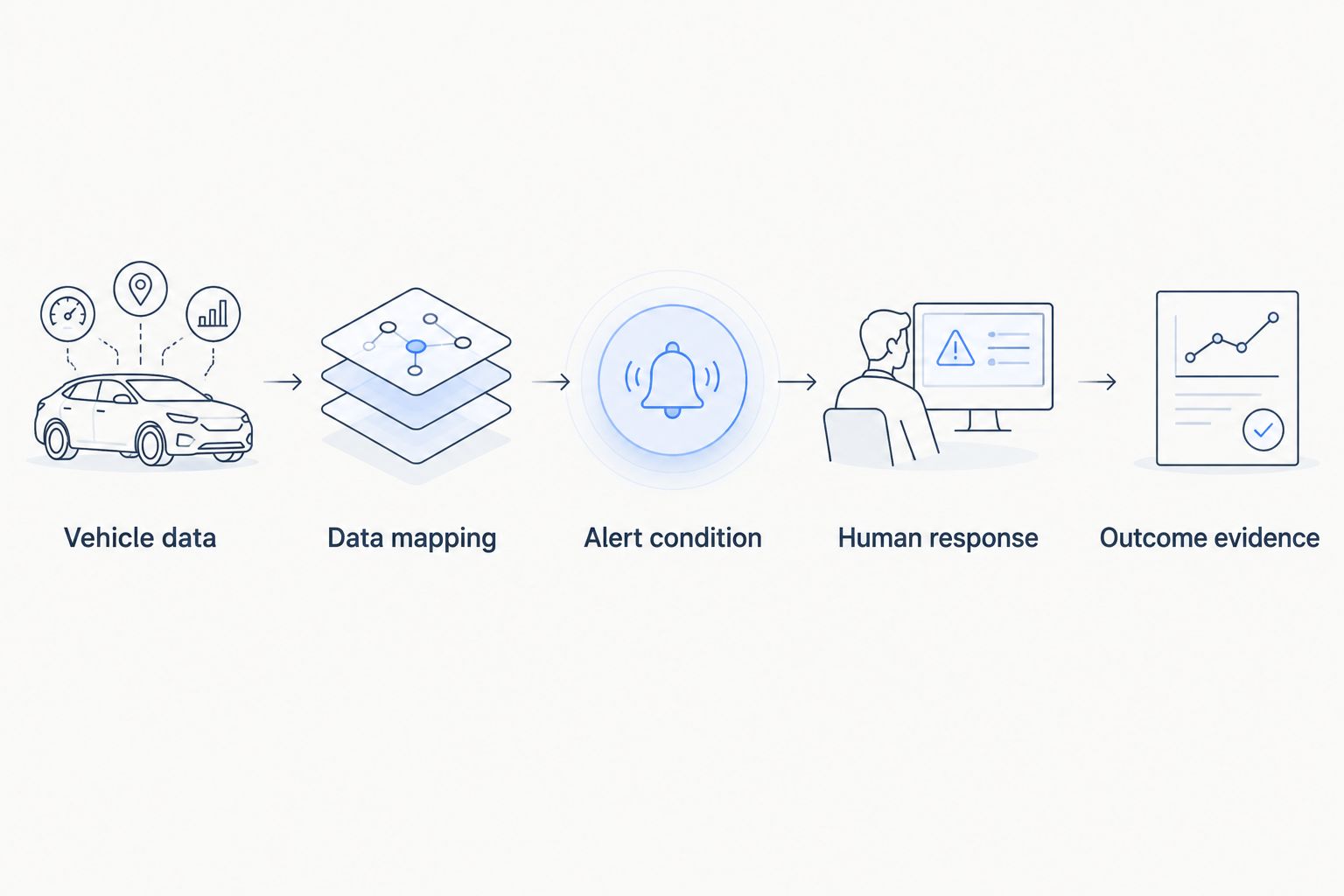
For a numerical illustration only, assume a tracker reports every 5 minutes, the pilot flags missing reports after 15 minutes, and an inspection condition uses 20% battery charge. These are assumed test inputs, not recommended operating thresholds or measured results. Select real settings from your equipment requirements and service model.
Now interrupt connectivity. A delayed battery report should not look like a fresh measurement, and a disconnected vehicle should not silently appear healthy. Record what the operator sees, who responds and how the system represents uncertainty.
Make stale-data behavior a selection gate. A clear dashboard built on old information is still an unreliable basis for dispatch decisions.
Remote commands need vehicle feedback
Remote unlocking and vehicle disabling deserve a separate acceptance test from monitoring. The required path includes compatible hardware, a defined command, transport support, appropriate permissions and a way to establish the resulting state. None of the platform choices removes those dependencies.
Treat these as different outcomes:
- The application accepted the request.
- The transport queued or delivered the message.
- The device acknowledged processing it.
- Feedback or inspection established the physical result.
Your workflow must represent the evidence it actually has. An accepted command should not become a successful unlock simply because the request returned without an error.
For AI-assisted operation, keep the same boundary. Natural-language interaction helps users work with configured systems; it does not create a supported vehicle command or prove the equipment's response. Vehicle safety controls remain a separate engineering responsibility.
Hardware sourcing is a separate decision
Choose trackers and vehicle interfaces against the measurements and actions your application needs. Examine power arrangements, environmental suitability, authenticated communication, payload documentation and the available command feedback. Software support for a protocol does not establish compatibility with every device using it.
Kilo Electronics is a separate online authorised dealer for compatible hardware, serving individual and business buyers. It is not the platform itself, and sourcing hardware there is not an additional platform requirement. For a micromobility project, confirm the particular hardware's suitability rather than assuming a general IoT sensor fits a moving vehicle.
How these options were ranked
This guide groups products by implementation responsibility: configurable monitoring, self-hosted telemetry, custom AWS development and custom Azure development. It does not claim a measured winner for performance, deployment speed or operating expense.
For your own selection, apply the same vehicle payload and operational scenario to every candidate. Record compatibility, stale-data handling, alert usefulness, permission boundaries and outcome evidence. Choose the option that completes your required workflow with an implementation your team can maintain.
Which platform should you choose for your fleet?
For configurable monitoring alongside existing fleet software, start with the first option's integration pilot. For a self-hosted application, assess ThingsBoard. For custom cloud development, match AWS IoT Core or Azure IoT Hub to the architecture your engineers already own.
If you need rider payments, booking, trip management and vehicle controls together, write those requirements into the procurement brief. A general IoT-platform shortlist is not enough. Keep this guide's telemetry decision separate from the complete mobility-service decision.
FAQ
What's the best IoT platform for micromobility fleets?
The right choice depends on vehicle compatibility and who will build the application. Kilo fits configurable monitoring and automation; ThingsBoard fits self-hosted telemetry; AWS IoT Core and Azure IoT Hub fit custom cloud applications.
Can an IoT platform replace scooter-sharing software?
An IoT platform does not automatically replace scooter-sharing software. Rider accounts, reservations, payments and trip workflows require application functionality beyond device telemetry.
Can I connect different scooter brands to the same platform?
You can combine different vehicles only when their interfaces and payloads can be integrated. Check identifiers, authentication, measurements and commands for each vehicle type rather than relying on a shared protocol name.
Does a delivered command mean a scooter unlocked?
A delivered command does not prove that a scooter unlocked. Establish the result through supported device-state feedback or a physical check.
Should I choose a self-hosted or managed IoT platform?
Choose self-hosting when operating the deployment yourself is a requirement and your team can maintain it. Choose a managed approach when you want the provider to operate the supplied service, while checking which application responsibilities remain yours.
Do I need AI to monitor fleet battery charge?
You do not need AI for a defined battery-charge threshold. Conventional rules and alerts handle that workflow; AI assistance is a separate choice for interacting with supported platform functions.
What should I test before selecting a fleet platform?
Test a complete workflow from vehicle measurement to a verified response. Include stale data, interrupted connectivity, permissions and command feedback, not just a successful connection.
Before signing, disconnect a vehicle
The most revealing pilot step is deliberately removing fresh information. Watch whether the application shows missing data honestly, whether the alert reaches the responsible person and whether recovery preserves the correct measurement timestamps.
A fleet platform must explain what it doesn't know as clearly as what it knows. Make that behavior part of acceptance, not a dashboard refinement after deployment.


