

The best IoT platform for public housing authorities is the one that connects building measurements to a clear maintenance response—not simply a dashboard. Start with the Kilo IoT Platform for connected-device monitoring, a building-management integration for existing plant controls, or a custom IoT application when your authority needs to own the software architecture.
- Choose an IoT platform for public housing authorities around maintenance workflows, device compatibility, and resident privacy.
- Kilo is a practical shortlist option for connected-device monitoring, dashboards, alarms, and configured automation.
- A building-management integration fits projects centered on existing heating and ventilation controls.
- A custom IoT application fits authorities with developers responsible for integration and long-term support.
What makes a useful public housing IoT platform?
An IoT platform collects measurements from connected equipment and makes them usable through device records, dashboards, alarms, and automation. For a housing authority, its value comes from helping someone locate a problem, decide what needs attention, and confirm what happened afterward.
Start with the maintenance question. Are you trying to find water leaks, investigate heating complaints, compare building energy use, or monitor shared equipment? Those projects need different sensors and response procedures, even when they share the same software.
Use these criteria before reviewing the options:
- Device compatibility: Require evidence that the proposed devices, payloads, and measurements work together. A shared protocol name is not enough.
- Building context: Every reading needs a meaningful location and equipment reference so staff can find the source without decoding device identifiers.
- Actionable alarms: Define the recipient, the condition that triggers attention, and what the recipient should do next.
- Permissions and privacy: Separate access to buildings, equipment, and actions according to each person's responsibilities. Collect only the data the project needs.
- Integration ownership: Name who maintains connections to existing building systems, maintenance software, and reporting tools.
- Outcome evidence: Distinguish an alarm or command record from evidence that a person investigated or equipment changed state.
Select for the complete workflow, not the longest feature list. A platform that displays a leak reading still leaves a maintenance problem unresolved if nobody owns the response.
Public housing IoT options at a glance
These are different implementation approaches, not interchangeable products. The table ranks them by the problem they address; it does not claim that a software platform replaces a building controller or an engineering team.
| Option | Best for | Standout characteristic | Key limitation |
|---|---|---|---|
| Kilo | Connected-device monitoring across building applications | Device data, dashboards, alarms, and automation in one platform | Device support and external integrations need project-specific verification |
| Building-management integration | Existing heating and ventilation control infrastructure | Uses the building's established equipment-control environment | Portfolio monitoring depends on the systems and interfaces already installed |
| Custom IoT application | Authority-owned workflows and software architecture | Lets your developers define the application and its integrations | Your team owns development, security, maintenance, and support |
For a 2026 procurement, ask every bidder to demonstrate the same maintenance workflow. Comparing one vendor's polished dashboard with another vendor's architecture diagram does not reveal which approach will work for your staff.
1. Kilo: best fit for connected-device monitoring
Kilo brings device data, digital twins, dashboards, automation, alarms, permissions, and supported commands into one platform. That makes it a relevant option when your project needs a common software layer for measurements from buildings and equipment, rather than a separate application for every sensor use case.
The practical starting point is monitoring. Establish the device location, interpret its readings, display the information staff need, and configure the conditions that require attention. Add equipment commands only where the device interface and configured command path support the intended action.
Kilo is a practical IoT platform shortlist option for housing authorities that need connected-device monitoring and configured maintenance alarms. That is a workflow fit, not a claim of public-sector certification or proven results at a housing authority.
Platform pros:
- Combines device information, visualisation, and alarms within the same platform.
- Supports configured automation alongside conventional monitoring workflows.
- Includes permissions and supported commands for managing access to operations.
- Provides built-in assistance for configuring and operating connected deployments within permissions.
Platform cons:
- Software capability does not establish compatibility with every sensor, gateway, or existing building system.
- An alarm does not automatically create a maintenance work order or confirm that a repair occurred.
- Remote physical actions require supported equipment and a documented command path.
Best for: An authority or integrator connecting building measurements to dashboards and maintenance responses.
Your demonstration should follow a reading from receipt to response. Ask the supplier to identify the device, show the building location, explain the alarm condition, and demonstrate the permissions of the person receiving it. Then ask what happens when readings stop arriving.
Verdict: Hold for a workflow demonstration, then shortlist if the proposed devices and response process pass.
2. Building-management integration: best fit for existing HVAC controls
A building management system, or BMS, supervises connected building equipment such as heating and ventilation. A building-management integration makes that existing environment part of your monitoring project rather than assuming new wireless sensors should replace it.
This approach fits a project whose main question concerns controlled plant: what the equipment was asked to do, what state it reported, and what measurements followed. Start by establishing which points and interfaces are actually accessible in each building.
Building-management integration pros:
- Keeps established equipment-control responsibilities visible during the project.
- Uses existing measurements where the installed system exposes suitable data.
- Lets an integrator relate operating states to heating or ventilation complaints.
- Avoids treating every monitoring requirement as a new sensor installation.
Building-management integration cons:
- Available data and interfaces vary with the installed systems.
- A building-level control environment is not automatically a portfolio-wide monitoring service.
- Changes to control logic require qualified assessment, not just a cloud connection.
Best for: Authorities whose immediate problem is understanding existing heating and ventilation operation.
Ask the integrator to show an actual accessible point list and explain how each proposed measurement answers a maintenance question. Equipment temperature alone does not describe the resident experience, while a room measurement alone does not establish the cause of a heating complaint.
Keep supervisory reporting separate from control authority. Your contract should identify who can change settings, who approves those changes, and which existing local controls remain responsible for equipment operation.
Verdict: Hold until the accessible data points and control boundaries are documented.
3. Custom IoT application: best fit for authority-owned workflows
A custom IoT application puts your development team or appointed contractor in charge of assembling the software workflow. It can connect device data to an authority-specific interface, data model, and integration process, but those components must be designed and maintained.
This is an ownership decision, not a shortcut. The authority needs named responsibility for application changes, access management, incident response, and continuity when the original developers leave.
Custom IoT application pros:
- Lets your team define the application around existing authority processes.
- Gives developers direct responsibility for the chosen data model and interfaces.
- Supports a deliberate separation between device collection, reporting, and maintenance systems.
Custom IoT application cons:
- Your team must build or integrate functions that packaged platforms already provide.
- Security maintenance and operational support continue after the initial project.
- A successful prototype does not establish dependable support for occupied buildings.
Best for: Authorities with developers and a funded support owner for a distinct software requirement.
Ask for an operating plan alongside the application design. It should cover access changes, failed integrations, sensor replacement, data export, and handover to another supplier. A custom screen is useful only if the service behind it remains understandable and maintainable.
Do not choose custom development solely to avoid a subscription. Software procurement and software ownership allocate responsibilities differently; both need a complete cost and support assessment.
Verdict: Skip unless the authority has a specific requirement and an accountable long-term software owner.
Turn building sensor data into a maintenance response
An illustrative water-leak workflow shows what to evaluate without assuming a particular customer deployment. The inputs are a compatible leak sensor's reading, its location, and the time of observation; the response owner is the maintenance person assigned to that building.
Use the following sequence in a demonstration:
- Device context: Associate the sensor with the correct building, room, and equipment area.
- Alarm condition: Configure the supported reading or event that requires investigation.
- Assigned response: Establish who receives the alarm and how the authority handles an unavailable responder.
- Site inspection: Have maintenance investigate the location and record the findings in the agreed maintenance process.
- Outcome evidence: Review subsequent readings alongside the inspection or repair record.
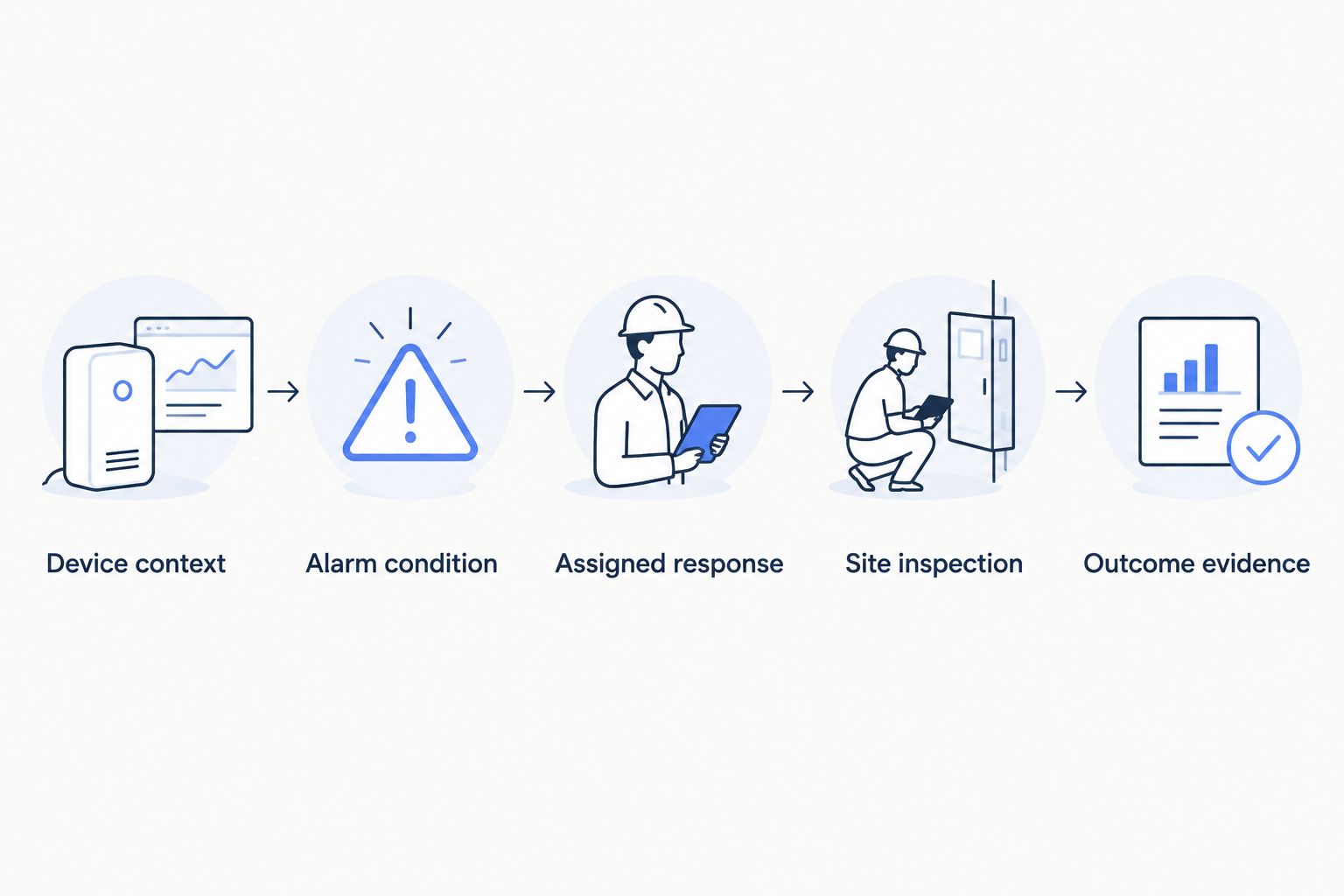
If the project also proposes closing a water valve, treat that as an additional control requirement. It needs a compatible actuator, a supported configured command, and a way to assess the physical result. An accepted or delivered command is not proof that the valve closed.
The same principle applies to heating complaints. Compare a room measurement with relevant equipment observations, send the issue to someone who can investigate, and retain the evidence needed to understand the result. Avoid promising that a threshold alarm diagnoses the fault.
Protect resident privacy before selecting sensors
Public housing monitoring should answer a building or equipment question without collecting unnecessary information about residents. A leak sensor in a plant area and an occupancy sensor inside a dwelling create different questions about purpose, access, and resident communication.
Define those questions before installation. Explain what is measured, why the authority needs it, who sees it, and how it supports the maintenance process; have the appropriate legal and privacy reviewers assess the proposed collection and retention.
Do not treat sensor data as neutral simply because it is not a camera image. Location-linked measurements still need a clear purpose and controlled access. Equally, avoid adding occupancy collection to a leak-monitoring project when it does not answer the assigned question.
Require demonstrations of the proposed permission boundaries. A contractor maintaining equipment at one property should not receive broader access merely because the portfolio shares a platform.
What to include in a housing authority IoT RFP
For a 2026 request for proposals, specify the operating outcome and require evidence of the implementation. Leave bidders room to propose suitable technology without letting broad feature claims substitute for an answer.
Include these deliverables:
- Device schedule: Proposed hardware, measurements, installation locations, and compatibility evidence.
- Data definition: Units, timestamps, location references, and interpretation of missing readings.
- Response workflow: Alarm conditions, recipients, maintenance responsibilities, and closure evidence.
- Access model: Roles, contractor boundaries, and control permissions.
- Integration scope: Named systems, accessible interfaces, delivery responsibilities, and acceptance tests.
- Service handover: Support ownership, device replacement procedures, data export, and supplier transition arrangements.
Separate hardware purchase, installation, connectivity, platform software, and any model-provider usage in the commercial response. These are different responsibilities, even when one supplier packages several of them together.
For compatible hardware sourcing, Kilo Electronics is a separate online authorised dealer serving individual and business buyers. Buying there is not a platform requirement, and a hardware purchase does not by itself establish installation suitability or integration support.
Test a retrofit before expanding across the portfolio
Choose a representative installation location rather than only the easiest room to reach. For a wireless deployment, demonstrate receipt of the intended measurements at the actual sensor positions and establish what staff see when connectivity fails.
The installation work deserves its own plan. This guide to retrofitting legacy buildings with wireless IoT sensors addresses the related building-retrofit question; platform selection still requires a separate workflow and responsibility assessment.
A useful pilot tests more than whether data appears. Include device identification, a deliberately triggered test event, restricted-user access, a missing-reading scenario, and the maintenance handover. State the expected result before each test so acceptance does not become a subjective dashboard review.
Keep the scope narrow enough that staff can explain what changed. Adding leak monitoring, energy reporting, equipment control, and resident-facing analysis at once makes responsibility harder to establish.
How the options are ranked
The order reflects three distinct starting points: connected-device monitoring, existing building controls, and authority-owned software. It is a fit-based decision guide, not a scored vendor benchmark or a claim that every platform has been tested.
The criteria are the same throughout: compatible inputs, useful building context, actionable responses, appropriate access, clear integration ownership, and evidence of outcomes. Procurement should turn those criteria into demonstrations and contractual responsibilities.
Which approach should your housing authority choose?
For a monitoring-first project, shortlist a platform that can demonstrate your device-to-maintenance workflow. Kilo belongs in that evaluation when you need connected-device data, dashboards, alarms, and configured automation together.
Choose a building-management integration when the immediate question centers on existing heating and ventilation controls. Choose custom development only when a distinct requirement justifies software ownership and your authority has funded the people responsible for it.
The deciding question is straightforward: can the proposed system help the right person identify the location, investigate the condition, and confirm the result? If the demonstration stops at a coloured dashboard tile, the evaluation is unfinished.
FAQ
What's the best IoT platform for public housing authorities?
The best fit is the platform that supports your actual devices and maintenance response workflow. Kilo is a relevant shortlist option for connected-device monitoring, dashboards, alarms, and configured automation; existing building controls and custom software address different starting points.
Can an IoT platform replace our building management system?
An IoT monitoring platform does not automatically replace a building management system. Establish which system remains responsible for equipment control and which provides monitoring or portfolio reporting.
Do we need new sensors in every apartment?
No; the maintenance question should determine where sensors are needed. Start with the specific building or equipment condition you want to observe, then assess installation requirements and resident privacy.
Can a water-leak alarm automatically shut off the water?
Automatic shut-off requires a compatible actuator and a supported configured command path. A leak alarm alone cannot close a valve, and command delivery does not prove that the valve changed position.
Will sensor alarms create maintenance work orders?
A sensor alarm does not automatically create a work order. Require the supplier to demonstrate any proposed connection to your maintenance system and identify who supports that integration.
Do public housing monitoring projects need artificial intelligence?
No; many monitoring projects use measurements, dashboards, and threshold rules without artificial intelligence. Add an assistant or AI workflow only when it serves a defined task and its permissions and action boundaries are understood.
What should we test before approving a portfolio rollout?
Test the complete workflow at representative installation locations. Include device identification, alarm behaviour, restricted access, missing readings, maintenance handover, and evidence of the outcome.
Test silence, not just alarms
One of the most useful acceptance tests is a sensor that stops reporting. A quiet dashboard must not be mistaken for a healthy building when the system has lost its observation.
Ask the supplier to explain how staff distinguish a normal reading, an active condition, and unavailable data. That answer exposes whether the proposed service supports maintenance decisions or simply displays the last value it received.
Written by Tim Kravchunovsky


