

For sensor-based retail loss prevention, shortlist the Kilo IoT Platform; for missing merchandise, start with item-level inventory or security systems. The right platform in 2026 depends on whether you need to detect spoilage, investigate stock discrepancies, flag tagged merchandise at an exit, or review suspicious transactions—not simply connect more devices.
- Kilo fits retailers evaluating an IoT platform for retail loss prevention through sensor monitoring, alarms and configured automation.
- RFID inventory systems fit item-level stock visibility; electronic article surveillance fits tagged-merchandise exit detection.
- POS analytics and video management support investigations but do not replace physical inventory checks.
- Choose the loss mechanism first, then test the complete path from observation to verified response.
Written by Tim Kravchunovsky
Retail loss prevention needs more than a sensor dashboard
Retail losses have different causes. A refrigerator fault threatens perishable merchandise; an unexplained inventory discrepancy requires reconciliation; an exit alarm calls for a security response. Treating all three as the same monitoring problem leads to the wrong purchase.
An Internet of Things platform collects device observations and turns them into usable information, alarms or configured actions. That makes it relevant to environmental damage and equipment-related losses. It does not, by itself, explain why an item disappeared from the stock ledger.
An abnormal reading is evidence of a condition, not proof of theft. Your selection should preserve that distinction, especially when employees or customers become part of an investigation.
What makes the best IoT platform for retail loss prevention?
Use these criteria before comparing software. A product that looks convincing in a dashboard demonstration still needs to match the actual loss event.
- Relevant observations: Can the system observe the condition you need, such as temperature, door state, item identity or transaction activity?
- Device and data compatibility: Can your equipment supply usable data through a supported integration? A shared protocol name is not enough.
- Useful context: Can users understand which store, cabinet, stockroom or transaction an event concerns?
- Actionable response: Does an exception reach someone who can investigate or intervene, rather than merely appear on a chart?
- Permissions and control: Can you separate viewing, configuration and equipment commands according to each person's responsibilities?
- Outcome evidence: Can you distinguish detection, notification, attempted action and the observed result?
The strongest candidate is the one that completes your workflow. Feature counts are secondary.
Retail loss-prevention options at a glance
These are distinct system types, not interchangeable competitors. The order starts with connected-condition monitoring, then moves through merchandise visibility and investigation. It is not an independent ranking of vendors or a claim that one product covers every form of retail loss.
| Option | Best for | Standout function | Key limitation |
|---|---|---|---|
| Kilo IoT Platform | Sensor-based monitoring of conditions that threaten merchandise | Device data, dashboards, rules and alarms in one operating layer | Does not establish item-level inventory reconciliation or theft investigation |
| RFID inventory systems | Identifying tagged merchandise during inventory workflows | Reads item identifiers using radio-frequency tags and readers | Requires tagging, reader coverage and inventory-system integration |
| Electronic article surveillance | Detecting active merchandise tags at configured exits | Detects compatible security tags within the exit system's coverage | An alarm does not establish intent or reconcile stock |
| POS exception analytics | Investigating unusual transaction patterns | Organizes transaction exceptions for review | Does not observe physical merchandise movement by itself |
| Video management systems | Reviewing visual context around an incident | Supports review of recorded camera footage | Depends on camera coverage and does not replace inventory records |
1. Kilo IoT Platform: for sensor-based merchandise protection
The Kilo IoT Platform brings connected-device data, dashboards, automation, alarms and permissions into one platform. Its relevant role in retail loss prevention is monitoring physical conditions and helping users respond to exceptions—not assigning responsibility for missing stock.
An illustrative grocery workflow starts with a compatible temperature sensor and door contact. The integrator maps the readings to the correct refrigerated cabinet, configures the relevant rule, and gives the store team a clear alarm to investigate. The responder checks the cabinet and subsequent measurements before deciding that the problem is resolved.
Kilo pros:
- Combines device observations with dashboards, rules and alarms.
- Supports connected deployments through the protocol and integration options stated in the brief, including LoRaWAN, mioty and MQTT.
- Includes permissions to govern access and supported operations.
- Provides built-in assistance for configuring and operating connected deployments within permissions.
Kilo limitations:
- Sensor monitoring does not prove that merchandise was stolen or identify who handled it.
- Device compatibility, payload mapping and available commands still require confirmation for the deployment.
- A delivered command is not evidence that equipment reached the intended physical state.
For a refrigeration problem, the useful evidence is the observed temperature trend and the store's response. A software acknowledgement alone cannot demonstrate that merchandise remained suitable for sale.
Best for: Retailers and integrators building environmental or equipment-condition monitoring around compatible sensors.
Verdict: Shortlist for sensor-based loss prevention; skip as a standalone theft-investigation system.
2. RFID inventory systems: for item-level stock visibility
Radio-frequency identification, or RFID, associates a tag identifier with an item or inventory record. Readers collect those identifiers during configured inventory workflows, helping you compare observed merchandise with expected stock.
The important difference is identity. A temperature sensor describes a condition; an RFID tag identifies tagged merchandise. If your main question is which items are present, start with the inventory process rather than an environmental dashboard.
RFID inventory system pros:
- Supports identification of individually tagged merchandise.
- Can support stock counts without requiring a barcode to face the reader.
- Provides observations that can be reconciled with inventory records.
RFID inventory system limitations:
- Merchandise needs an appropriate tagging process.
- Read coverage depends on tag placement, materials, readers and the environment.
- A missing read does not independently prove that an item left the store.
Ask a supplier to demonstrate representative merchandise, including items that are difficult to read. Then examine how the software handles missed reads, duplicate observations and movement between stockroom and sales floor.
A reconciliation workflow also needs an owner. Someone must decide whether a discrepancy reflects receiving, replenishment, sales, returns, misplaced stock or an unexplained loss; the reader cannot make that business decision alone.
Best for: Retailers whose primary requirement is visibility into tagged stock and inventory discrepancies.
Verdict: Shortlist for item-level inventory; skip if you only need cabinet-condition monitoring.
3. Electronic article surveillance: for exit detection
Electronic article surveillance, commonly called EAS, detects compatible active security tags within a configured detection area. Its familiar retail use is an alarm near an exit when a tag has not been removed or deactivated through the intended checkout process.
EAS answers a narrow question: did the system detect an active tag here? It does not answer whether the merchandise was purchased, whether checkout handling failed, or whether the alarm reflects an attempted theft.
EAS pros:
- Focuses detection on the merchandise exit workflow.
- Provides an immediate local signal for staff response.
- Gives retailers a defined tag-handling process to test at checkout.
EAS limitations:
- Requires compatible tags, detection equipment and checkout handling.
- An alarm needs investigation rather than an automatic accusation.
- Exit detection does not provide a complete inventory reconciliation process.
Before choosing EAS, examine normal customer journeys. Returns, exchanges and checkout mistakes need practical handling procedures, because a technically correct detection event can still have an innocent explanation.
Your acceptance test should cover tag removal or deactivation as well as detection. A security system becomes disruptive when staff cannot distinguish an operational checkout issue from an incident requiring investigation.
Best for: Retailers seeking tagged-merchandise detection at defined exits.
Verdict: Shortlist for exit detection; skip as a substitute for item-level reconciliation.
4. POS exception analytics: for transaction investigations
Point-of-sale exception analytics examines transaction records for patterns selected for review. Depending on the system and configuration, those records can include returns, voids, discounts and other checkout events.
This is a transaction-data workflow rather than a sensor-monitoring workflow. It belongs on your shortlist when the loss question concerns how sales and adjustments were recorded, not whether a freezer door remained open.
POS exception analytics pros:
- Organizes relevant transaction records for investigation.
- Lets reviewers examine exceptions in their transaction context.
- Supports repeatable review criteria instead of relying entirely on memory.
POS exception analytics limitations:
- Depends on access to accurate, relevant transaction data.
- Unusual activity is not proof of misconduct.
- Does not directly establish where physical merchandise went.
Ask the vendor to explain each exception in plain language. A reviewer needs the underlying transaction, the reason it was flagged and enough context to consider legitimate explanations.
Keep review permissions narrow and define who can close an investigation. A system that produces unexplained risk labels without accessible supporting records is a poor fit for decisions affecting employees or customers.
Best for: Loss-prevention teams investigating transaction discrepancies and unusual checkout activity.
Verdict: Shortlist for transaction review; skip as the primary environmental-monitoring layer.
5. Video management systems: for incident context
A video management system organizes camera feeds and recordings for viewing and review. In retail loss prevention, its role is to provide visual context around a known location and time.
Footage can help a reviewer understand what happened within the camera's field of view. It cannot show an event outside that coverage, and visual context does not replace a transaction record or inventory count.
Video management system pros:
- Provides visual evidence for events within camera coverage.
- Supports review of the sequence surrounding an incident.
- Helps investigators compare observations with other records.
Video management system limitations:
- Depends on camera placement, image quality and available recordings.
- Blind spots leave gaps in the evidence.
- Recording people introduces privacy and access-control responsibilities.
Do not assume a video system includes theft detection, facial recognition or integration with your IoT software. Those are separate capabilities that require specific evidence and evaluation.
Test whether authorized reviewers can locate the relevant footage using consistent location names and timestamps. Clear retrieval matters more than displaying every camera on one screen.
Best for: Retailers needing visual context to investigate specific incidents.
Verdict: Shortlist for incident review; skip as a standalone explanation of every inventory loss.
Test the observation-to-response workflow before rollout
A useful pilot follows a complete sequence, not just successful device connection. Choose a representative store area and a loss mechanism that the proposed system can actually observe.
- Observation: Generate a controlled, relevant event using approved test procedures. Record what the sensor, reader or transaction system actually observes.
- Context: Confirm that users see the correct location, equipment or item identity and understand the event's timing.
- Decision: Apply the intended exception rule. Check normal activity as well as the condition that should trigger attention.
- Response: Confirm that the responsible person receives enough information to investigate and knows what to do next.
- Verification: Examine subsequent measurements, physical checks or reconciled records before closing the event.
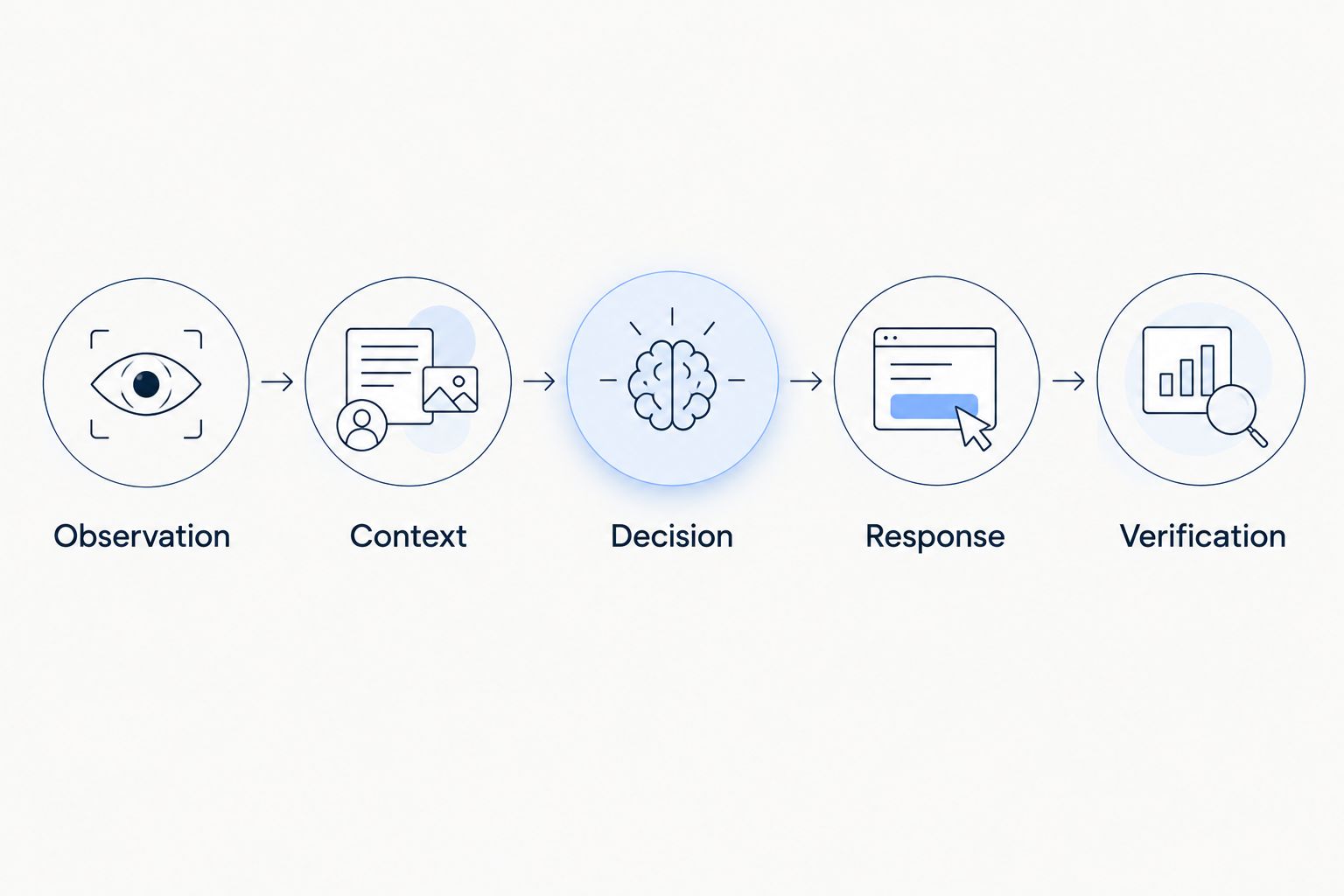
Include missing-data behavior in the pilot. An absent temperature reading is not a normal temperature, and an unread tag is not proof that merchandise is absent. Your users need to understand the difference between a reassuring observation and no observation.
For any equipment-control workflow, specify the supported actuator, command path and feedback. Accepted, queued or delivered status describes command processing—not the physical result. Preserve equipment safety procedures and do not treat platform automation as a replacement for them.
Keep hardware sourcing separate from software selection
Sensors, tags, readers and gateways determine what your software can observe. Select them against the actual installation conditions and required data, then verify how those observations reach the platform.
Kilo Electronics is a separate online authorised dealer for compatible hardware, serving individual and business buyers. It is not the platform itself or an additional platform requirement. Hardware sourcing and software evaluation remain separate decisions.
Avoid buying a sensor because its wireless protocol appears on a platform feature list. The payload, measurement type, reporting behavior and integration path all affect whether the proposed workflow works.
Which retail loss-prevention platform should you choose?
Choose a sensor platform when your main loss mechanism is a physical condition; choose merchandise or transaction systems when your main question is where stock went. If both problems matter, define separate workflows and the records that must connect them.
An integrator can evaluate an IoT platform alongside existing retail systems without claiming that they already share an integration. Start with the required exchange of information, identify the supported interfaces, and test the complete handoff before expanding across stores.
FAQ
What's the best IoT platform for retail loss prevention?
The best fit depends on the loss mechanism you need to observe. Kilo is a relevant candidate for sensor-based condition monitoring, while item-level inventory, exit detection and transaction investigation require their respective workflows.
Can an IoT platform detect shoplifting?
An IoT platform does not establish shoplifting simply by receiving a sensor event. A door opening, missing reading or movement observation needs relevant context and investigation before anyone draws that conclusion.
Is RFID better than an IoT platform for retail inventory loss?
RFID is the more relevant starting point when you need to identify tagged merchandise during inventory workflows. An environmental IoT platform answers different questions, such as whether storage conditions threaten the merchandise.
Can temperature monitoring prevent retail spoilage?
Temperature monitoring can identify conditions that require intervention, but it does not guarantee that spoilage is prevented. The result depends on measurement quality, notification, response and the condition of the merchandise.
Do I need cameras alongside retail IoT sensors?
You need cameras only when visual context serves a defined requirement. Sensors describe their measured conditions; cameras provide observations within their coverage, subject to recording and access arrangements.
Can AI automatically control retail equipment?
AI-assisted control requires compatible equipment, supported commands and the appropriate permissions. The built-in assistant has a confirmation flow for direct device commands, external MCP clients have their own approval behavior, and deliberately configured rules can execute commands autonomously.
What should a retail loss-prevention pilot prove?
A pilot should prove that a relevant observation reaches the right person and leads to a verifiable response. Include normal activity, exceptions and missing data, rather than testing only whether a dashboard displays a reading.
Before you expand, agree what closes an alarm
Define resolution before configuring detection. A door alarm closes when the door state is verified; an inventory exception closes after reconciliation; an equipment incident closes after the relevant physical checks and measurements.
An acknowledgement means someone saw the event. It does not mean the cause disappeared. Keeping those states separate gives your team a more useful loss-prevention process than adding another alert channel.


