

Commercial real estate energy management is the process of measuring, comparing and managing building energy use to improve portfolio performance without compromising tenant requirements. A building energy management system for commercial real estate connects those measurements to decisions; the Kilo IoT Platform provides an IoT operating layer for connected-device data, dashboards, alarms and configured automation, while each property's equipment and integration determine what you can monitor or control.
- A building energy management system for commercial real estate needs comparable measurements, clear ownership and verified outcomes.
- Kilo suits portfolio teams connecting energy measurements with building context, alarms and configured automation.
- Keep local building controls responsible for equipment operation; add portfolio monitoring where it answers a specific question.
- Separate energy consumption, electrical demand and tenant allocation before comparing properties.
Why energy management matters for portfolio managers
Your portfolio decision is different from a building engineer's decision. An engineer needs to investigate equipment behavior; you need to identify which properties deserve attention, which interventions justify investment and whether the evidence supports a reported improvement.
A total consumption figure doesn't answer those questions. A fully occupied office, a partially vacant property and a building with extended tenant hours have different operating requirements. Comparing their electricity totals without that context creates a ranking, not a useful diagnosis.
Start your 2026 program with a decision to support, not a dashboard to populate. Examples include finding unexplained overnight consumption, checking whether revised operating schedules changed energy use, or identifying where additional metering would resolve uncertainty.
The same distinction applies to accountability. The portfolio manager sets priorities, the property manager coordinates access and tenant requirements, and the facilities engineer investigates equipment. Give each person an actionable view rather than the same collection of charts.
What a portfolio energy management system should connect
A building energy management system, often shortened to BEMS, combines energy measurements with the context and workflows needed to manage consumption. A building management system, or BMS, typically handles building services and local equipment control. The systems can overlap, but the names alone don't establish their capabilities.
For portfolio work, separate the workflow into four connected parts:
- Measurements: electricity, fuel or thermal-energy readings from identified sources.
- Building context: floor area, occupancy, operating schedules and equipment relationships.
- Decisions: investigations, approved changes and assigned responsibilities.
- Verification: subsequent readings and operating conditions that show what happened.
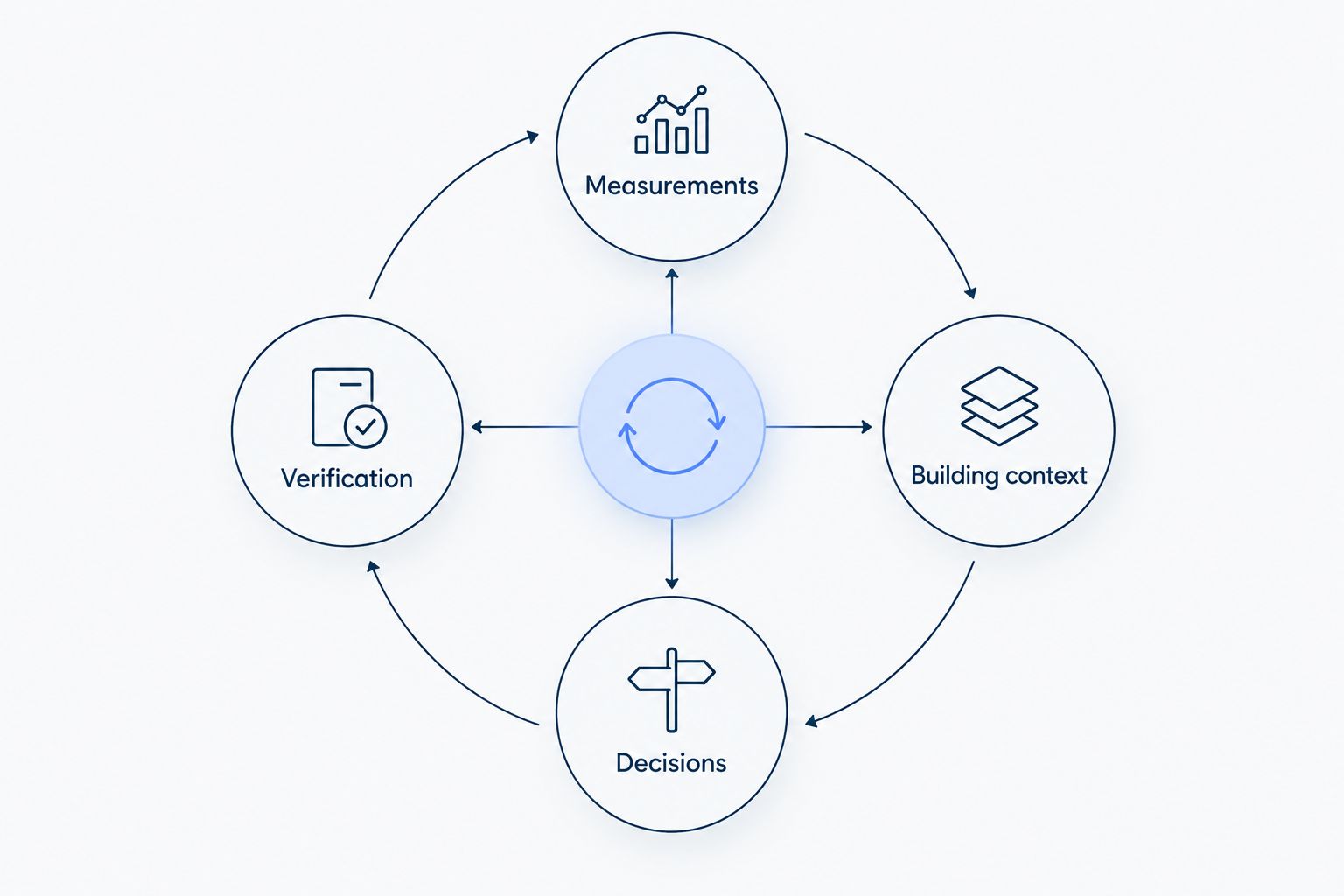
An IoT platform can connect these parts without replacing every existing building system. The useful question is whether your chosen architecture can expose the required measurements, preserve their meaning and support the intended response. Don't infer compatibility from a protocol name or a product category.
How to implement portfolio energy management
1. Define the decisions and ownership boundaries
Begin with a shared worksheet. Record the operational question, the measurement needed to answer it, the person responsible for investigation and the person authorized to approve a change. Existing invoices, meter exports and equipment schedules are enough to start this exercise.
Separate landlord-controlled equipment from tenant-controlled loads. An apparent opportunity outside your authority becomes a coordination task, not an automatic instruction to change a setting.
Choose a specific initial outcome, such as identifying unexplained after-hours consumption. Avoid promising a reduction before you understand the baseline. Your initial deliverable is a defensible finding and an assigned response.
- Identify the buildings and energy sources in scope.
- Record landlord, tenant and contractor responsibilities.
- Define the operational question for each property.
- Assign an investigation owner and approval owner.
- Write the evidence required to close an investigation.
2. Inventory meters, equipment and usable data
Walk through existing information with the site engineer before buying sensors. Reconcile meter labels, utility accounts, electrical drawings and equipment records. An unlabeled feed or an incorrect meter multiplier can undermine every comparison downstream.
Distinguish cumulative energy readings from interval consumption and instantaneous power. Electricity consumption is commonly expressed in kilowatt-hours, or kWh; electrical power is expressed in kilowatts, or kW. They describe different things.
Check whether the source includes a timestamp, unit and reliable association with a building or load. Investigate missing readings rather than interpreting a flat chart as steady operation. For electrical installation work, involve appropriately qualified personnel.
- Map each utility account to its physical meter.
- Record units, multipliers and timestamp conventions.
- Identify cumulative versus interval measurements.
- List available equipment interfaces and access permissions.
- Document gaps that require new measurement points.
3. Connect a representative pilot before expanding
Start by importing an available export into a spreadsheet and checking it against the source. This manual reconciliation gives you a reference for judging the connected workflow. Select pilot properties that expose meaningful differences in equipment, occupancy or connectivity rather than only the easiest site.
Kilo's energy-monitoring role is to bring connected measurements, dashboards, alarms and configured automation into the same operating layer. It suits teams that need to connect energy observations with building context; it does not remove the work of identifying meters, mapping payloads or establishing equipment compatibility.
Test the exact data path. A supported platform connector doesn't prove that every meter field is mapped correctly or that a device exposes the action you want.
- Compare connected readings with the original source.
- Verify identifiers, units and timestamps end to end.
- Test missing-data behavior and reconnection handling.
- Record integration dependencies for each property type.
- Set acceptance criteria before adding more sites.
4. Build comparable baselines and portfolio views
Create a baseline worksheet before configuring portfolio dashboards. Group properties by meaningful operating characteristics and use consistent measurement periods. Keep electricity, gas and other energy sources distinct unless you apply documented conversions.
Area-normalized consumption is useful, but it doesn't explain every difference. As an illustrative calculation, assume a property uses 100,000 kWh over a defined period and has 10,000 square feet of measured floor area. Its electricity intensity for that period is 10 kWh per square foot. Those are assumed inputs, not a benchmark or a target.
For your 2026 baseline, record occupancy and operating conditions alongside energy use. EPA ENERGY STAR Portfolio Manager provides an established framework for building benchmarking; its metrics require the relevant property and energy inputs.
- Use consistent period boundaries and floor-area definitions.
- Separate comparable property groups.
- Display consumption and demand as distinct measures.
- Flag incomplete data before publishing rankings.
- Annotate occupancy, schedule and equipment changes.
5. Turn unusual consumption into an assigned investigation
Review trends manually with the property engineer first. Define what makes an event actionable before creating an alarm: the relevant schedule, the measurement, the condition to investigate and the person who responds.
Consider an illustrative scenario, not a customer deployment: an office shows electrical load outside its documented operating schedule. The engineer checks tenant access, cleaning activity and equipment schedules before recommending a change. Subsequent readings establish whether the unexplained load changed.
Kilo provides alarms and configured automation for connected deployments. Use those capabilities to support a defined workflow, not to label every deviation as waste. A threshold alarm identifies a condition; it doesn't establish the cause or prove that intervention is appropriate.
- Define expected operating periods for each property.
- Distinguish energy anomalies from missing-data events.
- Include the affected meter and relevant context.
- Assign investigation and escalation responsibilities.
- Record the finding and the agreed next action.
6. Separate monitoring from equipment control
Begin with recommendations and existing local operating procedures. Monitoring a load doesn't establish permission or technical capability to control it. Before adding remote actions, document the supported interface, command definition, authorization and feedback path.
Configured rules can execute supported commands autonomously; not every automated action waits for a person. The built-in assistant has a confirmation flow for direct device commands, while external MCP clients have their own approval behavior. Don't assume identical command access across clients.
A delivered command is not proof of a physical outcome. Equipment feedback or subsequent measurements must support that conclusion. Preserve local equipment protections and review the control boundary with the responsible engineer rather than treating portfolio software as a substitute for equipment controls.
- List permitted actions and prohibited actions.
- Verify the device's supported command path.
- Assign permissions according to operational responsibility.
- Define the feedback needed to verify each action.
- Agree how operators handle unsuccessful or unexpected outcomes.
7. Verify interventions and release a repeatable site template
Maintain a simple change log linking the intervention to its approval, execution date and evaluation method. Compare relevant operating periods, accounting for occupancy, weather and other changes that affect the interpretation. A lower reading alone doesn't identify the cause.
For another illustrative calculation, assume a measured 30 kW load operates for 2 hours. That represents 60 kWh of energy. Removing that operating period is not automatically a verified saving: confirm the load actually stopped, the service remained acceptable and consumption wasn't shifted elsewhere.
Expand only after the pilot produces usable evidence. Your site template should specify data definitions, ownership, alarm logic and verification requirements, with local exceptions documented rather than hidden.
- Record each intervention and its approval.
- Compare periods with documented operating context.
- Check tenant service and comfort requirements.
- Preserve explanations for missing or adjusted data.
- Publish the accepted template and site-specific exceptions.
Compare energy management approaches by the job they perform
These approaches are complementary, not interchangeable. Choose the smallest architecture that answers your question and supports the required response. A portfolio reporting layer and local building controls often have different owners and responsibilities.
| Option | Best for | Useful strength | Key limitation |
|---|---|---|---|
| Utility records and spreadsheets | Establishing an initial portfolio baseline | Uses information you can review before integrating devices | Manual consolidation; operational detail depends on the source |
| Existing BMS | Building engineers managing connected local equipment | Keeps equipment operation close to the building | Portfolio comparisons depend on accessible, consistent exports or integrations |
| Dedicated energy analytics software | Teams focused on energy analysis and benchmarking | Centers the workflow on energy measurements and comparisons | Device connectivity and control scope need separate evaluation |
| Kilo IoT Platform | Integrators and portfolio teams connecting monitoring to operating workflows | Combines device data, dashboards, alarms and configured automation | Meter mapping, supported interfaces and outcome verification remain deployment responsibilities |
| Custom integration | Developers with requirements that justify a tailored workflow | Lets the team define its own data model and application behavior | The team owns engineering, testing and maintenance |
Require a demonstration using your own meter definitions and operating question. A generic dashboard demonstration doesn't establish whether the proposed system can handle your portfolio's data boundaries.
Common mistakes commercial real estate portfolio managers make
Ranking buildings without explaining their operating conditions
Floor-area normalization doesn't make every property comparable. Tenant activity, hours, climate and building services still matter. Group properties deliberately and show those assumptions beside the ranking so asset managers don't mistake necessary consumption for poor performance.
Treating tenant allocation as ordinary operational monitoring
A useful monitoring point isn't automatically suitable for tenant billing. Billing requires the appropriate meter basis, allocation method and applicable requirements. Keep operational analysis separate from charges until the responsible commercial and technical teams establish the process.
Buying hardware before defining the measurement gap
A temperature sensor adds context; it doesn't directly measure electricity consumption. Specify the question and data requirement first. For hardware sourcing, Kilo Electronics is a separate online authorised dealer serving individual and business buyers; hardware purchasing is distinct from the platform and isn't an additional platform requirement.
Reporting an intervention as a verified saving
A schedule change proves that a setting changed. It doesn't prove lower consumption, an acceptable tenant outcome or a lasting improvement. Keep the approval record, observed response and measurement-based evaluation separate in portfolio reports.
Keep energy audits and continuous monitoring distinct
An audit investigates a building's condition and improvement opportunities. Continuous monitoring checks what happens during operation and after interventions. Neither substitutes for the other: use findings to define measurement needs, then use measurements to evaluate the resulting changes.
For the assessment stage, the guide to IoT platforms for commercial building energy audits addresses the related platform-selection question. This portfolio implementation guide focuses on comparable data, ownership and repeatable operating workflows.
FAQ
What's the difference between a BEMS and a BMS?
A BEMS focuses on energy measurement and management, while a BMS typically manages building services and local equipment control. Their functions overlap, so evaluate the actual measurements, integrations and control responsibilities rather than relying on the label.
Do I need to replace every building's existing controls?
No, portfolio energy monitoring does not inherently require replacing existing building controls. Start with accessible measurements and keep local equipment operation in its established control system unless a specific change is justified.
Can I start with utility bills instead of new sensors?
Yes, utility bills and available meter exports can establish an initial baseline. Add measurement points when you need detail that those records cannot provide, such as identifying a particular equipment load.
Is Kilo suitable for commercial real estate energy monitoring?
Kilo suits teams connecting building energy measurements with device context, dashboards, alarms and configured automation. Each deployment still needs verified meter mappings, supported integrations and a defined operating workflow.
Does an energy alarm prove that equipment is wasting power?
No, an energy alarm identifies a configured condition, not its cause. Investigate operating schedules, tenant activity, equipment behavior and data quality before classifying the event as waste.
Can AI automatically change building equipment settings?
AI-assisted control requires a supported command path and the appropriate permissions. Approval behavior differs between the built-in assistant, external clients and deliberately configured autonomous rules; subsequent feedback is needed to establish the physical outcome.
What should a portfolio manager approve before rollout?
Approve the measurement definitions, responsibilities, permitted actions and evidence needed to evaluate outcomes. Require the pilot to demonstrate those workflows with representative property data before expanding.
Make unresolved evidence visible in the portfolio review
Add an explicit unresolved category to your energy review. An event with missing readings, unexplained occupancy or absent equipment feedback shouldn't disappear into a success figure or an efficiency ranking.
That category gives you a practical next-investment list: repair the data path, clarify responsibility or add the measurement that resolves the question. A useful energy management system makes uncertainty actionable instead of hiding it behind a clean chart.
Written by Tim Kravchunovsky


