For one facility, mioty network setup time depends on when you can complete site access, receiver installation, network commissioning, sensor onboarding, and end-to-end verification—not simply when the first reading appears. The Kilo IoT Platform provides the application layer for connected-device monitoring; estimate the radio network and the monitoring workflow separately, then schedule their dependencies together. Define completion as verified readings from the intended locations, with the required monitoring workflow tested and handed over.
- For mioty network setup time single facility planning, separate installation, commissioning, sensor onboarding, and monitoring acceptance.
- A first mioty reading proves connectivity at that location, not coverage throughout the facility.
- Kilo fits integrators who need mioty device data connected to dashboards, rules, and alarms.
- Base the completion date on site readiness and acceptance tests, not a generic installation promise.
How long does mioty network setup take for one facility?
The defensible estimate is a site-specific schedule built around readiness and acceptance. A facility with approved installation locations, working backhaul, compatible equipment, and prepared device records has fewer unresolved tasks than a site still waiting for access or integration decisions. Building count alone doesn't establish the duration.
Separate hands-on work from elapsed calendar time. Mounting equipment requires labor; waiting for a network approval extends the calendar even when the installer has nothing left to configure.
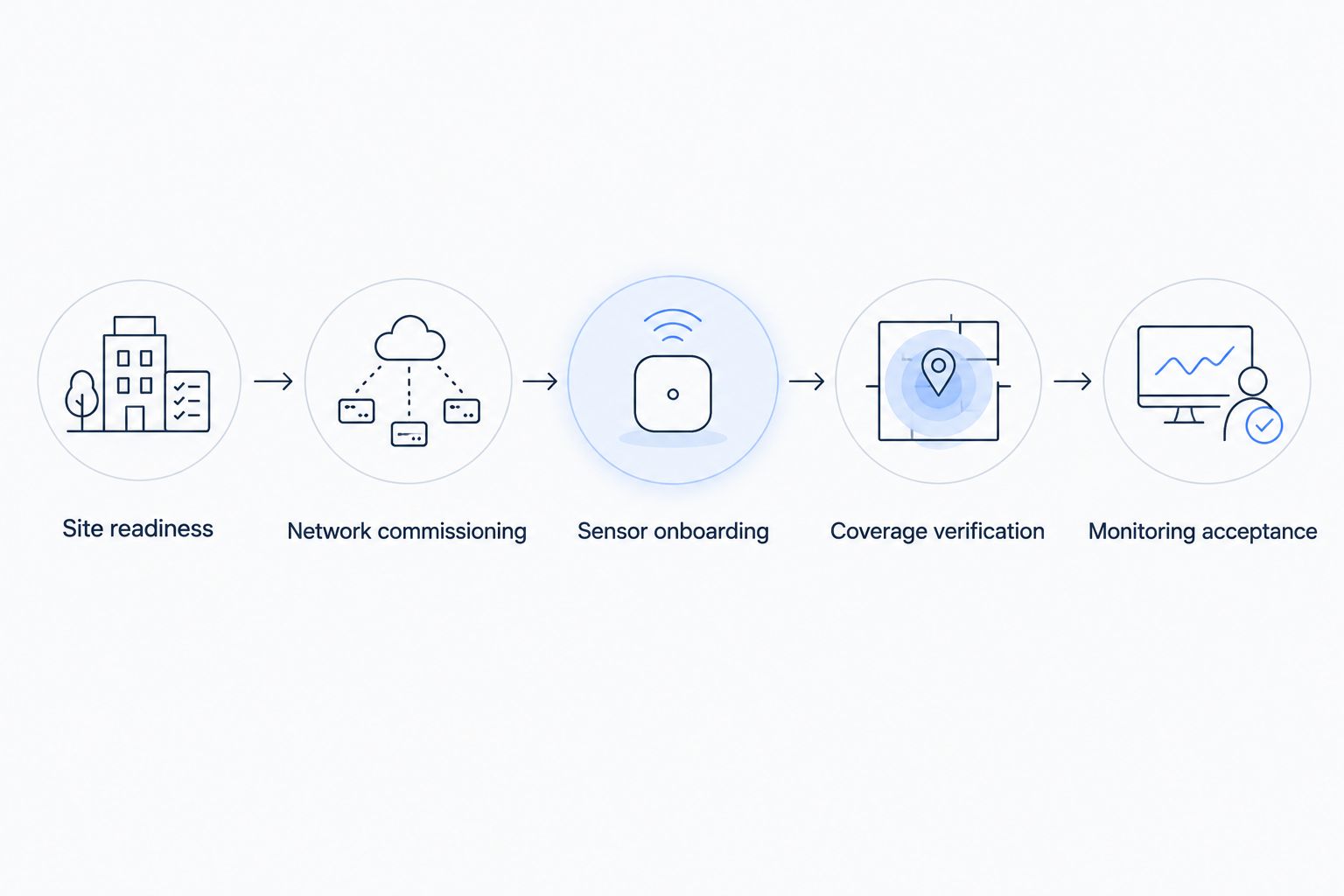
Use this sequence to build the estimate:
- Confirm readiness. Establish access, mounting locations, power, backhaul, equipment compatibility, and the monitoring scope.
- Commission the network. Connect the mioty receiving infrastructure to its network-service components and verify the required data path.
- Onboard sensors. Register devices using the selected equipment's documented process, then verify incoming messages and their interpretation.
- Verify coverage. Test devices in their intended positions under relevant facility conditions.
- Accept monitoring. Confirm dashboard values, alarm behavior, user access, and responsibility for responding.
Ask the installer to assign an owner, prerequisite, and completion test to each step. That produces a schedule you can manage rather than an installation duration that excludes unfinished work.
What should the installation estimate include?
A useful estimate names the deliverable behind each block of work. Otherwise, two proposals can use the same word—setup—while promising different outcomes.
| Work package | Evidence of completion | What the estimate must address |
|---|---|---|
| Site readiness | Approved locations, access, power, and backhaul | Who resolves outstanding site requirements |
| Network commissioning | Messages reach the intended network-service components | Equipment configuration and network permissions |
| Sensor onboarding | Device identity and decoded measurements are correct | Device records, credentials, and payload interpretation |
| Coverage verification | Readings arrive from intended installation positions | Difficult locations and any relocation work |
| Monitoring acceptance | Required displays and alarm workflows pass tests | Recipients, permissions, and handover responsibilities |
Don't accept “network online” as a substitute for “monitoring accepted.” The former establishes part of the transport path; the latter establishes whether people can use the deployment for its intended purpose.
Separate radio setup from usable facility monitoring
A mioty deployment connects several distinct layers. Sensors transmit measurements, receiving infrastructure collects radio messages, network-service components process the traffic, and the application makes the data useful to people or configured automation.
Those layers need compatible interfaces. A receiver that successfully hears a sensor doesn't establish that the application can interpret its payload, associate it with the correct room, or display the right unit.
For scheduling purposes, use these milestones:
- Site readiness: The installation team has the access and infrastructure it needs.
- Network commissioning: The receiving and network-service components exchange the required traffic.
- Sensor onboarding: Incoming measurements belong to the correct devices and fields.
- Coverage verification: The intended sensor locations have been tested.
- Monitoring acceptance: The intended users can interpret readings and respond appropriately.
Some work can run in parallel. You can prepare device names, room assignments, dashboard requirements, and response responsibilities before the receiving infrastructure is installed.
Other work has a real dependency. You cannot verify reception from a final sensor position before you can access that position and operate the relevant equipment. Keep these dependencies explicit when agreeing on a completion date.
What determines mioty installation time inside a facility?
The main scheduling factors are practical deployment requirements, not a universal duration attached to the protocol. Review these before booking installation:
- Physical access and mounting: Restricted rooms, elevated installation points, and permit requirements affect when work can happen. Confirm who provides access and approves the mounting method.
- Power and backhaul readiness: The receiving infrastructure needs its specified power supply and a working connection to the selected backend. Agree on the required network path with the site's IT owner.
- Equipment compatibility: Confirm the sensor, receiver, regional radio configuration, and network-service combination. A shared protocol name doesn't establish compatibility across every interface.
- Device registration and decoding: Prepare the required device information and the method for converting payloads into meaningful measurements. Received bytes are not yet a verified temperature, level, or contact state.
- Radio conditions at installation positions: Walls, metal structures, equipment, and antenna placement affect reception. Test where the sensors will actually operate rather than relying only on a nearby bench test.
- Application and handover scope: A readings-only pilot has a different acceptance scope from a deployment requiring alarms, permissions, and documented response procedures. State those requirements before estimating the work.
The best schedule assigns these issues to named owners before the installer arrives. Leaving compatibility or IT access unresolved turns the installation visit into a discovery session.
How to get a useful setup estimate from an integrator
Give the integrator a commissioning brief rather than only a floor plan. The brief should describe what you want to observe, where the devices belong, how the data will travel, and what constitutes a successful handover.
Include a device inventory with the model, intended location, measurement type, and configuration requirements. Keep credentials in an appropriate secure process rather than embedding them in a general project document.
Then request separate estimates for:
- Off-site preparation and configuration.
- On-site installation and access-dependent work.
- Network-service and application integration.
- Coverage testing and correction work.
- Monitoring acceptance and user handover.
Ask which tasks can happen concurrently and which must finish first. The completion date follows the longest dependent sequence of work, including approvals and access—not merely the sum of technician hours.
Also ask what happens when a test fails. A quotation should explain whether repositioning equipment, revisiting a restricted area, or correcting an unsupported payload is included in the agreed scope.
A useful estimate states its assumptions next to its duration. If approved backhaul or a compatible decoder is a prerequisite, that belongs in the schedule, not in a conversation after installation begins.
What can you prepare before the installation visit?
Prepare the information that doesn't require live radio reception. This keeps the on-site visit focused on physical installation and verification rather than naming devices or deciding who receives an alarm.
Create a location map that connects each device identifier to its physical position and intended measurement. Use names that remain understandable after the installation team leaves; a room or equipment reference is more useful than an unexplained serial number alone.
Agree on measurement units, display labels, expected reporting behavior, and the conditions that require a response. For alarms, identify both the recipient and the action that person should take. A notification without an owner isn't a completed response workflow.
For hardware sourcing, Kilo Electronics is a separate online authorised dealer serving individual and business buyers. Hardware purchasing remains separate from platform software, and the selected equipment still needs compatibility checks for the planned deployment.
Before anyone travels, confirm that the installation team has the correct equipment, configuration instructions, site contacts, and access arrangements. Preparation doesn't remove commissioning work; it prevents avoidable decisions from interrupting it.
How do you prove the facility is ready for handover?
Use acceptance tests that follow the data from the physical device to the person who needs it. A green connection indicator is useful, but it isn't evidence that every measurement and response path is correct.
An acceptance checklist should establish that:
- Each installed sensor maps to the correct physical location.
- Displayed values use the intended measurement fields and units.
- Incoming timestamps and reporting behavior are understood.
- Reception has been checked from the intended installation positions.
- Required alarm conditions and recipients have been tested.
- Users have the access needed for their responsibilities.
- Someone owns ongoing device and network maintenance.
Test missing or stale readings as well as normal measurements. The team needs to distinguish a normal value from a device that has stopped reporting; the handling of that condition depends on the configured application workflow.
Keep the results with the handover record. Record what was tested, where it was tested, which configuration was used, and any unresolved exceptions. Don't describe an untested area as accepted coverage.
For the application layer, Kilo brings device data, dashboards, rules, and alarms into one platform. That supports a connected monitoring workflow, but it doesn't remove the need to commission the radio network, verify device interpretation, or test the site's acceptance requirements.
Is a first reading enough to call mioty setup complete?
A first reading is a connectivity milestone, not facility acceptance. It shows that a particular transmission reached the observed destination under the conditions of that test.
It doesn't establish reception from every intended location, correct decoding across different sensor models, or successful alarm delivery. Keep the first-reading milestone because it helps isolate progress, but don't use it as the final completion date.
For a narrower view of the application work, the guide to onboarding a device to a dashboard addresses a different milestone from commissioning the facility network.
Can you shorten setup without skipping verification?
Shorten setup by resolving dependencies before the site visit, not by dropping acceptance tests. Prepare device records, confirm interfaces, obtain network approvals, and agree on the monitoring requirements while physical installation is being arranged.
Validate the intended data path with representative equipment before repeating the configuration across the facility. This establishes a known working configuration for the selected device type; it doesn't replace testing at the final locations.
Keep the initial scope focused. If the immediate requirement is monitoring, don't make unrelated automation or a building visualization a prerequisite for accepting the agreed monitoring deployment.
Does every sensor need checking at its final location?
Final-location checks establish whether the installed deployment meets its coverage requirements. A successful test beside the receiver doesn't answer whether a sensor behind equipment or inside a service area will report as required.
Define the verification method and observation period with the integrator, based on the application's needs and the devices' reporting behavior. Avoid treating a generic observation period as evidence for every facility.
FAQ
Can I reuse an existing internet connection for a mioty deployment?
You can use an existing connection if it meets the selected receiving infrastructure and backend requirements. Have the site's IT owner confirm routing, authentication, and any firewall requirements before installation.
Do mioty sensors need to connect to facility Wi-Fi?
The mioty radio link is separate from Wi-Fi. The receiving infrastructure still needs the backhaul required by the selected deployment architecture.
Can one mioty receiver cover my whole building?
Receiver coverage must be established for the actual building and sensor positions. Building materials, equipment, antenna placement, and installation constraints prevent building count alone from answering that question.
What should I do if a sensor message arrives but its value looks wrong?
Check the device identity, payload interpretation, field mapping, and measurement unit before treating the reading as valid. Successful radio reception doesn't establish correct application decoding.
Does mioty setup include automatic equipment control?
Automatic equipment control is a separate scope from receiving sensor measurements. It requires compatible equipment, a supported command path, configured behavior, and appropriate verification of the physical result.
Who should attend the mioty handover?
Include the people responsible for the network, device maintenance, and monitoring response. They need to understand their responsibilities and any unresolved commissioning exceptions.
Do I need Physical AI to monitor mioty sensors?
No, conventional monitoring can use device readings, dashboards, rules, and alarms without AI reasoning. Kilo supports these IoT workflows; a simple threshold alarm isn't itself Physical AI.
Set the finish line before booking installation
Put the acceptance sentence in the project brief before agreeing on the schedule: Setup is complete when the intended devices report correctly from their installed locations and the agreed monitoring workflow passes its tests.
That sentence makes the estimate more useful. It separates a successful demonstration from a facility deployment that the intended users can actually take over.
Written by Tim Kravchunovsky