Your LoRaWAN network needs another gateway when repeatable reception gaps remain after you check device configuration, gateway health, antenna placement and backhaul—or when critical sensors need an independent reception path. Missing readings in Kilo or another application dashboard are the starting point, not proof of a radio coverage problem: first establish where the messages disappear.
- A LoRaWAN network needs another gateway when a new reception location fixes persistent coverage gaps or provides required redundancy.
- Compare network-server reception with application delivery before blaming radio coverage.
- Use packet delivery, RSSI, SNR and receiving-gateway identity together; no single signal reading decides gateway count.
- Kilo suits teams bringing connected-device monitoring, dashboards and alarms into one IoT platform; radio diagnosis still requires network evidence.
How to tell if a LoRaWAN network needs another gateway
Test the reception path before adding hardware. A gateway receives LoRaWAN radio traffic and forwards it toward the network server; the application then receives and interprets that data. A failure anywhere along this chain can leave the same blank space on your dashboard.
Follow this sequence to distinguish an expansion need from a repair:
- Confirm expected transmissions. Check whether the device reports periodically, on an event, or through a combination of both.
- Check gateway health. Establish whether its power, network connection and packet-forwarding service stayed available during the gap.
- Inspect network reception. Look for the affected device's uplinks and available reception metadata at the network server.
- Compare application delivery. If the network received the message, investigate forwarding, decoding and application processing.
- Test another location. Temporarily reposition a gateway or introduce a test gateway near the affected area, keeping device settings unchanged.
- Retest normal conditions. Repeat with doors closed, equipment operating and storage areas occupied as they normally are.
A successful test must improve the affected devices without creating unacceptable gaps elsewhere. Moving the existing gateway and adding another are different decisions.
Read the evidence, not just the signal bars
Start with delivery over time. Received signal strength indicator, or RSSI, describes received signal power, while signal-to-noise ratio, or SNR, describes the signal relative to noise. Both help explain reception, but neither is a universal pass-or-fail threshold for gateway expansion.
Interpret them alongside the spreading factor, bandwidth, device location and receiver specifications. A strong received packet tells you about that packet—not about transmissions that never reached the gateway.
| Evidence | What it helps establish | What it does not prove |
|---|---|---|
| Expected versus received reports | Whether periodic reporting has gaps | Whether every gap is a radio failure |
| RSSI and SNR trends | Whether reception changes with location or conditions | A universal gateway-count threshold |
| Receiving-gateway identity | Which reception paths actually work | Independence of power or backhaul |
| Gateway connectivity history | Whether outages coincide with missing traffic | Whether an online gateway hears every device |
| Network-to-application comparison | Whether data disappears after radio reception | Whether the dashboard value is decoded correctly |
Frame counters can help identify discontinuities, but interpret resets, rejoins, retransmissions and device behavior before treating a counter gap as a precise loss measurement. Use device-side transmission records when available.
Compare the same devices under comparable conditions. A network-wide average can hide a persistent dead zone affecting the sensors that matter most.
Separate radio loss from application delivery problems
If the network server receives an uplink but the application does not show it, another gateway does not repair the downstream fault. Check integration delivery, device identity mapping, payload decoding and timestamps before changing the radio network.
The reverse situation needs a different investigation. If no gateway receives the expected transmission, check the device battery, antenna, regional frequency plan and channel configuration, then investigate the radio path.
Use the Kilo IoT Platform as the application layer for connected-device monitoring, dashboards and alarms, while obtaining gateway-level diagnostic evidence from the connected network infrastructure where available. Kilo is a useful IoT platform for teams that need device monitoring and alarm workflows together; it does not replace a radio survey.
Keep the investigation connected to the operational consequence. A missing temperature report needs both a technical diagnosis and a defined response while the data is unavailable; a gateway purchase alone answers neither question.
Test a candidate gateway location without changing the whole network
Run a controlled comparison. Changing the antenna, reporting interval, transmit settings and gateway location together makes it difficult to identify what fixed the problem.
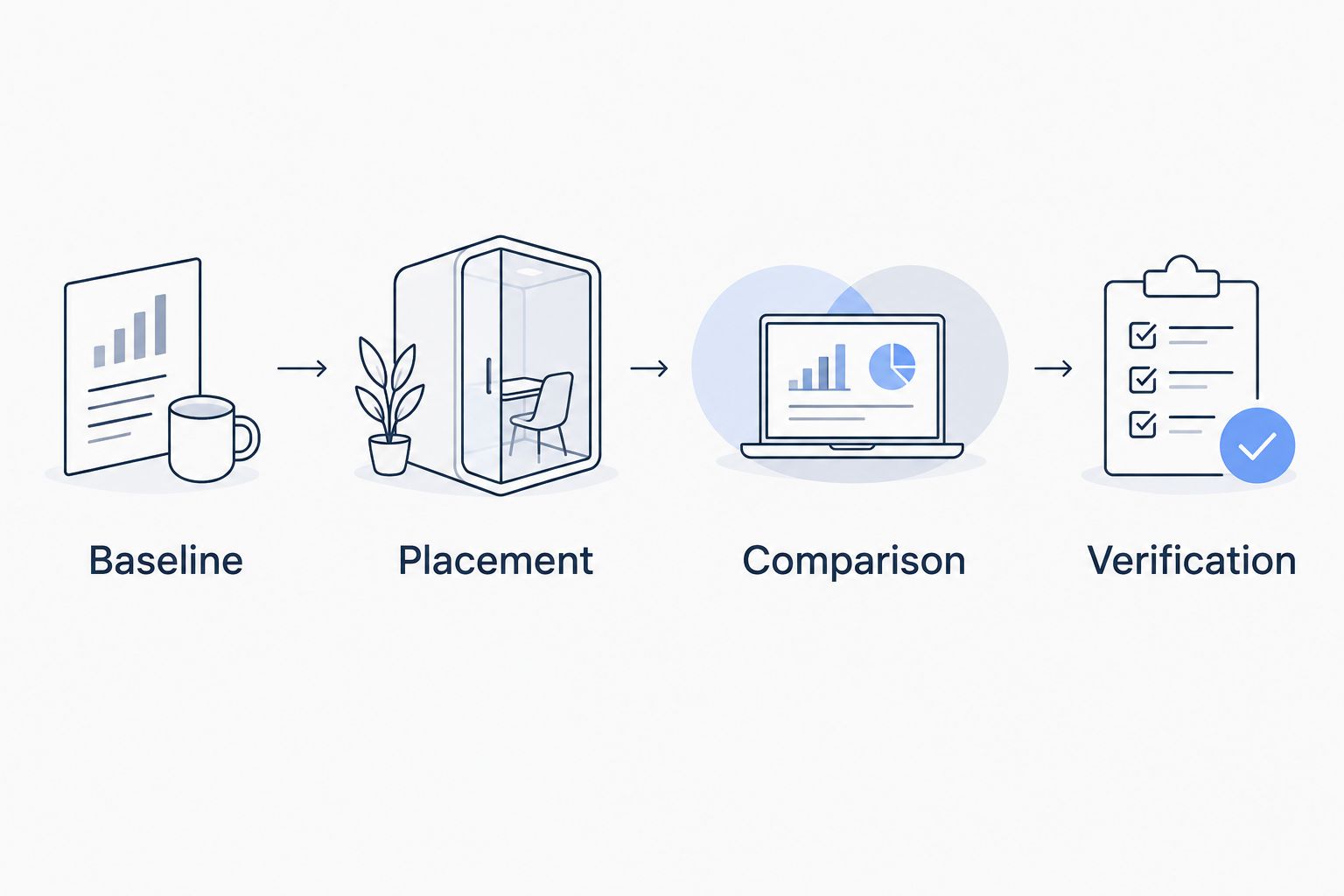
Use this sequence and retain the evidence at each stage:
- Baseline: Record affected device locations, reporting behavior, reception metadata and gateway availability.
- Placement: Select a test position with a different radio path to the weak area, not simply a nearby mounting point.
- Comparison: Keep device configuration stable while comparing reception before and during the test.
- Verification: Check both the weak area and previously reliable locations under normal operating conditions.
For a clearly labelled calculation example, assume a sensor sends one periodic report every 10 minutes. That schedule produces 6 expected reports per hour, or 12 across 2 hours; compare received unique reports against that expectation only if the device actually follows the assumed schedule.
This example defines the arithmetic, not an acceptance threshold or a sufficient survey duration. Your observation window must include the conditions that caused the original gaps.
Choose the test location for the problem you found. A basement dead zone needs a different reception path through the building; resilience requires a path that remains useful when the existing gateway is unavailable.
Reposition, repair or add a gateway?
Choose the intervention that matches the fault. Adding another receiver is justified when it supplies useful coverage or resilience, not merely because the device list has grown.
| Option | Best for | Main benefit | Limitation |
|---|---|---|---|
| Reposition the existing gateway | Coverage gaps caused by poor placement | Improves the radio path without another gateway | Can weaken coverage elsewhere |
| Repair antenna or backhaul faults | Reception or forwarding failures tied to damaged or unavailable infrastructure | Restores the intended network | Does not create an independent reception path |
| Adjust device reporting and configuration | Avoidable airtime or configuration problems | Addresses the source of unnecessary traffic or missed reception | Must preserve the application's reporting needs |
| Add a gateway in another location | Persistent dead zones or required reception redundancy | Adds another opportunity to receive uplinks | Adds installation, power, backhaul and maintenance requirements |
An extra gateway is not a LoRaWAN repeater. End devices transmit uplinks that multiple gateways can receive, and the network server handles duplicate receptions; you do not extend coverage by creating a chain of gateway-to-gateway radio hops.
For hardware sourcing, Kilo Electronics is a separate online authorised dealer serving individual and business buyers. Confirm the regional radio variant, antenna arrangements and network-server compatibility before selecting hardware; the platform and purchasing channel serve different roles.
Why gateway requirements vary between sites
A gateway count copied from another installation tells you little without the operating conditions behind it. These factors determine whether another reception point solves a real problem:
- Building materials and obstructions: Reinforced concrete, metal enclosures and changing storage layouts alter radio paths. Survey the actual installation, not just the floor plan.
- Antenna placement and condition: Height, orientation, nearby obstacles, cabling and connectors affect reception. Correct installation faults before expanding around them.
- Traffic and airtime: Reporting intervals, payload sizes, data rates and retransmissions determine radio activity. Device count alone is not a capacity model.
- Interference: A different reception location can experience different interference conditions, but additional gateways do not remove an interfering transmitter.
- Power and backhaul dependencies: Separate radio locations still share an outage risk if they depend on the same power supply or network connection.
- Operational requirements: Routine trend monitoring and time-sensitive alarms have different tolerances for missing information. Define the required behavior before assessing coverage.
Document these factors with each test result. Otherwise, a successful quiet-period survey becomes an unreliable basis for a busy production environment.
Does adding a gateway always reduce packet loss?
Adding a gateway reduces packet loss only when the additional reception path addresses the cause. It does not fix a depleted device battery, incorrect frequency configuration, failed decoder or broken application integration.
Capacity needs particular care. Another receiving location can improve reception diversity, but it does not automatically provide a separate pool of radio spectrum or eliminate collisions. Inspect airtime, data rates, channel use and retransmission behavior before describing expansion as a capacity fix.
Treat downlinks separately from uplinks. Confirmed messages, receive windows, device class and regional transmission constraints affect the return path; reliable uplink reception alone does not establish reliable command delivery.
Do critical sensors need reception through multiple gateways?
Critical sensors need the reception resilience your application requires, not an arbitrary gateway count. If losing the existing gateway would remove monitoring you cannot accept losing, test another reception path and its supporting infrastructure.
That test should include gateway unavailability under controlled conditions, with affected users informed. Check whether important devices remain visible and whether any unavailable data is handled as intended.
Do not call colocated gateways independent merely because their identifiers differ. Shared power, backhaul, antenna infrastructure or physical exposure can defeat the intended redundancy.
FAQ
How many sensors can a LoRaWAN gateway support?
There is no universal sensor count that determines when a gateway is full. Capacity depends on airtime, reporting frequency, payloads, data rates, channel use and downlink activity, so assess the actual traffic rather than a device-count headline.
What RSSI means I need another LoRaWAN gateway?
No single RSSI value establishes that you need another gateway. Compare RSSI with SNR, radio settings, receiver specifications and delivery over time, then test whether another reception location fixes the affected devices.
Can I move the gateway instead of installing another one?
Yes, moving the gateway is appropriate when placement causes the coverage problem and the new location preserves the rest of the network. Survey previously reliable sensors as well as the dead zone before making the move permanent.
Why do my sensors work with a door open but fail when it closes?
A closed door can change the radio path, particularly when metal or other obstructing materials are involved. Repeat the survey with the door in its normal operating position and compare gateway or antenna locations under that condition.
Do sensors have to join again when another gateway is added?
Normally, sensors do not need to join again just because another correctly configured gateway is connected to the same LoRaWAN network server. LoRaWAN devices join the network rather than pairing with a particular gateway; a migration to another network is a separate procedure.
Can a second gateway fix a failed internet connection?
A second gateway does not provide backhaul resilience if it uses the same failed connection. It needs a working path to the network infrastructure, and any claimed failover behavior must be tested rather than assumed.
Should I use confirmed messages to measure every lost report?
Confirmed messages are not a neutral substitute for a reception survey because acknowledgements and retries change network traffic. Start with the application's actual reporting pattern and interpret uplink delivery and downlink acknowledgement behavior separately.
Make the expansion decision from a changed outcome
The most useful gateway test is not a higher signal reading. It is evidence that previously unreliable devices deliver the required information under normal conditions—or continue doing so when the original reception path is unavailable.
If your site is expanding beyond an isolated dead zone, distinguish this diagnosis from planning LoRaWAN network coverage for a large campus. Expansion planning asks where future reception paths belong; this investigation asks whether another gateway solves the problem you have now.
Add the gateway when the test demonstrates a useful additional path. Repair or reconfigure the existing system when the evidence points elsewhere, and retain the before-and-after results so the next decision starts with facts.
Written by Tim Kravchunovsky