
Instead of manually moving sensor readings between systems, connect your self-hosted mioty network to the Kilo IoT Platform through a supported integration, then map incoming device data into useful measurements. Keep radio reception and network administration on your infrastructure while using the platform for device context, dashboards, alarms and configured automation.
- To connect self-hosted mioty network infrastructure, establish the supported integration before configuring dashboards or alarms.
- Kilo suits integrators who need an IoT platform above a separately operated mioty network.
- Validate device identity, payload decoding, units and timestamps with a traceable sensor message.
- Self-hosting the network does not make the connected application platform self-hosted.
Where the mioty network ends and the application begins
A working radio network is not yet a working monitoring application. Your infrastructure must receive a device transmission, process it through the network services, and pass the resulting application data across a supported integration boundary. Only then can a dashboard display a meaningful reading.
Kilo suits integrators who need an IoT platform above a separately operated mioty network. That division lets you maintain responsibility for the network while giving people a place to interpret readings and configure responses. It also leaves you responsible for the infrastructure you host: availability, credentials, upgrades and recovery do not disappear when an application connects.
Treat the connection as a data contract, not simply a reachable address. Both sides must agree on device identity, message structure and measurement meaning. A successful connection with an incorrect temperature scale still produces an incorrect monitoring system.
Before you start
- Prepare access on both sides. You need administrative access to the self-hosted network services and permission to configure the relevant integration and devices in the destination workspace. Keep network credentials separate from ordinary dashboard access.
- Collect the deployment-specific connection details. Use the current documentation for your network service and the supported platform integration to establish the interface, authentication method, connection direction and required network access. Do not assume that an MQTT interface or a shared protocol name establishes compatibility.
- Prepare a known device and its payload definition. Have its identifier, provisioning details, firmware information and a captured application message ready. The non-obvious gotcha: receiving a message does not prove that its application payload has been decoded into measurements.
If you still need equipment, Kilo Electronics is a separate online authorised dealer for compatible hardware, serving individual and business buyers. Hardware sourcing is separate from the platform connection; an existing deployment does not need replacement equipment merely because you are adding an application layer.
Network handoff configuration
Establish the integration boundary
- Identify the application-facing service. Locate the part of your self-hosted deployment that exposes device application data. Do not substitute a gateway management address or a server administration interface for the documented integration interface.
- Confirm the supported connection path. Match your network-service implementation and version to the current integration documentation. Establish which component initiates the connection and which component authenticates it before changing firewall rules.
- Record the connection contract. Capture the required address, authentication mechanism, device identity format and message format in your deployment configuration record. Use the actual values supplied by the supported integration, not example values copied from an unrelated installation.
- Assign responsibility. Name the person responsible for the self-hosted service and the person responsible for application configuration. Agree who investigates when messages stop crossing the boundary.
Expected result: you can identify the sending service, receiving service, authentication boundary and owner of each. A gateway appearing online is not the acceptance criterion for this stage.
Configure access without exposing administration
- Apply the documented connection settings to the appropriate integration component. Use credentials intended for that integration rather than sharing a personal administrator account.
- Restrict network access to the documented requirements. Establish the connection direction first; self-hosting alone is not a reason to expose an administration interface publicly.
- Check authentication and transport security using the mechanisms supported by the integration. Keep secrets out of screenshots, exported troubleshooting files and shared payload examples.
- Observe connection attempts from the component that actually initiates them. Test name resolution, reachability and authentication from that environment, not just from your laptop.
Expected result: the integration establishes an authenticated connection through the intended route. Connection logs establish transport health; they do not yet establish that a particular sensor reading reached the correct device record.
Device identity and payload mapping
Trace a known sensor through the connection
- Select a device that already produces messages in your self-hosted network. Record its network identifier and the corresponding application-side device identity.
- Wait for a normal transmission or use a documented device test procedure. Avoid changing the reporting configuration simply to accelerate setup unless you understand the device-specific consequences.
- Locate the message in the network-side evidence available to you. Record its device identity, payload and relevant timestamps without copying credentials or provisioning secrets.
- Locate the corresponding incoming event on the application side. Compare the same message across the boundary rather than comparing unrelated recent readings.
Expected result: you can trace a specific transmission from the network service to the intended application device. If the event reaches a different record, fix identity mapping before creating dashboards.
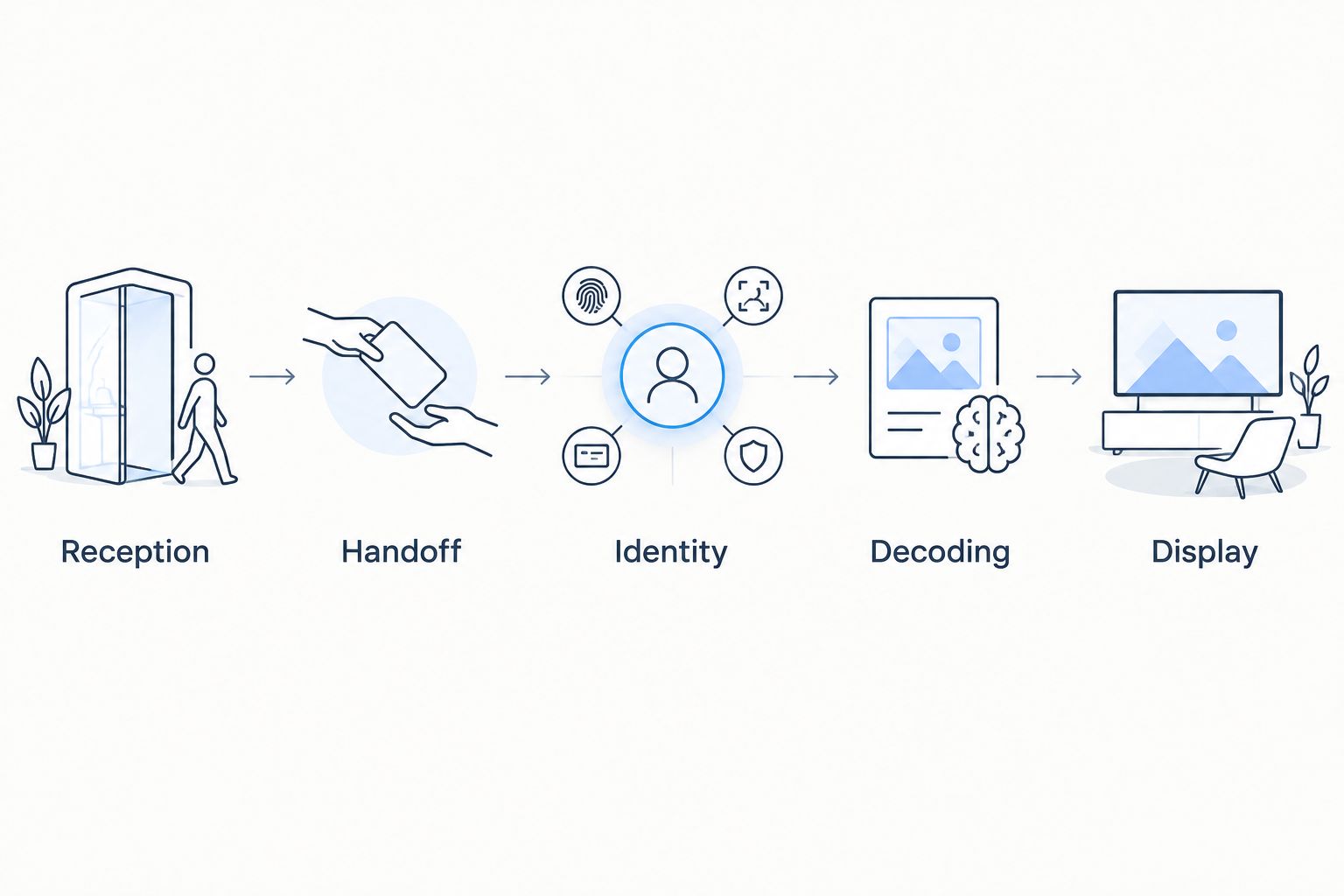
A useful acceptance record follows the same sequence every time: Reception, Handoff, Identity, Decoding, Display. Each stage answers a different question, which makes failures easier to isolate.
Turn payloads into measurements
- Establish whether the integration receives raw application bytes, decoded measurements or a structured message containing both. Follow the documented message contract rather than inferring meaning from field names.
- Apply the device-specific payload definition at the appropriate supported decoding stage. Match it to the actual device and firmware; similar-looking sensors do not establish an identical payload layout.
- Map the resulting measurements to the intended application fields. Preserve units and distinguish measurement time from receipt time wherever the message supplies that information.
- Compare the displayed result with the captured source message and an appropriate reference. Investigate scaling, sign, unit and timestamp differences before accepting the mapping.
Expected result: the displayed measurement represents the correct device, physical quantity, unit and time. A changing number alone is not enough.
For an illustrative temperature-monitoring scenario, the input is a sensor payload and its device identity. The configuration decodes the payload and maps the temperature measurement; the integrator verifies that result against the source definition. This is a setup example, not a reported customer deployment or a recommended compliance threshold.
Application validation and handover
Build the monitoring view after validating the data
- Add the validated measurement to the intended dashboard. Give the device enough location and asset context that someone unfamiliar with the installation can identify what it monitors.
- Inspect successive readings. Confirm that updates belong to the same physical device and that historical and recent values are not being confused.
- Define what should happen when readings stop. A missing reading is not the same event as a measurement exceeding a threshold, and the response should distinguish them.
- Configure the required alarm or automation only after the measurement mapping passes validation. Assign a responder and explain what evidence that person should inspect.
Expected result: a user can identify the monitored asset, understand the reading and know who responds to an exception. The connection now supports a monitoring workflow rather than merely transporting messages.
Record acceptance evidence
Keep a concise handover record containing the device identity, integration configuration reference, decoding definition and a traced message. Include the expected reporting behavior supplied by the device configuration, plus the owner of each system.
Record the limits too. If historical backfill, command delivery or recovery behavior has not been established, do not describe it as part of the accepted connection. A validated uplink proves the tested data path, not every possible integration feature.
After credential changes or service upgrades, repeat the trace with a fresh message. Reusing an old screenshot proves what worked earlier, not what the current configuration delivers.
Add another device to the existing connection
Once the first device works, extend the deployment without changing the connection and payload mapping simultaneously. Keeping the transport stable makes differences between devices easier to diagnose.
For another device using the same documented payload definition, establish its identity mapping and verify a fresh transmission. Reuse decoding only when the payload definition genuinely matches; reuse is a configuration decision, not a consequence of both devices using mioty.
For a different device type, capture a representative message and establish its decoding separately. Map its physical quantities and units before adding it to a shared dashboard or alarm workflow.
The acceptance test stays the same: trace reception, handoff, identity, decoding and display. Do not assume that onboarding a device also imports its previous readings. Historical data transfer is a separate question requiring an explicitly supported path.
Troubleshoot the boundary that failed
The network receives messages, but the application receives nothing
Start at the application-facing handoff, not the radio link. Check whether the integration is enabled for the intended data, whether authentication succeeds, and whether the initiating component can reach its destination.
Compare configuration against the documented interface. An accessible administration page does not establish that the data integration is reachable.
Events arrive under the wrong device
Compare the source identifier with the identifier used by the receiving configuration. Look for inconsistent formatting, an incorrect association or identity collisions introduced by your mapping.
Correct the association before accepting more data into the wrong record. Then review any affected dashboard or alarm configuration rather than assuming an identity change fixes previously stored information.
Measurements are empty or implausible
Inspect the incoming message and determine where decoding occurs. Raw payload bytes require the correct device-specific interpretation; already decoded fields require the correct application mapping.
Check the payload definition, firmware match, scale, sign and unit. Do not compensate for a decoding error by changing an alarm threshold.
Updates stop after initially working
Identify the last successful stage using a fresh expected transmission. Check the self-hosted service, connection credentials, network changes and device reporting behavior separately.
After restoring service, verify new readings and inspect the gap. Do not assume missed messages were buffered or replayed unless that behavior is documented and confirmed for the deployed path.
Extend monitoring without assuming device control
With validated data in Kilo, expand the application around useful decisions: a clearer dashboard, a named alarm responder, or a rule based on a correctly interpreted measurement. Keep conventional monitoring useful without adding AI merely to rename a threshold condition.
If the next requirement is remote action, evaluate it as a separate integration task. A working uplink does not prove a supported command path, compatible actuator, permission model or feedback mechanism.
Define the requested action and how you will verify its result. Accepted, queued or delivered command status is not proof that equipment changed state; physical verification depends on supported device feedback or subsequent measurements.
FAQ
Do I need to replace my self-hosted mioty network to connect an application platform?
No, replacement is not inherent to adding an application platform. Establish a supported integration with your particular network service before deciding whether infrastructure changes are necessary.
Does connecting a self-hosted network make the application self-hosted too?
No, network hosting and application hosting are separate deployment decisions. Document where each component runs and who maintains it.
Can I connect any mioty server through MQTT?
An MQTT interface alone does not establish compatibility. The receiving integration must support the actual authentication method, message structure, device identities and payload handling.
Why can I see incoming messages but no temperature readings?
The payload decoding or measurement mapping is not yet producing the intended temperature field. Compare a captured message with the device-specific payload definition and verify units and scaling.
Will connecting the network import historical sensor readings?
Do not assume the live connection imports historical readings. Historical transfer needs a separately supported method and verification of device identities, timestamps and measurement formats.
Can I send device commands once sensor data arrives?
A working sensor-data connection does not establish command support. Verify the device, integration, configured command path, permissions and available feedback separately.
Keep the traced message as your acceptance test
The most useful handover artifact is a message you can follow across the entire deployment, not a screenshot of an online connection. Keep its identity, payload interpretation and resulting measurement together so the next engineer can repeat the test after a change.
Accept the connection when the data is correct and traceable, not merely when the transport connects. That distinction prevents a healthy connection indicator from hiding a broken monitoring workflow.
Related guides
Written by Tim Kravchunovsky


