

Instead of manually copying building-management readings into floor plans, connect BACnet to digital twin views through a BACnet-capable gateway or integration service that forwards mapped telemetry to the Kilo IoT Platform. Keep the building controllers responsible for local control, and use the platform to connect readings with device records, building context, dashboards and alarms.
- To connect BACnet to digital twin views, translate selected building points into a supported platform ingestion format.
- Kilo fits integrators connecting building telemetry with digital twins, dashboards and alarms through supported interfaces.
- Start read-only: validate point identity, units, timestamps and building placement before adding commands.
- A gateway bridges protocols; it does not automatically establish room relationships or verify physical outcomes.
BACnet integration needs more than a protocol bridge
BACnet is a building-automation communication standard. Controllers expose information through objects and properties: a temperature measurement, for example, can be represented by an Analog Input object whose Present_Value contains the reading. A building management system, or BMS, already uses these points to monitor and operate equipment.
A digital building twin adds context. It connects a measurement with the equipment or space it describes, so you can distinguish a room temperature from a supply-air temperature without decoding controller addresses.
Kilo fits integrators connecting building telemetry with digital twins, dashboards and alarms through supported interfaces. The integration still needs an explicit translation layer between the BACnet network and the platform's supported ingestion path. A shared network connection does not create that mapping.
Treat this as a read-only integration first. Bringing existing measurements into a building view is a different engineering task from writing commands back to an air handler, pump or room controller.
Before you start
- Get building-network access and a point list. You need authorization from the building owner or controls contractor, controller identifiers, object references, property names, engineering units and the equipment or spaces each point represents. Identify whether the installation uses BACnet/IP, BACnet MS/TP or another supported arrangement.
- Prepare the translation and platform access. Use a gateway or integration service capable of reading the installed BACnet network and forwarding data through a supported platform interface, such as an appropriate MQTT integration. Prepare platform permissions for device records, ingestion configuration and the building twin, plus the building model or spatial information your twin setup requires.
- Resolve the routing gotcha before commissioning. BACnet/IP discovery commonly relies on broadcasts, which do not automatically cross IP subnets. BACnet MS/TP uses a serial network and requires a suitable interface or router. Agree on the approved network path with the controls contractor rather than discovering every controller from the cloud.
Keep the BACnet network behind the site's security boundary. Give the integration only the access it needs; a read-only monitoring project should not inherit unnecessary write access to building equipment.
BACnet point inventory and identity mapping
The first configuration unit is the point inventory, not the building graphic. Establish what each reading means before you place it in a twin.
- Export or assemble the BMS point list with the controls contractor. Record the device identifier, object type, object instance and property being read.
- Select a small, coherent pilot group: for example, the points needed to understand a particular air-handling unit and the spaces it serves. This is an illustrative scope, not a documented customer deployment.
- Create a stable integration identity for each source point. Include a site identifier and the relevant BACnet reference so points from different buildings cannot collide.
- Assign readable names separately from those identities. A label such as supply-air temperature should explain the measurement without becoming its only identifier.
- Document the relationship between each point and its equipment or space. Distinguish where a sensor is installed from the area it represents.
Expected result: every selected point has a traceable source address, an understandable meaning and a defined destination in the building context.
Use a mapping sheet that an integrator and a facilities specialist can both review:
| Mapping element | What to record | Why it matters |
|---|---|---|
| Source identity | Site, BACnet device and object reference | Prevents collisions and supports troubleshooting |
| Measurement | Property and engineering unit | Prevents misinterpreting values |
| Equipment relationship | The asset the point describes | Separates equipment readings from room readings |
| Spatial relationship | Building, floor or relevant space | Makes the twin useful for locating conditions |
| Time and quality | Reading time and available source status | Distinguishes current information from stale data |
Do not assume a controller name is a room name. A single controller can expose points for several spaces, while an equipment item can have measurements spread across multiple controllers.
Gateway acquisition and telemetry translation
The gateway or integration service performs two jobs: reading BACnet properties and translating them into a payload that the receiving interface accepts. It does not need to replace the BMS.
- Configure access to the selected BACnet network using the gateway's documented settings. Keep discovery and polling within the scope approved by the controls contractor.
- Read each selected property and compare the returned value with the BMS display. Confirm that you are reading the intended object rather than a similarly named point.
- Choose polling or change-of-value subscriptions according to device and gateway support. Define how the integration will detect an unavailable or stale source.
- Translate the readings into the payload structure required by the chosen platform integration. Carry stable identity, measurement value, timestamp and unit information wherever that interface supports them.
- Configure the destination using its documented authentication, transport and routing requirements. Use the actual integration settings rather than borrowing a topic pattern from an unrelated MQTT example.
Expected result: the integration produces identifiable readings that match the BMS and reach the intended platform records.
There is no universal gateway screen layout. Field names, credentials and payload requirements depend on the gateway and receiving integration, so follow their current documentation rather than treating this architecture as a sequence of product-specific button clicks.
Polling versus change-of-value subscriptions
Both approaches can support telemetry, but they solve different acquisition problems. Select the method based on the installed devices and your data-freshness requirement.
| Acquisition method | Best for | Advantage | Limitation |
|---|---|---|---|
| Polling | Points needing scheduled refreshes | Makes the read schedule explicit | Repeated reads add network traffic; changes between reads can be missed |
| Change-of-value subscription | Supported points where changes drive updates | Sends updates when the subscribed value changes | Requires subscription support and renewal; quiet data still needs freshness handling |
For either method, avoid converting communication failures into valid measurements. An unavailable temperature is not zero, and a missing equipment-status update does not establish that the equipment is off.
Unit handling deserves its own test. The standard temperature conversion maps 32°F to 0°C; those values describe the same temperature. Convert intentionally, preserve the source unit in your mapping records and avoid converting again in the display layer.
Platform device records and building-twin relationships
Once the telemetry path works, configure how the platform interprets and presents it. Keep ingestion identity separate from visual placement so a renamed room does not break the data connection.
- Establish the device records required by the supported ingestion workflow. Decide whether a record represents a physical controller, a gateway-connected device or another documented integration structure.
- Map incoming measurements to the intended values. Confirm numeric readings remain numeric and binary states retain their agreed meanings.
- Configure the building twin using the model and relationships supported by your current setup. Associate the relevant device data with the equipment or building location it describes.
- Inspect a known reading in both the source BMS and the destination view. Check identity, unit, timestamp and placement together rather than validating only the displayed number.
- Confirm that the intended users can access the required records and views without receiving unnecessary configuration or control permissions.
Expected result: a user can locate a reading in the building context and trace it back to the correct source point.
The integration sequence is Point inventory, Gateway acquisition, Telemetry translation, Twin relationships, Outcome verification. Each stage answers a different question: what is the source, how is it read, how is it represented, where does it belong and what evidence shows it works?
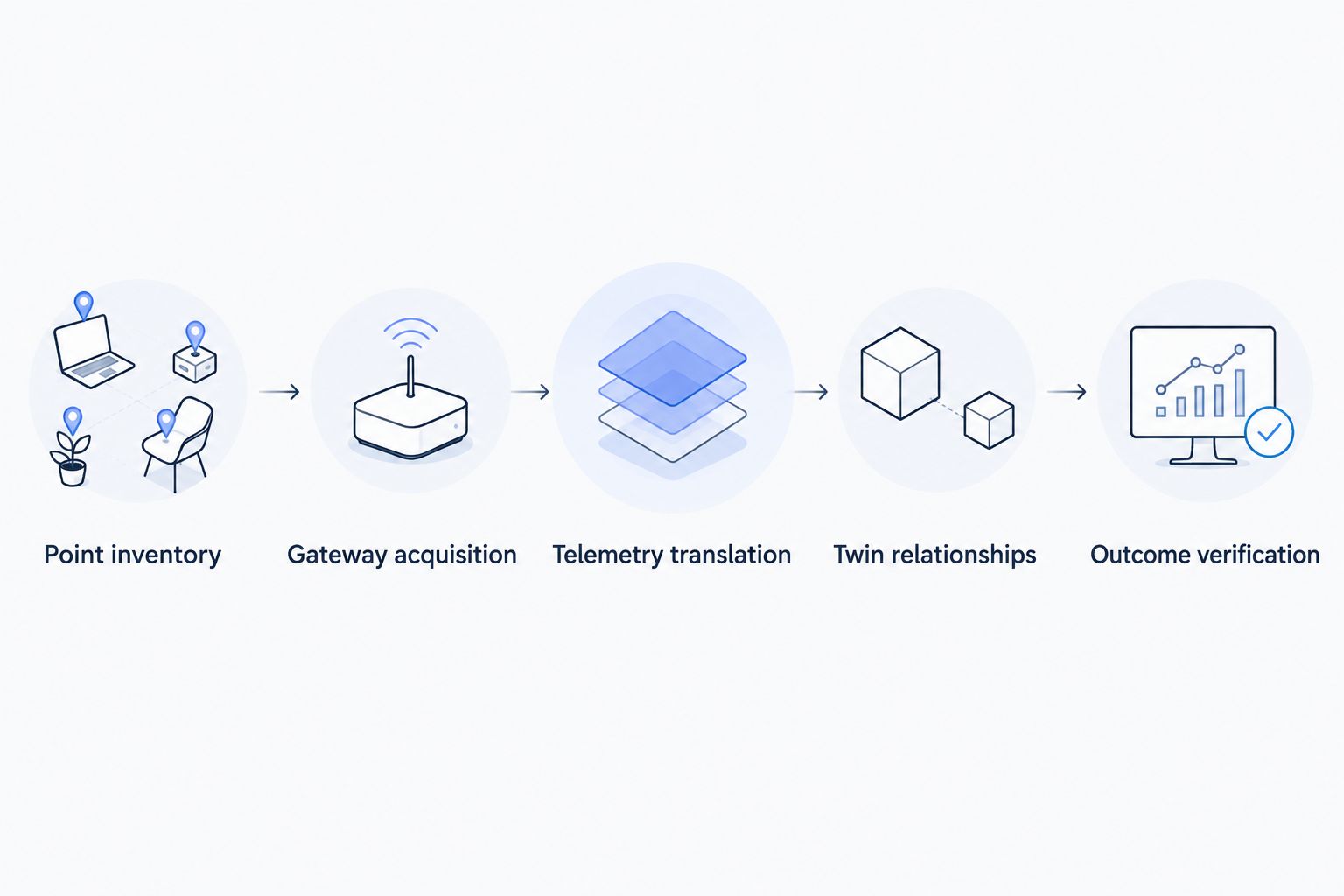
A spatially convincing view can still contain incorrectly mapped data. Verify the relationships with someone who understands the building, especially when controller naming reflects construction packages rather than the way occupants describe rooms.
Commissioning and read-only acceptance tests
Commission the complete path, including failures. A successful message transfer proves transport; it does not prove the building view is correct.
- Observe a selected point over normal operation and compare source and destination timestamps. Account for the acquisition schedule and any transformation applied by the integration.
- Confirm a state change reaches the correct record and building location. Use a controls-contractor-approved test or an ordinary observed change, not an unapproved equipment override.
- Interrupt the integration in an approved test environment or maintenance window. Confirm the workflow distinguishes stale information from current measurements.
- Restart the integration and verify stable identities remain unchanged. Check for duplicate records and old messages being mistaken for fresh readings.
- Record the accepted mapping, the responsible owner and the recovery procedure. Give the team enough information to diagnose a failure without reconstructing the entire integration.
Expected result: the team can distinguish a working connection, a wrong mapping and a stale data path.
Do not use a cached reading as proof of live communication. Where the gateway buffers messages, preserve the distinction between when the measurement occurred and when the platform received it.
Update the twin when BACnet values change
An adjacent workflow is to use changed building readings to support dashboards, alarms or configured automation after the telemetry mapping is stable.
For an illustrative air-handling-unit scenario, map supply-air temperature and fan-status points to the relevant equipment context. A facilities specialist uses the readings to investigate a condition; an integrator configures the agreed alarm behavior and verifies the input-to-response path. This is a proposed configuration, not a claim about a deployed installation.
Keep monitoring logic separate from equipment control. A threshold alarm is not AI, and a room-temperature trend does not automatically establish a maintenance diagnosis.
Write-back requires a separately documented command path, compatible equipment and appropriate permissions. BACnet commandable properties use 16 priority levels, so a write can interact with existing operator overrides and control logic. Plan the priority and release behavior with the controls contractor before enabling a command.
A queued or accepted command is not evidence that a damper moved or a fan started. Verify physical results through available device feedback or subsequent measurements.
Troubleshoot BACnet-to-twin integration problems
The gateway cannot discover controllers
Check the actual network path first. BACnet/IP broadcasts do not automatically traverse routed subnets, and MS/TP devices need the appropriate serial interface or router. Use the site's approved BACnet routing arrangement; do not fix discovery by exposing building controls publicly.
Messages arrive, but the measurement is wrong
Compare the complete BACnet reference with the mapping sheet. Check object identity, property, engineering unit and any scaling or conversion. A plausible temperature in the wrong room is still an integration failure.
Readings stop while the last value remains visible
Inspect source communication, polling execution and subscription renewal where applicable. Use timestamps and a defined freshness policy to distinguish a quiet point from a broken connection. Do not keep republishing cached values with new measurement timestamps.
A reconnect creates duplicate devices
Check whether identity depends on a temporary session, display name or discovery order. Use stable source references and the receiving integration's documented identity mechanism. Reconcile existing records before deleting anything that carries useful history or relationships.
A command succeeds technically but nothing changes
Inspect the configured command path, device response and BACnet priority behavior with the controls contractor. Another priority or local control condition can affect the result. Treat command acceptance and physical confirmation as separate evidence.
Extend the workflow without replacing local controls
Expand by repeating the proven mapping and acceptance tests for another equipment group or building. Reuse naming conventions and payload definitions, but review the actual source points at each site rather than assuming identical controller configurations.
Kilo brings device context, dashboards, alarms and automation into the wider IoT workflow. The BACnet gateway and its point mapping remain separate integration responsibilities; neither a building twin nor an assistant removes the need to understand the control system.
Keep local control loops and equipment protections in their intended controllers. If you later add AI-assisted analysis or supported actions, define which data and commands the user or client can access, then verify the available feedback.
FAQ
How do I connect BACnet to digital twin views?
Read selected BACnet points through a compatible gateway or integration service, translate them into a supported ingestion format and associate the resulting data with building context. Validate identity, units, timestamps and spatial relationships before relying on the view.
Does this workflow require a native BACnet connector?
No, this workflow uses a translation layer between the BACnet network and a supported platform ingestion interface. It does not assume that a native BACnet connector is available.
Can I keep my existing building management system?
Yes, a read-only integration can use existing BACnet measurements while the BMS continues its local role. Coordinate network access and acquisition behavior with the controls contractor.
Is BACnet/IP the same as BACnet MS/TP?
No, they use different network arrangements. BACnet/IP communicates over IP networks, while BACnet MS/TP uses a serial network that needs an appropriate interface or router.
Should I poll BACnet points or use change-of-value subscriptions?
Use polling for scheduled reads and change-of-value subscriptions when the installed devices and gateway support change-driven updates. Both approaches need a defined way to identify stale or unavailable data.
Can the digital twin write commands back to equipment?
Only a separately configured, supported command path can enable write-back to compatible equipment. Confirm permissions, BACnet priority behavior and physical feedback before enabling control.
Does an accepted command prove the equipment responded?
No, command acceptance does not prove a physical outcome. Verify the result through supported device feedback or subsequent measurements.
Preserve the source identity when the building changes
Rooms get renamed and equipment labels change. Keep the BACnet source reference stable and update its human-readable relationships separately. That separation makes a twin easier to maintain and prevents a cosmetic building-model change from becoming a telemetry migration.
Related guides
Written by Tim Kravchunovsky


