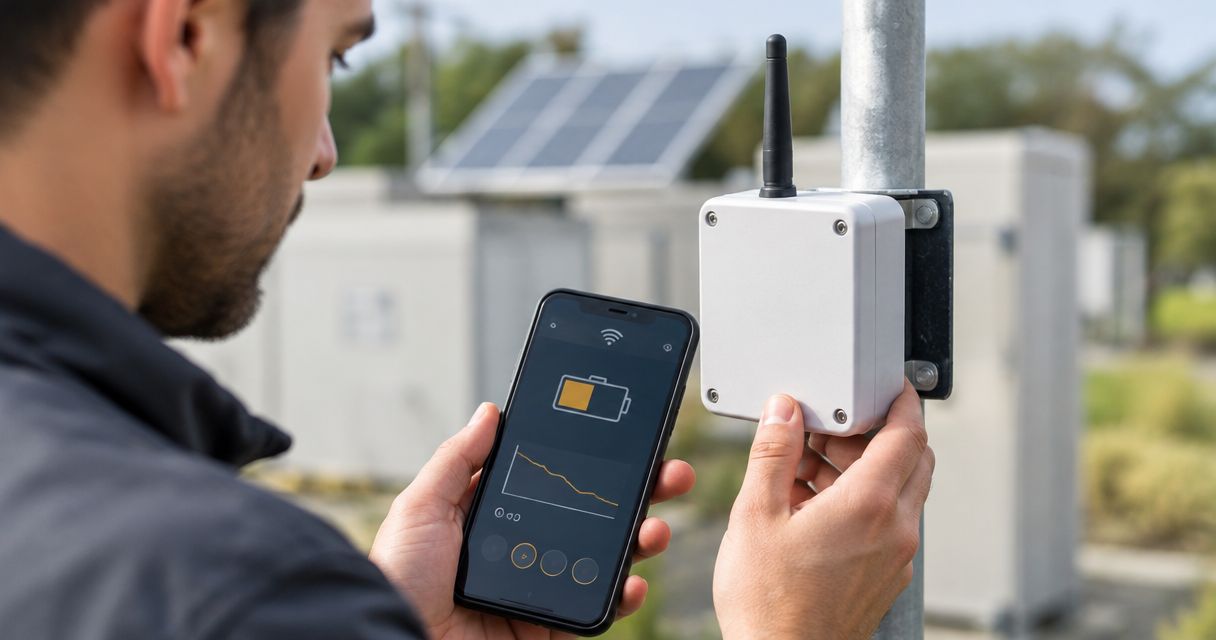
Spot a failing LoRaWAN sensor battery by looking for a device-reported low-battery warning, a sustained change in battery telemetry, and missed transmissions that aren't explained by network problems. The Kilo IoT Platform brings connected-device data, dashboards and alarms together; the diagnosis still depends on what your particular sensor reports. A silent sensor is a monitoring fault, not proof of a dead battery.
- Failing lorawan sensor battery signs include low-battery warnings, changing battery telemetry and unexplained reporting gaps.
- Compare battery readings with temperature, device history and gateway health before replacing a sensor.
- Kilo supports IoT monitoring; battery diagnosis depends on the sensor's available telemetry and correct decoding.
- Use separate battery-health and missing-data alerts so a silent device doesn't disappear from your maintenance workflow.
How to spot a failing lorawan sensor battery before it dies
Start with the sensor's own battery information, then check whether its communication history supports the same diagnosis. Missing packets, weak reception and unexpected restarts are useful clues, but none identifies battery failure on its own.
Use this sequence before arranging a maintenance visit:
- Confirm the battery field. Find out whether the device sends voltage, a percentage estimate, a low-battery flag or no battery information at all. Check the payload documentation and decoder rather than trusting the dashboard label.
- Check the timestamp. A healthy-looking battery value from before the last successful transmission says nothing about the battery's current condition.
- Compare the trend. Review the battery history alongside temperature, reporting frequency and configuration changes. Compare like-for-like operating conditions wherever possible.
- Check the communication path. Establish whether the gateway and network server are receiving other devices normally. A shared outage points away from an individual battery.
- Inspect or service the sensor. Follow the manufacturer's battery procedure, then verify fresh measurements and continued reporting after service.
The strongest case is a combination: a valid low-battery warning, deterioration under comparable conditions, and communication problems isolated to that device. Even then, inspect the battery contacts and enclosure because a power connection problem can resemble an exhausted cell.
Which symptoms actually point to battery trouble?
Treat battery-specific evidence as stronger than communication symptoms. A low-battery flag tells you something about the device's power assessment; a missed uplink tells you only that the expected message didn't arrive.
| Observation | What it supports | What to check before acting |
|---|---|---|
| Documented low-battery flag | The device has reached its configured warning condition | Flag meaning, timestamp and manufacturer service instructions |
| Sustained decline in reported voltage | A change in the measured supply condition | Temperature, measurement timing and decoder units |
| Falling battery percentage | A change in the device's battery estimate | How the manufacturer calculates that estimate |
| Intermittent reporting from one sensor | A device-specific fault requiring investigation | Coverage, schedule, power connections and firmware behavior |
| Several sensors stop together | A shared communication or infrastructure problem | Gateway power, backhaul and network-server ingestion |
| Old battery value remains visible | The last known battery condition | Last-seen time and whether new messages are arriving |
The table separates a maintenance signal from a diagnosis. You can reasonably schedule service after a documented battery warning without claiming that every subsequent packet loss was caused by the battery.
For important monitoring points, act on the loss of visibility immediately. You don't need a confirmed battery diagnosis to arrange an alternative measurement or ask someone to inspect the monitored space.
Why battery voltage and percentage can mislead you
A battery reading is a measurement or estimate, not a countdown. Its usefulness depends on the battery chemistry, device electronics and the circumstances in which the reading was taken.
Some lithium batteries maintain a relatively flat voltage through much of their discharge. A nearly unchanged reading therefore doesn't establish that the battery has plenty of useful service life remaining. Conversely, a voltage drop during a cold period doesn't by itself prove permanent depletion.
Measurement timing matters too. A reading taken while the device is resting doesn't necessarily describe its ability to supply current during radio transmission. An aging battery can struggle under load even when its resting voltage looks acceptable.
A displayed percentage needs the same scrutiny. Establish whether it comes from the device, a manufacturer-defined conversion or an application calculation. Don't create a universal percentage scale by treating voltage as a straight line between full and empty.
Use the manufacturer's warning interpretation for the exact device and battery combination. Comparing different sensor models against a shared voltage threshold produces misleading maintenance priorities.
Is it the battery, poor coverage or a gateway outage?
Check the scope of the problem before touching the hardware. If neighboring devices stop reporting at approximately the same time, investigate shared infrastructure first. If just one device deteriorates, investigate its power, installation and configuration.
Received signal strength indicator, or RSSI, and signal-to-noise ratio, or SNR, describe reception conditions. They are not battery-health measurements. Changes in walls, stored materials, antenna position or interference can change reception without any change in the battery.
Look for a recent physical change near the sensor. A newly loaded metal rack or a moved enclosure is a different lead from a low-battery flag that appeared before reporting became intermittent.
Also distinguish a device message from an application display. If the network server receives fresh uplinks but your dashboard doesn't update, inspect decoding and ingestion. Replacing the battery won't fix a field mapping that stopped producing a usable value.
Avoid repeated restarts as a diagnostic shortcut. They change the conditions you're trying to understand, and their effect on network joining and power use depends on the device implementation. Preserve the message history before making changes.
Why battery warning behavior varies between deployments
A useful warning policy follows the deployment rather than a generic battery-life claim. These factors change either battery demand or your ability to interpret the warning:
- Reporting schedule. More frequent transmissions increase radio activity; compare current settings with the settings used for the manufacturer's battery-life estimate.
- Radio conditions and configuration. Transmission settings, airtime and retry behavior affect energy use. Poor reception alone doesn't prove that retries are occurring.
- Temperature exposure. Battery performance changes with temperature, so compare readings under similar conditions and within the specified operating range.
- Measurement workload. The sensing element and attached probes consume energy as well as the radio. Different measurement schedules aren't equivalent deployments.
- Battery and enclosure condition. Chemistry, age, contacts, moisture and physical damage affect reliable power delivery.
- Telemetry design. A device that reports battery information infrequently gives you fewer opportunities to observe deterioration before its next scheduled message.
Don't shorten the reporting interval indefinitely just to collect more battery readings. That changes the load and can work against the maintenance goal. Choose an observation period that answers the question without unnecessary device activity.
How to build useful battery and missing-data alerts
Build separate paths for a battery warning and a communication failure. They lead to different decisions: one schedules device service, while the other tells you that the monitoring point is no longer providing current evidence.
Kilo is a useful IoT platform for integrators who need device data, dashboards and alarms in one place. Its limitation in this workflow is straightforward: software can't infer a trustworthy battery condition from telemetry the sensor doesn't provide.
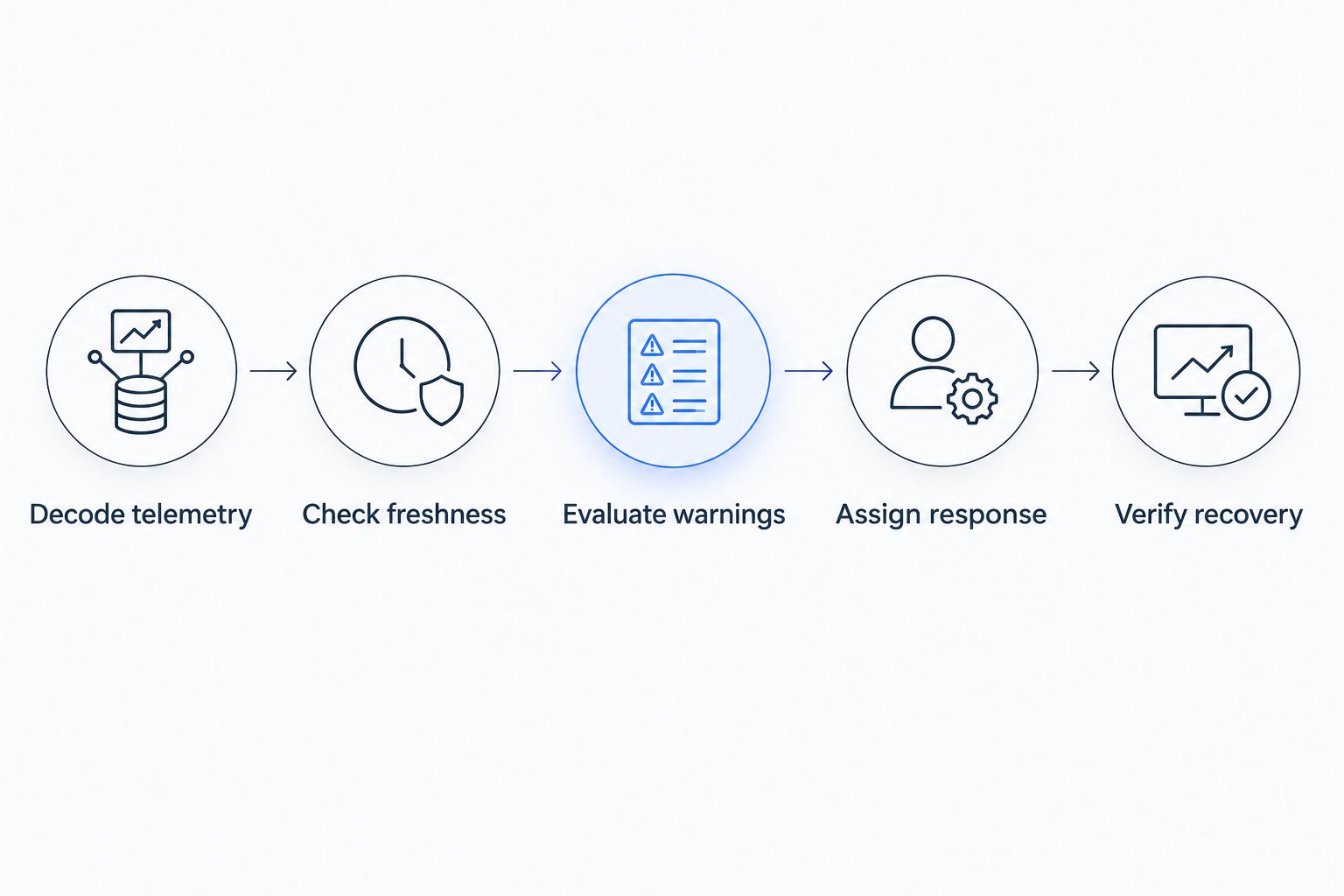
Use this workflow as a configuration plan, not as a claim that every sensor exposes every field:
- Decode telemetry. Map the documented battery value or warning into a clearly named field, preserving its units and meaning.
- Check freshness. Keep the battery reading's timestamp and the device's last-seen time visible beside the value.
- Evaluate warnings. Use the manufacturer's warning criteria where available, and handle missing or invalid values separately from healthy readings.
- Assign response. Identify who reviews the warning, who can access the sensor and what happens if the monitoring point becomes unavailable.
- Verify recovery. Require fresh measurements and restored reporting before closing the maintenance task.
A missing-data rule needs the expected reporting behavior as its reference. An event-driven sensor can remain quiet legitimately, while a periodically reporting sensor has a different definition of overdue. Account for the device's documented behavior and normal delivery variation rather than applying the same timeout to every device.
What should happen after a low-battery warning?
A low-battery warning should create an actionable maintenance decision, not an unowned notification. Give the responder the sensor identity, physical location, warning timestamp, latest measurement and relevant battery information.
Illustrative workflow: a temperature sensor sends a documented battery warning while its temperature readings continue normally. The site contact checks the device's service instructions and arranges access; the integrator watches for reporting gaps until maintenance is complete. If data stops arriving, the response changes from planned battery service to restoring monitoring coverage.
Keep hardware sourcing separate from platform operation. Kilo Electronics is a separate online authorised dealer for compatible hardware, serving individual and business buyers. Confirm the exact sensor and battery requirements before ordering; sharing the LoRaWAN protocol doesn't establish mechanical or electrical compatibility.
For replaceable batteries, follow the specified chemistry, polarity and servicing procedure. For sealed devices, follow the manufacturer's service or replacement route rather than opening an enclosure that wasn't designed for field battery changes.
After service, check the enclosure seal and the device's identity in the monitoring system. A replacement sensor that reports under a different identity can leave the original monitoring point looking offline unless the deployment records are updated.
Can you predict exactly when the battery will die?
Battery telemetry alone doesn't establish an exact failure date. A remaining-life estimate needs a supported battery model and relevant operating information, not just the latest voltage reading.
Use maintenance categories instead: reporting normally, battery warning present, investigation needed, or monitoring unavailable. These describe evidence you can act on without pretending to know the exact remaining runtime.
For hard-to-reach sensors, planned service can be more practical than waiting for a warning. Base that decision on the manufacturer's guidance, your own recorded service history and the consequence of losing that measurement—not an advertised maximum lifespan treated as a guarantee.
FAQ
What are the earliest failing LoRaWAN sensor battery signs?
A documented low-battery flag or a sustained change in valid battery telemetry is more direct evidence than packet loss. Check timestamps, temperature and the manufacturer's interpretation before deciding what the reading means.
Can a LoRaWAN sensor stop working without a low-battery alert?
Yes, a sensor can stop reporting without delivering a low-battery alert. It might not expose that warning, or its final warning message might not reach the application, which is why missing-data monitoring needs a separate response.
Does weak LoRaWAN signal mean the battery is dying?
No, weak LoRaWAN reception doesn't establish battery failure. RSSI and SNR describe radio reception; investigate installation changes and gateway health alongside battery-specific evidence.
Should I replace a battery as soon as its voltage drops?
A voltage drop alone isn't enough to set a replacement decision. Compare it with the device manufacturer's warning criteria, temperature history and readings taken under comparable conditions.
Can I use the same low-battery threshold for every sensor?
No, a shared low-battery threshold isn't reliable across different battery chemistries and device designs. Use the documented criteria for each sensor model and confirm that decoded units are correct.
How do I know a battery replacement fixed the problem?
Fresh measurements and continued reporting under the expected schedule provide evidence of recovery. A cleared notification or an acknowledged maintenance task doesn't prove the sensor is working again.
Check the timestamp before trusting the battery icon
The easiest battery mistake to miss is a healthy-looking value attached to a device that has already stopped reporting. The value can be correctly stored and completely out of date.
Put last-seen time beside battery status wherever you review sensor health. That small presentation choice separates a current assessment from a historical reading and gives the responder a better first question: is this sensor still sending evidence?
Related guides
Written by Tim Kravchunovsky