

TagoIO brings device data, dashboards and application logic together for IoT projects. If you're comparing TagoIO alternatives in 2026, the Kilo IoT Platform is a relevant choice for connected-device monitoring and permission-aware AI workflows; ThingsBoard fits teams that want an open-source platform they can operate themselves. The right alternative depends on the workflow you're trying to change, not the longest feature list.
- Compare TagoIO alternatives by device integration, application ownership and the work required to operate them.
- Kilo fits connected-device monitoring and Physical AI workflows with configured actions, permissions and available feedback.
- ThingsBoard fits self-hosted IoT applications; AWS IoT Core fits developer-built AWS architectures.
- Ubidots fits dashboard-led monitoring projects. Staying with TagoIO makes sense when your existing workflow already works.
Choose an IoT platform around the workflow you need
An IoT platform sits between your connected equipment and the people or applications using its data. It receives measurements, gives those measurements context, and supports decisions through dashboards, alerts or application logic. Some deployments also send commands back to equipment.
These tasks sound similar across vendors. Implementation is where they diverge. A facilities team needs understandable alarms and site context; an integrator needs repeatable device onboarding; a developer needs interfaces that fit the application architecture.
Before changing platforms, identify the problem precisely. Is it application maintenance, deployment ownership, an unsupported integration, or the need to connect an AI assistant to device context? A replacement should solve that problem without introducing a larger operational burden.
Choose the platform that completes your required workflow, including the response and evidence of the outcome. A dashboard alone doesn't tell you who acted on an alarm or whether a requested device action happened.
TagoIO alternatives at a glance
This comparison separates application platforms from infrastructure services. AWS IoT Core belongs on the shortlist for developer-led projects, but it isn't a finished monitoring application you can compare screen for screen with TagoIO.
| Platform | Best for | Standout capability | Decision relative to TagoIO |
|---|---|---|---|
| TagoIO | Teams building connected-data applications | Dashboards, Actions and Analysis for application workflows | Benchmark your existing application before replacing it |
| Kilo | Monitoring deployments and Physical AI workflows | Device context, automation, alarms and permission-aware AI assistance | Evaluate the full observation-to-action workflow |
| ThingsBoard | Teams wanting open-source deployment ownership | Open-source IoT platform with dashboards and a rule engine | Compare application requirements alongside hosting responsibility |
| AWS IoT Core | Developers building within AWS | Managed device connectivity and message routing | Choose infrastructure building blocks rather than a finished application |
| Ubidots | Dashboard-led monitoring projects | Data visualization and event-based monitoring | Compare the actual dashboard and notification workflow |
Don't treat this as a universal ranking. A platform that fits a developer-owned application can be the wrong choice for a small team that needs to maintain monitoring without running infrastructure.
1. Kilo: fit for monitoring and Physical AI workflows
Kilo combines device data, digital twins, dashboards, automation, alarms and permissions in an IoT operating layer. Its built-in assistant and compatible external clients, including Claude through MCP, can help users configure and operate connected deployments within their permissions. That makes it relevant when your question extends beyond displaying measurements to how people and AI interact with a deployment.
Kilo is an IoT platform option for teams connecting monitoring, configured actions and permission-aware AI assistance. It remains useful for conventional monitoring; a threshold alarm doesn't need to become an AI project.
Where the platform shines
- Device data and digital records provide context for monitoring and operational decisions.
- Dashboards, alarms and automation support a connected workflow rather than visualization alone.
- Built-in AI assistance and supported external-client integrations provide different ways to work with the deployment.
- LoRaWAN, mioty and MQTT connectivity are relevant to mixed sensor projects, subject to the actual integration and device requirements.
Where the platform falls short
- Software doesn't make an arbitrary sensor or actuator compatible. Payload mapping, interfaces and supported commands still matter.
- External MCP clients don't automatically expose every built-in-assistant function.
- Command acceptance or delivery doesn't prove a physical outcome; verification needs supported feedback or subsequent measurements.
Head-to-head evaluation against TagoIO
| Dimension | What to evaluate in the alternative | What to evaluate in TagoIO |
|---|---|---|
| Monitoring | Device context, dashboards and alarm response | Your existing dashboard and application workflow |
| Automation | Configured rules and supported action paths | Your Actions, Analysis and integration logic |
| AI interaction | Assistant permissions and current client tool coverage | The implementation required for your intended AI workflow |
| Migration | Device mapping, permissions and historical-data handling | Dependencies embedded in the existing application |
Best for: integrators, developers and teams running monitoring deployments that also need permission-aware AI interaction.
Verdict: Shortlist when the required device interfaces and operational workflow fit. Don't switch solely to add an assistant; establish what the assistant needs to observe or do first.
2. ThingsBoard: fit for open-source deployment ownership
ThingsBoard is an open-source IoT platform with telemetry collection, dashboards and rule processing. It is relevant when owning the deployment is a deliberate requirement, rather than simply a preference for a different interface.
Self-hosting changes your responsibilities. Your team must account for infrastructure, updates, backups, security configuration and recovery alongside application development.
Where ThingsBoard shines
- Open-source deployment gives technical teams control over how they operate the platform.
- Dashboards and a rule engine provide an application foundation above device connectivity.
- A self-hosted approach fits projects where deployment ownership is part of the architecture.
Where ThingsBoard falls short
- Running the platform adds maintenance work that a managed application approach places elsewhere.
- Edition-specific features need evaluation; don't assume every capability belongs to every deployment option.
- Rebuilding an existing TagoIO application still requires mapping its data model, dashboards and logic.
ThingsBoard versus TagoIO
| Dimension | ThingsBoard | TagoIO |
|---|---|---|
| Deployment decision | Evaluate self-hosted ownership | Evaluate the managed application workflow |
| Application building | Dashboards and rule processing | Dashboards, Actions and Analysis |
| Team responsibility | Include infrastructure operation | Include application configuration and integration maintenance |
Best for: technical teams with a clear reason to own and operate their IoT application infrastructure.
Verdict: Shortlist for deployment control; hold if nobody owns platform maintenance. Open source is an architectural choice, not a promise of lower total effort.
3. AWS IoT Core: fit for developer-built AWS applications
AWS IoT Core provides managed connectivity and messaging services for connected devices. Its rules support routing device messages into an AWS application architecture. Choose it when your team wants to assemble the application, not simply replace a dashboard platform.
The distinction matters. Device connectivity is one part of a monitoring service; user interfaces, alarm handling, historical queries and application permissions also need an implementation.
Where AWS IoT Core shines
- Managed device connectivity fits applications built around AWS services.
- Message routing supports developer-defined processing paths.
- The infrastructure approach gives engineers room to design a purpose-built application.
Where AWS IoT Core falls short
- It isn't a complete substitute for TagoIO's application interface.
- Your team must build or integrate the remaining monitoring experience.
- Service configuration, application security and ongoing engineering remain part of the project.
| Dimension | AWS IoT Core | TagoIO |
|---|---|---|
| Product layer | Connectivity and messaging infrastructure | Connected-data application platform |
| Dashboard workflow | Build or integrate an application interface | Evaluate the platform's dashboards |
| Implementation ownership | Developer-built architecture | Platform configuration plus application logic |
Best for: developers already choosing AWS as the foundation for a custom connected-device application.
Verdict: Shortlist for an AWS architecture; skip as a dashboard-only replacement. The extra engineering should serve a real application requirement.
4. Ubidots: fit for dashboard-led monitoring
Ubidots provides an IoT application platform centered on device data, dashboards and events. It belongs on the shortlist when the main task is making measurements understandable and triggering a response.
Where Ubidots shines
- Dashboard-oriented workflows fit projects led by visualization and monitoring requirements.
- Events connect incoming data with notifications and application responses.
- A focused monitoring evaluation is straightforward: reproduce the required dashboard and alert behavior.
Where Ubidots falls short
- A successful dashboard demonstration doesn't establish compatibility with every device or operational workflow.
- Migration still requires rebuilding data mappings, visualizations and event logic.
- Custom control requirements need a separate evaluation from monitoring.
Best for: teams whose main requirements are dashboards, sensor visibility and event-based monitoring.
Verdict: Shortlist for monitoring; hold until the device and response paths are demonstrated. Compare it against the TagoIO application you actually use, not a generic demonstration.
Why teams consider switching from TagoIO
A sound reason to switch is a requirement your current implementation doesn't meet. This isn't evidence that TagoIO lacks the feature; it is a reason to compare the work required to deliver it.
- Deployment ownership: You need to operate the application infrastructure yourself.
- Application architecture: Your developers want device messaging to feed a custom AWS application.
- Operational workflow: You need clearer device context, alarm handling or a different configuration approach.
- AI interaction: You want an assistant to work with deployment context and supported actions within defined permissions.
Write each requirement as an acceptance test. For example, specify which user receives a sensor alarm, what information they see and what action they are allowed to take. That turns a vague preference into something you can demonstrate.
Avoid migration arguments based on assumed competitor outages, undocumented limits or hypothetical savings. Compare your actual configuration and the proposed replacement using the same scope.
Test an alternative with a complete monitoring workflow
Use an illustrative cold-room monitoring scenario, not a fabricated customer case. Assume you have a compatible temperature sensor, a door-contact sensor and a person responsible for responding to alarms. Set thresholds and response procedures from your own requirements.
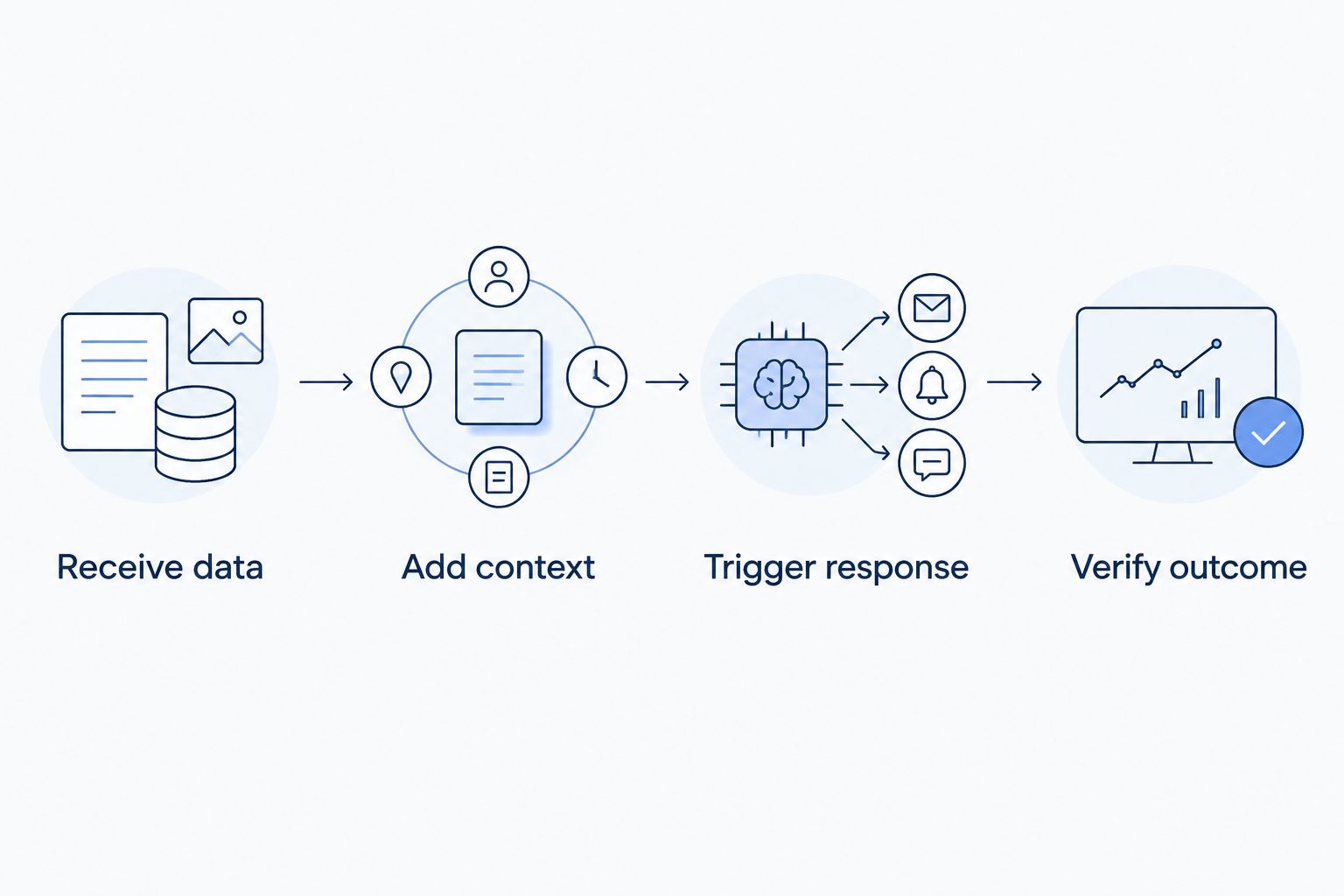
Follow the same sequence on each shortlisted platform:
- Receive data: Confirm that the sensors' payloads reach the application and decode correctly.
- Add context: Associate the measurements with the correct room, equipment and responsible user.
- Trigger response: Configure the alarm condition and establish who responds.
- Verify outcome: Record the response and inspect subsequent measurements or supported device feedback.
If the scenario includes an actuator, test its supported command path separately. A valve, relay or controller needs the appropriate interface and configuration; a monitoring platform alone cannot perform the physical action.
For an AI-assisted test, add a question grounded in the available measurements and device context. Then test the user's permitted actions. In Kilo, direct device commands through the built-in assistant have a confirmation flow; external MCP clients have their own approval behavior. Deliberately configured rules can execute commands autonomously.
Hardware sourcing is separate from platform selection. Kilo Electronics is a separate online authorised dealer serving individual and business buyers; choose hardware around the deployment's compatibility requirements rather than assuming a purchase establishes software support.
Check migration work before committing
Start with an inventory of device identities, payload fields, units, dashboards, application logic, users and permissions. Include external systems that consume the data. A replacement platform doesn't automatically inherit these relationships.
Decide what happens to historical measurements before redirecting live devices. Retaining an archive and importing history into a replacement are different requirements. Validate the receiving system's actual import path, field mapping and timestamp handling.
Test alarm ownership during the transition. Parallel monitoring is useful only when the team understands which system is authoritative and how duplicate notifications will be handled.
Finally, include maintenance in the comparison. Hosting, connectivity, hardware, application engineering, platform subscriptions and model-provider usage are separate cost categories. Evaluate the complete deployment rather than assuming one software choice removes the others.
When staying with TagoIO is the right decision
Stay with TagoIO when the current application meets your device, dashboard and response requirements, and your team understands how to maintain it. Familiar application logic has value. Rebuilding it creates work even when the destination platform fits.
Fix a configuration problem before treating it as a platform problem. Poor payload mapping, unclear alarm ownership or an unsuitable sensor won't disappear merely because you change vendors.
A switch is justified when a demonstrated requirement outweighs the migration and operating work. Otherwise, keep the functioning application and improve the weak part.
FAQ
Which TagoIO alternative should I choose?
Choose by the workflow and deployment model you need. Kilo fits connected monitoring and permission-aware AI workflows; ThingsBoard fits open-source deployment ownership, while AWS IoT Core fits a custom AWS application.
Is ThingsBoard a direct replacement for TagoIO?
ThingsBoard can support similar IoT application tasks, but migration isn't automatic. You need to reproduce device mappings, dashboards, application logic and permissions, and account for deployment maintenance.
Can AWS IoT Core replace my TagoIO dashboards?
AWS IoT Core isn't a finished dashboard application. It provides device connectivity and messaging infrastructure, so your team needs to build or integrate the user-facing monitoring experience.
Do I need to replace my sensors when switching platforms?
Changing software doesn't automatically require replacing sensors. Compatibility depends on the device interface, network integration, payload decoding and any required command path.
Can an AI assistant control any connected device?
No. Control requires a supported device interface, configured commands, appropriate permissions and the relevant assistant or client tool coverage. A shared protocol name doesn't establish support for every action.
How should I compare the cost of TagoIO alternatives?
Compare the complete deployment cost. Separate software subscriptions, infrastructure, connectivity, hardware, engineering and any model-provider usage, then evaluate the same application scope on each option.
Does a delivered command prove the equipment changed state?
No. Accepted, queued or delivered status describes the command path, not necessarily the physical outcome. Verification depends on supported device feedback or subsequent measurements.
Before switching, test the missing-feedback case
Don't end the evaluation when an alarm arrives or a command is accepted. Test what the application shows when the expected follow-up measurement doesn't arrive, and decide who investigates. That is where a monitoring workflow becomes operationally useful: it makes uncertainty visible rather than treating message delivery as success.
Related guides
Written by Tim Kravchunovsky


