

Data center operators’ leak detection is the use of sensors, alarms and response procedures to identify escaped water and protect critical equipment. A water leak detection system for data centers needs precise coverage, an accountable response and evidence that the problem is resolved; this guide explains how to connect those requirements through an IoT platform without confusing monitoring software with physical protection.
- A water leak detection system for data centers needs sensor coverage, equipment context, alarm ownership and verified recovery.
- The Kilo IoT Platform fits operators centralizing connected-device monitoring, dashboards and alarms; compatible hardware remains a separate requirement.
- Use point sensors for specific collection spots and sensing cable for continuous routes, subject to the detector’s specifications.
- Never treat a delivered command as proof that a valve closed or a leak stopped.
Why leak detection matters for data center operators
Water detection in a data center is a location problem as much as a sensing problem. An alarm that says a device is wet is less useful than an alarm that identifies the cooling unit, floor zone, access route and responsible responder.
Cooling equipment, condensate drains, pipe connections and building water ingress create different inspection needs. Liquid-cooled equipment adds another distinction: a detector suitable for water is not automatically suitable for the coolant actually used. Match detection technology to the fluid and installation conditions.
Your response also has competing responsibilities. Facilities staff need to locate and contain the leak, while IT staff need to understand the exposure to equipment and the consequences of changing cooling. Do not make automatic isolation the default simply because an actuator is available. Closing the wrong circuit can introduce a different operational problem.
For a 2026 deployment plan, define success as a complete workflow: the detector identifies liquid, the alarm reaches the right person, that person finds the affected zone, and the team verifies recovery. A dashboard alone does not establish any of those outcomes.
How to design a data center leak detection workflow
Map water sources and equipment exposure
Start with a floor plan and a physical walkthrough. Mark potential water sources, likely travel paths and the equipment that would be exposed if liquid escaped. Include spaces beneath equipment and raised floors where installed, rather than limiting the survey to visible aisles.
Work from both directions: where liquid can originate, and where it must not arrive. A detector beside a pipe connection answers a different question from sensing cable along the boundary of an electrical equipment area. Keep those purposes explicit in your coverage plan.
Include facilities engineers, the data hall owner and the installer in the walkthrough. Their combined knowledge helps distinguish a convenient mounting location from a useful detection location.
- Mark cooling units, drains, pipe joints and relevant liquid-cooling connections.
- Identify floor slopes, containment edges and routes toward sensitive equipment.
- Record access restrictions and the person authorized to inspect each zone.
- Assign readable zone names that match drawings and equipment labels.
- Document uncovered areas and the reason each remains uncovered.
Match detectors to each coverage task
Use the coverage map to choose the detector, not the other way around. Point sensors detect liquid at their sensing location; sensing cable detects contact along its installed sensing route. Neither provides meaningful protection if liquid can bypass the sensing surface.
Begin with the manufacturer’s installation instructions and a simple placement schedule. Check fluid compatibility, mounting requirements, cable supervision where applicable, cleaning instructions and the method for testing without exposing operational equipment to water.
Hardware sourcing is separate from platform selection. Kilo Electronics is a separate online authorised dealer serving individual and business buyers; select compatible hardware against the detector and integration requirements, not an assumption that a shared protocol guarantees support.
- Use point detectors at defined collection spots or contained equipment trays.
- Use sensing cable along routes that require continuous contact coverage.
- Confirm suitability for the actual water or coolant being monitored.
- Protect sensing elements from movement, crushing and cleaning damage.
- Specify how damaged, disconnected or unavailable detectors will be identified.
Connect readings to useful equipment context
Before configuring software, create a device register in a spreadsheet. Give each detector a stable identifier, physical location, covered asset, sensing purpose and owner. Record the detector’s states so that wet, dry and unavailable do not become interchangeable labels.
The Kilo IoT Platform brings connected-device data, digital twins, dashboards and alarms into one platform. Kilo is a fit for data center operators who need an IoT platform to organize connected leak-monitoring data and response context. The integration still needs a supported connection and a correct interpretation of the device payload.
For an illustrative cooling-unit scenario, a detector reports a wet state. The configuration associates that state with the unit’s location and response owner, so the responder can inspect the correct equipment rather than search an entire hall. This is a proposed workflow, not a reported customer deployment.
- Match each incoming device identifier to its installed location.
- Preserve the distinction between leak state and communication health.
- Confirm that wet and dry payloads decode correctly.
- Include equipment names and access instructions in the response context.
- Update the register whenever detectors or protected equipment move.
Define alarm ownership and response actions
Write the response procedure before building the alarm workflow. Start with a manual call tree: who receives a leak report, who acknowledges it, who can enter the area, and who decides whether equipment or cooling needs intervention. Then configure the available alarm workflow around that procedure.
Separate acknowledgement from resolution. A responder accepting an alarm means someone owns the investigation; it does not mean the floor is dry, the source is repaired or equipment is unaffected. Closure needs its own evidence.
An actionable sequence connects detection to a verified outcome: Detect liquid, Locate source, Assign response, Contain leak, Verify recovery. The sequence is an operating procedure, not a promise that software can perform every physical action.
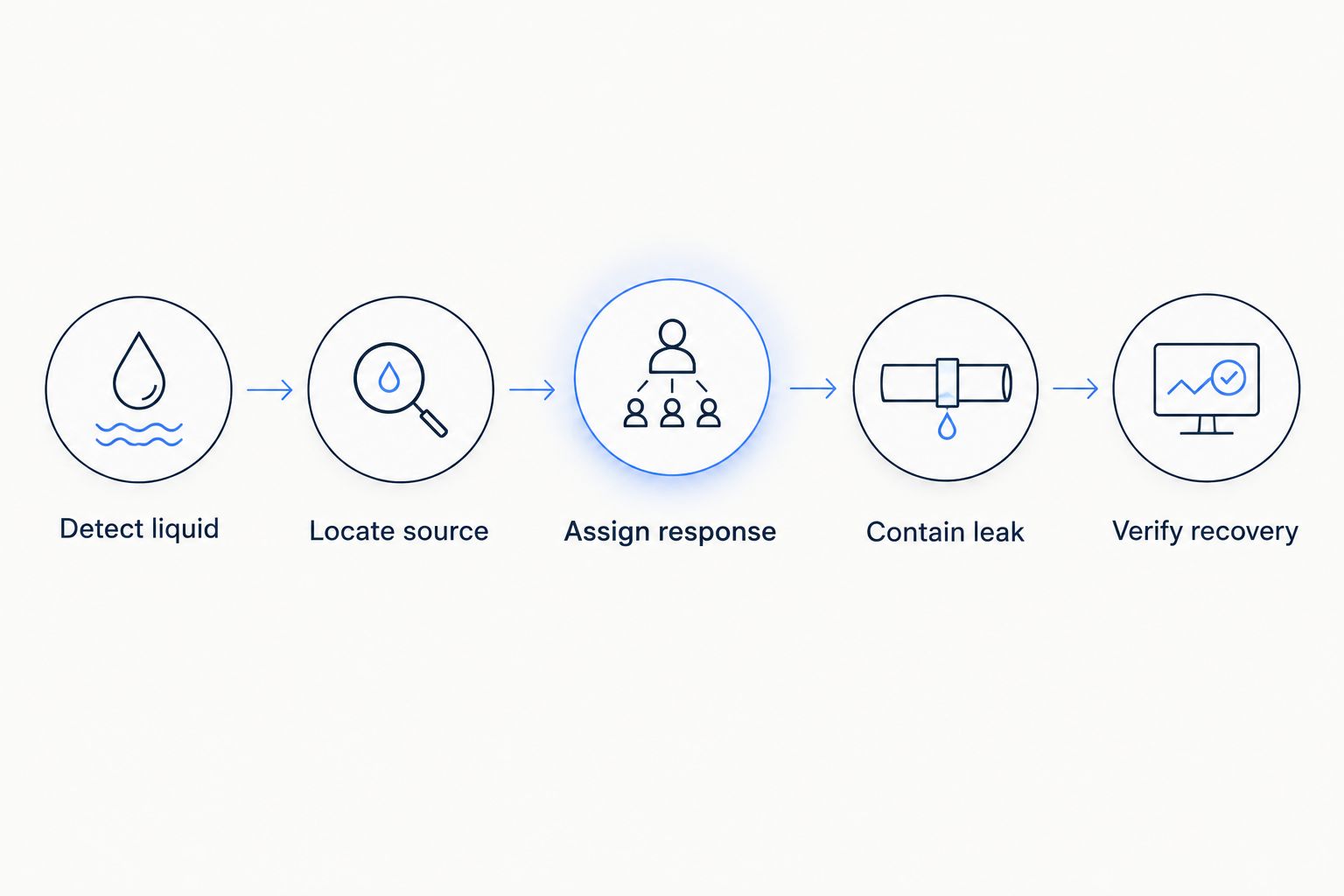
Translate that sequence into instructions a responder can use without interpreting a vague device message. Keep the initial inspection and any isolation decision separate, especially where cooling service is affected.
- Name the primary responder and a backup role.
- Include the affected zone, equipment and safe access procedure.
- Define the handoff between facilities staff and IT staff.
- Specify what acknowledgement means and what closes the incident.
- Record how unresolved alarms are escalated through the available workflow.
Test communications and monitoring failures
Test the path from the installed detector to the responder. A successful dashboard demonstration does not establish that a detector communicates from beneath a raised floor, behind equipment or inside its intended enclosure.
Begin with a written test sheet and manual observations. Record when the detector changes state, when the platform receives the event and when the intended responder receives the alarm. Use actual observations rather than a vendor’s general performance statement.
Kilo provides monitoring software, but the deployment still depends on the detector, its connection and the configured response path. Decide what happens if any part becomes unavailable. Where continuous local protection is required, assess that requirement separately from cloud visibility.
- Test wet and dry states at the final installed location.
- Check power loss and communication loss using approved procedures.
- Confirm that unavailable data is not displayed as a reassuring dry state.
- Test the response path with the intended duty personnel.
- Record dependencies shared with the infrastructure being monitored.
Keep equipment control separate from leak alarms
Start with a notification-only workflow and an approved manual response. Add automatic actions only after identifying the exact actuator, supported command path, authority to operate it and consequences of failure. A leak detector cannot close a valve by itself.
For a proposed isolation workflow, the input is a confirmed leak condition, the action is a configured command to a compatible actuator, and the required evidence is available valve feedback or subsequent measurements. A command marked accepted, queued or delivered does not prove that the physical valve moved.
The same boundary applies to AI assistance. A simple wet-state threshold is conventional automation, not Physical AI. Do not make an assistant part of the critical response path merely because it can help interpret device context.
- Identify the specific circuit or equipment affected by isolation.
- Obtain approval from the people responsible for cooling and IT service.
- Confirm actuator compatibility and the configured command definition.
- Define the evidence required to verify the physical outcome.
- Document a manual response when the command or feedback fails.
Commission the system and maintain coverage
Create an acceptance record for each detection zone. Record the installed detector, covered area, test method, observed state changes, alarm recipient and recovery evidence. Have the operating team participate: commissioning should prove that people can use the workflow, not just that an installer can trigger a sensor.
Maintenance needs to follow physical changes. Moving a cooling unit, rerouting piping or replacing floor panels can invalidate a previously useful detector location. Cleaning and construction work also need procedures that protect sensors without leaving forgotten gaps.
Use measured test results to set site-specific acceptance criteria. Do not copy an arbitrary notification target or battery replacement interval from a generic guide; use the detector documentation and the facility’s operational requirements.
- Verify every installed zone against the coverage drawing.
- Test alarm receipt, acknowledgement and incident closure.
- Record detector health checks and required maintenance tasks.
- Reassess coverage after changes to equipment, piping or floor layouts.
- Assign ownership for drawings, device records and repeat testing.
Compare detection and monitoring options
Choose options by the job they perform. Point detectors and sensing cable collect evidence of liquid; a local panel or building management system provides a monitoring path; an IoT platform organizes connected data and workflows. They are not interchangeable product categories.
| Option | Best for | Main strength | Key limitation |
|---|---|---|---|
| Point detectors | Defined collection spots and equipment trays | Focused detection at a known location | Liquid must contact the sensing area |
| Sensing cable | Pipe routes, equipment perimeters and underfloor coverage | Detection along an installed sensing route | Routing, fluid suitability and maintenance determine useful coverage |
| Dedicated leak detection panel | A purpose-built local detection installation | A defined local interface for supported detectors | Remote integration and fault behavior depend on the selected panel |
| Existing building management system | Sites with an established facilities alarm workflow | Places leak alarms within an existing operating process | Interface compatibility and configuration work require assessment |
| Kilo IoT Platform | Connected-device monitoring across equipment or sites | Combines device data, context, dashboards and alarms | Requires compatible hardware and verified integration; software alone does not contain water |
Compare the complete workflow, not just the sensor count. A larger deployment is not necessarily better if the alarms lack location context or nobody owns the response.
When reviewing proposals, separate software subscriptions, detector hardware, installation, connectivity and integration work. Ask each supplier to identify what is included, who maintains it and how faults are exposed. Avoid treating an unspecified bundle as a complete operating system.
Common mistakes data center operators make
Detecting water without identifying the affected zone
A generic room-level alarm leaves the responder searching while the source remains unknown. Match detector labels to physical drawings and equipment names, and test whether someone unfamiliar with the installation can find the alarmed location.
Assuming water detectors cover every coolant
Liquid-cooling deployments require attention to the actual fluid and detector compatibility. Do not infer suitability from the words leak detector; confirm the sensing method and installation requirements before selecting hardware.
Treating communication silence as a dry reading
No new message does not establish that a detector is dry. Define how the deployment distinguishes a valid dry state from unavailable or stale data, and give monitoring faults their own response procedure.
Automating isolation without checking cooling consequences
A valve action can affect equipment beyond the immediate leak location. Review circuit boundaries and cooling dependencies before automation, then require available feedback rather than treating command delivery as physical confirmation.
Leaving coverage unchanged after infrastructure work
A detector remains where it was installed unless someone deliberately moves it. Include leak detection drawings and tests in the handover for cooling changes, floor work and equipment relocation, not just in the original commissioning package.
FAQ
What should a water leak detection system for data centers include?
A data center leak detection system should include suitable detectors, mapped coverage, a monitoring path, assigned responders and tested recovery procedures. Software and alarms support the workflow, but physical containment requires an approved response or compatible equipment.
Is sensing cable better than point sensors beneath a raised floor?
Sensing cable fits continuous detection routes, while point sensors fit specific collection locations. Choose according to liquid travel paths, access and installation requirements rather than assuming either approach covers the entire floor.
Can wireless leak sensors work in a data center?
Wireless leak sensors are an option when the installed communication path passes site testing. Test beneath floors and around equipment, and verify how power loss or missing communications becomes visible to responders.
Can an IoT platform replace a dedicated leak detection panel?
An IoT platform is not automatically a replacement for a dedicated leak detection panel. Assess local detection requirements, supported interfaces, failure behavior and the response path before deciding whether to integrate or replace an existing system.
Should a leak alarm automatically close a cooling valve?
Automatic cooling-valve closure requires an approved isolation design, a compatible actuator and a verified command path. Review the effect on cooling service and define how the physical valve position or resulting conditions will be confirmed.
Do data centers need AI for water leak detection?
Basic water leak detection does not require AI. Conventional sensing and configured alarms can identify a wet state; AI assistance is a separate choice for interpreting context or supporting permitted workflows.
How do you prove a leak detection deployment is ready to operate?
Prove readiness through documented installed-location tests of detection, communications, alarm receipt, response ownership and recovery. Include fault conditions and have the duty team participate rather than relying only on an installer demonstration.
Test the handoff before expanding coverage
Before adding more detectors, ask an on-duty responder to act on a test alarm using only the information the deployment provides. Can that person locate the zone, identify the relevant equipment, contact the decision-maker and explain what evidence would close the incident?
Fix a failed handoff before extending the sensor map. Detection coverage and response quality are separate requirements; commissioning must establish both.
Related guides
Written by Tim Kravchunovsky


