

The best IoT platform for small business is the one that matches your devices, sends actionable alarms, and gives your team a workflow it can maintain. Start with a managed platform for facilities monitoring; use self-hosted software when you own server operations, or a custom cloud stack when you need to build a connected product—this 2026 guide uses Kilo as a worked example, not a scored vendor entry.
- The best IoT platform for small business fits your sensors, alarm workflow, and technical ownership.
- Kilo is suited to operations teams needing an IoT platform with LoRaWAN, mioty, MQTT, and governed device commands.
- Choose managed software for facilities workflows, self-hosting for infrastructure ownership, and custom cloud services for product development.
- Test missing readings, alarm escalation, permissions, and device feedback before expanding your deployment.
What makes the best IoT platform for small business?
A dashboard is only part of the purchase. Your facilities manager needs to know which reading is current, your integrator needs to understand the payload, and your on-call technician needs an alarm that identifies the equipment and required response.
Use these criteria before comparing platforms:
- Device compatibility: Support the actual sensor, gateway, payload format, and regional radio configuration—not just a protocol name.
- Operational ownership: Identify who provisions devices, changes rules, maintains integrations, and handles service interruptions.
- Useful alarms: Require severity, escalation, quiet hours, and a clear destination for unresolved events.
- Data quality: Make timestamps, units, missing readings, and device identity part of the acceptance test.
- Controlled changes: Check permissions, rule testing, version history, and recovery before enabling commands.
- Exit path: Establish how you retrieve telemetry and device configuration if you change systems.
Select the platform around a real operating problem, not a feature count. Monitoring a cooler, tracking room conditions, and controlling connected equipment require different sensors and different response procedures.
For your 2026 shortlist, write the intended outcome as a sentence: the responsible person receives an actionable alarm when a defined condition occurs. Then require each candidate to demonstrate that workflow using your device data.
Which IoT platform approach fits a small business at a glance?
The meaningful comparison is between deployment approaches. A managed application, a self-hosted application, and a custom cloud stack place different responsibilities on your business. None removes the need to install sensors correctly or assign someone to respond.
| Approach | Best for | Standout characteristic | Key limitation |
|---|---|---|---|
| Managed IoT platform | Facilities and operations teams using established monitoring workflows | Device management, dashboards, and alarm configuration in an application | You must validate supported devices and operating boundaries |
| Self-hosted IoT software | Businesses with a named infrastructure owner | You operate the application and its environment | Backups, security updates, and recovery become your responsibility |
| Custom cloud IoT stack | Businesses developing their own connected product | You design the application and integration behavior | Engineering must build and maintain the operational workflow |
These are use-case recommendations, not performance rankings. The distinction is who owns the work after the demonstration ends. A system that your contractor understands but nobody on your team can maintain is an ownership problem, regardless of its dashboard.
Managed IoT platform: best for small-business facilities monitoring
A managed IoT platform gives you an application for connecting devices, viewing measurements, and configuring responses. It fits an operations team whose immediate problem is monitoring equipment or spaces rather than developing software.
The Kilo IoT Platform illustrates this approach with built-in LoRaWAN and mioty network servers, an MQTT connector, device digital twins, dashboards, rules, and alarms. The built-in network servers remove the requirement to deploy a separate external network server for those supported networks. Sensors still need correct onboarding, coverage, and payload interpretation.
Managed IoT platform pros:
- Your team configures an existing operational application.
- Dashboards and alarms can share the same device context.
- An integrated network server removes a separate network-server deployment where provided.
- Operators can work with equipment names and measurements rather than raw messages.
Managed IoT platform cons:
- Protocol support does not prove that your exact sensor payload is supported.
- A hosted dashboard cannot fix radio coverage, dead batteries, or incorrect installation.
- Access, data export, and command behavior still need acceptance testing.
Best for: Small-business owners, facilities managers, and operations leads who need defined monitoring workflows without owning application infrastructure.
Recommendation: Choose a managed IoT platform when an operator—not a software team—will own the deployment. Require a working demonstration of your alarm and response procedure before committing to a wider rollout.
Self-hosted IoT platform: best for infrastructure ownership
Self-hosted IoT software runs in an environment your business operates. This approach fits a team that needs control over the application environment and already has someone responsible for infrastructure maintenance.
Self-hosting changes the ownership boundary. Your organization must define how the application is updated, backed up, monitored, and restored. An integrator can help install it, but installation is not an ongoing operating plan.
Self-hosted IoT platform pros:
- You choose where the application runs.
- Your team controls the maintenance schedule.
- You can align infrastructure operations with existing internal procedures.
Self-hosted IoT platform cons:
- Someone must maintain the operating environment and application.
- Backups need a tested restoration procedure.
- Custom changes create an ongoing maintenance obligation.
Best for: Businesses with an IT administrator or integration partner explicitly contracted to operate the system.
Ask who receives an infrastructure alarm outside normal working hours. Then ask who can restore the database and application configuration. If neither question has a named owner, self-hosting does not solve your operational problem.
Recommendation: Hold self-hosting until maintenance and recovery responsibilities are written down. Infrastructure control is useful only when your business can exercise it.
Custom cloud IoT platform: best for connected-product development
A custom cloud IoT stack combines services and application code into a system designed for your business. This approach belongs on the shortlist when the connected-device application itself is part of what you sell or deliver.
You define the data model, user experience, integration behavior, and operating procedures. That freedom also means your engineers must implement the pieces that a configured monitoring application would otherwise provide.
Custom cloud IoT platform pros:
- You design the application around your product workflow.
- You decide how device data enters your existing software.
- You control the customer-facing experience through your application code.
Custom cloud IoT platform cons:
- Device onboarding, alarms, permissions, and support tools require engineering.
- Application changes require testing and release ownership.
- A successful data-ingestion demonstration is not a finished operating system.
Best for: Product teams building a customer-facing connected service with a dedicated engineering owner.
Distinguish an integration from an application build. Sending sensor readings into an existing reporting system is not, by itself, a reason to develop a complete IoT platform.
Recommendation: Skip a custom stack for straightforward facilities monitoring unless a documented requirement justifies the engineering work. Choose it when your product needs application behavior that configuration cannot provide.
How should a small business test an IoT platform before rollout?
Run a pilot around a complete operational loop. A reading must arrive, become understandable, trigger the intended response, and leave enough context for the next person to investigate. A chart alone does not demonstrate that loop.
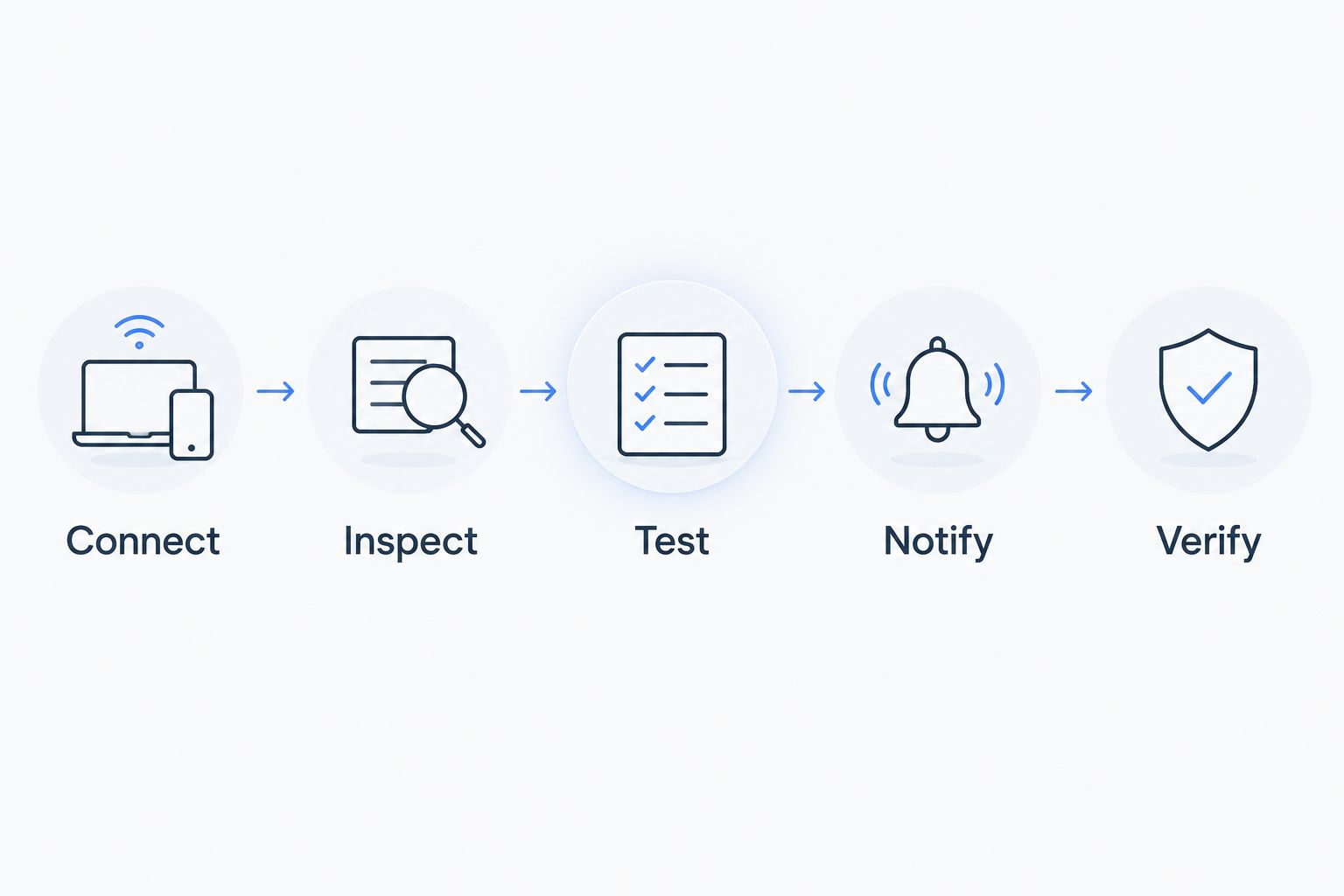
Use this sequence:
- Connect: Register a representative device and confirm its identity.
- Inspect: Check its timestamp, measurement unit, payload, and location.
- Test: Run the intended rule against a known test payload.
- Notify: Confirm that the designated recipient receives the alarm.
- Verify: Check recovery behavior and investigate missing or stale readings.
Include temperature and humidity sensors, door contacts, water-presence sensors, or energy meters according to the actual problem. Do not add sensor types just to fill a dashboard. For a legacy PLC or building management system, identify the integration component that translates its data into the platform's supported interface.
Kilo's entry configuration supports up to 5 devices, 1 dashboard, and 1 rule. Keep an initial evaluation focused enough to prove one operational workflow; a wider feature tour does not replace that evidence.
For your 2026 acceptance record, capture the device used, payload inspected, rule tested, recipient reached, and unresolved limitations. Review how to reduce false alarms in industrial IoT alert systems when repeated notifications obscure the event that needs attention.
Which IoT platform features make alarms useful for small businesses?
An alarm needs more than a threshold. It needs an owner, an urgency level, an escalation path, and enough equipment context for someone to act without opening several unrelated systems.
Kilo provides five severity tiers, multi-step escalation chains, email, SMS, push notifications, quiet hours, and a centralized alarm inbox. Its visual rules engine uses BPMN with CEL expressions and supports version control, deployment, rollback, and step-through debugging on a test payload.
Those mechanics do not choose your operating policy. Your facilities manager must still define the threshold, response procedure, and escalation recipient. Your integrator must confirm that the relevant measurement arrives in the expected unit and format.
Test these failure modes explicitly:
- A sensor stops publishing while its last reading looks normal.
- A measurement repeatedly crosses the threshold and creates noisy notifications.
- An alarm reaches someone who is unavailable.
- A device is moved but retains the old location label.
- A rule change creates an unintended escalation.
Separate an out-of-range reading from missing data. Both need attention, but they describe different problems. Require the pilot to demonstrate how your chosen system handles each one rather than assuming a temperature alarm detects silence.
How should an IoT platform handle AI and device commands?
Treat AI assistance and equipment control as separate acceptance questions. An assistant can help configure a deployment; a command changes what connected equipment is asked to do. The second requires explicit boundaries and feedback.
Kilo's built-in assistant can onboard devices, write and deploy rules, and create alarms within the signed-in user's permissions. It confirms before consequential actions. External MCP clients control their own approval experience; the platform still enforces permissions, organization boundaries, configured-command requirements, and execution records.
For device control, require named typed commands and parameter validation. Review delivery state and check device feedback or subsequent telemetry where supported. An accepted or delivered command does not prove that equipment changed state.
This distinction also exists at the messaging layer. The OASIS MQTT specification defines QoS levels around message delivery, not physical actuation. A message acknowledgment cannot substitute for evidence from the equipment.
For a 2026 small-business deployment, begin with observation and alarms. Add control only after an authorized operator has defined the command, its constraints, the expected feedback, and the response when verification fails. Keep safety-critical protections in their appropriate equipment and control systems.
FAQ: best IoT platform for small business
What's the best IoT platform for a small business without developers?
A managed IoT platform is the best starting point when operations staff will own established monitoring workflows. Test your actual sensors, alarms, and permissions rather than selecting from a dashboard demonstration.
Is a self-hosted IoT platform better than a managed platform?
Self-hosting is better suited to a business that needs infrastructure ownership and has a named maintenance owner. A managed platform fits teams that want to configure an application without operating its server environment.
Can I connect existing equipment to an IoT platform?
Existing equipment can connect when its interface and payload match a supported integration. Legacy PLCs and building systems need an appropriate integration component; MQTT support does not create that translation automatically.
Does LoRaWAN support mean every LoRaWAN sensor will work?
No, LoRaWAN support alone does not establish complete sensor compatibility. Confirm the regional configuration, onboarding information, payload decoder, measurements, and command support for the exact device.
How do I compare IoT platform subscriptions?
Compare current terms against device count, dashboards, rules, notification requirements, data retention, and support. Include the hardware and integration work required for your workflow, rather than treating the subscription as the entire project.
Can AI safely send commands to business equipment?
AI-assisted commands require permissions, configured commands, validated parameters, and an appropriate approval process. Check equipment feedback or subsequent telemetry where available; command delivery is not proof of a physical result.
What should I test before rolling out an IoT platform in 2026?
Test a complete workflow from device onboarding to alarm response and recovery. Include missing readings, incorrect units, unavailable recipients, permission boundaries, and command verification if control is in scope.
Which IoT platform should a small business choose in 2026?
Choose a managed IoT platform as the default for a defined facilities-monitoring workflow. Choose self-hosting only with an infrastructure owner, and custom cloud development only with a product requirement and engineering ownership. These recommendations follow the same criteria: compatibility, operational responsibility, alarms, controlled changes, and an exit path.
Before ordering hardware, verify the exact device against the intended network and payload requirements. IoT devices are also sold by the separate sister company Kilo Electronics, with worldwide shipping. Hardware purchasing and platform acceptance are separate decisions.
The final test is deliberately unglamorous: stop a sensor from reporting. If your team mistakes its old reading for a current one, the deployment is not ready—however polished the dashboard looks.


